Samsara Driver
- 26.87K
- 4.7
- Installs
- 1.00M
- Price
- Free

Screenshots
Analysis by Reviewed APKs
Samsara Driver brings the everyday tools of professional fleet driving into one mobile app, from Hours of Service logs and inspections to routes, messages, and safety feedback. It is aimed at drivers whose work is organized through Samsara, rather than people looking for a general-purpose navigation app. After looking at its mix of practical workflows and recognition features, I see a useful work hub, provided your job uses the system.
A Shift in One Place
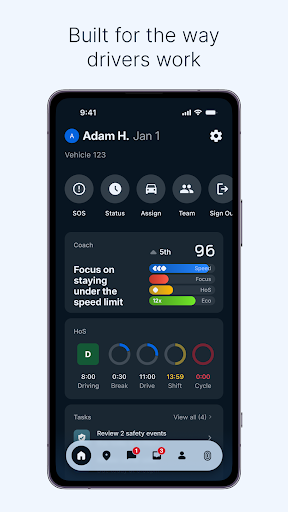
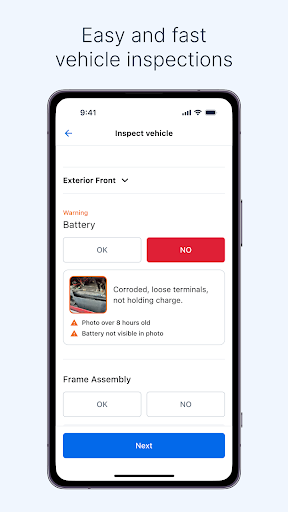
Picture the start of a delivery shift: I need to check what I’m doing, keep my driving records in order, and make sure the vehicle inspection is handled before I get moving. Samsara Driver is designed to bring those jobs together. I can use it to log and certify Hours of Service, work through an inspection, and find tasks, documents, forms, or a route without switching between separate work tools.
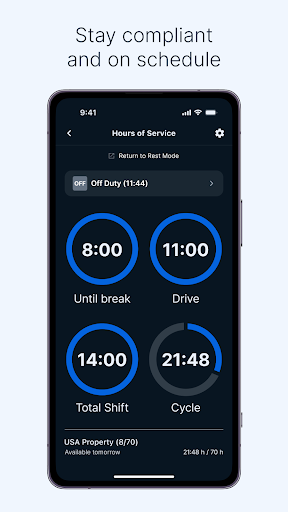
Later, if a break is coming up or a roadside official needs an inspection report, the app’s compliance tools are meant to help me respond quickly. If dispatch needs an update, in-app messaging keeps that conversation close to the rest of the shift. The appeal is less about one remarkable feature than about having routine work steps gathered in a single place while I’m on the road.
A Work Tool, Not a Road Trip App
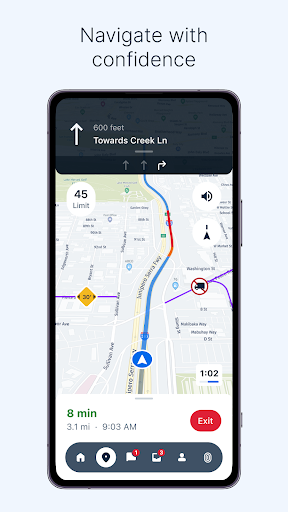
The obvious comparison is with a standalone navigation app or a paper logbook, but Samsara Driver has a broader, more specific job. It combines real-time navigation with work tasks, inspections, Hours of Service, safety feedback, and communication with managers or dispatch. A driver can also see scorecards, training, and recognition features. That combination makes most sense when the driver’s workplace already relies on the Samsara system.
I wouldn’t choose it as a general map app for vacations, errands, or independent trip planning. Its focus is professional driving workflows and staying connected to a fleet operation, not finding restaurants or planning a weekend route. Nor is it a replacement for every company process: what a driver can do depends on the tools and tasks their work setup makes available. The distinction matters before expecting a personal navigation app experience.
Small Habits That Help
The easiest way to get value from an all-in-one work app is to make it part of a routine instead of treating it as a place to visit only when something goes wrong. I’d start a shift by checking the home screen for assigned tasks, then work through forms and inspection steps as they come up. Guided, tile-based workflows are intended to make those steps easier to follow and less likely to be skipped.
I’d also make a habit of checking upcoming break alerts and reviewing any safety feedback or coaching tasks when I have a suitable pause. At the end of the day, the app’s recaps, scorecards, and milestones can provide a quick look back at progress. Small, regular check-ins should feel more manageable than trying to catch up on records or acknowledge events all at once.
More From Our News Desk

Zoom Meetings, Google Meet, or Teams: Which Is Easiest to Join?

How I Build a Free Streaming Lineup With Tubi

Why Crunchyroll Is the Default Anime App for So Many Fans

YouTube TV: A Practical Guide to Cutting Cable

Rummikub and the Small Comfort of Phone Games

TeamViewer Remote Control or AnyDesk for Helping Family?
Who Will Get the Most From It
I’d recommend Samsara Driver to professional drivers whose companies use its tools and who want their daily records, inspections, tasks, and communication in one mobile place. Drivers who appreciate reminders, guided workflows, safety coaching, or recognition for milestones may find the extra features useful too. It is especially relevant to people who need to move between driving duties and administrative steps during a working shift.
It may not suit someone who simply wants a personal navigation app or has no work connection to Samsara’s driver workflows. Some of its value comes from fitting into a fleet’s processes, so the experience is not just a matter of downloading it and using it independently. Drivers who prefer paper-based routines or want a narrowly focused map tool may find the range of work features unnecessary.
Samsara Driver is developed by Samsara and is listed in the Tools category. On Google Play, it has more than one million installs and a 4.7-star rating from about 27,000 ratings. The app is free to download, with no in-app purchases or ads. Its content rating is Everyone, which describes the store’s content classification rather than whether the work features suit every driver.
The listed version is 2641.100.490910. The app was released on July 7, 2016, and its listed last update is October 27, 2026. An Android minimum-version requirement is not included among the supplied app details, so anyone checking compatibility should consult the current Google Play information for their device.
How Samsara Driver Fits a Working Shift
A Practical First Look
When I first opened the idea of Samsara Driver, what stood out was the range of work sitting under one roof. This is not a single-purpose logbook with a few extras attached: its stated scope runs from compliance and safety to communication, navigation, tasks, and recognition. That breadth could be reassuring during a busy shift, although it also means the app’s relevance depends on which parts a driver actually needs.
I’d approach setup with the job in mind: identify the tasks, records, and communication that are part of a normal day, then learn where those fit in the app’s home-screen workflow. The supplied description emphasizes intuitive access and tile-based steps, rather than detailing a particular account setup process. The useful first question is whether the work routine I need is represented in the tools my fleet uses.
The Daily Work Loop
On a typical workday, the app is meant to move between planning, compliance, and communication without losing sight of the driving itself. Drivers can log and certify Hours of Service, see alerts about upcoming breaks or possible violations, and access inspection reports. They can also open tasks, documents, forms, and routes. That makes the app feel more like a work dashboard than a tool used only at the beginning or end of a shift.
The day-to-day benefit is practical rather than flashy: fewer separate places to check for routine work. A driver can submit DVIRs and inspections digitally, then message a manager or dispatch through the app when communication is needed. I’d still expect the exact workflow to depend on the job, but the design goal is clear: keep common driving and fleet tasks close at hand.
Safety and Recognition
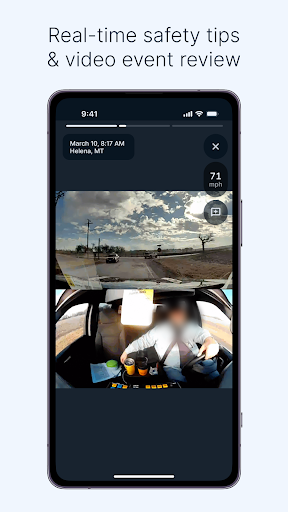
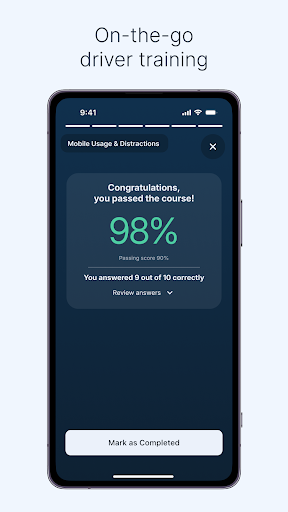
Safety features give the app a feedback loop beyond record keeping. Drivers can see safety scores and active coaching tasks, review and acknowledge safety events, and complete training in short mobile-friendly formats. I like that these tools are framed as ongoing parts of the workday, rather than as a separate destination that a driver must remember to visit after a long stretch on the road.
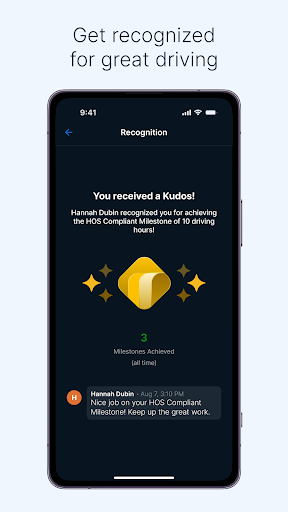
There is also a more encouraging side to the feedback. Scorecards, badges, streaks, milestones, leaderboards, and kudos give drivers ways to see progress and receive recognition. End-of-day recaps are described as a way to revisit safe habits and achievements. Those elements may motivate some people, though they are supporting features rather than a reason to overlook the app’s core operational purpose.
A Steadier Shift Routine
A workable routine could begin with checking the day’s tasks and route, then completing the inspection steps before heading out. During the shift, I’d use the Hours of Service tools and pay attention to break alerts, while keeping the messaging option available for dispatch or a manager. When forms or documents come up, guided workflows can help make each step part of the same routine instead of an end-of-day scramble.
At a natural pause or after finishing work, I’d review any safety events, coaching tasks, or training that needs attention. The scorecard and recap features could then help put the day’s feedback and achievements in perspective. This is not a promise that every driver will use every tool each day; it is a sensible way to make the app’s varied features feel connected rather than like a long list of unrelated options.
Keep the Context in Mind
The biggest limitation is also the clearest boundary: Samsara Driver is built around professional fleet work. Someone without access to the relevant workplace setup may find that its tasks, communication, and records do not translate into a useful personal app. It should not be mistaken for a general navigation product just because it includes routing guidance and real-time navigation.
Its wide feature set may also feel like more than a driver needs if their role only calls for one or two of these jobs. Safety feedback and recognition will appeal differently from person to person, and not everyone wants gamified milestones in a work tool. Before relying on it for a specific routine, I’d check that the functions needed for that role are part of the driver’s work setup.
Samsara Driver makes a convincing case as a central mobile hub for professional drivers: it brings together compliance, inspections, routes, communication, safety feedback, and recognition. Its strongest quality is the way those everyday jobs can sit alongside one another, rather than being scattered across separate tools. The trade-off is that this breadth is useful mainly in the right fleet-work context.
I’d recommend it to drivers whose work already runs through Samsara and who want a more organized way to handle routine tasks on shift. I would not pick it as a personal maps app or expect it to serve every driver independently. If the work setup fits, its mix of practical workflows and coaching makes it worth considering.
Samsara Driver Frequently Asked Questions
What is Samsara Driver used for?
Samsara Driver is a work app for professional drivers. It supports tasks such as logging and certifying Hours of Service, completing inspections and forms, accessing routes and documents, messaging managers or dispatch, and reviewing safety feedback. It also includes training and recognition features. Its intended use is fleet and driving work, rather than general personal navigation.
Which devices can I use Samsara Driver on?
The supplied app details identify Samsara Driver on Google Play, so Android is the store platform covered here. They do not provide a specific minimum Android version. For device compatibility and current availability, check the Google Play information for the app, since requirements can vary over time.
What Android version does Samsara Driver require?
A minimum Android version is not included in the supplied details. Because device requirements can vary as an app is updated, check the current Google Play information before installing or updating Samsara Driver. The listed app version is 2641.100.490910.
Does Samsara Driver cost money?
Samsara Driver is listed as free to download, with no in-app purchases or ads in the supplied store details. Drivers should still check the current Google Play information for the latest terms. The app’s usefulness is tied to professional driving workflows and the tools a driver’s workplace uses.
Is Samsara Driver suitable for personal use?
It is best suited to professional drivers handling work such as inspections, Hours of Service, fleet tasks, and communication with dispatch or a manager. People seeking a general-purpose navigation app may find its focus too specialized. Whether its work features fit a particular role depends on the driver’s workplace setup.
Pros
- Combines Hours of Service, inspections, forms, and routes in one work-focused app.
- Includes safety scores, coaching tasks, training, and event acknowledgments.
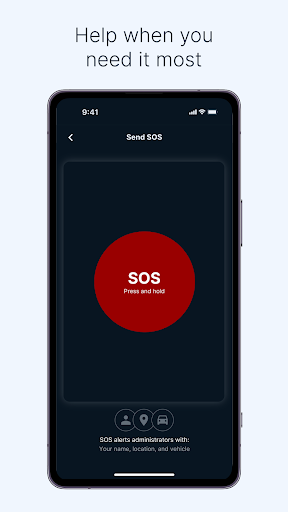
- Offers in-app messaging, navigation guidance, and an SOS option.
- Adds scorecards, milestones, badges, and kudos alongside routine workflows.
Cons
- Its work-focused features are less useful outside a Samsara fleet workflow.
- The broad feature set may be unnecessary for drivers with simpler needs.
- The supplied details do not give a minimum Android version.
- Category
- Tools
- Version
- 2641.100.490910











