Reverse Lookup: Phone Search
- 29.41K
- 4.5
- Installs
- 1.00M
- Price
- Free

Screenshots
Analysis by Reviewed APKs
Reverse Lookup: Phone Search helps identify unfamiliar phone numbers by searching for details such as a caller name, carrier, phone type, and location. I found its purpose refreshingly narrow: it is for people who want a little context before deciding whether to return a call or reply to a text, not for managing every part of their phone. The lookup and community reports are useful, though results depend on the number.
A call worth checking
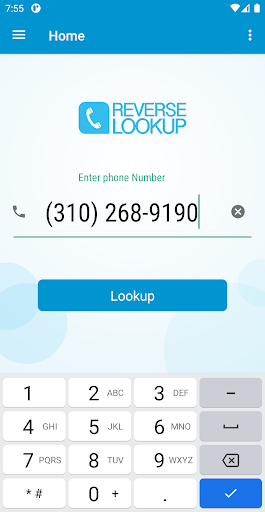
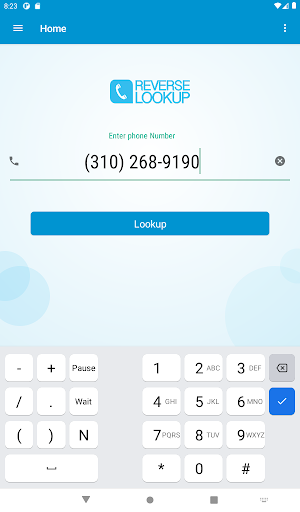
When I first considered how I would use Reverse Lookup, I pictured an ordinary interruption: an unfamiliar number appears while I am making dinner, and I do not want to answer on impulse. I can enter a valid 10-digit number, or copy one from my call log and paste it into the app. The search is focused on finding identifying details, rather than turning a missed call into a complicated research project.
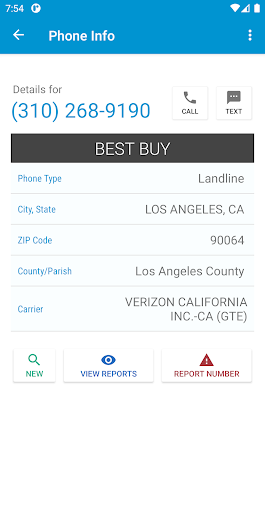
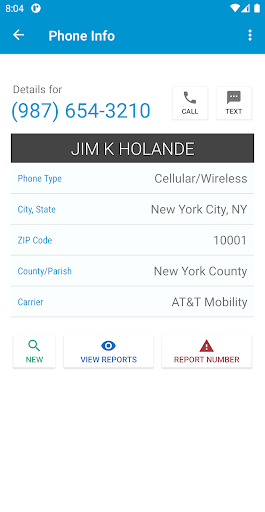
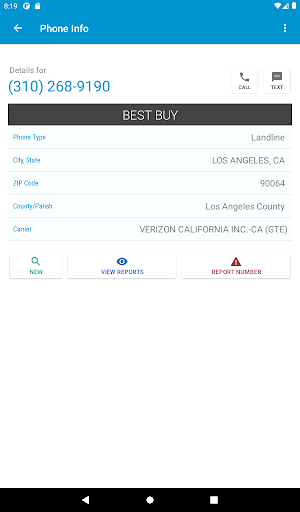
For a supported number, the app can return an associated name or caller ID, along with details such as carrier, phone type, county or parish, ZIP code, and city or state. I like having more than one clue to consider, especially when a name is unavailable. The information is not a promise that I will identify every caller, but it can help me make a more informed choice about what to do next.
A lookup, not a call blocker
The obvious alternative is simply answering, calling back, or searching a number elsewhere. Reverse Lookup gives me a purpose-built way to check a number and also lets users read and submit reports about suspicious numbers. That community angle adds context beyond the directory details, although reports are other users’ accounts and are best treated as one input rather than a final verdict.
This is not a full phone-management tool. The supplied description focuses on identifying numbers and sharing reports; it does not describe blocking calls, maintaining a blacklist, or searching numbers outside the United States and Canada. I would choose it when I want context about a standard 10-digit number, not when I need a broader contact organizer or a complete solution for unwanted calls.
Small habits that help
A useful habit is to check the number while the missed call is still easy to find. If it appears in my call log, copying and pasting it avoids mistyping digits; otherwise, entering the 10-digit number gives me a straightforward route to a search. I would take a moment to compare the returned details with the call I received instead of making a decision from a single field.
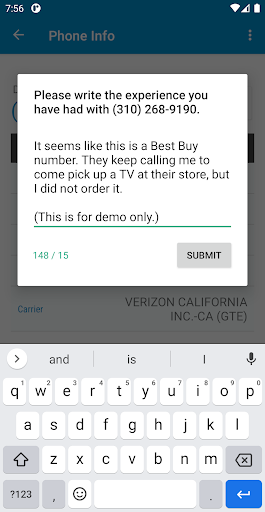
I would also read existing reports before adding my own. If I choose to report a number, keeping the note tied to what I actually experienced makes the community feature more useful to the next person. The app describes lookups as anonymous and says the number’s owner is not notified, but I would still use the service with sensible expectations about what a lookup can reveal.
More From Our News Desk

Zoom Meetings, Google Meet, or Teams: Which Is Easiest to Join?

How I Build a Free Streaming Lineup With Tubi

Why Crunchyroll Is the Default Anime App for So Many Fans

YouTube TV: A Practical Guide to Cutting Cable

Rummikub and the Small Comfort of Phone Games

TeamViewer Remote Control or AnyDesk for Helping Family?
Who may find it useful
I would recommend Reverse Lookup to anyone who regularly gets calls or texts from unfamiliar U.S. or Canadian numbers and wants a quick way to check available caller details. It should suit people who prefer to investigate before calling back, as well as users willing to contribute a report after a suspicious call. The no-login, no-subscription approach described for the app also makes the basic idea easy to understand.
It may not suit someone expecting every number to resolve to a verified person, or someone who needs international coverage, call blocking, or a broader phone utility. The app itself notes that accurate identification is not always possible. I would treat results as helpful context, not proof of who contacted me, and remember that community reports reflect other users’ experiences.
Reverse Lookup: Phone Search is a Tools app from Orave Technologies. On Google Play, it has over 1 million installs and a 4.5-star rating from around 29,000 ratings. The content rating is Everyone. The app is free to download, contains ads, and has no in-app purchases according to the supplied app facts.
The supplied app facts give the current version as 1.3.9, with a release date of July 23, 2020, and a last update date of September 17, 2026. The minimum Android version is worth checking on Google Play, since that requirement can vary by device and app update.
Checking the Caller Before Calling Back
A simple first step
The app’s first impression is shaped by a clear, specific job: provide a place to look up a phone number. The setup described is light on ceremony. There is no account or subscription required to use the service, and the search begins with a valid 10-digit number. That makes the idea easy to grasp if all I want is a little more information about a missed call.
I appreciate that the number can be copied from a call log and pasted into the search field. That small shortcut matters when I am checking a number on the same phone that received it. I would still double-check the digits before searching, since a simple typo could lead me to details associated with a different number.
The everyday lookup
In day-to-day use, I would reach for Reverse Lookup when a caller is unfamiliar and I have a spare moment to investigate. The app searches phone numbers from the United States and Canada, including standard 10-digit landline, mobile, and fax numbers. Its results may include a name or caller ID and location or carrier information, giving me several pieces of context to consider.
The description says searches retrieve information from a phone directory, but coverage and accuracy can vary from one number to another. I would not assume that a missing name means a call is safe, or that a reported name is automatically correct. The practical value is that I can gather clues before deciding whether a callback makes sense.
Reports add context
The feature that gives the app a little more depth is its suspicious-number reporting. I can read reports other users have submitted for a number, then decide whether their experiences resemble mine. For someone receiving repeated unfamiliar calls, that shared record may add useful perspective alongside the caller details returned by a lookup.
Reporting is also a way to pass along an experience for other users to see. I would keep my own contribution factual and limited to what happened, since a report is a personal account rather than a definitive identification. The app says users can investigate anonymously and that the number’s owner is not notified when a lookup is made.
A low-effort routine
My practical routine would be to leave an unknown call unanswered if I am busy, then check the number when I have a quiet minute. I would copy it from the call log, paste it into Reverse Lookup, and review the available identity and location details. If reports are present, I would read them too, while keeping in mind that they are user-submitted information.
After that, I can decide whether the call merits a reply or whether I would rather wait. If I have a relevant experience with a suspicious number, I can add a report to help the next person who checks it. This is a modest workflow, but that is part of the appeal: the app is designed around one small decision rather than a full afternoon of phone cleanup.
Coverage has limits
The biggest limitation is that a lookup may not produce a complete or accurate identity. The app says it can identify most numbers, while also acknowledging that accurate identification is not always possible. Some searches may return a caller ID when a name is unavailable, and the location or carrier details should be treated as clues rather than a personal profile.
Geographic coverage is another boundary: the described service searches U.S. and Canadian numbers in the standard 10-digit format. I would not choose it for international numbers or expect it to stop calls from reaching my phone. The supplied feature set centers on searches and community reports, so anyone wanting call blocking should look for a tool specifically built for that job.
Reverse Lookup: Phone Search is a focused utility for checking unfamiliar U.S. and Canadian numbers. I like the combination of directory details and user reports, along with the simple copy-and-paste route from a call log. Its results are useful as context, but not every number can be identified accurately.
I would try it if unknown calls are a recurring nuisance and I want to investigate before responding. I would skip it if I need international coverage, dependable identification for every caller, or call-blocking controls. For a narrow lookup task, it offers a practical starting point without requiring an account or subscription.
Reverse Lookup Frequently Asked Questions
What is Reverse Lookup: Phone Search used for?
Reverse Lookup: Phone Search is used to check unfamiliar phone numbers. It can return details such as an associated name or caller ID, carrier, phone type, ZIP code, county or parish, and city or state. Users can also read and submit reports about suspicious numbers. Results are not always accurate or complete, so I would use them as context.
Which phones and platforms support Reverse Lookup: Phone Search?
The supplied app information describes Reverse Lookup: Phone Search as an Android app. It searches standard 10-digit numbers from the United States and Canada, including landline, mobile, and fax numbers. The minimum Android version can vary by device or update, so check the Google Play store details for the requirement that applies to your phone.
What Android version does Reverse Lookup: Phone Search require?
The minimum Android version is worth checking on Google Play, where the requirement for your device can be confirmed. The app is listed as version 1.3.9 in the supplied facts. Its stated purpose is to look up standard 10-digit U.S. and Canadian numbers; compatibility and available information can depend on the device and number.
Does Reverse Lookup: Phone Search cost money?
The app is free to download, contains ads, and has no in-app purchases in the supplied app facts. Its description says users do not need a subscription or login to perform lookups. Store details can change, so it is sensible to check Google Play for current terms before installing.
Is Reverse Lookup: Phone Search suitable for identifying every caller?
It may suit people who want extra context about unfamiliar U.S. or Canadian numbers and are comfortable treating results as clues. The app says accurate identification is not always possible, so it is not a fit for anyone who needs certainty about every caller. It focuses on lookups and reports, not call blocking.
Pros
- Looks up standard 10-digit U.S. and Canadian numbers across several phone types.
- Can show caller identity clues, carrier, phone type, and location details.
- Lets users read and submit reports about suspicious numbers.
- No login, subscription, or in-app purchases are described.
Cons
- Identification can be incomplete or inaccurate for some numbers.
- Coverage is limited to U.S. and Canadian numbers.
- The described features do not include call blocking.
- Category
- Tools
- Version
- 1.3.9











