Random Number Generator .
- 437
- 4.5
- Installs
- —
- Price
- Free
Screenshots

Analysis by Reviewed APKs
Random Number Generator . is a focused iPhone and iPad tool for picking numbers within a range, with options for repeats and automatic generation. I’d reach for it to run a quick classroom activity, settle a low-stakes choice, or keep a workout moving without writing numbers on scraps of paper. Its appeal is its simplicity: it handles one small job directly, though it is not a full statistics or data-analysis app.
A quick pick, without paper
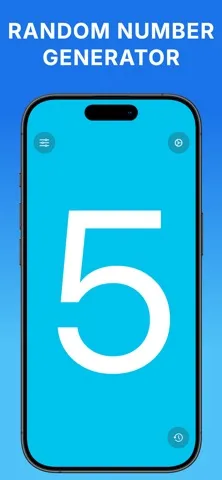
Imagine you’re helping a group choose who goes first, or calling out numbers for a simple classroom game. I’d open Random Number Generator ., set the range to match the group, and tap to get a number. The result is shown in a large, clear display, which is handy when I’m holding the phone up for other people to see. There’s no need to prepare slips of paper or explain a complicated process.
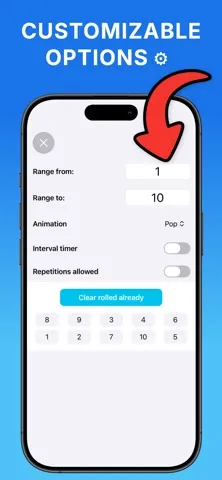
For a longer activity, I can choose whether numbers are allowed to repeat. That makes the app more flexible than a quick number-picking shortcut: a repeated draw can suit one activity, while a no-repeat sequence can suit another. The optional interval timer can generate new numbers automatically every few seconds, so I can keep a session going without tapping for every result.
A tool, not a stats suite
The app makes most sense when the task is simply to produce a number within limits. Compared with paper slips, a die, or asking someone to pick a number, it’s quick to reset the range and choose whether repeats are allowed. I also like that the display is designed to be easy to read at a glance. For a casual draw or a structured activity, that keeps the process straightforward.
I wouldn’t treat it as a replacement for a spreadsheet, calculator, or dedicated statistics package. The description focuses on generating numbers, not recording results, analyzing datasets, or building a detailed experiment. It can support activities such as games, raffles, workouts, and classroom exercises, but the work around those activities remains yours. If you need a record or deeper analysis, this is only one small part of the workflow.
Make the range do the work
A useful habit is to decide the limits before starting, rather than changing them in the middle of a draw. For a group activity, I’d match the range to the number of participants, then choose the repeat setting to fit the rules. That small bit of preparation makes each tap easier to understand and helps prevent confusion about whether a number can appear again.
When I want a steady sequence, the interval timer is the feature I’d consider first. It can generate a new number every few seconds, which is more convenient than repeatedly tapping while leading an activity or keeping time during exercise. For a one-off decision, manual generation is simpler. Either way, keeping the range and repeat choice consistent is the main workflow tip; the app is intentionally not trying to add a lot of extra steps.
More From Our News Desk

Zoom Meetings, Google Meet, or Teams: Which Is Easiest to Join?

How I Build a Free Streaming Lineup With Tubi

Why Crunchyroll Is the Default Anime App for So Many Fans

YouTube TV: A Practical Guide to Cutting Cable

Rummikub and the Small Comfort of Phone Games

TeamViewer Remote Control or AnyDesk for Helping Family?
Who will find it useful
I’d recommend Random Number Generator . to people who regularly need a quick, visible number pick: teachers, game hosts, workout planners, or anyone running a simple draw. The controls described are relevant to both casual use and more structured activities, and the choice about repeats is especially useful when the rules depend on it. Its focused design is a plus if you want a small utility rather than another app to learn.
It may not suit someone looking for a complete raffle-management system, a saved history of results, or statistical analysis. Those jobs go beyond the described number-generation features. It also lives on Apple’s mobile platform and requires iOS 17.0 or later, so it isn’t a fit for someone who needs an Android or desktop tool. If your need is simply “pick a number in this range,” though, the narrow scope is the point.
Random Number Generator . is a free Tools app from Natalia Jakubczyk-Gajewska for iPhone and iPad. On the App Store, it has a 4.5 out of 5 rating from 437 ratings. The app is rated 4+, and its listed minimum requirement is iOS 17.0. Its current version is 1.3.20.
The app was released on February 15, 2023, and its most recent update is dated September 15, 2026. It is free to download, and the description says optional premium features are available through in-app purchases. The description also presents the experience as ad-free. It does not give a price for the optional purchases, so check the App Store for current purchase details.
A Small Utility With a Clear Job
A simple first impression
When I first opened the app, the idea I wanted from it was immediate: choose a range, then generate a number. Its stated focus on a clean interface and large display suits that job. There’s no need to think of a long setup process before using it for a quick classroom prompt or a game. The app is designed to keep attention on the result rather than surrounding it with distractions.
The main setup decision is practical rather than technical: what limits should the number fall between? Once those are clear, the repeat option helps tailor the draw. I appreciate that these choices map directly to real activities. A teacher calling on students and someone running a game may both need random numbers, but they may not want the same rules for repeated results.
The everyday experience
Day to day, the core interaction is deliberately brief. I set a range and tap to generate; the app produces a number within those limits and displays it clearly. That makes it easy to use in the middle of something else, rather than stopping to navigate a more elaborate tool. When I’m coordinating a group, a big readable result is more useful than a screen packed with controls.
The choice between generating with or without repetitions is the detail that makes the simple interaction more adaptable. A draw where every number remains eligible can allow repeats; a sequence where each number should appear only once can use the other mode. The app’s description specifically supports both approaches. I’d still make the rules clear to anyone taking part, since the app generates the number but doesn’t explain the activity for you.
The timer changes the rhythm
The interval timer is the feature that stands apart from a basic tap-to-generate tool. It can automatically produce a new random number every few seconds, which changes the app from a one-off picker into something that can keep a sequence moving. I can see that being useful when I’m leading an activity and would rather focus on the group than repeatedly reach for the screen.
The other standout is the control over repeats. It’s a small setting, but it affects how useful the app is for different situations, from a casual decision to a structured exercise. Along with the selectable range and easy-to-read display, that gives the app a compact set of tools without making its purpose hard to understand. The description also emphasizes an ad-free experience, keeping the focus on the number being generated.
A practical activity routine
For a classroom game, I’d start by setting the range to the numbers assigned to students or teams. Before generating anything, I’d decide whether a number can come up again and set the repeat option accordingly. Then I could tap for each turn, or use the interval timer if the activity calls for automatic draws. The large display gives everyone a clear result to follow.
For a workout, I’d use the same basic routine but choose a range that matches the choices in the session. The timer may help when I want new numbers at a regular pace, while manual generation gives me more control between exercises. In either case, the app doesn’t replace planning the activity. It makes one repetitive part—choosing a number—easier to handle.
Keep its scope in mind
The app’s narrow purpose is both its strength and its main limitation. It generates numbers, but the described feature set doesn’t include tracking past results, exporting data, or analyzing outcomes. For a quick draw or an activity that only needs the next number, that’s fine. If I wanted a documented sequence or a broader set of statistical tools, I’d need something beyond this app.
I’d also keep the platform requirement in mind before relying on it for a group. It requires iOS 17.0 or later, so it won’t fit every Apple device. Optional premium features are mentioned, but their prices aren’t part of the basic description; anyone considering them should check the App Store. Those are practical considerations rather than reasons to dismiss a tool that otherwise keeps its job clear.
Random Number Generator . is a tidy option for people who want a number in a chosen range without extra ceremony. I like the repeat control, readable result, and interval timer because each one has an obvious use. It stays focused instead of pretending to be a full activity-management or statistics app.
I’d recommend it to iPhone and iPad users who often run simple draws, games, classroom tasks, or timed activities and meet the iOS requirement. If you need saved results or analysis, look elsewhere. For quick number generation, this app keeps the process refreshingly direct.
Random Number Generator . Frequently Asked Questions
What is Random Number Generator . used for?
Random Number Generator . generates numbers within a range you choose. It can generate with or without repetitions, and an interval timer can automatically produce another number every few seconds. The app is suited to simple uses such as classroom activities, games, raffles, workouts, experiments, and everyday decisions.
Which devices support Random Number Generator .?
The app is available for Apple mobile devices and requires iOS 17.0 or later. It is not an Android app. If you are unsure whether your particular device or operating system version is supported, check the App Store details before downloading.
Is Random Number Generator . free?
The app is free to download. Its description says optional premium features are available through in-app purchases, but the purchase prices are not specified here and may vary. Check the App Store for current pricing and purchase details.
Does Random Number Generator . have ads?
The app’s description says it provides an ad-free experience. It also describes a simple interface with a large display, range selection, repeat controls, and an optional interval timer. For the latest details about the app, the App Store is the best place to check.
Is Random Number Generator . right for my needs?
It should suit someone who needs quick number picks for a game, classroom activity, workout, or similar task. Its features focus on generation rather than keeping a history or analyzing results, so it may not fit users who need those broader tools. It also requires iOS 17.0 or later.
Pros
- Lets you choose a number range and decide whether repeats are allowed.
- Large, clear number display is useful when sharing a result with a group.
- Optional interval timer can generate numbers automatically every few seconds.
- Focused number-generation tool with an ad-free experience described by the developer.
Cons
- Requires iOS 17.0 or later, which excludes older Apple devices.
- The described features do not include result history or statistical analysis.
- Optional premium features are mentioned, but their prices may vary.
- Category
- Tools
- Version
- 1.3.20











