Plaud: AI Work Companion
- 11.43K
- 4.6
- Installs
- 500.00K
- Price
- Free
Screenshots

Analysis by Reviewed APKs
Plaud: AI Work Companion is built to turn recorded meetings, calls, and conversations into transcripts, summaries, and follow-up work. I see it suiting people whose days produce more spoken information than they can comfortably review later, especially those already using a Plaud device or desktop capture. Its appeal is broader than note-taking, though the plans and capture setup are worth understanding before making it part of a routine.
From conversation to follow-up
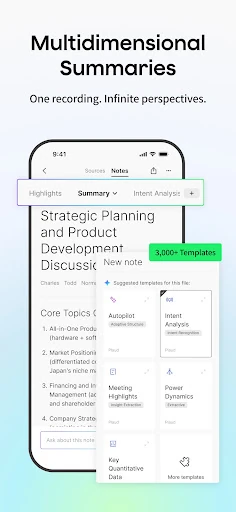
Imagine finishing a customer call with a handful of decisions, a promised email, and a question you need to revisit next week. Plaud’s intended workflow is to capture that conversation, produce a transcript and AI summary, then use Plaud Agent to turn the relevant context into a draft or brief. That gives the app a practical job beyond storing audio: helping move spoken discussions toward the next piece of work.
I’d use the summary as a quick first pass, then return to the transcript or recording when a detail matters. Plaud says generated documents can link back to the relevant moments in the original recording, which is useful for checking context rather than treating a summary as a perfect record. Before anything is sent or posted on a user’s behalf, the product asks for confirmation, keeping a review step in the workflow.
More than a recorder
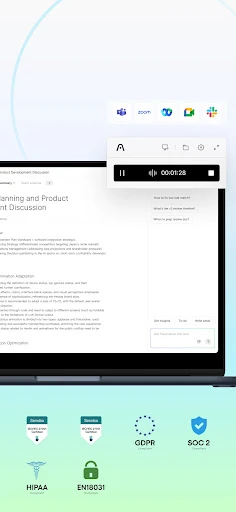
A basic voice recorder saves audio, while a conventional notes app is best when I already know what I want to type. Plaud is aimed at the middle ground: capturing conversations and helping convert them into written, reusable work. It can support in-person, phone, and online meeting capture, but the stated setup differs: a Plaud device is used for in-person and phone conversations, while Plaud Desktop handles online meetings without a meeting bot.
That makes it a less natural choice for someone who only wants a simple place to jot a grocery list or manually organize personal notes. Its strongest case is work that starts as spoken discussion and continues as summaries, follow-ups, reports, or project updates. The AI output still deserves a human read, and the monthly transcription allowance may matter if recording is a daily habit.
Build a useful record
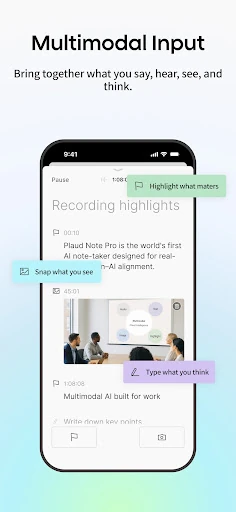
A small habit that should help is adding context while the conversation is still happening. Plaud supports marking key moments, adding notes, and including images, so a recording need not stand alone as a long stream of audio. A short reminder about why a topic matters can make a later return to the transcript more useful, especially when several conversations concern the same project.
I’d also make requests to Plaud Agent specific about the output: for example, ask for a meeting follow-up or project update and name the context it should use. The app describes Skills for reusing preferred workflows and Routines for recurring work. Once a pattern proves useful, those options could reduce repeated setup, while links to source moments offer a way to check details before sharing the result.
More From Our News Desk

Zoom Meetings, Google Meet, or Teams: Which Is Easiest to Join?

How I Build a Free Streaming Lineup With Tubi

Why Crunchyroll Is the Default Anime App for So Many Fans

YouTube TV: A Practical Guide to Cutting Cable

Rummikub and the Small Comfort of Phone Games

TeamViewer Remote Control or AnyDesk for Helping Family?
Who gets the most from Plaud
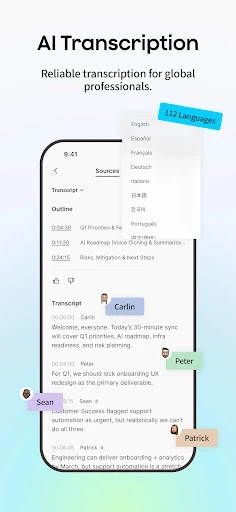
I’d recommend Plaud to professionals who regularly leave meetings with more follow-up than they can comfortably capture by hand. Customer-facing workers, project leads, and people who revisit discussions weeks later may get particular value from transcripts, summaries, and a knowledge base that Agent can draw on. Support for more than 112 languages and custom vocabulary also gives the transcription workflow room to handle varied terminology and language needs.
It may be a poor fit if you rarely record conversations, prefer to write every note yourself, or want a simple recorder with no AI workflow to consider. The capture approach also depends on the situation: the product describes using a Plaud device for in-person and phone recording and Desktop for online meetings. People with frequent long recordings should weigh the plan’s monthly transcription limit and available paid options.
Plaud: AI Work Companion is a Tools app from PLAUD LLC. On Google Play it has over 500,000 installs and a 4.6-star rating from around 11,400 ratings. It is rated Everyone. The app is free to install, contains no ads, and offers in-app purchases; individual items are priced from $2.99 to $239.99.
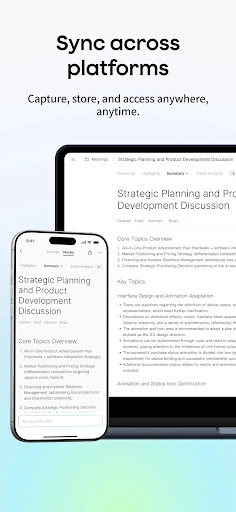
The current listed version is 3.30.0. Plaud first appeared on September 28, 2023, and its listed last update was October 30, 2026. The Android version requirement is not included in the available store details, so I’d check the Google Play entry on the device you plan to use. Plaud also describes Mobile, Web, and Desktop access, with recordings, transcripts, and knowledge kept in sync.
A closer look at the Plaud workflow
Getting started with context
My first impression of Plaud is that it is designed around a chain of work, not a single record button: capture a conversation, make sense of it, and use it to produce something. That framing matters because the app’s value depends on what happens after the recording. Someone expecting only a tidy audio library may find its broader set of AI work tools more than they need.
The capture method is the first practical decision. Plaud describes a device for in-person meetings and phone calls, and Plaud Desktop for online meetings, without a meeting bot. I’d choose the setup that matches the conversations I actually need to preserve before planning a routine around the mobile app. The product also says its content stays in sync across Mobile, Web, and Desktop.
A repeatable daily flow
The day-to-day promise is straightforward: record a conversation, receive a transcript and summary, then use that material later. Transcription supports more than 112 languages, and custom vocabulary is available. For a user who often hears specialized names or terms, the vocabulary option is a practical detail; it addresses a common source of friction in speech-to-text rather than adding another layer of note formatting.
The next step is where Plaud separates itself from a transcript archive. Agent can draw on conversations and knowledge to create requested work, such as an email, research brief, report, or project update. I would still read the result carefully. Plaud’s source links provide a way to revisit relevant recording moments, and the confirmation requirement before sending or posting gives the user a chance to approve an action.
Tools beyond transcription
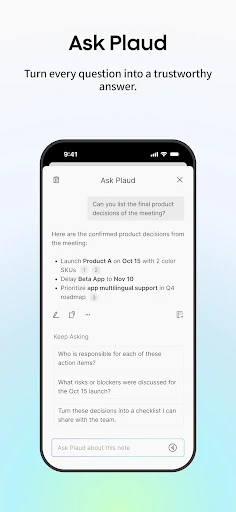
Plaud Agent accepts plain-language tasks and is intended to find relevant context before producing an output in the requested format. The examples include turning customer calls into research briefs, drafting meeting follow-ups, and bringing back context from weeks or months earlier. That long-range retrieval is potentially more useful than a summary alone when work spans multiple conversations.
The app also describes Skills for reusing preferred workflows and Routines for automating recurring work. It can work across Slack, Notion, Google Calendar, Linear, and other services, according to the product description. Documents, presentations, and reports can include links to the recording moments they rely on, which helps keep generated work connected to its source.
For capturing more than speech, users can mark key moments, add notes, and include images. Those additions give later summaries and retrieval more context than audio by itself. The product also describes unlimited cloud storage and synchronization across Plaud Mobile, Web, and Desktop, so the working record is not limited to one device.
A meeting-to-action routine
A sensible routine might start with capturing a project meeting through the appropriate Plaud setup, then reviewing the summary once it is ready. I’d mark the moments tied to decisions or open questions and add brief notes when a point needs extra explanation. That takes a little attention during the conversation, but it can make the record easier to use than relying on an undifferentiated transcript later.
Afterward, I could ask Agent for a concise project update or a draft follow-up, using the meeting and relevant knowledge as context. I’d compare the draft against linked recording moments, correct anything that needs nuance, and approve it before it goes anywhere. If the same kind of update comes up regularly, Skills or Routines may help make that sequence more repeatable.
Limits to consider
The main practical limit is transcription capacity. Plaud’s Starter Plan includes 300 minutes per month, Pro includes 1,200 minutes, and Unlimited is described as offering unlimited transcription. The Team Plan is aimed at teams and includes centralized management, file sharing, and shared knowledge capabilities. The product says every Plaud device includes Starter, but people who record heavily may need to consider a paid plan.
Plaud also asks users to trust an AI-assisted process with recorded conversations and generated work. A transcript or summary is useful as a working aid, not a substitute for checking important details against the source. The confirmation step before sending or posting is reassuring as a workflow safeguard, but it does not remove the need to review what Agent has prepared.
Finally, capture is not identical across situations: the described setup uses a Plaud device for in-person and phone conversations, and Desktop for online meetings. That means the app may be less convenient for someone hoping to handle every recording scenario from a phone alone. It is worth matching the hardware and plan to actual recording habits before committing.
Plaud: AI Work Companion makes the most sense as a bridge between conversations and the work that follows them. Transcription, summaries, context retrieval, and Agent-generated drafts form a coherent toolkit for people who revisit meetings often. The useful features are paired with real considerations: capture setup, monthly minutes, and the need to check AI output.
I’d try Plaud if meetings and calls regularly create follow-up work that gets lost in the shuffle, especially if I could benefit from searchable context and repeatable workflows. I would skip it for occasional voice notes or a preference for fully manual note-taking. Before choosing a plan, I’d compare its allowance with how much I genuinely record.
Plaud Frequently Asked Questions
What is Plaud: AI Work Companion used for?
Plaud is used to capture meetings, calls, and conversations, then turn recordings into transcripts, AI summaries, and follow-up work. Its Agent can use conversation and knowledge context to prepare items such as emails, reports, presentations, and project updates. Users can also mark key moments and add notes or images to give recordings more context.
Which devices and platforms support Plaud: AI Work Companion?
The app is available on Android through Google Play. The product also describes Plaud Web and Plaud Desktop, with recordings, transcripts, and knowledge synchronized across Mobile, Web, and Desktop. It describes a Plaud device for in-person meetings and phone calls, and Desktop for online meetings. Availability and device compatibility are worth checking in the relevant store or product details.
What Android version does Plaud: AI Work Companion require?
The Android version requirement can vary by release and device, so check the Google Play entry for the current requirement before installing. Plaud’s listed current app version is 3.30.0. The Google Play page is the best place to confirm whether a particular Android phone or tablet can run the version available to you.
Is Plaud: AI Work Companion free?
Plaud is free to install and contains no ads, but it offers in-app purchases. Store pricing for individual items ranges from $2.99 to $239.99. The product describes Starter, Pro, Unlimited, and Team plans, with different transcription allowances or team features. Plan availability and prices can vary, so check Google Play for current purchase details.
Who should use Plaud: AI Work Companion?
Plaud is best suited to people who regularly record work conversations and want help turning them into searchable notes, summaries, and follow-up documents. It may be less appealing to someone who rarely records, wants only a basic voice recorder, or prefers to write notes manually. The right fit also depends on capture setup and how many transcription minutes a user needs.
Pros
- Turns recordings into transcripts, summaries, and practical follow-up documents.
- Supports more than 112 languages and allows custom vocabulary.
- Links generated documents to relevant moments in the original recording.
- Syncs recordings, transcripts, and knowledge across Mobile, Web, and Desktop.
Cons
- In-person and phone capture is described around use of a Plaud device.
- The Starter Plan includes 300 transcription minutes per month.
- AI summaries and drafts still need careful review against the source.
- Category
- Tools
- Version
- 3.30.0











