Paramount+
- 516.65K
- 4.1
- Installs
- 10.00M
- Price
- Free

Screenshots




Analysis by Reviewed APKs
Paramount+ is a video-streaming app for watching series, films, live sports and news, with a mix of familiar network shows and subscriber-only originals. I’d consider it for a household that wants several kinds of entertainment in one place, especially if CBS, Nickelodeon or sports are part of the regular rotation. My overall take: a broad, appealing catalog, though plan differences and advertising are worth weighing before subscribing.
A night with something to watch
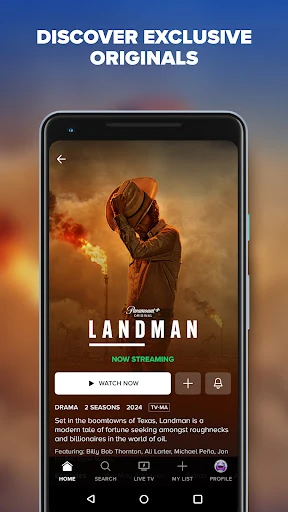
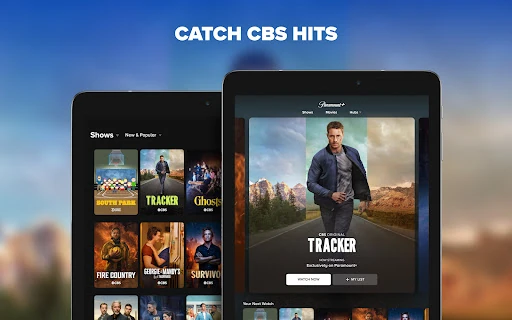
When I want to settle in without agreeing on one kind of show in advance, Paramount+ has a useful spread to browse: a movie for the evening, a familiar series for a quick episode, or sports and news when I want something live. The catalog includes shows such as Survivor, South Park and SpongeBob SquarePants, alongside original series and films. That variety gives the app a practical role in an ordinary evening, rather than making it feel like a one-show destination.
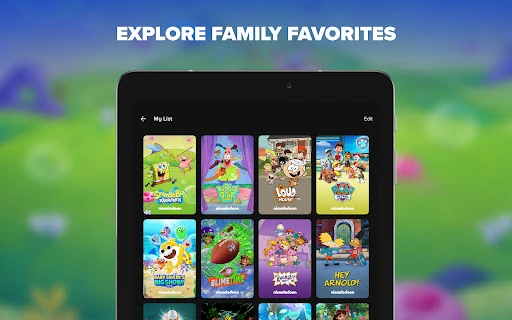
I’d use My List to keep likely picks together instead of trying to remember a title when I finally have time to watch. In a household, individual profiles can help each person keep their own place, and Kids Mode gives families a child-focused profile option. Those features make the app easier to share across different tastes. The appeal is less about discovering an entirely new way to watch TV and more about collecting a lot of familiar viewing options in one service.
A broad streaming companion
Compared with a service centered on a single franchise or a narrow type of programming, Paramount+ tries to cover more ground. It combines on-demand episodes, films, subscriber-only originals, live sports, news streams and curated live channels. That makes it a plausible companion to other streaming subscriptions, or a main choice for someone whose favorites are already represented in its catalog. The right comparison is your own weekly watchlist: its breadth matters most when you’ll actually use several parts of it.
It is still a streaming service, not a general-purpose TV guide or a way to access every channel and event. Some live features are tied to Premium, live TV includes ads, and the service’s description says availability is limited to the United States. Catalog availability can change, too. If your main reason for subscribing is one specific show, sporting event or local station, check that it is available on the plan and in your area before making it your regular option.
Small habits that help
I’d start by using profiles rather than letting a shared account become one long, muddled trail of different tastes. With up to six profiles, household members can have separate spaces, and parents can choose the Kids Mode profile feature for children. That setup is especially useful when one person watches sports highlights and another mostly wants cartoons or drama. It doesn’t require a complicated routine; the benefit comes from choosing the right profile before settling in.
My List is the other low-effort habit I’d build. Add films or series as they catch your eye, then use that short list when you have limited time and don’t want to browse from scratch. I’d also keep a simple distinction in mind between on-demand viewing and live programming, since live channels and events work differently from choosing an episode or film. A little planning makes the catalog feel more manageable without turning entertainment into homework.
More From Our News Desk

Zoom Meetings, Google Meet, or Teams: Which Is Easiest to Join?

How I Build a Free Streaming Lineup With Tubi

Why Crunchyroll Is the Default Anime App for So Many Fans

YouTube TV: A Practical Guide to Cutting Cable

Rummikub and the Small Comfort of Phone Games

TeamViewer Remote Control or AnyDesk for Helping Family?
Who will get the most from it
I’d recommend Paramount+ to viewers who already enjoy its mix of CBS, BET, Nickelodeon, Comedy Central, MTV and other familiar programming, and to people who want originals, films and sports in the same app. Families may appreciate individual profiles and Kids Mode, while sports fans may be drawn to the live and on-demand UFC coverage or other listed events. It is most compelling when more than one part of that catalog fits your actual viewing habits.
It may be a weaker fit if you only want one title, rarely watch video, or expect every plan to include the same live options and ad experience. The Premium plan adds particular features, while live TV has ads, so it’s worth matching the plan to what you intend to watch. I’d also pause if you are outside the United States, since the service description limits app use to the U.S. Overall, it suits varied household viewing better than a very specific single-purpose need.
Paramount+ is an Entertainment app from CBS Interactive, Inc. On Google Play, it has over 10 million installs and a 4.1-star rating from about 517,000 ratings. The app is free to install, but it offers in-app purchases; the listed in-app purchase range is $1.00 to $139.99 per item. The app contains ads, and its content rating is Teen.
The current version shown is 17.3.0. The app was released on October 3, 2013, and the listed last update is October 27, 2026. A minimum Android version is not specified in the available app facts, so check Google Play on your device for current compatibility. Subscription plans and their prices can change; the app description directs viewers to its plans and pricing information.
A Lot of Viewing in One App
Getting oriented
My first impression is of an app trying to serve several kinds of viewer at once. Its lineup spans on-demand series and movies, originals, sports and live streams, so there is more to consider than simply picking a show and pressing play. That variety is a strength if your household has different tastes, but it can also make the first decision feel broad. I’d begin with the categories and titles I already recognize rather than attempting to explore everything at once.
The sensible setup step is to make the app fit the people using it. Paramount+ supports up to six individual profiles and offers a Kids Mode profile feature. I’d choose the appropriate profile for each viewer, then start building My List as interesting titles come up. Those are concrete ways to make later visits easier. The service description also distinguishes between plans, so I’d check what a subscription includes before relying on a particular live feature.
The everyday viewing mix
On an ordinary day, the range is the main convenience. I can think of Paramount+ as a place for a full episode when I have time, a movie when I want a longer watch, or a live stream when I want news or sports coverage. The described options include CBS News 24/7, CBS Sports HQ and Mixible, as well as 20 curated live channels. That makes the app useful in different moods without requiring every viewing session to be a planned event.
The on-demand side also brings together recognizable library titles and subscriber-only originals. That mix matters because it gives me more than one reason to open the app: a familiar series can be an easy default, while an original or film can be the more deliberate choice. I’d still judge the service by how often I actually return to those options. A large catalog sounds nice, but the practical value comes from finding things I want to watch more than once.
Features with a clear purpose
The profiles and Kids Mode stand out because they address a real shared-TV problem: one app may need to serve adults and children without treating everyone as the same viewer. Up to six profiles give household members separate spaces, while the Kids Mode option is specifically intended for children. I wouldn’t mistake that for a promise about every title or every viewing situation, but it is a useful family-oriented feature to have within the service.
My List is another straightforward feature that suits the way people actually browse. It gives me a place to save favorites for later, rather than expecting me to remember every title I spot. The mix of on-demand content and live streams is also notable: the service includes around-the-clock news coverage, sports scores and highlights, entertainment news and curated channels. Those are distinct viewing options, not just more episodes in a library.
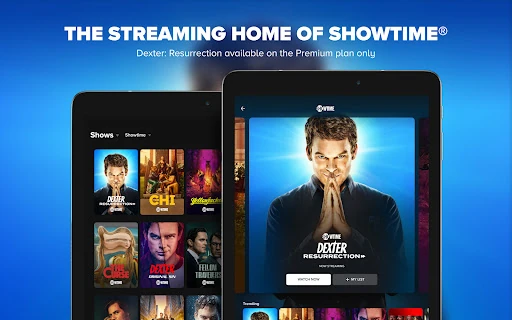
Premium brings a separate set of advertised benefits, including ad-free shows and movies, a local CBS station live and access to SHOWTIME. The plan also includes certain live events. The distinction is important: the app’s features are not all necessarily part of every subscription, and live TV still has ads. I’d treat the plan details as part of the feature set rather than assume that installing the app alone unlocks every option.
A simple weekly routine
A practical routine could start with a quick pass through the catalog when I have a spare moment. If a series, film or event catches my eye, I’d save it to My List. Later, when I have a proper viewing window, I can go straight to those saved choices instead of browsing indefinitely. This works particularly well when my viewing time is short and unpredictable, because I can separate finding something interesting from deciding what to watch right now.
For a household, I’d pair that habit with separate profiles. Each person can build a more relevant list and return to their own viewing choices. If children use the app, the Kids Mode profile is an option to consider. For live programming, I’d check the plan and availability in advance, especially if a specific event or local station is the reason I’m opening the app. That small check avoids assuming that every live option is available to every subscriber.
Limits to keep in mind
The catalog’s breadth comes with a few conditions. Paramount+ says availability can change, and its app use is limited to the United States. Live TV is subject to availability, and some live events or local CBS access are described as Premium benefits. If I were subscribing for a particular program, event or station, I’d verify that it is currently included where I live rather than making the decision based on a general catalog description.
Advertising is another practical consideration. The app contains ads, and the description says Premium offers ad-free shows and movies, while also noting that live TV has ads and plans may include trailers, sponsorship or similar material. So “ad-free” should not be read as a blanket promise across every kind of viewing. The in-app purchase range is broad, and specific subscription pricing can change, so I’d compare current plans before choosing.
Finally, the app is most useful when its particular mix matches your routine. Someone who only wants one occasional film may not need a broad service, while a household that uses series, sports, kids’ programming and live news could get more out of it. That’s a matter of fit rather than a flaw in the app. I’d keep expectations tied to the content and plan I actually intend to use.
Paramount+ makes a case for itself through variety: familiar series, originals, films, live sports and news live together, with profiles and My List helping make that range easier to use. I like the practical mix, especially for households with different viewing habits. The main caveats are plan distinctions, advertising and the U.S.-only availability described by the service.
I’d recommend trying it if several parts of the catalog already sound appealing, and checking current plan details before paying for a specific live feature. If you want just one narrow kind of content, the breadth may matter less. For viewers who want a flexible entertainment app and will use more than one part of it, Paramount+ is worth a closer look.
Paramount+ Frequently Asked Questions
What is Paramount+ used for?
Paramount+ is a video-streaming app for on-demand series and films, subscriber-only originals, live sports, news coverage and curated live channels. The catalog includes programming associated with CBS, BET, Nickelodeon, Comedy Central, MTV and other brands, along with films and sports. What is available can change, so check the app for the current selection.
Which devices can run Paramount+?
Paramount+ is an Android app available through Google Play. The Android version required can vary with the app and device, so check the Google Play page for the current compatibility details before installing. The service description says use of the app is limited to the United States.
What Android version does Paramount+ require?
The minimum Android version can vary or change as the app is updated. Check the Paramount+ page on Google Play for the requirement that applies to your device. The current app version shown is 17.3.0, but that does not by itself establish which Android versions are supported.
Does Paramount+ cost money?
The app is free to install and offers in-app purchases. The listed in-app purchase range is $1.00 to $139.99 per item, but subscription plans and prices can change. Check Google Play and Paramount+’s current plan information for the price and included features that apply before subscribing.
Is Paramount+ a good fit for families?
It may suit households with different viewing tastes because it supports up to six individual profiles and includes a Kids Mode profile feature. Its catalog spans children’s programming, series, films, sports and news. Families should still review the available content and plan details to decide whether the service fits their needs.
Pros
- Combines series, films, originals, live sports and news in one streaming app.
- Up to six profiles help household members keep separate viewing spaces.
- My List offers a simple way to save titles for later.
- Kids Mode provides a profile option for families with children.
Cons
- Some live features and programming are tied to the Premium plan.
- The app contains ads, and live TV still has advertising.
- Service use is limited to the United States, with availability varying.
- Category
- Entertainment
- Version
- 17.3.0