Notification History
- 28.44K
- 3.7
- Installs
- 5.00M
- Price
- Free

Screenshots
Analysis by Reviewed APKs
Notification History is a utility for keeping a record of notifications and other brief messages that can otherwise disappear from view. I can see it helping anyone who regularly dismisses alerts too quickly or wants to find out which app sent an unwanted notification. Its appeal is practical rather than polished: it collects several kinds of messages in one place, but recording requires permissions and a little setup.
When a message disappears
Picture checking your phone between errands, spotting a useful alert, and swiping it away before you have properly read it. Notification History is built for that moment. Once its recording permissions are enabled, it can keep notifications so you can look back later, rather than relying on the status bar to remain your memory. I like the straightforward purpose: it gives transient messages somewhere to be reviewed after the interruption has passed.
The log can also be useful when a pop-up is more irritating than helpful. If an unfamiliar app keeps producing status-bar advertisements, the recorded notification may help identify its source; the app also offers a way to uninstall apps directly. I would treat that as a troubleshooting aid, not a promise that every alert will be captured. The practical value is having a record to consult when the phone's usual notification area no longer has the answer.
A log, not a new inbox
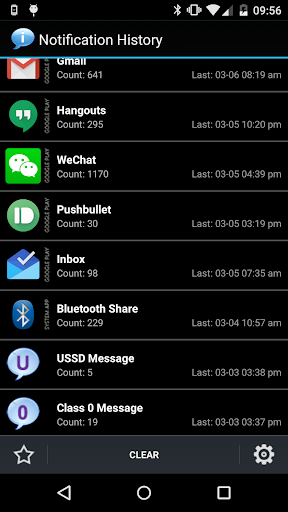
The obvious alternative is the phone's own notification shade, which is quicker for alerts that are still there. Notification History has a different job: it records messages for later review and can group them by app or sort them by time. It also covers more than standard status-bar notifications, including toasts and certain dialog messages. That broader log is handy when the information appears briefly and disappears before I can deal with it.
This is not a replacement for a messaging app, email client, or a full device backup. Its description says it can only show messages from supported apps after recording has been enabled; it cannot retrieve a social message that the system never saved beforehand. Nor is it a general notification-management suite. I would choose it for looking back at short-lived alerts, not for composing replies or organizing every kind of personal communication.
Make the log useful
The first useful habit is enabling the relevant access before an alert goes missing. The app's instructions distinguish notification access from accessibility access, and the permissions needed depend on what you want it to record. Once recording is running, grouping by app can narrow a busy history, while sorting by time helps retrace what happened during a particular stretch of the day.
I would also use the ignore option for apps whose alerts are not worth keeping, and clear entries when the log has served its purpose. Search and copying a notification to the clipboard give me a couple of ways to retrieve or reuse a detail without scrolling endlessly. These small choices matter more than checking the app constantly: set it up around the alerts you care about, then consult it when a specific question comes up.
More From Our News Desk

Zoom Meetings, Google Meet, or Teams: Which Is Easiest to Join?

How I Build a Free Streaming Lineup With Tubi

Why Crunchyroll Is the Default Anime App for So Many Fans

YouTube TV: A Practical Guide to Cutting Cable

Rummikub and the Small Comfort of Phone Games

TeamViewer Remote Control or AnyDesk for Helping Family?
Who may find it useful
I would recommend Notification History to people who often dismiss alerts in a hurry, receive brief messages that are easy to miss, or want a record to help identify which app produced an intrusive notification. It may also suit users who encounter USSD or Class 0 messages and want those recorded. If you are comfortable enabling access in Android settings, its purpose is easy to understand and fairly focused.
It may not suit someone who expects a complete archive of conversations, wants deleted messages recovered from before setup, or would rather avoid granting notification and accessibility access. Recording also depends on the relevant services being enabled, so this is not a set-it-and-forget-it answer to every missed alert. The free version contains ads, while the description reserves several extras for Pro. Those trade-offs make it best for a specific need, not everyone.
Notification History is an Android Tools app from Yotta Studio. Google Play shows over 5 million installs and a 3.7-star rating from 28,442 ratings. It is free to download and contains ads. The content rating is Everyone. The supplied app information gives version 1.10.9 and a release date of June 28, 2012.
The supplied app information gives September 1, 2026, as the last update date. The description says a Pro upgrade removes advertisements and adds features, including notification backup and sharing, a desktop widget, and automatic dismissal of certain dialogs. No price for that upgrade is provided here, so check Google Play for current purchase details. The app says information is stored locally and not shared.
A closer look at the notification log
Setup takes attention
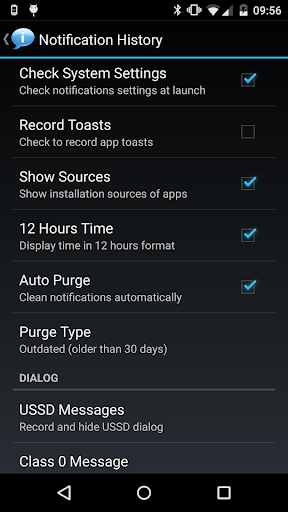
When I first opened an app with this job, my first question would be what it needs permission to observe. Notification History explains that its accessibility service is used for recording toasts, USSD messages, Class 0 messages, and dialog messages. App visibility permission is used to show app names and icons. Those requests are closely tied to what the app says it does, but they are still worth understanding before switching them on.
The setup instructions vary by Android generation. On Android 5.0 and later, notification recording uses Notification Access settings; recording toasts uses Accessibility settings. Older systems have a different route. In either case, the history begins only after the relevant services are enabled. That is a little more involved than simply installing an app, but it explains why an empty log immediately after opening it does not necessarily mean anything is broken.
Review alerts on your time
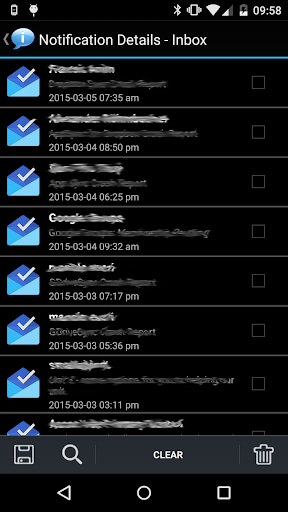
Day to day, the core experience is about looking backward. Instead of trying to catch every alert as it arrives, I can return to the log when I have a moment and inspect what was recorded. Grouping messages by app gives the history a sensible starting point, while time sorting helps when I remember roughly when something appeared but not which app sent it.
A search option and clipboard copying round out that retrieval routine. I can search for a detail rather than manually scanning every entry, then copy a notification if I need its text elsewhere. The app also lets users clear notifications and ignore specific apps. These are modest tools, but together they make a history more manageable than an undifferentiated pile of old alerts.
More than status bar alerts
The wider range of recorded items is what distinguishes this app from a simple notification list. Its description includes status-bar notifications, toasts, USSD messages, Class 0 or Flash SMS messages, dialogs, and app installation, update, and uninstall history. That variety could be useful if a message appears outside the normal notification shade or if I am trying to remember a recent app change.
The app can display an app's installation source, with examples including system apps, Google Play, Amazon, and unknown installers. It can also offer direct app uninstalling from the history. I would not assume every device or message source behaves identically, but these details give the log a troubleshooting angle beyond merely rereading a missed alert.
A practical evening check
A realistic routine would be to enable recording for the types of alerts I care about, go through an ordinary day, and open the history later if something seems to have vanished. I might group entries by app to spot a repeat offender, or sort by time to reconstruct a brief sequence. If one app is generating noise I do not need, ignoring its notifications can keep future reviews more focused.
For a fleeting USSD or Flash SMS dialog, the free version can record the relevant message, while automatic dismissal and some related options are described as Pro features. The app also describes optional sound, vibration, and LED reminders in Pro. I would consider those only if the specific message type is part of my routine; most users may get enough value from the basic history and search.
Keep expectations grounded
The main limitation is timing: the app cannot create a record of an alert that arrived before recording was enabled. Its description specifically notes that messages from social apps can only be read later if Notification History was already active when the notification appeared. That distinction is important. This is a forward-looking log, not a recovery tool for old conversations or messages that were never saved by the system.
Permissions and compatibility are another consideration. Recording depends on Android settings and enabled services, and the instructions differ across system versions. The description also notes that another accessibility service using notification access can interfere. If nothing is being recorded, checking the relevant settings is a sensible first step. Ads are present in the free app, and several conveniences require Pro, so the experience is not entirely friction-free.
Notification History makes a useful case for keeping a searchable record of alerts that are easy to dismiss and hard to remember. I like that it goes beyond the status bar, with support for toasts, certain dialogs, and app-change history. Its value depends on setup, though, and it cannot retrieve messages from before recording began.
I would try it if missed alerts or short-lived messages are a recurring nuisance and I am comfortable enabling the required access. If I only need a basic notification shade or expect a complete message backup, I would look elsewhere. For its narrower purpose, Notification History is a practical tool with clear limits.
Notification History Frequently Asked Questions
What is Notification History used for?
Notification History records notifications and other brief items such as toasts, USSD messages, certain dialogs, and app installation or update events. You can group entries by app, sort them by time, search, and copy notification text. It is intended for reviewing items after they disappear, provided recording was enabled when they arrived.
Which devices can run Notification History?
Notification History is an Android app. Its description gives different setup instructions for systems before Android 5.0 and Android 5.0 or later, using accessibility and notification-access settings. The minimum Android version is worth checking on Google Play for your device, since requirements and compatibility can vary.
Is Notification History free, and does it have ads?
The app is free to download and contains ads. Its description refers to a Pro upgrade that removes advertisements and adds options such as backing up and sharing notifications. The upgrade price and current purchase details may vary, so check Google Play before deciding.
Can Notification History recover old deleted messages?
No. The app can only keep a message for later if recording was enabled when the notification arrived and the system made it available. It is not a way to retrieve messages from before setup or messages that were never saved by the system. Its main role is keeping a record going forward.
Who should use Notification History?
It may suit someone who frequently dismisses alerts too quickly, wants to investigate which app sent a notification, or needs to review supported short-lived messages. It may not suit people who want a complete conversation archive or prefer not to enable notification and accessibility access. The free version also includes ads.
Pros
- Keeps a record of notifications for later review once recording is enabled.
- Groups by app and sorts by time to make a busy history easier to browse.
- Supports searching and copying notification text to the clipboard.
- Records several brief message types beyond standard status-bar notifications.
Cons
- Requires enabling relevant notification or accessibility services in Android settings.
- Cannot recover notifications that arrived before recording was turned on.
- The free version contains ads, and several extra features require Pro.
- Category
- Tools
- Version
- 1.10.9











