My Breezeline
- 1.68K
- 3.3
- Installs
- 100.00K
- Price
- Free

Screenshots
Analysis by Reviewed APKs
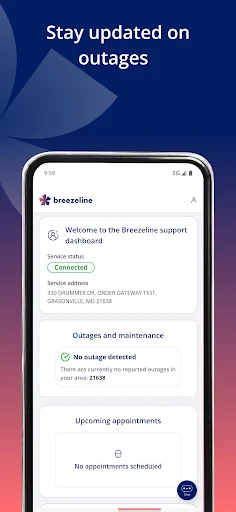
My Breezeline is a customer-account app for handling Breezeline billing and basic equipment support from an Android phone. I’d consider it most useful for subscribers who want to check a bill, arrange a payment, or try a modem reset without starting at a computer. Its job is practical rather than broad: it brings a handful of account and troubleshooting tasks together, though it won’t replace a general internet-management or productivity app.
A bill-day check-in
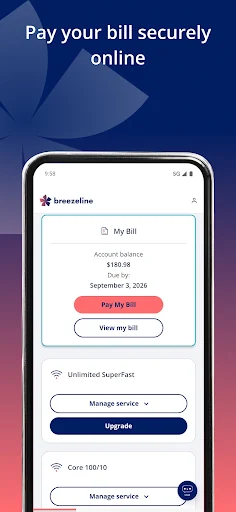
When I picture using My Breezeline on an ordinary bill day, the appeal is having the account basics and billing tasks in one place. I can check account information, view the bill, and pay it online. If the timing is inconvenient, scheduling a payment is another option. That makes the app a sensible stop during a quick monthly admin session, rather than a tool I’d need to keep open all day.
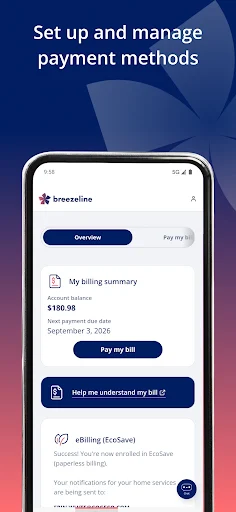
The billing choices also cover a few different habits. Someone who prefers fewer paper statements can set up paperless billing, while automatic payments are available for people who want to reduce the number of monthly reminders they handle themselves. I’d still take a moment to review the bill before setting a routine, but it’s useful that the app supports both one-time attention and more hands-off payment arrangements.
An account tool, not a router suite
The obvious alternative for many people is signing in to manage their account another way, such as using a web browser. My Breezeline’s distinct role is narrower and more mobile: it offers account information, bill viewing and payment, plus a few modem-support options. If I’m already holding my phone, opening an app for a quick check can feel more direct than finding a computer for a routine task.
It is not a general-purpose home-network control center, and I wouldn’t choose it to manage unrelated internet providers or compare service plans. The described troubleshooting is focused on modem status, manual steps, and an online reset. That may help with a basic equipment issue, but the app’s stated role is account management and support, not a promise to diagnose every connection problem or replace personalized help.
Small habits that help
I’d get the most everyday value by choosing one simple billing routine: check the bill when it becomes relevant, then decide whether to pay it or schedule a payment. The app also offers automatic payments and paperless billing, so users can choose a setup that suits their own preferences instead of treating every month as a fresh task. Those are practical options, not reasons to skip checking account details.
For equipment support, I’d start by checking the modem status and then use the manual troubleshooting steps if something seems wrong. Keeping the app in mind as a first stop can make that process feel more orderly than jumping between unrelated sources for basic guidance. If those steps do not address the issue, the description says virtual assistants and real agents are available for further help.
More From Our News Desk

Zoom Meetings, Google Meet, or Teams: Which Is Easiest to Join?

How I Build a Free Streaming Lineup With Tubi

Why Crunchyroll Is the Default Anime App for So Many Fans

YouTube TV: A Practical Guide to Cutting Cable

Rummikub and the Small Comfort of Phone Games

TeamViewer Remote Control or AnyDesk for Helping Family?
Who may find it useful
I’d recommend My Breezeline to Breezeline subscribers who want a phone-based way to check account information, handle bills, or look at modem status. It should make the most sense for people who already prefer doing small household-admin tasks on their phone, especially if they value payment scheduling, automatic payments, or paperless billing. The app’s focus is clear: it brings several recurring service tasks together rather than trying to be an all-purpose digital toolbox.
It may be less appealing to someone who rarely uses mobile apps for account management, or who expects detailed network controls beyond the troubleshooting options described. People seeking a service comparison tool or a broad productivity app should look elsewhere, since those are not its stated jobs. I’d also keep expectations grounded: a support app can offer guidance and agent contact, but the description does not suggest that every equipment problem can be resolved inside it.
My Breezeline is developed by Breezeline Apps and is available on Google Play. It has 100,000+ installs and a 3.3-star rating from around 1,700 ratings. The app is free to download, with no in-app purchases or ads listed in its store facts. Its content rating is Mature 17+, so it is worth checking the store page if that rating matters for your household.
The current version shown in the supplied store facts is 3.0.3. The release date is February 28, 2022, and the last update is listed as September 28, 2026. The minimum Android requirement is worth checking directly on Google Play, since it can vary with app updates and device compatibility. These details can help set expectations before installing, especially on an older phone.
A closer look at account and support tasks
A straightforward starting point
When I first open an account app like this, I want to know whether it is built around something I actually need to do. My Breezeline’s stated focus is easy to understand: manage a Breezeline account, deal with billing, and get help with equipment. That focus makes it feel like a companion for a service relationship, rather than an app that expects me to invent reasons to use it.
There is no need to imagine a complicated setup flow to see its basic purpose. The listed tasks give a clear sense of what the app covers before I reach for it: account information, bill viewing and payment, and modem troubleshooting. For a subscriber who already wants those tasks on a phone, that practical scope is more important than a long list of unrelated extras.
The routine account work
The billing side is the part most likely to earn a regular place in my routine. I can view a bill and pay online, or schedule a payment if I want to handle it at a different time. Those options suit different approaches to monthly admin: some people prefer to take care of the bill immediately, while others prefer to plan the payment around their schedule.
Paperless billing and automatic payments add choices for people who want to simplify recurring chores. I’d treat them as settings to choose carefully rather than features to activate on autopilot. The useful point is that the app supports more than a one-off payment; it can also accommodate a more consistent billing workflow for users who would rather manage those preferences through their account.
Support beyond billing
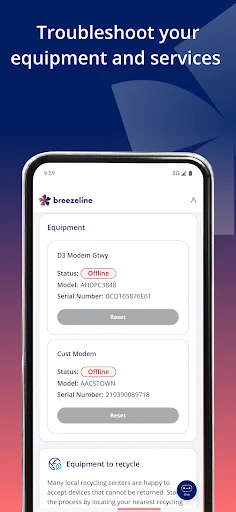
The equipment tools give the app a second purpose beyond account housekeeping. Users can view modem status, follow manual troubleshooting steps, and reset the modem online. That sequence is practical for a basic check: look at the status, try the guidance, and consider the reset option if it seems appropriate. The description does not spell out every possible fault, so I’d view these as focused support tools rather than a universal fix.
My Breezeline also describes virtual assistants for immediate help and the option to connect with real agents for personalized support. The virtual agents are described as available around the clock. That mix is useful in principle: a user can start with automated help and seek a person when the issue calls for it. It gives the support side a more complete role than a static collection of instructions alone.
A practical household routine
A simple monthly routine could start with opening the app to review account information and the current bill. From there, I could pay online or schedule the payment, depending on what fits that month. If I prefer fewer recurring steps, I could consider the automatic-payment and paperless-billing options. The routine stays focused on a few concrete tasks, which is a good fit for an app meant to support one service account.
On a day when the internet connection is acting up, the app’s equipment tools provide another clear starting point. I’d check the modem status, work through the manual steps, and use the online reset option only if it seems relevant to the situation. If I still needed guidance, the described virtual assistant or real-agent support could be the next step. This is a tidy process to keep in mind, without assuming the app can resolve every issue.
Keep the scope in mind
My Breezeline is tied to Breezeline account and equipment tasks, so its usefulness depends on being a customer who wants to manage those things from a phone. It is not described as a tool for managing another provider’s service, controlling every aspect of a home network, or comparing internet packages. That narrow scope is not a flaw by itself, but it does mean the app is likely to be occasional rather than essential for some users.
The Google Play rating is 3.3 stars from around 1,700 ratings, which is worth keeping in mind alongside the app’s practical feature list. A rating cannot tell me whether a particular billing or support task will fit one person’s needs, but it is a useful part of the overall picture. I’d check the current store details for device compatibility and decide based on whether its specific account tools match my routine.
My Breezeline has a clear, useful purpose: it gathers Breezeline account checks, billing options, and basic modem support in one mobile app. I like that the described tools cover both recurring chores and a possible equipment problem, with virtual and real-agent support also part of the offering. Its appeal is strongest when those tasks are already part of your household routine.
I’d recommend giving it a try if you’re a Breezeline subscriber who wants to manage bills or start troubleshooting from an Android phone. If you want a broad network-control app or rarely handle service tasks on mobile, it may not become a regular part of your day. The focused feature set is the point, and also the main limit.
My Breezeline Frequently Asked Questions
What is My Breezeline used for?
My Breezeline is for managing a Breezeline account, viewing and paying bills, scheduling payments, and setting up automatic payments or paperless billing. It also offers modem-status information, manual troubleshooting steps, and an online modem reset. The description includes virtual-assistant help and a way to connect with real agents.
Which devices support My Breezeline?
My Breezeline is available on Google Play for Android devices. The minimum Android version can vary with compatibility and app updates, so check the current Google Play store page for your phone before installing. The described app is for managing a Breezeline account and related equipment support.
What Android version does My Breezeline require?
The Android requirement may vary by app version and device. Check My Breezeline’s Google Play store page for the current minimum version and compatibility information before downloading, particularly if your phone is older. The store page is also the best place to confirm current app details.
Does My Breezeline cost money?
My Breezeline is free to download on Google Play. The supplied store facts show no in-app purchases and no ads. Payment-related features in the app are for handling a Breezeline bill; check your account and the store page for details that may vary.
Is My Breezeline useful for every internet customer?
It is aimed at Breezeline subscribers who want mobile access to account information, billing, or modem troubleshooting. It is not described as a general tool for other providers or as a full network-control app. If you do not manage service tasks on your phone, its focused features may not suit you.
Pros
- Combines bill viewing, online payment, and payment scheduling in one account app.
- Offers paperless billing and automatic payments for different monthly routines.
- Includes modem status, manual troubleshooting steps, and an online reset option.
- Describes both virtual-assistant help and access to real agents.
Cons
- Its account and equipment tools are focused on Breezeline subscribers.
- The troubleshooting features are limited to the options described in the app information.
- A 3.3-star Google Play rating may give some users pause.
- Category
- Tools
- Version
- 3.0.3











