Move to iOS
- 224.01K
- 3.6
- Installs
- 100.00M
- Price
- Free
Screenshots
Analysis by Reviewed APKs
Move to iOS is Apple’s Android app for moving personal content to a new iPhone or iPad. It suits people who are switching phones and want to bring familiar things like contacts, photos, messages, and calendars along without first saving them elsewhere. After spending time with its setup instructions and transfer workflow, I see it as a focused bridge between two devices: useful for a one-time move, but not an everyday organizer.
A switch-night transfer
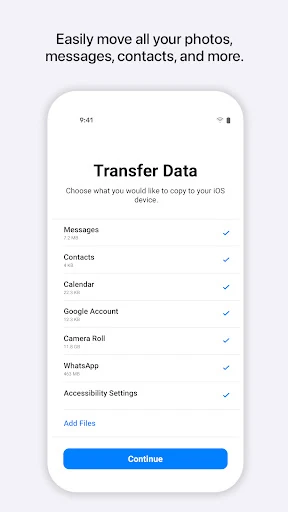
When I first considered using Move to iOS, I pictured the familiar switching-day routine: the new iPhone is ready, the old Android still holds years of photos and conversations, and I would rather not rebuild everything by hand. The app is designed for exactly that moment. It moves selected kinds of content directly from the Android device to the new iPhone or iPad, including contacts, photos, videos, calendars, and message history.
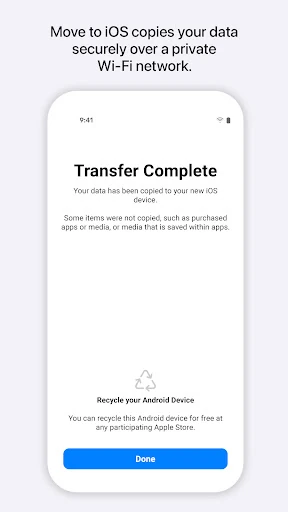
The process asks you to keep both devices nearby and connected to power while the transfer runs. During setup, the iPhone or iPad creates a private Wi-Fi network and finds the nearby Android device running the app. After you enter a security code, the transfer begins. I like that the steps keep the job contained between the two devices rather than asking me to prepare a separate saved copy first.
A bridge, not a backup
Move to iOS makes most sense beside the alternatives people actually face when changing platforms: moving information manually, or using another way to save and restore it. Its appeal is a guided transfer from Android to iPhone or iPad, with a range of personal content handled in one process. That makes it a practical tool for a new-device setup, rather than something I would open every week to manage files.
It is not a general-purpose file manager, a way to sync Android and Apple devices indefinitely, or a substitute for using the new phone after the move. Its job is narrower: carry supported content across during a switch. If you are staying on Android, or simply want to manage your existing phone, this is not the app I would reach for. The one-way move is its defining strength and its main boundary.
Make the move smoother
I would treat the transfer as a small setup project, not something to squeeze into the last few minutes before leaving home. Put both devices together, connect them to power, and give the process room to finish. The app’s instructions specifically call for keeping the phones nearby and powered during the transfer, so having a calm stretch of time matters more than trying to multitask through the setup.
It also helps to think beforehand about which kinds of information matter most. Move to iOS can handle items such as contacts, calendars, photos, videos, call logs, voice memos, mail accounts, and WhatsApp content. Some permissions are optional, but declining them can make some features unavailable. I would read each permission request in context and allow the ones needed for the content I actually want to move.
More From Our News Desk

Zoom Meetings, Google Meet, or Teams: Which Is Easiest to Join?

How I Build a Free Streaming Lineup With Tubi

Why Crunchyroll Is the Default Anime App for So Many Fans

YouTube TV: A Practical Guide to Cutting Cable

Rummikub and the Small Comfort of Phone Games

TeamViewer Remote Control or AnyDesk for Helping Family?
Who should give it a try
I would recommend Move to iOS to someone moving from an Android phone to a new iPhone or iPad who wants a guided way to bring personal information along. It covers more than just an address book: the supported transfer includes photos and videos, message history, calendars, call logs, mail accounts, voice memos, and WhatsApp content. For a switch that might otherwise involve lots of separate steps, that breadth is useful.
It may not suit someone looking for an ongoing sync tool, a general backup app, or a way to transfer content from an iPhone to Android. It is also worth setting aside time and keeping both devices powered rather than expecting a completely hands-off process. The app is free and focused, but the experience depends on having both the old Android device and the new Apple device available for the migration.
Move to iOS is made by Apple and is available on Google Play for Android. Google Play shows over 100 million installs and a 3.6-star rating from about 224,000 ratings. The app is free, with no in-app purchases or ads. Its content rating is Everyone, which fits a utility for moving personal information between devices.
The version identified in the supplied app details is 4.0.5. The app was released on September 16, 2015, and its listed last update is October 1, 2026. A minimum Android version is not included in the available details, so check Google Play for the requirement that applies to your device.
A Guided Route Between Phones
The first setup steps
Move to iOS has a clear purpose from the start: it helps an Android device hand content to a new iPhone or iPad. I appreciate that the app does not ask me to make a separate copy of everything before beginning. Instead, the new Apple device creates a private Wi-Fi network, and the Android app connects to it as part of the transfer.
Entering a security code is part of establishing that connection. That small step makes the process feel like a deliberate pairing rather than a background transfer happening without my involvement. The setup still depends on having both devices ready and close by, so I would start only when the new device and the Android phone can stay together for the duration.
The transfer itself
The day-to-day experience is really a one-time workflow rather than a daily app routine. Once the devices are connected and the code is entered, Move to iOS transfers supported content and places it in the appropriate areas on the iPhone or iPad. The list includes familiar essentials such as contacts, calendar events, photos, videos, and message history, along with several other categories.
Keeping both devices nearby and connected to power is the practical instruction I would take most seriously. I would avoid treating the transfer as something to start while rushing out the door or juggling other setup tasks. The app’s role is straightforward, but the move itself is a handoff between two devices, and it deserves a little uninterrupted time.
More than contacts
The range of supported content is what makes Move to iOS more useful than a contacts-only transfer. Alongside contacts, photos, videos, and calendars, the app can move call logs, mail accounts, voice memos, and message history. WhatsApp content is also included in the described transfer. That breadth could save someone from piecing together several separate ways to bring common personal information over.
The app also handles permissions by category. Location is required to establish the Wi-Fi connection between the Android device and the Apple device. Permissions for items such as SMS, photos and videos, contacts, calendar, call logs, music and audio, notifications, and phone information are optional, though declining them can make some features unavailable. I find that distinction useful when deciding what access to grant.
A calmer switching routine
My practical routine would be to start with both phones charged or connected to power, place them beside each other, and begin the migration when I can leave them alone. I would think through the content I care about before responding to permission requests. If messages and photos matter most, for example, those are the categories I would pay particular attention to during setup.
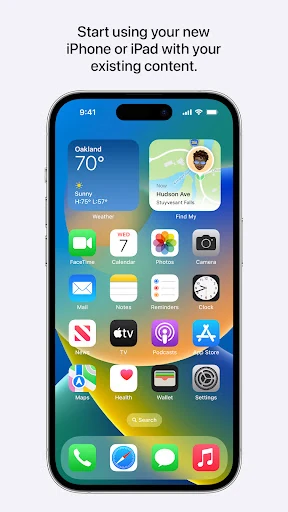
After the transfer, I would move on to using the new iPhone or iPad rather than expecting Move to iOS to become part of my regular routine. It is built around the switch itself. That makes it easy to understand where it belongs: install it on the Android device when preparing to move, use it for the handoff, and then focus on the new device.
Keep expectations grounded
The main limitation is its narrow direction and purpose. Move to iOS is for transferring content from Android to iPhone or iPad; it is not described as a two-way sync service or a general-purpose way to organize files. If your goal is simply to keep two phones updated together, this is not the kind of ongoing tool its workflow suggests.
The transfer also depends on a few practical conditions: both devices need to be available, close together, and connected to power until the job is done. Optional permissions can affect which kinds of content are available to migrate. I would check the Android version requirement in Google Play before installing, since that requirement can depend on the current app release and device.
Move to iOS is a focused utility that earns its place during one specific transition. Its guided connection and broad set of supported content make moving from Android to an iPhone or iPad feel more manageable than handling every category separately. The need to keep both devices together and powered is a real consideration, but it is easy to plan around.
I recommend it to Android users preparing to switch to Apple hardware who want a direct, guided migration. I would skip it if you need ongoing syncing, a general file manager, or a transfer in the opposite direction. For a planned switch, it is a sensible tool to have ready before setup begins.
Move to iOS Frequently Asked Questions
What is Move to iOS used for?
Move to iOS transfers supported content from an Android device to a new iPhone or iPad. The listed content includes contacts, calendars, photos, videos, message history, call logs, mail accounts, voice memos, and WhatsApp content. The Apple device creates a private Wi-Fi network, and the Android app connects after you enter a security code.
Which devices can use Move to iOS?
The app is for Android devices being used to transfer content to an iPhone or iPad. Both devices need to be nearby and connected to power during the transfer. Move to iOS is available on Google Play for Android; check the store for current device compatibility and requirements before starting.
What Android version does Move to iOS require?
The minimum Android version can vary with the app release and device. Check the Move to iOS page on Google Play for the requirement that applies to your phone. The transfer itself also requires the Android device to be near the new iPhone or iPad and connected to power until the process finishes.
Does Move to iOS cost money?
Move to iOS is free on Google Play. It has no in-app purchases and contains no ads according to its store details. You may still want to check Google Play for current app information and compatibility before installing, since store details can change.
Is Move to iOS right for every phone user?
It is a good fit for someone moving from Android to a new iPhone or iPad who wants to transfer supported personal content in a guided process. It is not an ongoing sync tool or a general-purpose file manager. If you are not switching to an Apple device, its main purpose may not be relevant to you.
Pros
- Moves a broad range of personal content from Android to iPhone or iPad.
- Uses a guided, direct connection between the two devices.
- Free to use, with no ads or in-app purchases.
- Can transfer WhatsApp content as part of a wider migration.
Cons
- Only serves the Android-to-iPhone or iPad switching process.
- Both devices need to stay nearby and powered during the transfer.
- Some content migration depends on granting optional permissions.
- Category
- Tools
- Version
- 4.0.5