Morse Code - Learn & Translate
- 3.47K
- 4.4
- Installs
- 1.00M
- Price
- Free

Screenshots
Analysis by Reviewed APKs
Morse Code - Learn & Translate is a practical Android app for converting text and Morse code, studying the alphabet, and sending signals with a phone. I like that it brings a quick translator and a structured learning path together without making either one feel like a side note. It suits curious beginners and people who already use Morse code; my overall take is that it is a handy, focused reference with useful ways to practice.
A quick translation on the go
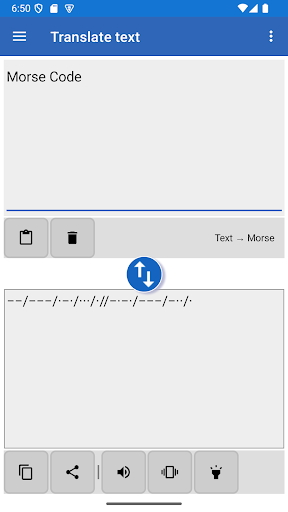
When I first tried the translator, I pictured a simple everyday job: checking how to write a short message in Morse before sharing it with someone. I can type the text and see its translation as I go, then copy the result or share it with another app. That makes the app useful for a quick lookup at home, on a break, or while talking with someone who is learning alongside me.
The direction switches automatically when the app recognizes that I am entering Morse rather than ordinary text. I also found it useful that the default slash separators distinguish letters and words, while the settings let me change those separators. If I want to hear or send the result rather than just read it, the app can transmit it through the speaker, flashlight, or vibrations.
Translator, not a messaging app
Compared with looking up a Morse chart online, this app does more than show which dots and dashes match a letter. It translates both ways, can play a code, and provides a learning module for building recognition over time. When I only need to check one character, the searchable code table is a direct alternative to typing a whole phrase into the translator.
I would not treat it as a general chat service or a substitute for a radio setup. Its job is conversion, reference, practice, and manual signaling using the phone’s speaker, light, or vibrations. That focus is a plus if Morse code is the point, but it may feel too specialized if I only want a broad language-learning app or a standard way to message friends.
Small habits that help
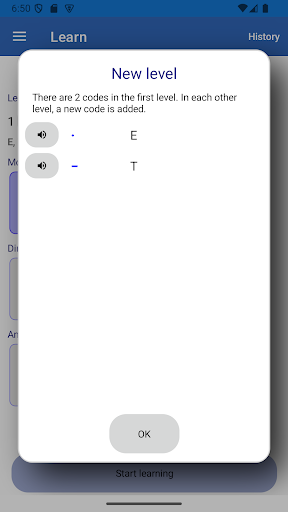
I get more from the learning module by keeping a session small. It introduces letters in levels, starting with two and adding a new one in each later level. I can choose where to begin and decide when I am ready to move on, so there is no need to race through a course just to reach the end.
For quick practice, I can use the random text generator to create longer material to translate, or look up a character in the code table when I get stuck. Switching between reading, typing an answer, and listening to a code gives me different ways to work on recognition. I would also set the transmission speed and other sound options to suit the pace I can follow.
More From Our News Desk

Zoom Meetings, Google Meet, or Teams: Which Is Easiest to Join?

How I Build a Free Streaming Lineup With Tubi

Why Crunchyroll Is the Default Anime App for So Many Fans

YouTube TV: A Practical Guide to Cutting Cable

Rummikub and the Small Comfort of Phone Games

TeamViewer Remote Control or AnyDesk for Helping Family?
Who will get the most from it
I would recommend Morse Code - Learn & Translate to anyone who wants a reference and practice tool in one place. Beginners can work through its levels at their own pace, while people with some experience can jump to a suitable level, translate text, or check the code table. The ability to copy, paste, and share translations makes it useful for short, practical tasks as well as casual study.
It may not suit someone looking for a broad course with a wide range of subjects, or a full communications service. The app stays centered on Morse code and related tools. People who prefer learning only through long explanations may also find its question-and-answer levels less suited to them. I see it as a compact companion for practice and reference, rather than a replacement for every way of studying or communicating.
Morse Code - Learn & Translate is developed by Pavel Holeček. On Google Play, it has over one million installs and a 4.4-star rating from about 3,500 ratings. The app is free, with no in-app purchases or ads. Its content rating is Everyone, making it suitable for a general audience.
The supplied app details give version 9.6.12, a release date of July 6, 2020, and a last update date of October 11, 2026. The minimum Android version is not included in the available details, so check Google Play for the requirement that applies to your device.
A closer look at learning and translating
A clear place to begin
When I first opened the app, the appeal was its direct purpose: turn text into Morse, translate Morse back into text, or start learning. Those jobs are closely related, so having them together feels sensible rather than crowded. I could begin with a translation right away, or treat the learning levels as a more deliberate route into the code.
The translator accepts pasted text as well as typing, and the app can receive text shared from another app. That gives it a few convenient entry points for a phrase I already have. I also appreciate that learning does not force me to start at the first level if I know some basics already.
Translation in daily use
The real-time conversion is the central convenience. I can type a message and watch the Morse version appear, or enter a code and let the app interpret it as text. Automatic direction selection saves an extra choice when moving between the two formats. When the result is ready, copying it or sharing it to another app keeps the next step simple.
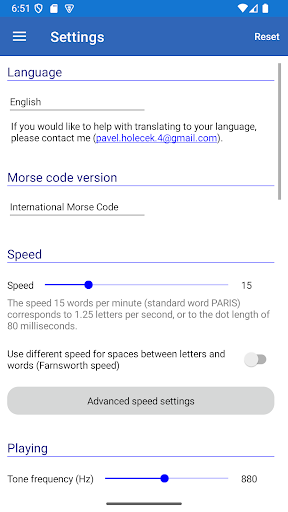
I spent time exploring the settings that affect how a translation is presented and sent. Letter and word separators can be customized, and transmission options include speed, Farnsworth speed, and tone frequency. The app also supports different Morse code versions, including International Morse Code and several local versions. Those choices make it more adaptable than a bare conversion box, though most casual lookups will not require changing them.
More than dots and dashes
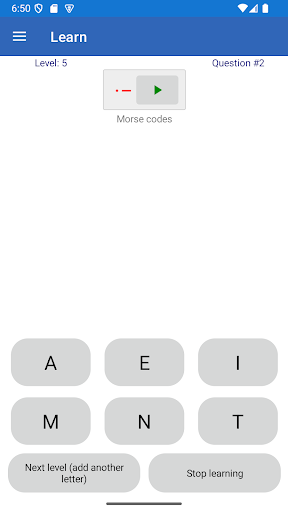
The learning module stands out because it breaks the alphabet into levels rather than presenting every character at once. Questions can show a letter or a Morse code, and I can answer with a selection or type the translation. When a code is played through the speaker, it adds listening practice to the exercise instead of asking me to rely only on a visual pattern.
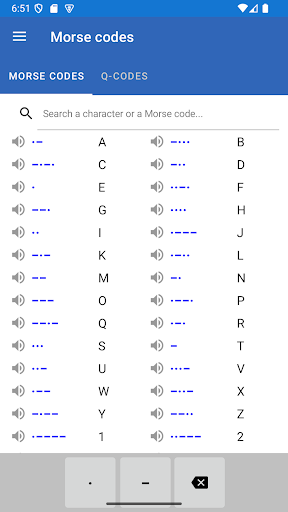
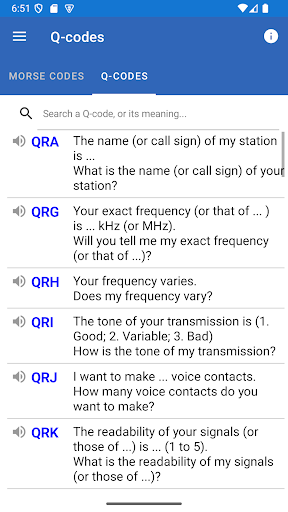
There are useful reference tools beyond the lessons. A table shows letters alongside their Morse codes, and a search bar can find a letter or code. The app also includes a list of amateur radio Q-codes. When a Q-code appears in entered Morse, its meaning can be shown alongside it; that behavior can be switched off in settings.
I also found a random text generator for practicing with longer passages and a small set of ciphers accessible from the translator. The available operations include swapping dots and dashes, reversing Morse codes, and using a password with the Vigenère cipher. These are extras rather than the main reason I would open the app, but they give experienced users more to explore.
A repeatable practice routine
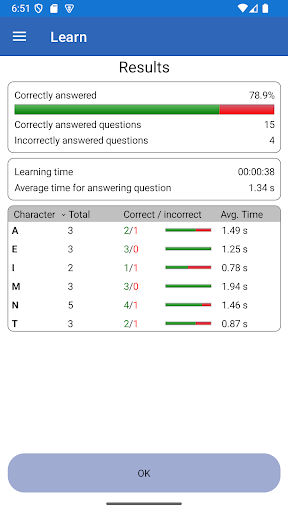
A routine that works for me is to spend a few minutes on one learning level, then use the code table to check any characters I keep mixing up. I can listen to a code during an exercise and answer by typing, which makes the session feel more active than simply rereading a chart. Once the current group feels manageable, I can choose to move to the next level.
On days when I want a practical task instead of a lesson, I can paste in a phrase, translate it, and play it through the speaker or another supported output. For longer practice, the random text generator supplies material without requiring me to compose it myself. That combination makes it easy to switch between study and hands-on testing without needing a separate reference.
Keep the scope in mind
The app’s breadth is useful, but the number of settings and extras could be more than a beginner needs on the first visit. Transmission speed, tone frequency, code versions, Q-codes, and ciphers are helpful when they match a specific task. For a first session, I would stick to the translator or the early learning levels and explore the rest only when there is a reason.
This is still a specialized Morse code tool. The learning module uses levels and answer questions, rather than presenting a broad curriculum, and the app’s sending options are the phone’s speaker, flashlight, and vibrations. If I need another kind of communication or a wider course, I would look elsewhere. For Morse practice, translation, and reference, its focused toolkit is the point.
Morse Code - Learn & Translate earns its place on my phone by combining quick conversion with a learn-at-your-own-pace module and practical reference tools. The ability to listen to codes, send them through several phone outputs, and customize translation settings gives it more depth than a basic chart. It remains focused, which is exactly what I want from a Morse code utility.
I recommend it to beginners who want guided practice and to experienced users who need a translator or searchable reference. Just keep expectations centered on Morse code rather than a general learning or messaging app. The free, ad-free setup makes it easy to try, and the different tools give regular learners reasons to return.
Morse Code Frequently Asked Questions
What is Morse Code - Learn & Translate used for?
Morse Code - Learn & Translate converts text to Morse code and Morse code back to text. It also offers lessons arranged in levels, a searchable code table, a list of amateur radio Q-codes, and ways to transmit a message with the phone’s speaker, flashlight, or vibrations. A random text generator can provide material for translation practice.
Which devices can run Morse Code - Learn & Translate?
The app is available for Android through Google Play. The supplied details do not specify a minimum Android version, and requirements can vary with app updates and devices, so check the Google Play page for the version that applies to your phone or tablet.
Does Morse Code - Learn & Translate cost money?
Morse Code - Learn & Translate is free on Google Play. The supplied details say it does not contain ads and does not offer in-app purchases. Store details can change, so it is worth checking the Google Play page for current information before installing.
Can Morse Code - Learn & Translate teach a beginner?
Yes. Its learning module introduces letters through levels, beginning with two letters and adding another in later levels. Questions can be answered by selecting an option or typing a translation, and a Morse code can be played through the speaker during relevant exercises. You can also choose a level rather than starting from the beginning.
Who is Morse Code - Learn & Translate best for?
It suits people who want to learn Morse code, translate short text, look up codes, or practice sending signals with a phone. Its content rating is Everyone. It is more specialized than a general study or messaging app, so people who need those broader purposes may prefer another tool.
Pros
- Translates text and Morse code in real time, with automatic direction selection.
- Learning levels let beginners progress gradually and experienced users choose where to start.
- Supports speaker, flashlight, and vibration transmission with adjustable settings.
- Includes a searchable code table, Q-codes, random practice text, and useful sharing.
Cons
- The range of settings and extras may feel like a lot during a first session.
- Its learning tools focus on Morse code rather than a broad educational curriculum.
- The supplied details do not specify a minimum Android version.
- Category
- Tools
- Version
- 9.6.12











