Miracast - Wifi Display
- 65.23K
- 3
- Installs
- 10.00M
- Price
- Free
Screenshots
Analysis by Reviewed APKs
Miracast - Wifi Display is an Android app for sending your phone’s screen to a compatible TV or wireless display adapter. It suits people who want to share what is already on their phone without reaching for a cable. I found the idea straightforward, but its usefulness depends on both devices supporting wireless display and being on the same network. It is a focused tool, not a universal casting fix.
A quick screen-sharing moment
Picture a friend asking to see photos from a recent trip while everyone is gathered around the living room. Instead of passing a phone from hand to hand, you can open Miracast - Wifi Display, look for a compatible TV on the current Wi-Fi network, and try to mirror the phone’s screen. That’s the app’s central job: making the small display visible on a larger one.
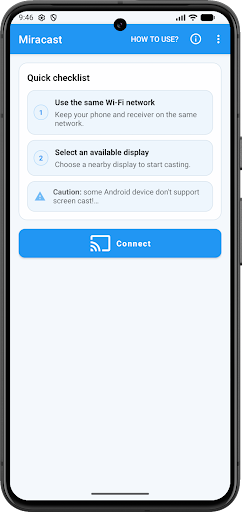
The basic process is easy to understand: check that the TV supports Wireless Display or Miracast, put the phone and TV on the same network, then use the app’s connect button and choose the TV. I like that the task is clearly defined. The catch is equally clear: if the phone or TV lacks the needed support, a simple connection attempt may go nowhere.
A narrow casting option
Compared with a TV’s own built-in apps, this is for showing the Android screen itself rather than browsing for a streaming service or choosing a specific video to cast. That can be handy for photos, a page, or something already open on the phone. It is a more direct screen-mirroring idea than a general entertainment hub, and it keeps the phone at the center of the experience.
I wouldn’t treat it as a replacement for every kind of casting. The description focuses on Android screen mirroring to a Smart TV or wireless display adapter that supports Miracast, not sending content to any television regardless of its capabilities. It also isn’t a tool for sharing a screen with another phone or for managing media libraries. Compatibility is the deciding factor, not the number of buttons.
A smoother connection routine
A little preparation can save the awkward pause that comes with trying to connect while people are waiting. Before opening the app, I’d check whether the TV has Wireless Display or Miracast support and make sure both devices are connected to the same network. That simple checklist follows the app’s stated setup and helps separate a network mismatch from a device that simply doesn’t support the feature.
For regular use, it helps to think of the app as a quick bridge for a particular moment rather than something that needs constant attention. Keep the TV’s display capability in mind, open the app when there is something to share, and select the TV from the available devices. If the phone cannot cast its screen, repeated tapping is unlikely to change that underlying limitation.
More From Our News Desk

Zoom Meetings, Google Meet, or Teams: Which Is Easiest to Join?

How I Build a Free Streaming Lineup With Tubi

Why Crunchyroll Is the Default Anime App for So Many Fans

YouTube TV: A Practical Guide to Cutting Cable

Rummikub and the Small Comfort of Phone Games

TeamViewer Remote Control or AnyDesk for Helping Family?
Who might find it useful
I’d recommend Miracast - Wifi Display to Android users who already have a Miracast-compatible television or wireless display adapter and want a straightforward way to mirror their phone. It makes the most sense for occasional sharing around the home: showing pictures, displaying something on the phone to a group, or putting the phone’s current screen on a larger display.
It may disappoint anyone expecting every TV to appear automatically or wanting a broad casting app that works across unrelated devices. The phone itself also needs screen-casting support, so the app cannot solve every hardware limitation. If you rarely need to mirror a phone, or your television does not support Wireless Display or Miracast, this is unlikely to become a regular part of your routine.
Miracast - Wifi Display is a free Android Tools app from The Tree Team. Google Play shows more than 10 million installs and a 3.0-star rating from about 65,000 ratings. It contains ads and offers in-app purchases, with listed item prices ranging from $1.39 to $11.99. Its content rating is Everyone.
The current version is 3.1. The app was released on August 6, 2017, and its last update was October 3, 2026. The description says it supports Android 4.2 and above. That is the stated minimum, while actual screen-casting support can also depend on the phone and the display device.
A closer look at phone mirroring
Getting started
When I first opened an app built for a single job like this, I wanted the setup steps to be easy to follow. Miracast - Wifi Display keeps the process grounded in a few practical checks: confirm the TV supports Wireless Display or Miracast, connect both devices to the same network, and then choose the TV after tapping connect.
That simplicity is appealing, but it does not remove the need for compatible hardware. The app’s description warns that some devices do not support screen casting. I’d check that first rather than assume the app can add a capability the phone or television lacks. Once those basics line up, the app’s purpose is clear without a long learning curve.
The everyday experience
Day to day, the app is best understood as a route from the phone’s screen to a larger display. Its device-finding feature looks for displays that support screen casting on the current Wi-Fi network, and the connection flow asks you to select the TV. That gives it a practical role when the thing you want to show is already on your Android device.
I’d expect the experience to be most useful when the television and phone are already set up for wireless display. If a device does not appear, the first useful checks are whether it supports Miracast and whether both devices are on the same network. The app’s narrow focus makes the task easy to grasp, but leaves compatibility as the main variable.
What it can do
The two capabilities described are screen mirroring to a compatible TV and finding screen-casting devices on the current Wi-Fi network. Those features work together: one helps locate a destination, and the other is the reason to connect. I appreciate that this is a specific promise rather than a long list of unrelated tools.
That also sets a sensible expectation for what appears on the big screen: the Android device’s screen, rather than a separate collection of content inside the app. A Smart TV needs Wireless Display or Miracast support, or the destination can be a wireless display adapter. The description does not make this a general-purpose solution for every television or display.
A practical sharing habit
For a low-fuss photo-sharing evening, I’d check the TV’s wireless display setting before guests arrive and confirm the phone is on the same network. When it is time to share, I’d open Miracast - Wifi Display, tap connect, and choose the television if it appears. That order keeps the app’s simple connection steps from becoming a last-minute troubleshooting session.
The same basic routine makes sense whenever the phone’s screen needs to be visible to more than one person. Check compatibility, check the shared network, then make the connection. If screen casting is not supported by the phone, the app’s own description says it may not work; knowing that early is more useful than repeatedly trying the same connection.
Limits to keep in mind
The biggest limitation is device support. The TV needs Wireless Display or Miracast, the Android phone needs to support casting its screen, and the devices need to be connected to the same network. That is a fairly specific combination, so this app will not be equally useful in every home or with every phone.
There are also ads and optional in-app purchases, which are worth considering if you prefer a completely uninterrupted free tool. The Google Play rating is 3.0 stars, so user feedback is mixed. I would approach it as a focused utility whose value depends on matching hardware, rather than expecting it to smooth over every compatibility issue.
Miracast - Wifi Display has a clear purpose and a simple connection routine: find a compatible display on the current network and mirror an Android screen. I like that it stays focused on that task, but the hardware requirements are central, not incidental. A compatible TV and phone make the app worth a try; without them, the basic promise falls away.
My recommendation is for Android users who already know their TV supports Miracast or Wireless Display and occasionally want to share the phone screen. If you need broad compatibility or want a general media-casting platform, look elsewhere. For the right setup, this is a straightforward utility, with ads and mixed user ratings to weigh before installing.
Miracast Frequently Asked Questions
What is Miracast - Wifi Display used for?
Miracast - Wifi Display is used to mirror an Android device’s screen to a compatible Smart TV or wireless display adapter. It can look for devices that support screen casting on the current Wi-Fi network. The TV needs Wireless Display or Miracast support, and the phone must support screen casting too.
Which devices and platforms support Miracast - Wifi Display?
The app is for Android. Its description covers casting to a Smart TV that supports Wireless Display or Miracast, or to a wireless display adapter. Both the phone and TV need to be connected to the same network for the described setup. Compatibility can vary by device, so check the store information and your device’s capabilities.
What Android version does Miracast - Wifi Display require?
The description says the app supports Android 4.2 and above. That is the stated Android requirement, but it does not guarantee screen mirroring will work on every phone. The device also needs to support casting its screen, and the receiving display must support Miracast or Wireless Display.
Is Miracast - Wifi Display free?
The app is free to install on Google Play. It contains ads and offers in-app purchases, with listed item prices from $1.39 to $11.99. Store details can change, so check the Google Play page for current pricing and purchase information before installing.
Who should use Miracast - Wifi Display?
It is best suited to Android users with a compatible TV or wireless display adapter who want to show their phone screen on a larger display. It may not suit people whose devices lack screen-casting support or who expect it to work with any television. The Google Play content rating is Everyone.
Pros
- Focused screen mirroring for compatible Android phones and wireless displays.
- Can find screen-casting devices on the current Wi-Fi network.
- Simple connection steps make the app’s main task easy to understand.
- Free to install, with a clear use for occasional screen sharing.
Cons
- Requires screen-casting support on the phone and Miracast or Wireless Display on the TV.
- Both devices need to be connected to the same network.
- Contains ads and in-app purchases, and its Google Play rating is mixed.
- Category
- Tools
- Version
- 3.1











