Meeting Guide
- 4.76K
- 4.7
- Installs
- 1.00M
- Price
- Free

Screenshots

Analysis by Reviewed APKs
Meeting Guide is a practical way to find Alcoholics Anonymous meetings, whether I’m looking nearby or checking online options around a particular time. It suits people who want meeting details in one searchable place rather than having to track down information across local sites. After looking through its main tools, my take is that it stays focused on that useful job, with a few thoughtful touches for repeat searches.
Finding a Meeting Nearby
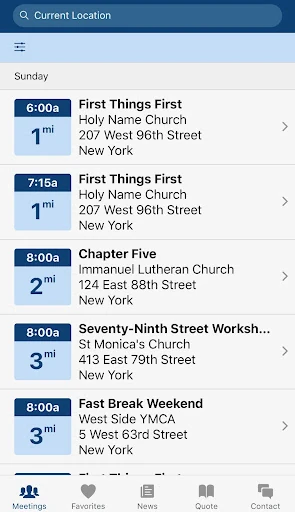
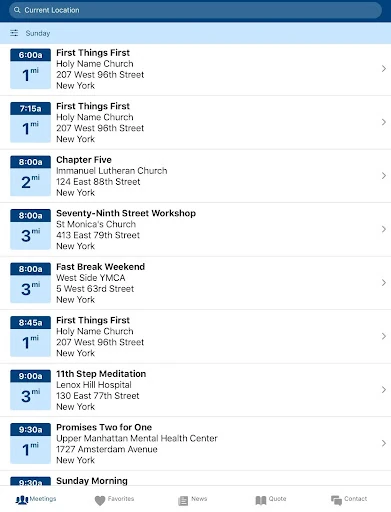
When I first opened Meeting Guide, I pictured the familiar moment of needing a meeting but not knowing which local listing to trust or where to start. The app is built for that situation: I can search by name or location, or share my location to see nearby options. If I’m in an unfamiliar part of town, entering a place in the search bar gives me another route without requiring location sharing.
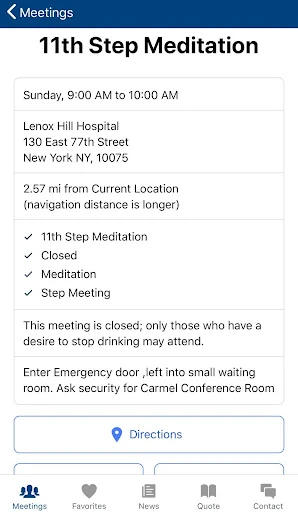
The app brings together meeting information supplied by A.A. service entities, and its listings refresh twice daily. That makes it feel more useful for planning than a loose collection of old notes or bookmarked pages. I can scan available options, save favorites, and return to them later. The point is not to manage a meeting myself; it is to make finding A.A. meeting information more direct when I need it.
A Focused Alternative to Searching
The obvious alternative is searching the web for a local meeting, then checking different pages for times and locations. Meeting Guide narrows that task to A.A. meeting information and offers a searchable listing instead. Its coverage comes through more than 500 A.A. service entities, so it is organized around that network rather than being a general directory of events or a broad social platform.
That narrow focus is also a boundary. I wouldn’t turn to Meeting Guide to arrange a workplace meeting, build an agenda, assign tasks, or collaborate on documents; those are not the tools described here. It is for locating A.A. meetings, including online meetings, not for hosting or running a meeting. If my goal is general event planning, a calendar or project tool would be a better fit.
Small Habits That Help
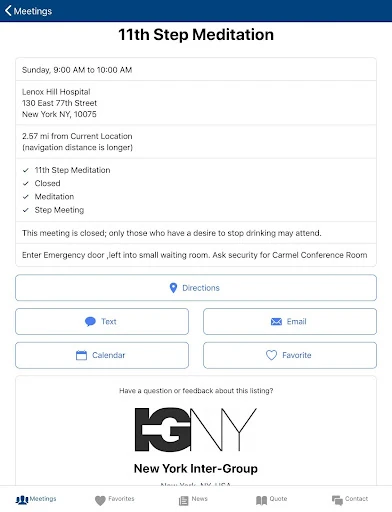
I’d start by searching for a town or neighborhood when I want a quick overview, then save useful options with the heart icon. The app keeps separate favorites for its in-person and online views, which makes it easier to keep those choices distinct. On a busy day, that small bit of preparation can save me from repeating the same search when I’m trying to decide where to go.
For online options, I’d check the Online tab and use the available filters or keyword search to narrow the worldwide list of upcoming meetings. Times appear in the device’s local timezone, a helpful detail when I’m looking beyond my immediate area. I’d also keep in mind that listings refresh twice daily, so checking the app close to when I need a meeting is a sensible habit.
More From Our News Desk

Zoom Meetings, Google Meet, or Teams: Which Is Easiest to Join?

How I Build a Free Streaming Lineup With Tubi

Why Crunchyroll Is the Default Anime App for So Many Fans

YouTube TV: A Practical Guide to Cutting Cable

Rummikub and the Small Comfort of Phone Games

TeamViewer Remote Control or AnyDesk for Helping Family?
Who May Find It Useful
I’d recommend Meeting Guide to people looking for A.A. meetings and to anyone who wants a simple way to search local or online options. It can also help someone who regularly attends and wants to keep a few useful listings close at hand. Search by location, favorites, and the separate online view all support practical, everyday use without asking me to learn a complicated planning system.
It may not suit someone looking for general meeting management, calendar coordination, or tools for organizing a team discussion. The app’s purpose is specifically A.A. meeting information, so its usefulness depends on wanting that kind of directory. People who prefer not to share location can search by entering a place instead. Anyone relying on a particular listing should still check the details that matter to them.
Meeting Guide is developed by A.A. World Services, Inc. On Google Play, it has over 1 million installs and a 4.7-star rating from around 4,800 ratings. It is free to download, has no in-app purchases, and contains no ads. Its content rating is Everyone, and it requires Android 8.0 or later.
The current version is 5.0.5. The app was released on June 17, 2018, and its most recent update was October 30, 2025. Meeting information is refreshed twice daily from more than 500 A.A. service entities. The app’s described privacy approach says location is used to find nearby meetings when shared and that geolocation and search information are not kept.
A Closer Look at Meeting Guide
A Straightforward Start
My first impression is that Meeting Guide gets to its central purpose quickly: finding meeting information. The description points to a main meeting listing with separate In-Person and Online views, so the main choice is clear before I start narrowing things down. I appreciate that this is not presented as a complicated account of schedules, agendas, and group administration. It is a directory for a specific need.
Location sharing is optional. If I allow it, the app can show meetings near me while I’m actively using it; if I don’t, I can enter a location in the search bar. I like having those two paths because not every search needs to begin with device location. That choice gives the app a practical starting point without making location access the only way to look around.
Searching Day to Day
The everyday experience revolves around finding a listing that matches where and how I want to attend. Searching by meeting name or location is useful when I already have a detail in mind; location-based results are the more natural option when I’m simply looking for something nearby. Those different approaches make the directory feel usable both for a planned visit and for a quick search in a new area.
I also like that meeting information is refreshed twice a day rather than being treated as a one-time download. That is a practical detail for a directory where times and locations matter. It doesn’t mean I should assume every listing will answer every question, but it gives me a reason to use the app as a current starting point rather than relying solely on an old saved note.
Online and In-Person Choices
The Online view is the most notable recent addition. It presents upcoming meetings from around the world, with times shown in the device’s local timezone. I can see the appeal for someone who wants to look beyond nearby in-person options, or who needs to search for a meeting while away from home. The local-time display removes one small but potentially confusing step from comparing options.
Filters and keyword search help narrow that online list, while the in-person view remains its own path through the listings. Favorites are separate between the two views, so I can save an online option without mixing it into my in-person choices. That separation is a modest design decision, but it makes sense if I use the app in different circumstances.
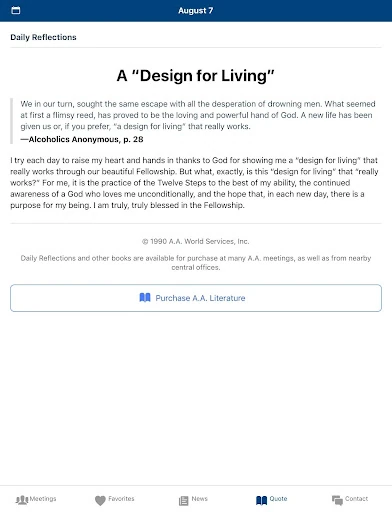
Daily Reflections are another feature mentioned in the app description, alongside more accurate locations for local contact information and an improved interface with a menu bar and Contact function. These details broaden the app slightly without changing its main role: meeting information remains the center of the experience.
A Useful Search Routine
A routine I’d use is to search a location before I leave, scan the available meeting information, and save a few options that may come in handy again. If plans change, favorites give me a shortcut instead of requiring me to remember the exact search terms. I’d keep online and in-person favorites separate according to where I expect to use them.
If I’m looking for an online meeting, I’d switch to the Online tab, check the time in my local timezone, and use a filter or keyword if the list is broad. For a search near a place I’m visiting, I can enter that location rather than share my current one. This is a simple workflow, but it matches the app’s tools instead of making the search more elaborate than it needs to be.
Limits to Keep in Mind
Meeting Guide is focused on A.A. listings, so it is not a universal directory for every kind of support group or public event. Its coverage depends on information relayed by A.A. service entities, and the app says those details refresh twice daily. I’d treat it as a useful place to search, while taking care to check any listing details that are especially important to my plans.
There is also a privacy tradeoff to understand. Sharing location lets the app provide nearby results while it is in use; entering a location is an alternative. The app says it does not retain geolocation or search information, while usage information is collected through Google Analytics in aggregate to help improve the app. That is worth knowing before deciding how I want to search.
Finally, the app’s narrow scope is a feature only if I want meeting information. People expecting scheduling tools, agendas, document sharing, or general-purpose collaboration will not find those jobs addressed here. I see Meeting Guide as a practical directory rather than a full organizer, and judging it by that purpose makes its strengths and boundaries easy to understand.
Meeting Guide does a focused job well: it gives me ways to search A.A. meeting information, keep favorites, and explore online options alongside in-person listings. The local-time display and location search alternatives are especially practical touches. It is not a general meeting planner, but it does not need to be one to be useful.
I’d recommend it to Android users who want a straightforward A.A. meeting directory, particularly those who may search in more than one location or use online listings. If you need tools for organizing a work meeting or managing a calendar, look elsewhere. For its intended purpose, Meeting Guide is a sensible app to keep available.
Meeting Guide Frequently Asked Questions
What is Meeting Guide used for?
Meeting Guide helps people find A.A. meeting information. It supports searches by meeting name or location, nearby results when location is shared, and a separate view for upcoming online meetings. Users can also save favorites. It is a directory for A.A. meetings, not a general-purpose tool for scheduling or managing meetings.
Which devices can run Meeting Guide?
Meeting Guide is available for Android devices through Google Play. It requires Android 8.0 or later. Device compatibility can vary, so it is worth checking the app’s Google Play page for the current requirements on a particular device.
Is Meeting Guide free, and does it have ads?
Meeting Guide is free to download on Google Play. It has no in-app purchases and contains no ads. Store details can change, so check the Google Play page for current information before installing.
Does Meeting Guide show online meetings?
Yes. Meeting Guide has an Online view with upcoming meetings from around the world, displayed in the device’s local timezone. Filters and keyword search help narrow the results. The app also has an in-person meeting view, and each view keeps its own favorites.
Who is Meeting Guide best suited for?
It is best suited to people looking for A.A. meeting information, whether they want nearby in-person options or online listings. It may not suit people seeking general event planning, team agendas, or collaboration tools. Those needs fall outside the app’s described purpose.
Pros
- Searches by meeting name or location, with nearby results available when location is shared.
- Offers separate in-person and online meeting views, with independent favorites.
- Online meeting times appear in the device’s local timezone.
- Free to download, with no in-app purchases or ads.
Cons
- Focused on A.A. meeting information rather than general event or meeting management.
- Finding nearby results through location requires sharing location with the app.
- Meeting information refreshes twice daily, so details may not reflect every immediate change.
- Category
- Lifestyle
- Version
- 5.0.5