Maytag
- 8.55K
- 4.4
- Installs
- 100.00K
- Price
- Free
Screenshots
Analysis by Reviewed APKs
Maytag is a companion app for connecting and managing compatible Maytag smart appliances. It is aimed at households that want to check laundry or kitchen tasks from a phone, save custom cycles, or get a nudge when a wash finishes. I like the practical focus: it can make a few routine steps easier, but it depends on having the right connected appliance and a reliable home network.
A laundry day with Maytag
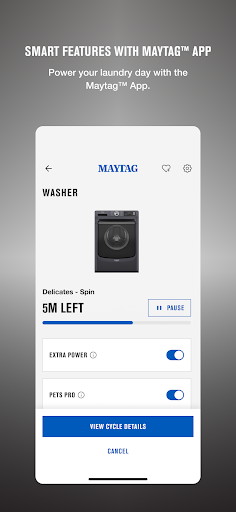
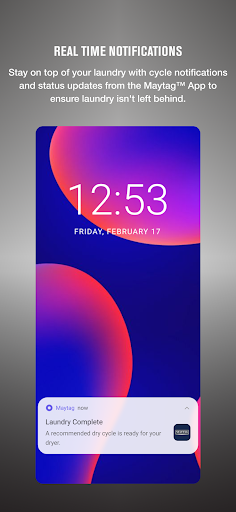
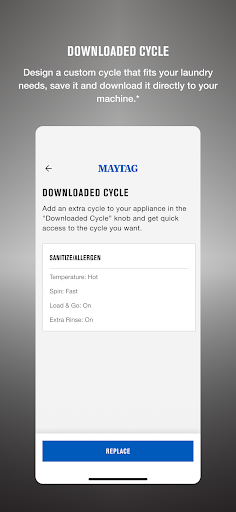
When I imagine using Maytag on a busy weekday, the useful moment is easy to picture: I start a compatible washer, leave to run an errand, and get a notification when the cycle ends. That small update can help me avoid leaving clean clothes in the machine for hours. If I have saved a preferred cycle, I can return to it without choosing the same settings from scratch each time.
Scheduling is another practical fit for a household where laundry has to work around school, work, or dinner. I can set a wash cycle for a more convenient time, then use the app to keep track of its progress. For a family, the Assign a Task feature can send customized texts to relatives to keep laundry moving. It is not a substitute for doing the washing, but it can help coordinate the handoffs.
A companion, not a replacement
Maytag makes the most sense alongside a compatible connected Maytag appliance. It adds phone-based controls and notifications to household tasks rather than replacing the appliance’s own role. Compared with checking the machine in person or relying on memory, a cycle notification and remote controls can be handy. Voice commands are also supported through a Google Assistant- or Alexa-enabled device, giving people another way to interact with compatible appliances.
This is not a general laundry planner, a universal smart-home controller, or an app for controlling appliances from other brands. Its features depend on the connected appliance, and some options are limited to select models. If I do not own a compatible Maytag smart appliance, there is little reason to expect the app to help with everyday chores. I would treat it as an accessory to the appliance, not a standalone household organizer.
Small habits that help
I would start by saving the cycles I reach for most often as Favorites. That gives recurring loads a quicker path through the app and avoids repeatedly setting up the same custom cycle. Notifications are worth enabling if I tend to be in another room or out of the house when a wash finishes. Those two habits focus on the app’s clearest everyday benefits without turning laundry into another complicated system to maintain.
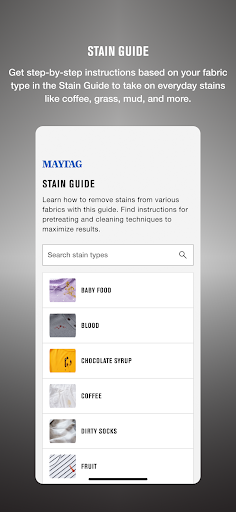
For laundry, I would check whether my particular model supports scheduled washes or specialty cycles before building a routine around them. The Stain Guide can also be useful to consult when an everyday mark needs attention. In the kitchen, Smart Presets and remote oven preheating may suit a predictable meal routine. I would keep the phone, appliance, and home network set up reliably; remote features depend on a compatible appliance being enabled for remote use.
More From Our News Desk

Zoom Meetings, Google Meet, or Teams: Which Is Easiest to Join?

How I Build a Free Streaming Lineup With Tubi

Why Crunchyroll Is the Default Anime App for So Many Fans

YouTube TV: A Practical Guide to Cutting Cable

Rummikub and the Small Comfort of Phone Games

TeamViewer Remote Control or AnyDesk for Helping Family?
Who will get the most from it
I would recommend Maytag to someone who already has a compatible Maytag smart washer, dryer, or kitchen appliance and wants a little more visibility into daily tasks. It is especially relevant to busy households that benefit from cycle notifications, scheduled washing, saved settings, or coordinating laundry between family members. People who use a connected oven may also appreciate remote preheating and Smart Presets when those features are supported by their model.
It may not suit someone shopping for a broad appliance-control app or hoping to use phone features with a standard, unconnected machine. Model support matters, and the app also requires a 2.4GHz router for appliance connection. If I prefer keeping household routines entirely manual, the added setup may not feel worthwhile. I would check compatibility before relying on any particular feature, since available options can differ between appliances.
Maytag is published by Whirlpool Corporation and is listed in the Lifestyle category on Google Play. The app has over 100,000 installs and a 4.4-star rating from 8,548 ratings. Google Play gives it an Everyone content rating. Its listed release date is January 24, 2019.
The app is free to download, and the provided store details show no in-app purchases or ads. Its version varies with device. A minimum Android version and a last-updated date are not provided in the available facts, so I would check Google Play for current device compatibility and version details.
How Maytag Fits Into Home Routines
Getting connected
My first impression is that Maytag has a clear, practical job: connect a phone with a compatible smart appliance. I would begin with the appliance and the home Wi-Fi details nearby, rather than expecting the app to be useful before setup. A 2.4GHz router is required, and the appliance needs to be compatible and set to remote enable for remote features to work.
The app can use Bluetooth and local network access to make the connection process easier, while location permission is used to find Wi-Fi networks. Camera access is optional for scanning a QR code during connection, and notifications are optional but enable features such as cycle notifications. I would grant permissions when their purpose fits what I am doing, especially if I want the app to alert me when a cycle ends.
The everyday experience
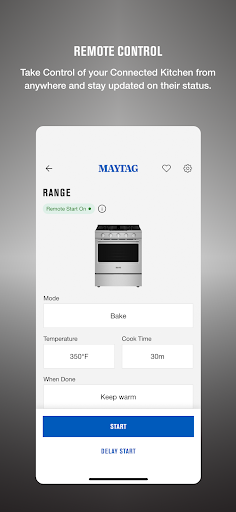
Day to day, the strongest benefit is being able to check or manage a compatible appliance without standing beside it. A cycle-ending notification can save a trip to the laundry room just to see whether a load is done. Remote Start lets me start or stop an appliance from the phone, while Favorites provide a way to save customized cycles for repeat use.
These conveniences are modest, but that is part of the appeal. I do not need an elaborate plan to get value from a timely alert or a saved setting. Remote controls are most useful when I already know what I want the appliance to do, and they rely on the appliance being set up for remote use. The app adds flexibility to a household routine rather than making the routine disappear.
Features with a clear purpose
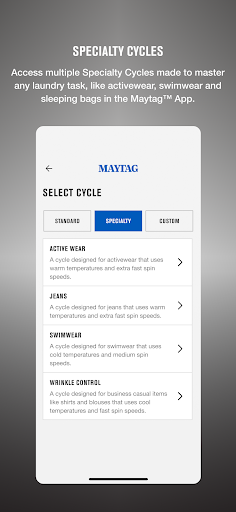
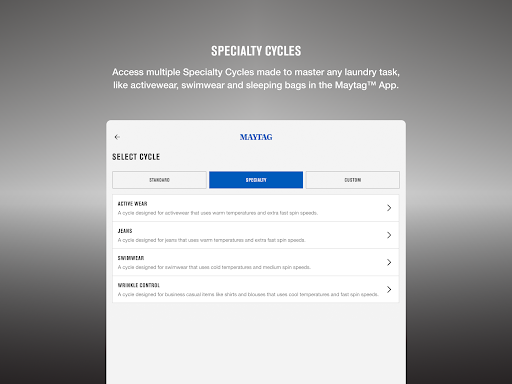
For laundry, scheduling a wash cycle can help fit a load around the rest of the day. The Stain Guide offers steps for common tough stains, and select models can access specialty cycles such as activewear or sleeping bags. Assign a Task adds a family-coordination angle by sending customized texts to relatives. These features feel most relevant when they address a specific recurring snag, rather than being used just because they are available.
Kitchen features bring the same remote-control idea to meal preparation. Smart Presets automatically set temperatures for tasks such as sautéing, simmering, and searing, while Remote Preheat lets me prepare a compatible oven from a smartphone or tablet. Availability depends on the appliance, so I would not assume every Maytag-connected product includes every option. The useful distinction is that laundry and kitchen tools are tailored to different supported appliances.
A simple weekly routine
A low-effort routine could start with saving one or two common laundry cycles, then checking the app when a notification arrives. If a wash needs to happen at a particular time, scheduling can help fit it around other plans. In a shared household, Assign a Task could prompt another family member to move the load along. I would keep the routine lightweight so the app supports the work instead of becoming another chore.
For a meal that uses the oven, remote preheating may be useful when I am away from the kitchen but ready to cook soon. Smart Presets can simplify certain temperature choices on supported models. I would still make sure the appliance is set up for remote control and follow the normal steps required for using it. The app’s best role is handling convenient controls and reminders, not deciding what the household should cook or wash.
Limits to keep in mind
The main limitation is compatibility: Maytag’s features require a connected appliance, and specific options can vary by model. Some specialty laundry cycles are only available on select appliances. A compatible device and the required 2.4GHz router are also part of the setup, so this is not a useful download for every Maytag owner by default. I would check my appliance’s support before planning around a particular control.
Remote management also depends on the appliance being set to remote enable, and the description notes that some mobile devices and operating systems may not be supported. Permissions affect particular conveniences: notifications support cycle alerts, while Bluetooth and local network access help with connection. These are worth understanding during setup. Maytag can make a connected routine more convenient, but it does not remove the need to configure the appliance and network correctly.
Maytag is a focused companion app that can make connected laundry and kitchen routines easier to track and manage. Cycle alerts, saved settings, scheduling, and remote controls are useful when they match the appliance and the way a household already works. I like that its benefits are concrete, even if they are not essential for everyone.
I would recommend it to owners of compatible Maytag smart appliances who want phone-based controls or helpful reminders. If your appliance is not supported, or you are looking for an all-purpose home app, this is unlikely to be the right fit. Check model compatibility and network requirements before counting on a particular feature.
Maytag Frequently Asked Questions
What is the Maytag app used for?
Maytag connects with compatible Maytag smart appliances so users can receive cycle notifications, save customized cycles, and remotely manage appliances. Laundry features include scheduling, a Stain Guide, and some model-specific cycles. Kitchen features include Smart Presets and remote oven preheating on supported appliances. Which tools are available depends on the connected model.
Which phones and appliances work with the Maytag app?
Maytag is an Android app available through Google Play. It is designed for compatible Maytag smart appliances, and some mobile devices or operating systems may not be supported. Appliance features can vary by model. A 2.4GHz router is required, and the appliance must be set to remote enable for remote features.
What Android version does the Maytag app require?
The Android version requirement can vary with the device and current app release. Check the Maytag page on Google Play for the latest compatibility details for your phone. The app description also notes that some mobile devices and operating systems may not be supported.
Does the Maytag app cost money?
The Maytag app is free to download on Google Play. The provided store details show no in-app purchases and no ads. Using its connected controls requires a compatible Maytag smart appliance, and features depend on the model. Check the store page for current app details.
Is the Maytag app useful without a smart appliance?
The app is mainly intended to connect with compatible Maytag smart appliances, so it may not be useful if you do not have one. It can help owners with notifications, saved cycles, scheduling, and remote controls where supported. Before relying on a feature, check whether your particular appliance supports it.
Pros
- Cycle notifications make it easier to keep track of laundry while away from the appliance.
- Favorites and scheduling can simplify repeated laundry routines.
- Laundry and kitchen features cover several everyday tasks on supported models.
- Free to download, with no ads or in-app purchases shown.
Cons
- Useful controls depend on owning a compatible Maytag smart appliance.
- A 2.4GHz router and remote-enabled appliance are required for remote features.
- Some features are limited to select models, and device support may vary.
- Category
- Lifestyle











