Lock Screen
- 20.09K
- 3.7
- Installs
- 10.00M
- Price
- Free
Screenshots
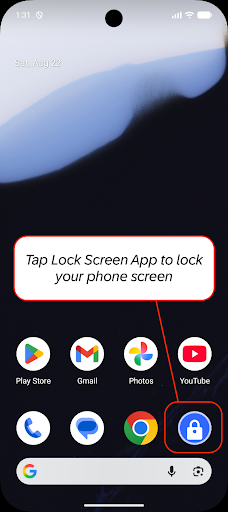
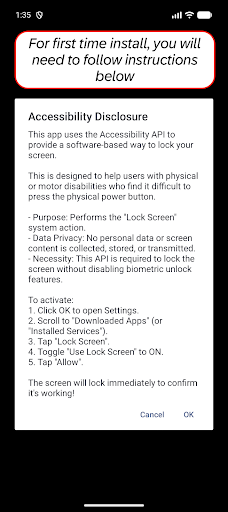
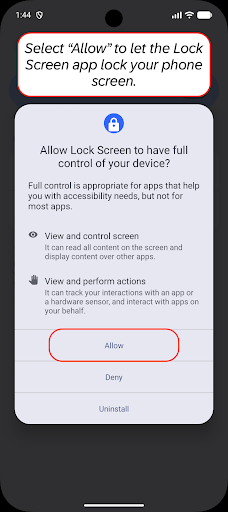
Analysis by Reviewed APKs
Lock Screen is a small Android utility for turning off and locking your phone without pressing its physical power button. I can see it helping people who find that button difficult to use, and anyone who wants another way to lock the device. Its purpose is refreshingly narrow: it does not replace your phone’s lock screen or add customization. It simply offers an accessible on-screen route to a routine action.
A gentler way to lock
When I first considered where Lock Screen might fit, I pictured the end of an ordinary day: I have finished reading a message, set my phone down, and want the display off without reaching for the side button. The app is built for that one small moment. Rather than using a physical control, it performs the screen-lock action through an accessibility service, giving the phone a software-based alternative.
That alternative can matter more than it sounds if pressing a hardware button is uncomfortable or difficult. It may also appeal to someone who prefers not to rely on a button for every lock. I would think of it as a convenience you can reach for when needed, not a new lock-screen experience. The app’s focus stays on putting the device to sleep and locking it.
A utility, not a new lock screen
The name could suggest a tool for changing wallpapers, adding widgets, or redesigning the screen you see before unlocking. That is not what this app is for. Lock Screen handles the action of locking the device; it does not present a collection of themes or promise a more decorative interface. If your main goal is a new visual style, this is the wrong kind of app to start with.
Its closest comparison is the phone’s own power button, since both routes lead to a locked screen. The difference is that Lock Screen offers an on-screen method, which may suit people who have trouble with the physical control or want to use it less. It also is not a general phone-security suite. The description focuses on carrying out the lock action, not managing passwords or adding a separate security system.
Make it part of a routine
I would get the most from Lock Screen by treating it as a simple habit rather than something to configure repeatedly. For example, after finishing a quick check of a notification, use the app’s screen-lock action instead of reaching for the hardware button. That keeps the utility tied to a clear purpose and makes it easier to judge whether the extra on-screen option genuinely helps during the day.
It is also worth being deliberate about the permissions involved. The app describes Accessibility Service access as the way it performs the system-level lock action, and says that older Android versions use Device Administrator permission as an alternative. Reading those explanations before enabling access gives the setup some context. If you later remove the app, its instructions explain that Device Administrator access must first be unchecked on older versions.
More From Our News Desk

Zoom Meetings, Google Meet, or Teams: Which Is Easiest to Join?

How I Build a Free Streaming Lineup With Tubi

Why Crunchyroll Is the Default Anime App for So Many Fans

YouTube TV: A Practical Guide to Cutting Cable

Rummikub and the Small Comfort of Phone Games

TeamViewer Remote Control or AnyDesk for Helping Family?
Who may find it useful
I would recommend Lock Screen first to someone who finds a physical power button awkward to press, including people with motor impairments. It also makes sense for anyone who simply wants a direct software option for locking the phone. Because the job is so focused, it is easy to understand why you might keep it installed: it offers an alternative for one frequent action, rather than trying to take over the whole device.
It may not suit someone expecting lock-screen customization, notification controls, or a richer collection of tools. There is little reason to add a dedicated utility if the phone’s existing button is comfortable and convenient. I would also suggest thinking through the permission request before setup, since the app relies on Android’s Accessibility Service for its main task. People who are uneasy granting that access may prefer to stick with the hardware control.
Lock Screen is an Android tools app from olalab. Google Play shows over 10 million installs and a 3.7-star rating from about 20,000 ratings. It is free to install, with no in-app purchases and no ads. Its content rating is Everyone, and the current version shown in the supplied app facts is 2.5.
The app was released on April 2, 2013, and its listed last update is October 23, 2026. The supplied facts do not give a minimum Android version, so check the Google Play store entry on your device for current compatibility details. The description says Accessibility Service access performs the lock action, while Device Administrator permission is used as an alternative on older Android versions.
A closer look at the simple lock action
A focused first impression
The first thing I like about the idea behind Lock Screen is that it does not ask me to learn a new way of managing my phone. Its role is easy to explain: provide a way to lock the screen without using the hardware button. That kind of narrow purpose can be useful when the physical control is inconvenient, and it avoids making the app sound like a replacement for Android’s existing lock screen.
Setup deserves a little attention because the app needs permission to carry out its main task. The description explains that Accessibility Service access is used specifically to lock the screen. It also notes that Device Administrator permission serves as an alternative on older versions of Android. I would read those explanations carefully and decide whether the access fits my needs before enabling it.
The everyday action
In daily use, the appeal is the small interruption it can remove. If my hand is already near the screen, an on-screen lock action can feel more natural than shifting my grip to press a side button. That is especially relevant for someone who has difficulty pressing physical buttons. The app does not need to turn a quick lock into a larger process; the utility is in making that one action accessible by another route.
I would not expect it to change what happens after the screen turns off. The phone still uses its existing lock and unlock behavior, and the app’s stated job is to initiate the system-level lock action. Its description specifically says the accessibility method can avoid invalidating biometric authentication on Android 9 and above. That is a practical detail for people who use fingerprint or face unlock, rather than a promise of extra security features.
The permissions explained
The most notable feature is also the reason to pay attention during setup: Accessibility Service access lets the app perform the system-level action of turning off and locking the screen. The developer says this access is used solely for that function and that the app does not collect, store, or share personal or sensitive user data through the service. I find that explanation useful because it connects the permission to the app’s specific purpose.
On older Android versions, the description says Device Administrator permission is used as an alternative way to lock the device. It also provides uninstall instructions that begin by unchecking Lock Screen under the phone’s Device Administrators settings, then removing the app from Apps. This is worth knowing before installation, particularly if you are unfamiliar with administrator permissions or expect to uninstall apps without first changing a device setting.
A simple daily pattern
A sensible routine would be to use Lock Screen at the moments when pressing the hardware button is inconvenient, rather than forcing it into every interaction. I might finish reading a short notification, use the app to lock the phone, and put it away. That keeps the app’s value easy to assess. If the on-screen method becomes a comfortable alternative, it has earned its place; if not, the familiar power button remains an option.
I would also make a habit of checking that the phone still behaves as expected after setup, especially if I rely on biometric unlocking. The app’s description addresses Android 9 and later, saying its accessibility approach does not invalidate biometric authentication. Since Android versions and device behavior can differ, a brief everyday check is more useful than assuming every phone will handle permissions in exactly the same way.
Keep expectations modest
Lock Screen’s narrow scope is both its main strength and its main limitation. It offers an alternative to pressing a physical button, but it is not presented as a lock-screen designer, notification manager, or broad security tool. Anyone installing it for wallpaper choices, widgets, or shortcuts is likely to be disappointed. I would judge it on whether its one action is useful in my own routine, not on features it was not designed to provide.
The permission model may also be a deciding factor. Accessibility Service access is central to the described method, and Device Administrator permission applies as an alternative on older Android versions. The developer explains why these are used and how administrator access can be removed before uninstalling. Still, people who would rather avoid those permissions may be more comfortable using the physical button. Compatibility details are worth checking in the store.
Lock Screen is a practical, single-purpose utility for people who want to lock their phone without pressing a physical button. I appreciate that its job is clear and that the permission explanation connects access to that job. The trade-off is equally clear: it offers little value if the hardware button already works well for you.
I would recommend giving it a look if button use is uncomfortable or an on-screen locking option would make everyday phone use easier. If you are seeking a customizable lock screen or a larger toolkit, this is not the app to choose. It does one small thing, and its usefulness depends on whether that thing solves a real inconvenience for you.
Lock Screen Frequently Asked Questions
What is Lock Screen used for?
Lock Screen is an Android utility for locking the phone without pressing its physical hardware button. Its description says it uses Accessibility Service access to perform the system-level screen-lock action. It is not described as a tool for customizing wallpapers or widgets. The main use is providing another way to turn off and lock the screen.
Which phones and platforms support Lock Screen?
Lock Screen is an Android app distributed through Google Play. The supplied app facts do not state a minimum Android version, so compatibility may vary by device and Android release. Check the Google Play store entry on your phone for current requirements. The description notes a different permission method on older Android versions.
Does Lock Screen cost money?
The app is free to install, and the supplied facts say it has no in-app purchases and contains no ads. Store details can change over time, so it is sensible to check the Google Play page before installing. Its described purpose is the screen-lock action rather than a paid set of additional customization features.
What permissions does Lock Screen need?
The description says Accessibility Service access is used exclusively to perform the screen-lock action. On older Android versions, Device Administrator permission is used as an alternative. The developer says the app does not collect, store, or share personal or sensitive user data through the Accessibility Service. Review the permission explanation and decide whether it suits your needs.
Is Lock Screen right for everyone?
It may suit people who have difficulty pressing physical buttons or who want an on-screen way to lock their phone. It is less useful for someone who is comfortable with the power button, and it is not presented as a lock-screen customization app. People uneasy with the required permissions may prefer the phone’s hardware control.
Pros
- Offers an alternative to pressing the physical power button to lock the phone.
- Its focused purpose may help people who find hardware buttons difficult to use.
- Free to install, with no ads or in-app purchases in the supplied facts.
- Explains why accessibility and, on older versions, administrator access are used.
Cons
- Its narrow purpose offers little appeal if the hardware button is already convenient.
- Accessibility Service access is required for the described screen-lock method.
- It does not provide the wallpapers, widgets, or customization some may expect.
- Category
- Tools
- Version
- 2.5











