Level Tool App
- 501
- 3.5
- Installs
- 100.00K
- Price
- Free
Screenshots
Analysis by Reviewed APKs
Level Tool App turns an Android phone into a set of measuring tools for checking surfaces and angles. It suits people hanging a picture, aligning a shelf, or working through small home projects who would rather use a phone than reach for a separate level. After looking at its range of modes, my take is that it offers useful flexibility, though phone-based readings are best treated as a practical guide.
A quick check at home
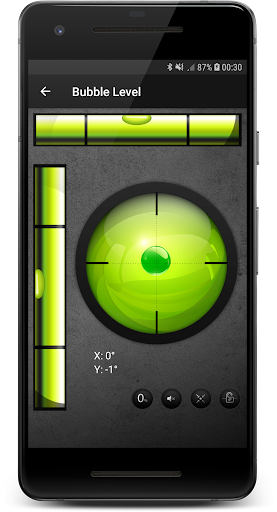
When I’m putting up a picture, the frustrating part is often not making the hole but deciding whether the frame will sit straight. Level Tool App is built for that kind of small check: open a leveling mode, place the phone against a surface, and use the on-screen reading to judge its angle. The familiar bubble-level option makes the basic task easy to understand without needing to learn a specialist measuring tool.
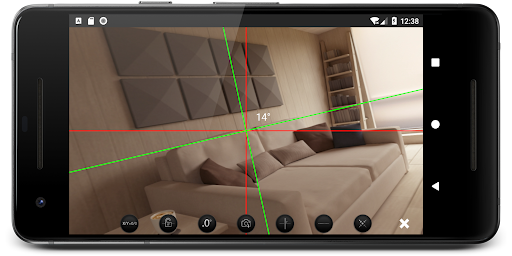
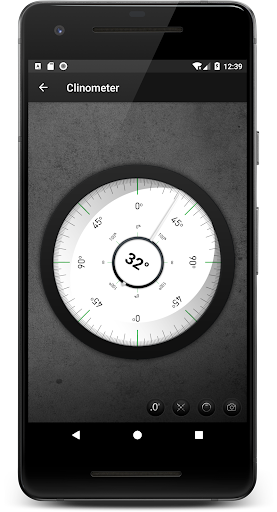
For an angled surface or line, I could switch to the clinometer, which is intended to measure slopes. The app also describes a camera-based laser option, with a calibration control and the ability to take a photo of measurements. That gives the app more range than a single bubble display, although it still depends on the phone being positioned and calibrated sensibly.
A phone tool, not a toolbox
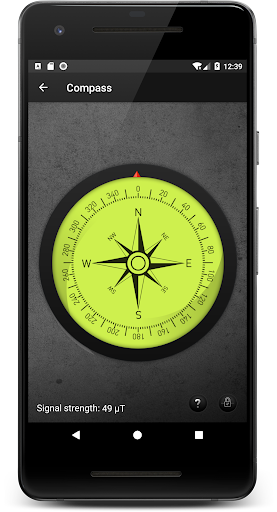
Compared with carrying a separate spirit level, the obvious advantage is convenience: a phone is often already in my pocket, and the app groups several measuring options together. The bubble level covers familiar horizontal or vertical checks, while the inclinometer is aimed at slopes. A compass with a bubble level combines a heading check with leveling, so the app can be handy when a task calls for both.
That convenience does not make it a replacement for every measuring instrument. Level Tool App is for checking angles and alignment, not for measuring lengths or replacing a full set of building tools. I’d use it for everyday household jobs and quick estimates, then reach for a dedicated tool if a project calls for a specific level of certainty or a measurement the app does not provide.
Make readings more useful
A useful habit is to decide which mode matches the job before taking a reading. A flat surface check calls for the bubble level, while a sloped line is what the clinometer is designed to handle. The app also lets users recalibrate the camera-based lasers with a button. I’d take a moment to do that when switching tasks rather than assume one calibration suits every position.
For a job that needs a record or a second opinion, the app describes taking a photo of measurements and sharing them with friends or colleagues. That could be useful when I’m comparing a result with someone helping on the project. I’d still keep the phone steady and check the surface itself, since a saved image is a reference to a reading, not a substitute for careful placement.
More From Our News Desk

Zoom Meetings, Google Meet, or Teams: Which Is Easiest to Join?

How I Build a Free Streaming Lineup With Tubi

Why Crunchyroll Is the Default Anime App for So Many Fans

YouTube TV: A Practical Guide to Cutting Cable

Rummikub and the Small Comfort of Phone Games

TeamViewer Remote Control or AnyDesk for Helping Family?
Who may find it useful
I’d recommend Level Tool App to Android users who do occasional DIY, hang pictures, adjust furniture, or want a quick way to check a slope. Its several measuring options make it more versatile than a single-purpose bubble-level app, and the compass-with-level combination may appeal to someone who wants both readings in one place. The main draw is having a few familiar tools together when a separate instrument is not close at hand.
It may be less appealing to people who want a dedicated, highly specialized measuring instrument or who prefer not to rely on a phone for this sort of task. The app contains ads and offers in-app purchases, which can also matter to people seeking an entirely uninterrupted free experience. I’d treat it as a convenient helper for ordinary jobs rather than assume it will suit every project or replace all physical tools.
Level Tool App is developed by Mystic Mobile Apps GPS Tools and is listed in the Tools category. On Google Play, it has over 100,000 installs and a 3.5-star rating from 501 ratings. It is free to download, contains ads, and offers in-app purchases. The listed price range for those purchases is $0.99 to $8.99 per item.
The app has an Everyone content rating. Its listed version is 1.5.0, with a release date of February 16, 2019, and a last update date of August 19, 2026. The available details do not give a minimum Android version, so I’d check the Google Play entry on the device I plan to use before installing.
A closer look at everyday leveling
Getting oriented
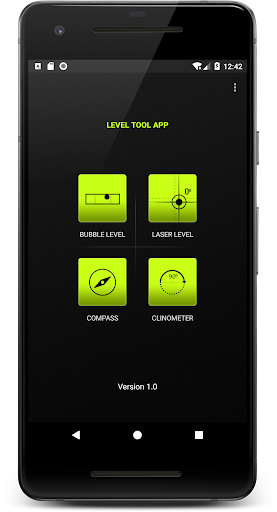
When I first opened the description of Level Tool App, what stood out was the promise of several familiar instruments rather than one complicated measurement system. There is a bubble level, an inclinometer, a compass with a bubble level, and a camera-based laser option. That mix suggests a tool meant for quick practical checks, whether I’m dealing with a flat surface or trying to understand the angle of a slope.
The basic premise is easy to grasp: choose a leveling approach that suits the object and use the phone to check its position. For the camera-based option, the app describes calibrating its on-screen lasers and recalibrating them with a button. I’d approach that step deliberately, especially before relying on a reading, rather than treating the first number or visual cue as automatically meaningful.
Everyday measuring
For the usual home jobs, the traditional-style level is the most immediately understandable part. I can picture using it while checking whether a shelf or picture frame is sitting straight, or placing the phone on its side to check another orientation. Those are brief tasks where opening an app can be more convenient than searching for a separate tool.
When I spent time considering the different modes, the clinometer seemed the natural choice for a sloped line rather than a straightforward flat surface. The app’s description also says it can measure the angle of a surface using the phone’s camera. These options give it a broader role than simple leveling, though the task still depends on matching the mode to what I’m trying to measure.
Modes that add range
The camera-based laser feature is the most distinctive option in the description. It uses on-screen lasers to help calibrate a surface, and the app allows users to recalibrate with a button. I like the idea of having that approach alongside a more conventional bubble display: one app can offer different ways to think about alignment instead of forcing every job into the same view.
The clinometer and compass round out the set. The inclinometer is meant for measuring angles of sloped lines, while the compass includes a bubble level so users can check heading and level at the same time. The app also describes taking a photo of measurements and sharing them. Those are concrete extras that could make a quick reading easier to keep or discuss.
A practical project routine
For a shelf or picture project, I’d start by choosing the bubble level and checking the phone’s position against the surface I care about. If I were working with a slope instead, I’d move to the clinometer. Keeping that simple distinction in mind makes the range of modes feel useful rather than overwhelming, and it reduces the chance of using a feature that does not match the job.
If I needed to refer back to a reading, I’d use the described photo option and share it with the person helping me. On a camera-based measurement, I’d also use the recalibration control as needed. That routine stays practical: select a mode, position the phone carefully, check the result, and save or share it only if doing so helps with the task.
Keep expectations grounded
A phone-based level is convenient, but convenience is not the same as being the right instrument for every situation. The app’s modes are focused on angles, alignment, and heading; they do not turn it into a general measuring kit. For work where a particular instrument or measurement is required, I would not assume that a phone app covers the need just because it offers several modes.
There are also practical trade-offs in the store details: the app contains ads and offers paid in-app items, and its Google Play rating is 3.5 stars from 501 ratings. Those details do not decide whether the tool will be useful for a particular person, but they are worth weighing alongside its convenience. Checking compatibility in the store is sensible before making it part of a routine.
Level Tool App’s strongest point is its variety: bubble leveling, slope-angle checks, a compass with a level, and a camera-based laser option are gathered in one Android app. For quick home tasks, that can be a useful convenience. I also appreciate that its described photo and sharing options give users a way to keep a measurement in view.
I’d try it if I wanted an accessible helper for occasional alignment checks and understood its limits as a phone-based tool. It is less compelling for anyone who wants a specialized instrument or an ad-free experience. Overall, it looks most worthwhile for everyday DIY jobs where having several basic modes nearby matters more than replacing dedicated equipment.
Level Tool Frequently Asked Questions
What is Level Tool App used for?
Level Tool App is for checking the angle and alignment of surfaces with an Android phone. It includes a bubble level, a clinometer for sloped lines, a compass with a bubble level, and a camera-based laser option. The app also describes taking photos of measurements and sharing them, which can help when keeping a reading for a project.
Which devices can run Level Tool App?
Level Tool App is available for Android through Google Play. The minimum Android version is worth checking on its store page, since the version needed can vary with the app and device. I’d look there before installing, particularly if the phone is older, rather than assume that every Android device can run it.
Does Level Tool App cost money?
The app is free to download, but it contains ads and offers in-app purchases. The listed purchase prices range from $0.99 to $8.99 per item. If you want to know what a particular purchase includes or whether the available options have changed, check the current Google Play store page before deciding.
Can Level Tool App replace a physical level?
It can provide a convenient phone-based check using its bubble-level and angle-measuring options, which may be enough for ordinary household tasks. It is not described as a replacement for every measuring instrument. For a project that calls for a particular tool or measurement, I’d use the appropriate equipment rather than assume the app covers that need.
Who is Level Tool App best suited to?
It is a reasonable fit for Android users who want quick checks for pictures, shelves, surfaces, or slopes and like having several measuring modes together. It may not suit someone who needs a specialized instrument or dislikes ads and in-app purchases. The app’s store page is the place to check current compatibility and purchase details.
Pros
- Combines bubble leveling, slope-angle measurement, a compass, and a camera-based laser option.
- Includes a recalibration control for its camera-based laser measurements.
- Lets users take photos of measurements and share them.
- Free to download for quick, occasional household checks.
Cons
- Contains ads and offers in-app purchases.
- A phone-based tool may not suit projects requiring dedicated measuring equipment.
- Google Play rating is 3.5 stars from 501 ratings.
- Category
- Tools
- Version
- 1.5.0











