JLab
- 3.59K
- 3.9
- Installs
- 1.00M
- Price
- Free

Screenshots
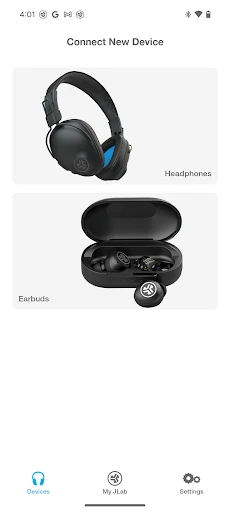
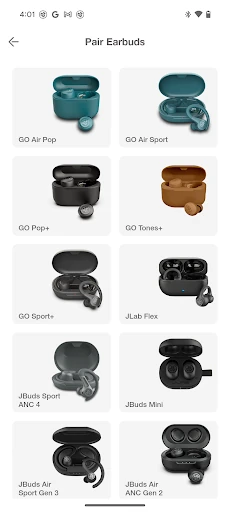
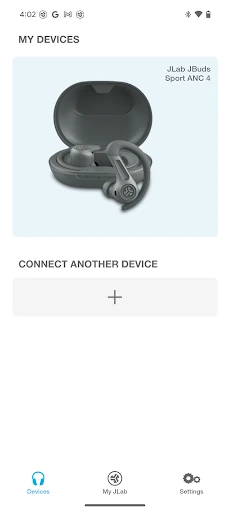
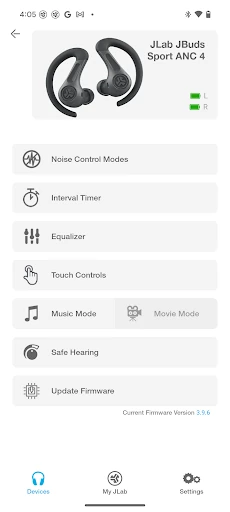
Analysis by Reviewed APKs
JLab is a companion app for adjusting settings on compatible JLab earbuds and headphones. It suits listeners who want more control over sound, noise handling, and earbud touch controls than the hardware offers by itself. I like that its options are practical rather than complicated: presets are ready to use, while custom adjustments are there for people who want them. The catch is that its usefulness depends on owning a supported model.
A quick sound adjustment
Picture settling in for a commute with compatible JLab earbuds. The standard sound is fine for a podcast, but music on the ride home could use a little more bass. JLab gives you a few sound presets to try, including Signature, Balanced, and Bass Boost, so you can make a change without starting from scratch. If those do not quite suit your taste, the app also offers custom EQ adjustments.
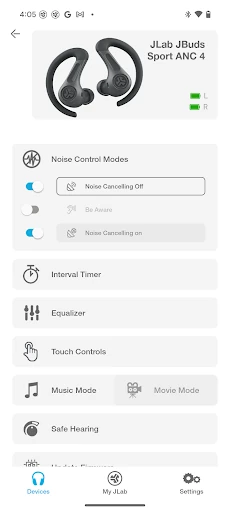
Noise handling is another reason to open the app before heading out. With compatible earbuds, you can adjust active noise cancellation from off to its maximum setting, rather than choosing only between on and off on the earbuds themselves. Be Aware settings let supported models bring more outside sound into the mix. The practical appeal is simple: you can tailor the listening experience to the situation instead of settling for one fixed setup.
A companion, not a player
I think of JLab as a settings companion for compatible JLab audio products, not as an alternative to a music or podcast app. Its job is to let you change sound, noise-control options, and earbud controls, and to provide product software updates when available. That makes it useful in the background of a listening routine, rather than something most people need to keep open while listening.
The distinction matters if you are looking for a broad audio hub. JLab’s described features focus on supported JLab models and their controls; they do not make it a general-purpose player or a way to customize every brand of headphones. If you already have a supported product, the app adds settings worth exploring. If you do not, there is little reason to install it just to play audio.
Small tweaks that stick
A useful approach is to try the presets before reaching for the detailed equalizer. I would start with Balanced for everyday listening, then compare Signature or Bass Boost with the same song or podcast. If none feels right, the custom EQ lets you adjust bass, mid-range, and treble at several listed frequency levels. Making one change at a time keeps it easier to tell what actually improved the sound.
It also helps to treat noise controls as situational settings. I would check ANC before a quiet listening session and revisit Be Aware when I want more outside sound, where the earbuds support those features. Customizing touch controls can make common actions suit personal habits better. A quick check for product software updates is another sensible part of setup, rather than something to remember only after a setting behaves unexpectedly.
More From Our News Desk

Zoom Meetings, Google Meet, or Teams: Which Is Easiest to Join?

How I Build a Free Streaming Lineup With Tubi

Why Crunchyroll Is the Default Anime App for So Many Fans

YouTube TV: A Practical Guide to Cutting Cable

Rummikub and the Small Comfort of Phone Games

TeamViewer Remote Control or AnyDesk for Helping Family?
Who will get the most from it
I would recommend JLab to people who own one of its compatible earbuds or headphones and want to tune how they sound or behave. It is particularly relevant if you care about choosing an EQ profile, adjusting available noise controls, or changing touch functions. The app gives those settings a place outside the earbuds themselves, which can be more convenient than relying only on built-in controls.
It may not suit someone without a compatible JLab product, or anyone expecting a full music service, broad device support, or a complicated audio workstation. The level of control also varies by product: features such as ANC and Be Aware apply only to compatible models, and Safe Hearing is described for future JLab models. For owners of supported gear, though, the app’s focused approach is a reasonable fit.
JLab is developed by JLab Audio and is available on Google Play for Android. The app has over one million installs and a 3.9-star rating from about 3,600 ratings. It is free to download, with no in-app purchases or ads indicated in the supplied app details. Its content rating is Everyone, and the stated minimum Android requirement is Android 7.0.
The supplied app details give version 1.9.8.5, a release date of May 17, 2023, and a last update date of January 26, 2026. The update note mentions compatibility for more JLab models. Since settings depend on a supported product, it is worth checking the model compatibility information before relying on a particular feature such as ANC, Be Aware, or Safe Hearing.
Fine-Tuning JLab for Everyday Listening
A focused first impression
The app’s purpose is easy to understand: it provides extra settings for compatible JLab products. When I first opened a companion app like this, the key question would be whether my own model is supported, because not every option applies to every device. JLab names a range of compatible models, including GO Pop+, JBuds Mini, Work Buds, and Studio Pro+.
Once the product match is clear, the choices are straightforward in concept. There are sound profiles, controls, and model-dependent options for noise handling. That gives a new user a few sensible places to begin without needing to understand every EQ frequency immediately. I would start with the preset that sounds most appealing and explore the finer adjustments only if I wanted a more personal result.
Settings for daily use
For everyday listening, the presets are the least fussy part of the experience. JLab includes Signature, Balanced, and Bass Boost, plus a Custom option. That makes it possible to compare broad sound approaches before spending time adjusting individual ranges. Someone who switches between spoken audio and music may appreciate having options, though the supplied details do not describe automatic switching between them.
The controls can matter just as much as sound. Compatible JLab products have earbud controls for actions such as volume, track changes, and play or pause, and the app lets users customize those controls. I like the idea of fitting the actions to my own habits: a setting that feels natural during a walk may be more useful than a default I keep forgetting.
More than equalizer presets
The Custom EQ is more detailed than the three ready-made sound profiles. It exposes bass at 200, 280, and 400 Hz; mid-range at 550, 770, 1,000, and 2,000 Hz; and treble at 4,000, 8,000, and 16,000 Hz. That level of adjustment gives interested listeners room to experiment, while the presets remain available for anyone who would rather make a quick choice.
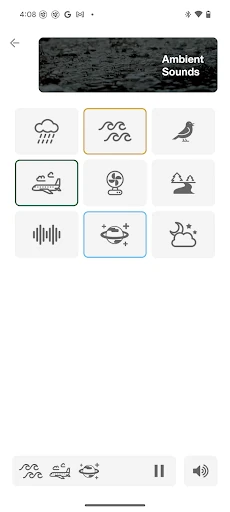
Noise options add another layer for supported products. Active noise cancellation can be adjusted from off through to maximum in the app, while Be Aware lets users change how much outside sound comes through. Recent changes also mention Ambient Sounds and the ability to save favorites as a custom preset. These additions make the app more than a place to pick an EQ profile, though the available options still depend on the model.
A simple listening routine
A practical setup routine does not need to take long. I would first identify the compatible JLab model, choose one of the sound presets, and listen to a familiar track or podcast. If the preset is close but not quite right, I would try a small custom EQ change and compare again. This avoids turning a quick adjustment into a long session of moving every control.
Before a walk or commute, I would check the available noise settings and adjust them for the environment, if the earbuds support them. At home, I might use a different sound preset, or leave the controls alone once they feel right. The option to customize earbud actions can also be useful to set up once and revisit only when my preferred controls change.
Know the compatibility limits
The biggest limitation is that JLab is designed around compatible JLab products. Owning another brand’s headphones does not make the app a general-purpose sound controller. Even within the supported lineup, features differ: ANC and Be Aware are explicitly limited to earbuds that support them. Checking the model list before expecting a particular control can save a frustrating search through settings.
Safe Hearing also has a stated scope: the description says future JLab models will support switching between default output, 95 dB, or 85 dB. That should not be read as a promise that the option is available on every current product. More broadly, this is a focused utility rather than an app for managing a whole audio library. Its value comes from the JLab hardware and settings it can serve.
JLab makes sense when you want to get more from a compatible JLab listening device. Its EQ presets, custom sound controls, adjustable supported noise features, and customizable earbud controls give it practical jobs beyond basic setup. I especially like that casual listeners can stick with presets while more particular users can dig into frequency adjustments.
I would try it if I owned a supported JLab model and wanted more control over sound or button behavior. I would skip it if I wanted a music player or support for unrelated headphones. Before counting on ANC, Be Aware, or other model-specific options, check that the product supports them.
JLab Frequently Asked Questions
What is the JLab app used for?
JLab is a companion app for customizing compatible JLab products. Depending on the model, it can provide sound presets and custom EQ, noise-control adjustments, Be Aware settings, customizable earbud controls, and product software updates. Some features are limited to compatible earbuds or future models, so the exact options depend on the JLab product you use.
Which phones and devices can use the JLab app?
The supplied app information describes JLab as an Android app, with Android 7.0 as its minimum requirement. It is intended to work with compatible JLab audio products, and the supported-model list includes earbuds and headphones such as GO Pop+, JBuds Mini, Work Buds, and Studio Pro+. Check the Google Play details for current device requirements and compatibility.
Does the JLab app cost money?
JLab is free to download, and the supplied app details indicate no in-app purchases or ads. The app’s useful features are tied to compatible JLab products, so downloading it alone does not provide the same controls for unrelated headphones. Store details can change, so the Google Play information is the best place to check current availability and terms.
Does every JLab product support ANC and Be Aware?
No. The app description says ANC adjustments are for ANC-compatible earbuds, and Be Aware settings apply only to compatible earbuds. Supported controls and sound options can differ by model. JLab also says Safe Hearing support will apply to future models, with listed output options of default, 95 dB, or 85 dB. Check your product’s compatibility details.
Who should install the JLab app?
It is most useful for someone who owns a compatible JLab product and wants to adjust sound, available noise settings, or earbud controls. It is less suitable for people without JLab gear or those looking for a general music player. The app’s features vary by model, so checking the Google Play information and product compatibility is worthwhile.
Pros
- Useful sound presets offer an easy starting point before experimenting with custom EQ.
- Supported models can adjust ANC and Be Aware settings through the app.
- Customizable earbud controls let owners tailor common actions to their habits.
- The app can provide software updates for compatible JLab products.
Cons
- Its usefulness depends on owning a compatible JLab product.
- ANC, Be Aware, and other options are not available on every model.
- Custom EQ adjustments may feel overly detailed for listeners who just want presets.
- Category
- Tools
- Version
- 1.9.8.5











