inskam
- 16.04K
- 2.9
- Installs
- 5.00M
- Price
- Free

Screenshots
Analysis by Reviewed APKs
inskam is a phone app for interacting with compatible devices, with photo and video recording plus previews of captured media. It makes most sense if you already have an inskam-supported camera or other device and want to use your phone as part of the experience. My overall take is that it has a focused job, but its usefulness depends heavily on the device connection working with your phone.
A camera beside the phone
Picture checking a small camera or other supported device while you have your phone in hand. inskam is designed to connect the phone with a device, then let you record photos or videos and preview them in the app. That gives it a practical role when the device is awkward to look at directly or when you want the phone involved in capturing and reviewing what it sees.
The appeal is straightforward: instead of treating the phone as a camera on its own, you use it as an interface for another device. I would reach for inskam when I had a compatible product ready and wanted to check a view, make a recording, and review the result without switching to a separate general-purpose camera app. That is a specific use, rather than an all-purpose photography workflow.
A companion, not a camera suite
The obvious comparison is your phone’s built-in camera app. That app is the natural pick for ordinary snapshots and videos because it is already part of the phone’s camera routine. inskam has a different job: it is intended to work with supported devices. If you do not have one of those devices, the app’s central purpose may not be relevant to your day.
I would not treat inskam as a photo editor, social media tool, or broad camera-control studio. The described functions are recording photos and videos and previewing them; there is no basis to expect editing tools or sharing features. That narrower scope can be an advantage when you simply need a companion app, but it also means the connected hardware matters more than a long list of app features.
Make the connection routine
A little preparation can make this kind of app easier to use. I would check that the device is one inskam supports, keep the phone nearby, and confirm the connection before relying on it for a recording. The app says it supports Wi-Fi products and checks whether the current Wi-Fi connection is one it can use. That makes the network connection part of the practical setup, not just background detail.
For a regular task, I would open the app, connect the supported device, use the recording function, and preview the photo or video afterward. Keeping that sequence simple makes it easier to spot a connection problem before an important moment. The description also explains why location permission may be requested for Wi-Fi name detection; knowing that rationale can make the permission prompt less surprising.
More From Our News Desk

Zoom Meetings, Google Meet, or Teams: Which Is Easiest to Join?

How I Build a Free Streaming Lineup With Tubi

Why Crunchyroll Is the Default Anime App for So Many Fans

YouTube TV: A Practical Guide to Cutting Cable

Rummikub and the Small Comfort of Phone Games

TeamViewer Remote Control or AnyDesk for Helping Family?
Who might find it useful
I would recommend inskam to someone who already owns a compatible device and wants a phone-based way to interact with it, record photos or videos, and preview the results. It is best approached as a practical companion rather than an app to install in hopes of improving everyday phone photography. If the device connection is central to your routine, the app’s focused set of functions may be enough.
It may not suit someone looking for filters, editing, social sharing, or a conventional camera replacement. Compatibility and Android version also deserve attention: the app description specifically warns about USB cameras on Android 10 and mentions using an available version in that situation. The Google Play rating is 2.9 from about 16,000 ratings, so I would check current user feedback and device details before making it part of an important workflow.
inskam is developed by app-Tools and is listed on Google Play in the Tools category. It has over 5 million installs and a 2.9-star rating from 16,044 ratings. The app is free, with no in-app purchases and no ads. Its content rating is Everyone, which makes the store’s age classification broad.
The current version provided is 1.0.288. The app was released on September 10, 2018, and its last update is dated September 11, 2026. The available details do not give a minimum Android version, so check the Google Play store page for the requirement that applies to your phone. The description notes an Android 10 issue involving USB cameras.
A focused companion for connected devices
First, check the device
My first impression is that inskam is built around a specific connection, not around browsing a collection of camera effects. The key question before opening it is whether you have a device it supports. The description says the app interacts with devices through mobile phones and supports Wi-Fi products, so the hardware and connection are the starting points for making sense of what the app can do.
I would also pay attention to the phone’s Android version if the device uses USB. The app description warns that Android 10 may not recognize a USB camera and says an available version may need to be installed in that situation. That is a meaningful caveat to encounter before planning a session, especially if you expect a quick plug-in-and-record experience.
Recording and reviewing
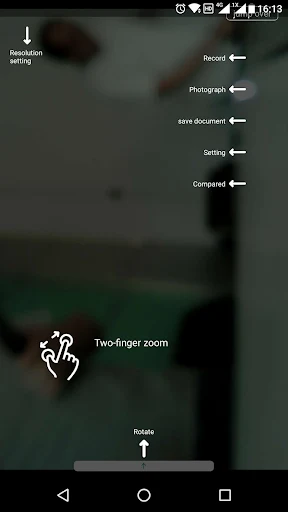
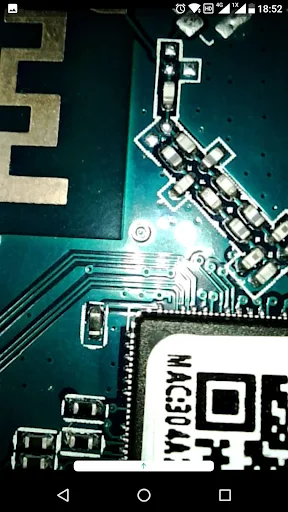
The central experience described is concise: use the client to record photos or videos, then preview photos and videos. That gives the app a clear beginning and end for a small task. You are not left guessing whether reviewing a capture is part of its purpose, but there is also no claim of a larger editing or publishing process after the preview.
In day-to-day use, I would think of the phone as a control and viewing companion for the supported device. The value is less about making the phone camera itself better and more about having a phone-based way to interact with another piece of equipment. That distinction matters when deciding whether to install it or simply use the camera app already on the phone.
Wi-Fi and permission context
One detail that stands out is the explanation around location permission. The app says Google requires that permission to obtain the name of the Wi-Fi network currently connected to the phone. inskam uses that network name to determine whether the connection is one of its supported Wi-Fi products and to help connect to products.
The description says this permission is used for Wi-Fi name detection, not to obtain the phone’s location information. That explanation is useful context when a permission request appears, particularly for someone who is cautious about granting permissions. As with any permission, I would read the prompt on the phone and make sure the app’s requested access fits the task I am trying to do.
A simple session workflow
For a routine inspection or recording, I would start by checking the supported device and its connection, then open inskam and use the recording option when ready. Afterward, I would preview the captured photo or video before wrapping up. This keeps the app’s stated functions in a practical order and gives me a chance to notice whether the capture came through as expected.
If the device depends on Wi-Fi, I would also make sure the phone is connected to the network the product uses. Since inskam checks the current Wi-Fi name to identify supported products, the network is part of the workflow. A small check before recording is less frustrating than finding out midway through that the phone and device are not connected in the way the app expects.
Keep expectations grounded
inskam’s usefulness rests on compatibility. The app description does not present it as a universal camera utility, so someone without a supported device may have little reason to keep it installed. Even with the right hardware, the Android 10 USB-camera warning is worth taking seriously and checking against the phone and device combination before depending on it.
The app’s modest 2.9-star Google Play rating is another reason I would approach it with practical expectations. The stated functions are limited and clear, but a smooth experience will depend on the connection and the device being recognized. I would use it for the supported recording and preview tasks, rather than assuming it offers extra camera tools that are not described.
inskam has a narrow, understandable purpose: connect a phone with supported devices, record photos or videos, and preview them. I like that the app explains its Wi-Fi permission rationale, but hardware compatibility and the USB-camera warning on Android 10 are important parts of the experience.
I would try it if I already had a compatible inskam-supported device and needed those recording and preview functions. If I wanted an everyday camera app, editing tools, or a broad set of creative features, I would look elsewhere. Check the current store details and device compatibility before relying on it.
inskam Frequently Asked Questions
What is inskam used for?
inskam is a phone app for interacting with supported devices. Its described functions include recording photos and videos and previewing those photos and videos. The app also supports Wi-Fi products and checks the current Wi-Fi connection name to determine whether it is a supported product connection.
Which phones and devices work with inskam?
inskam is an Android app on Google Play and is intended to work with supported devices, including Wi-Fi products. The description warns that Android 10 may not recognize a USB camera and refers users to an available version in that situation. Check the store and device details for compatibility before relying on a particular setup.
What Android version does inskam require?
The Android version requirement can vary and is worth checking on the Google Play store page for the version available to your phone. The app description specifically mentions a recognition problem with USB cameras on Android 10, so USB-camera users should review that note before use.
Does inskam cost money or have in-app purchases?
inskam is free to download on Google Play. The provided app details say it has no in-app purchases and contains no ads. Store information can change, so it is sensible to check the current Google Play page for the latest details.
Is inskam right for everyday phone photography?
It may suit someone who already has a supported device and wants to record photos or videos and preview them through a phone app. It is not described as a general photo editor or a replacement for the phone’s regular camera app. If you do not have compatible hardware, its main purpose may not fit your needs.
Pros
- Combines photo and video recording with previews in a focused companion app.
- Supports Wi-Fi products and explains why it checks the connected network name.
- Free to download, with no in-app purchases or ads.
Cons
- Its usefulness depends on having a compatible device and connection.
- The description warns that Android 10 may not recognize USB cameras.
- A 2.9-star rating suggests checking recent user feedback before relying on it.
- Category
- Tools
- Version
- 1.0.288