iAquaLink
- 22.62K
- 4.2
- Installs
- 500.00K
- Price
- Free

Screenshots
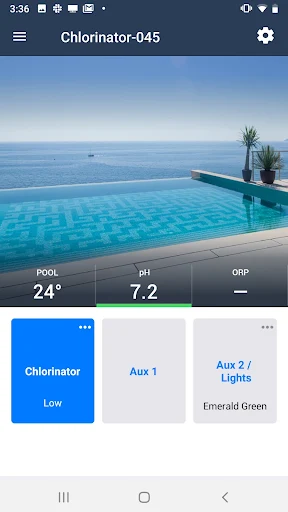
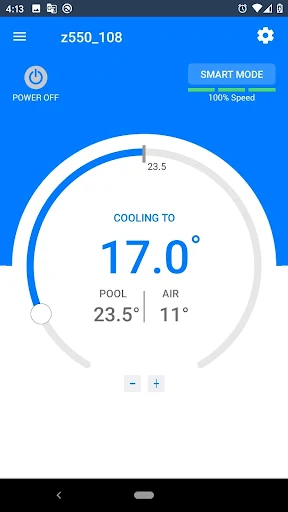
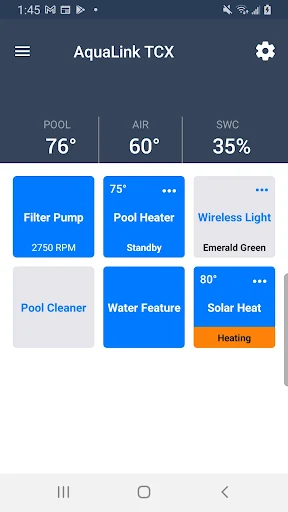
Analysis by Reviewed APKs
iAquaLink is a companion app for monitoring and controlling compatible pool and spa equipment from a mobile device. It suits pool owners who want to adjust things like temperature, lights, pump settings, or cleaner modes without being at the equipment. My overall take is that it has a focused, practical purpose: it can make routine pool control more convenient, provided your setup includes supported equipment.
A poolside check from anywhere
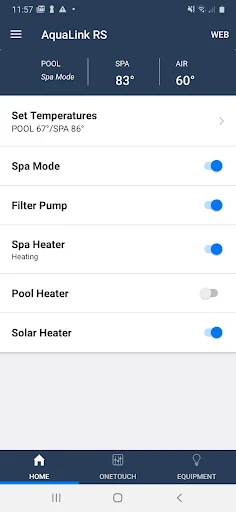
Picture a warm afternoon when I’m finishing errands and want the spa ready before I get home. With compatible AquaLink automation, iAquaLink can let me control pool and spa features remotely, including heating, sanitizer generation, lights, waterfalls, and jets. Instead of walking out to the equipment area to make each adjustment, I can use the app to manage the connected functions from my mobile device.
The practical appeal is less about doing something dramatic and more about small timing decisions. I might want to set a comfortable temperature before guests arrive, or switch on pool lights when evening plans change. The app also supports OneTouch Scenes on compatible automation, which can group actions into a selected scene. That gives the pool routine a little more flexibility without making the app a general-purpose home-control tool.
A companion, not a pool system
iAquaLink is best understood as a remote control and monitoring companion for specific Zodiac pool equipment. It is not a replacement for the pump, heater, chlorinator, or robotic cleaner itself, and it does not turn an unsupported pool setup into a connected one. The supported families include AquaLink RS, PDA, and Z4 automation, plus selected pumps, cleaners, heat pumps, and salt-water chlorinators.
That focus makes it different from a broad smart-home app or a pool-maintenance guide. Its job is operating compatible equipment, rather than teaching water care or managing every brand of pool hardware. If your setup matches one of the supported product families, having controls together on a phone can be useful. If it does not, the app’s central promise may not apply to your equipment.
Small habits that help
I’d get the most from iAquaLink by treating it as a quick check-in tool rather than something I need to open constantly. Before a swim, I could check the connected pool functions and adjust what matters for that visit. For a spa evening, heating and the relevant lights or jets are the kinds of controls that can make a short planning window more convenient.
It also helps to think in terms of the equipment you actually own. A variable-speed pump setup can use custom speeds and schedules, while a compatible heat pump offers temperature monitoring and heating or cooling settings. A robotic cleaner has its own cleaning modes. Those differences mean there is no single routine for every user; the useful habit is learning which controls match your system and using those consistently.
More From Our News Desk

Zoom Meetings, Google Meet, or Teams: Which Is Easiest to Join?

How I Build a Free Streaming Lineup With Tubi

Why Crunchyroll Is the Default Anime App for So Many Fans

YouTube TV: A Practical Guide to Cutting Cable

Rummikub and the Small Comfort of Phone Games

TeamViewer Remote Control or AnyDesk for Helping Family?
Who will get the most from it
I’d recommend iAquaLink to pool and spa owners who already have compatible equipment and want convenient access to its controls while away from the equipment itself. It may also suit pool professionals who work with supported systems. The appeal is especially clear for people who regularly adjust heating, lights, pump operation, cleaner modes, or other connected pool functions.
It is a less natural fit for someone who only wants pool-care advice, or whose equipment is outside the supported families. The app’s usefulness depends on the hardware, so I would check compatibility before expecting it to manage a whole pool setup. If you prefer to adjust equipment only at the control panel, remote access may also be less valuable in your day-to-day routine.
iAquaLink is published by Zodiac Pool Systems, Inc. and is a Lifestyle app for Android. Google Play shows over 500,000 installs and a 4.2-star rating from about 23,000 ratings. The app is free to download, with no in-app purchases or ads reported in the supplied store details. Its content rating is Everyone.
The supplied app details give version 7.3.4, an original release date of February 24, 2012, and a last-updated date of September 8, 2026. No minimum Android version is provided in those details, so device compatibility is worth checking on Google Play. The app’s core functions depend on having supported pool equipment.
What Remote Pool Control Feels Like
A purpose-built first impression
When I first open an app with this much equipment-specific purpose, the key question is not whether it can control every pool on the block. It is whether my own system is among the supported ones. iAquaLink covers several equipment families, from pool and spa automation to pumps, robotic cleaners, heat pumps, and salt-water chlorinators.
That breadth is useful, but it also sets expectations: the controls available depend on the equipment in the setup. I would start by identifying the connected product family and the functions it supports, rather than assuming every control described for the app will appear for every owner. That makes the first step less about exploring blindly and more about matching the app to the hardware.
Everyday control, at a distance
The daily value of iAquaLink is straightforward: compatible equipment can be monitored and controlled through a mobile device. For a pool owner, that can mean adjusting connected features without being at the pool. For a spa user, heating the spa ahead of time is a more tangible example than opening the app just to browse.
I like that the supported functions reach beyond a single on-off switch. AquaLink automation can control multiple pool and spa features, while compatible pumps can use custom speeds and schedules. The range makes the app relevant to different routines, though the actual day-to-day experience depends on which equipment is installed.
Features with practical purpose
The standout feature is the variety of controls tied to supported hardware. AquaLink RS, PDA, and Z4 systems can manage up to 32 pool or spa features, including lights, waterfalls, and jets, and can use OneTouch Scenes. For someone who has several connected functions, being able to manage them through one app is more useful than a single-purpose remote.
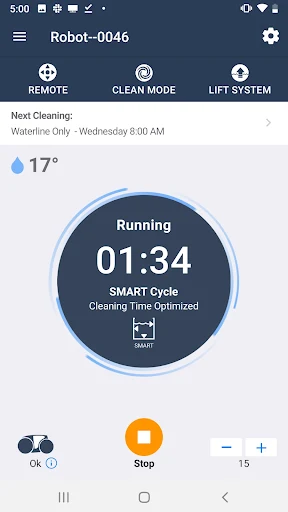
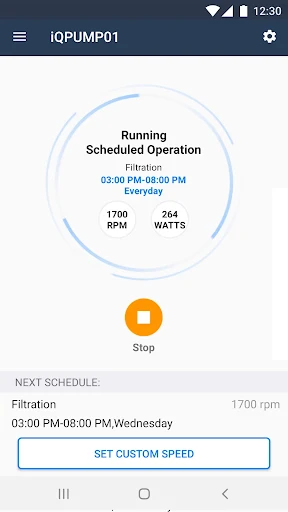
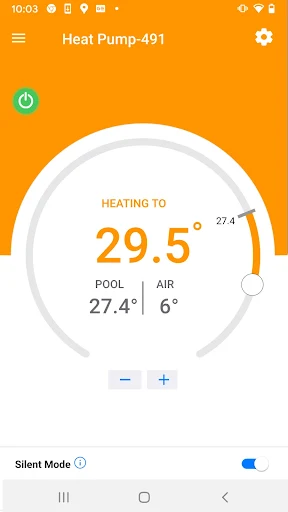
Other equipment has its own focused tools. The iQPUMP01 supports custom speeds, schedules, and power-use monitoring. Supported robotic cleaners offer cleaning-mode selection and, on some models, remote control and Easy Lift removal. Connected heat pumps can show air and water temperatures and provide temperature and mode settings.
Salt-water chlorinator systems in the listed families add another set of controls, including filtration pump, heating, and pool-light management. Automatic water-balance maintenance is described as requiring optional pH Link or Dual Link modules. These features are specific to the equipment and modules, not a universal set of functions for every installation.
A simple pool routine
A useful routine could start before the pool is used: check the connected equipment, adjust the functions needed for that visit, and leave longer-running pump settings to a custom schedule if the pump supports it. When the plan changes, remote control can be handy for a quick adjustment rather than a trip to the equipment area.
For a spa evening, I’d think in terms of heating and the compatible spa features I actually use. For a swim, lights or other connected features may matter more. A robotic cleaner owner might instead choose a cleaning mode. The point is not to operate everything every day; it is to use the relevant controls when the routine calls for them.
Compatibility sets the limits
The biggest limitation is also the clearest one: iAquaLink is designed around supported Zodiac equipment. If the pool has a different system, or a model outside the listed families, the app may not provide the controls an owner expects. Even within supported families, features can vary by model, so it is sensible to check the exact hardware rather than rely on a broad feature description.
The app also does not replace the equipment it controls. It offers connected management, not a universal pool-maintenance service. Some water-balance functionality depends on optional modules, and the robotic cleaner’s remote control and Easy Lift features vary by model. Those distinctions matter when deciding whether the app will cover a particular pool routine.
Finally, the feature range can make expectations easy to overstate. An owner with a compatible cleaner may care mostly about cleaning modes, while an automation user may have many more controls. I’d judge iAquaLink by the specific tasks supported by my installation, not by assuming every described capability is available to every user.
iAquaLink makes the most sense as a practical remote companion for a compatible pool or spa system. Its mix of automation, pump, cleaner, heat-pump, and chlorinator controls can simplify small adjustments and fit around real pool routines. The main question is hardware compatibility, not whether the app offers a universal solution.
I’d recommend it to owners who already use supported equipment and want mobile access to its functions. If your setup is not among the supported families, or you are looking for general pool-care guidance, this is probably not the app to start with. Check your exact equipment before relying on any particular control.
iAquaLink Frequently Asked Questions
What is iAquaLink used for?
iAquaLink is used to monitor and control compatible pool and spa equipment from a mobile device. Depending on the connected products, it can cover functions such as pool features, pump speeds and schedules, robotic-cleaner modes, heat-pump settings, and chlorinator controls. The available functions depend on the supported equipment and, for some features, optional modules.
Can I use iAquaLink on my phone or tablet?
iAquaLink is an Android app distributed through Google Play. Its description refers to control from a mobile device. The supplied facts do not specify a minimum Android version, so check the app’s Google Play page for current device requirements and compatibility before installing.
What Android version does iAquaLink require?
The supplied app details do not give a minimum Android version. Requirements can vary as the app is updated and by device, so the Google Play page is the best place to check compatibility for your phone or tablet. Also confirm that your pool equipment belongs to a supported product family.
Is iAquaLink free, and does it have in-app purchases?
The supplied Google Play details show iAquaLink as free to download, with no in-app purchases and no ads reported. Store information can change over time, so it is worth checking the current Google Play page for the latest details before downloading.
Will iAquaLink work with my pool equipment?
It supports specified Zodiac equipment families, including AquaLink RS, PDA, and Z4 automation, selected pumps and robotic cleaners, connected heat pumps, and salt-water chlorinators. Features vary by model, and some water-balance functions need optional modules. Check your exact equipment against the Google Play description before relying on a particular feature.
Pros
- Controls several types of compatible pool and spa equipment from a mobile device.
- Supports useful options such as pump schedules, cleaner modes, and temperature settings.
- OneTouch Scenes can group pool or spa actions on compatible automation systems.
- Free to download, with no in-app purchases or ads reported.
Cons
- Its usefulness depends on owning equipment from the supported product families.
- Available controls vary by equipment model, and some functions need optional modules.
- The supplied details do not specify a minimum Android version.
- Category
- Lifestyle
- Version
- 7.3.4











