Hume Health
- 21.48K
- 4
- Installs
- 1.00M
- Price
- Free

Screenshots
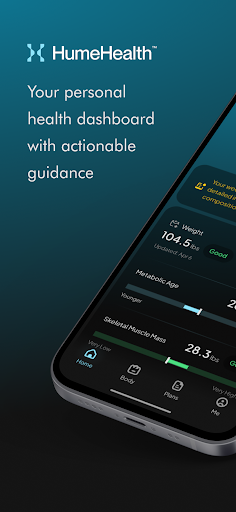
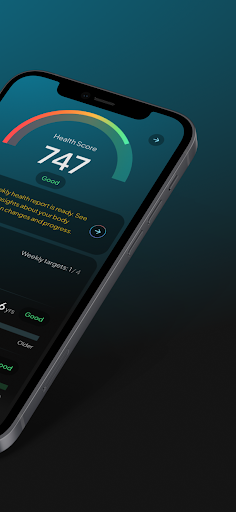
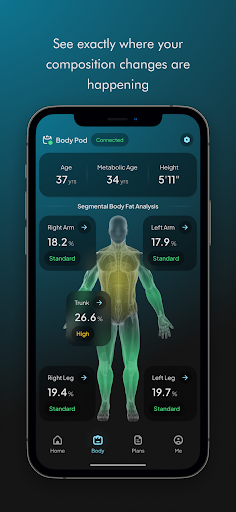
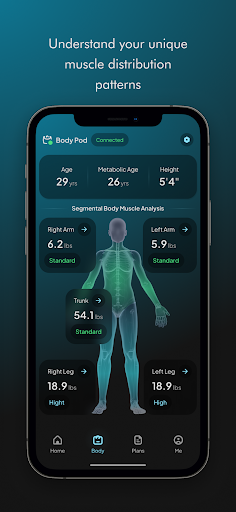
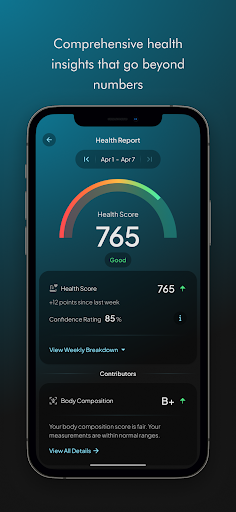
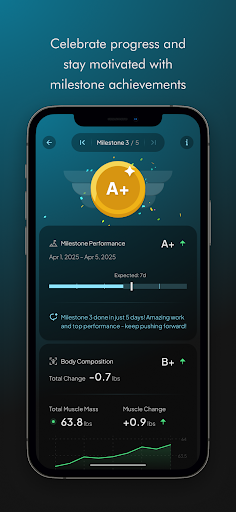
Analysis by Reviewed APKs
Hume Health is a companion app for people who use a Hume Body Pod or Hume Band to track health and wellness information. Its appeal is straightforward: it brings those devices into one place for monitoring weight and broader health trends. I see it as a useful part of a device-based routine, rather than a standalone wellness app, and that distinction matters before you get started.
A Check-In That Fits Real Life
When I first considered how Hume Health would fit into an ordinary morning, the appeal was having a companion for a measurement routine I already wanted to keep. A Hume Body Pod or Hume Band is required, so the app makes most sense after you have one of those devices. Rather than treating it as a general-purpose health journal, I’d use it to keep an eye on information gathered through the Hume hardware.
A practical pattern might be to check in at a consistent time, use the paired device as intended, then open Hume Health to monitor the resulting information. That gives the app a specific job in a daily routine: helping you follow your health and wellness over time. The description also mentions tracking weight and longevity, so it is aimed at people interested in more than a one-off measurement.
A Device Companion, Not a Journal
Hume Health sits in a different lane from a standalone wellness app. Its central requirement is the Hume Body Pod or Hume Band, which makes the hardware part of the experience rather than an optional extra. If you already use one, the app can serve as the place to track and monitor information associated with it. If you are looking for an app that works on its own, this is not the most natural fit.
It is also worth being clear about what the app is not: the provided description does not position it as a coaching program, a medical service, or a social network. Its focus is tracking, monitoring, and improving overall health and wellness with Hume devices. That narrower role can be a plus for someone who wants a companion to their hardware, but a drawback for anyone expecting a broad collection of independent tools.
Keep the Routine Consistent
The simplest way to get value from a tracking companion is to make check-ins predictable. I’d choose a regular moment that already exists in my day, such as a morning routine, and use the relevant Hume device before opening the app. That kind of consistency makes it easier to follow information over time than dipping in occasionally and trying to make sense of scattered check-ins.
I’d also keep expectations grounded: tracking can help make information easier to follow, but the app is still a companion to its hardware. If you use both the Hume Body Pod and Hume Band, the all-in-one positioning may be appealing; if you have neither, there is no described device-free use case to build a routine around. Start with the device you own and treat the app as its monitoring partner.
More From Our News Desk

Zoom Meetings, Google Meet, or Teams: Which Is Easiest to Join?

How I Build a Free Streaming Lineup With Tubi

Why Crunchyroll Is the Default Anime App for So Many Fans

YouTube TV: A Practical Guide to Cutting Cable

Rummikub and the Small Comfort of Phone Games

TeamViewer Remote Control or AnyDesk for Helping Family?
Who Will Get the Most From It
I’d recommend Hume Health to people who own a Hume Body Pod or Hume Band and want an app connected to tracking and monitoring their health information. It should particularly suit someone who likes the idea of making regular check-ins part of a routine, including people interested in weight and longevity tracking. Google Play shows a 4.0-star rating from around 21,000 ratings, suggesting a substantial audience has tried it.
It may be less suitable if you want a wellness app that stands alone, or if your priority is a set of features beyond what the description states. The hardware requirement is the main dividing line: without a Hume device, the app’s intended role is hard to realize. I’d also look elsewhere if you expect it to replace professional care or provide a broad, independent health program.
Hume Health is an Android app from Hume Health Corp. On Google Play, it has over 1 million installs and a 4.0-star rating from about 21,000 ratings. The content rating is Everyone. The app is free to download, and its Google Play listing indicates that it contains in-app purchases.
The listed in-app purchase prices range from $9.99 to $109.99 per item, and the app does not contain ads. The current listed version is 9.29.2. It was released on September 30, 2019, and its most recent listed update was November 3, 2026. A minimum Android version was not provided in the supplied app details.
Making Health Tracking a Daily Habit
Getting Started With Hume
My first impression is that Hume Health is defined less by a long feature list than by its relationship with Hume hardware. The app’s description is concise: it is a place to track, monitor, and work on overall health and wellness, with a Hume Body Pod or Hume Band required. That makes the setup decision unusually clear. Before downloading, I’d first make sure I have one of the devices the app is designed to accompany.
Once that requirement is met, I’d approach the app as the other half of a measurement routine, not as a self-contained destination. The provided information does not spell out a detailed onboarding flow, so I wouldn’t assume particular setup screens or connection steps. The important practical point is that the device and app are meant to work together.
The Day-to-Day Role
In everyday use, the most reasonable expectation is that Hume Health helps users follow health information gathered with the Hume Body Pod or Hume Band. Its stated purpose is to track and monitor, which gives it a practical role between check-ins: return to the app to keep an eye on your information rather than treating each measurement as an isolated event.
That focus can suit someone who appreciates having a dedicated companion instead of trying to make a general wellness app fit a particular device. At the same time, the app’s usefulness depends on whether you want to use Hume hardware in the first place. It is not described as a place to do all your health-related activities without a device.
A Shared Home for Devices
The most notable feature in the supplied description is the all-in-one approach: Hume Health is presented as a shared app for users of the Hume Body Pod and Hume Band. That gives people with either device a common place to track and monitor information. For someone using Hume products, having one companion app is a clear, practical organizing idea.
The app also frames its purpose around overall health and wellness, with the summary specifically mentioning weight and longevity tracking. That points to an interest in following more than a single number, although I would keep the expectation tied to those stated purposes rather than assume a particular dashboard, analysis method, or recommendation system. The concrete appeal is the device-linked tracking role.
A Simple Check-In Routine
For a realistic routine, I’d connect app check-ins to a moment I already repeat, rather than waiting for motivation to strike. A regular morning or another consistent point in the day can make the process feel less like an extra task. Use the Hume device as part of that routine, then turn to Hume Health to monitor the information the device is intended to provide.
I’d avoid reading too much into a single check-in. The app is described as a tool for tracking and monitoring, so its natural role is to help you keep attention on information over time. A steady habit gives that purpose a better chance to be useful. The app does not need to become the center of the day; a short, repeatable check may be enough.
Limits to Keep in Mind
The biggest limitation is also the clearest: Hume Body Pod or Hume Band hardware is required. That rules out the app as a simple download for someone who wants to start tracking without buying or already owning a Hume device. The app’s companion nature is a sensible design focus, but it makes the choice dependent on the wider Hume setup.
The supplied details do not describe specific screens, metrics beyond the stated weight and longevity focus, or other standalone tools. I would therefore judge the app on its basic promise rather than expect features that have not been described. It is best approached as a device-linked tracker, not as a comprehensive health service or a substitute for professional guidance.
Cost is another practical point to check before committing. The app is free to download, but Google Play shows in-app purchases priced from $9.99 to $109.99 per item. Those purchases may matter depending on what you want from the wider experience, so I’d review the current store information and device details before making a decision.
Hume Health has a clear purpose: it accompanies the Hume Body Pod and Hume Band, giving users a place to track and monitor health and wellness information. I like that straightforward role, but the hardware requirement is central, not incidental. This is a companion app first, and its appeal depends on whether you are already interested in Hume’s devices.
If you own a Hume device and want to make regular tracking part of your routine, Hume Health is worth considering. If you want a standalone wellness app, I’d look for something designed to work without dedicated hardware. Before spending, check the current in-app purchase details and make sure the device-based approach suits you.
Hume Health Frequently Asked Questions
What is Hume Health used for?
Hume Health is a companion app for tracking, monitoring, and working on overall health and wellness with a Hume Body Pod or Hume Band. The app summary also mentions weight and longevity tracking. A compatible Hume device is required, so it is intended to be used alongside that hardware rather than as a device-free tracker.
Can I use Hume Health on an iPhone or other devices?
The supplied app details identify Hume Health as an Android app distributed through Google Play. They do not specify support for other platforms or devices. For current compatibility information, check the app’s store information and the details for the Hume Body Pod or Hume Band you plan to use.
What Android version does Hume Health require?
The minimum Android version was not provided in the supplied details. Requirements can vary as the app is updated, so check the current Google Play information on your device before installing. You will also need a Hume Body Pod or Hume Band to use the app as intended.
Does Hume Health cost money?
Hume Health is free to download and contains in-app purchases. The listed purchase prices range from $9.99 to $109.99 per item, though what is available and the current prices may vary. Check Google Play for the latest purchase details before deciding whether the app fits your budget.
Is Hume Health right for someone without a Hume device?
Probably not as a standalone wellness app. Hume Health requires a Hume Body Pod or Hume Band and is described as their companion for tracking and monitoring health information. It is a better fit for someone who owns, or plans to use, one of those devices than for someone seeking an independent tracking app.
Pros
- A clear companion role for Hume Body Pod and Hume Band owners.
- Brings health and wellness tracking into one Hume app.
- Free to download and contains no ads.
- Focused on monitoring, with weight and longevity tracking mentioned.
Cons
- Requires a Hume Body Pod or Hume Band to use as intended.
- In-app purchases range from $9.99 to $109.99 per item.
- Not described as a standalone wellness app for device-free tracking.
- Category
- Tools
- Version
- 9.29.2











