HryFine
- 231.79K
- 3.9
- Installs
- 50.00M
- Price
- Free

Screenshots
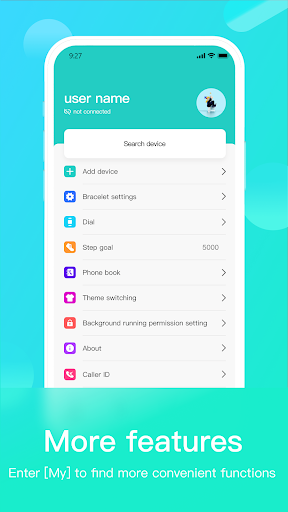
Analysis by Reviewed APKs
HryFine connects a phone with a compatible wearable, bringing call and message alerts and a handful of device controls into one place. It suits people who want their bracelet or watch to stay in step with everyday phone notifications, rather than shoppers looking for a full workout or health-tracking suite. My overall take is practical: the core idea is clear, and its usefulness depends on how well it fits the wearable you already use.
A Quieter Phone Check
When I first considered HryFine’s main job, I pictured the familiar busy stretch between leaving home and arriving at work: phone tucked away, calls coming in, and messages piling up. The app is designed to pass call and SMS reminders from a phone to a connected wearable over Bluetooth Low Energy. That makes the wrist the glance point, while the phone can stay in a pocket or bag instead of needing constant attention.
The appeal is less about doing something elaborate and more about having key notifications follow you. HryFine also describes syncing SMS and the address book, and pushing messages from third-party apps to the wearable in real time. Those options could be useful when I’m walking, carrying groceries, or working with my hands. The exact experience depends on a compatible wearable, but the everyday purpose is easy to understand.
A Companion, Not a Coach
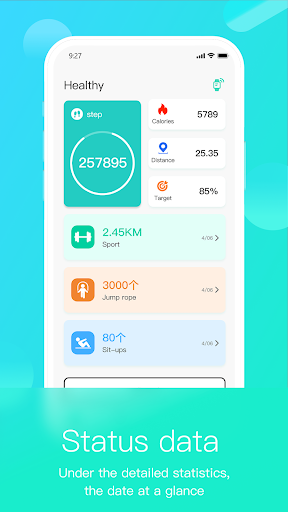
HryFine makes more sense as a companion app for wearable products than as a standalone destination. Its stated focus is keeping phone notifications and device-related services together: call and message reminders, address-book syncing, a device search, and a Bluetooth anti-lost warning. If the main reason I reach for an app is to check a deep workout history or build a training plan, this description does not make HryFine sound like the right tool.
That distinction matters when comparing it with a general fitness tracker app or simply checking notifications on the phone itself. HryFine’s role is to bridge the phone and wearable, rather than replace either one. I wouldn’t install it expecting restaurant recommendations, task management, team collaboration, or advanced analytics; those are not the functions described for this app. It is most relevant when a wearable needs a phone-side companion.
Small Habits That Help
A useful habit is to decide which alerts I actually want to see on my wrist before turning every available notification into a distraction. HryFine describes call reminders, SMS notifications, and real-time pushes from third-party apps, so a little selectivity can make the wearable’s role clearer. I’d start with the alerts that matter during a walk or a busy workday, then adjust my routine around what I find useful.
I’d also make the device tools part of a simple check-in. The app can show the bracelet’s power and offers device search and a Bluetooth anti-lost warning. Checking those details before heading out could help me notice a low battery or misplaced wearable sooner. Remote photo taking is another supported option, worth remembering when I want to use the wearable as a phone-camera remote rather than digging through menus.
More From Our News Desk

Zoom Meetings, Google Meet, or Teams: Which Is Easiest to Join?

How I Build a Free Streaming Lineup With Tubi

Why Crunchyroll Is the Default Anime App for So Many Fans

YouTube TV: A Practical Guide to Cutting Cable

Rummikub and the Small Comfort of Phone Games

TeamViewer Remote Control or AnyDesk for Helping Family?
Who may find it useful
I’d recommend HryFine to someone who already has a compatible wearable and wants calls, texts, and selected app messages to reach it from a phone. The device-focused extras may also appeal to people who like being able to check bracelet power, look for the device, or use remote photo taking. Its stated support for multiple languages, including English, German, French, Spanish, Japanese, and others, broadens its potential audience.
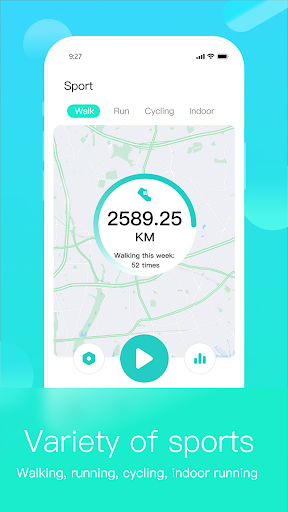
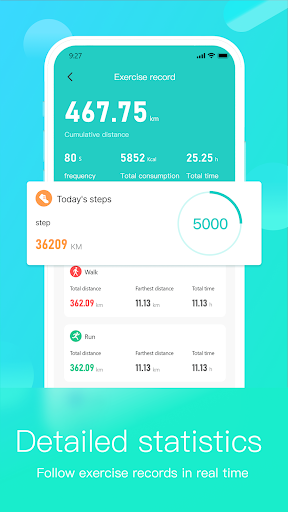
It may be less appealing if you want a standalone sports app with clearly described training plans, detailed exercise analysis, or a broad social fitness community. Those are not the functions laid out here. The wearable connection is central, so someone without a compatible device has little reason to choose HryFine. I’d also suggest keeping expectations focused on practical phone-to-wearable services, rather than assuming every device will offer the same experience.
HryFine is an Android app from Shenzhen United Power Technology Co., Ltd. Google Play shows more than 50 million installs and a 3.9-star rating from around 232,000 ratings. It is free to download, contains ads, and does not offer in-app purchases. Its content rating is Everyone. The version shown is 3.8.25, and the stated release date is September 23, 2019.
The provided app details give October 21, 2026, as the last update date. They do not specify a minimum Android version, so I’d check the Google Play page on the device I plan to use before installing. HryFine’s described role is to connect phone services with wearable products, including call and SMS reminders, device information, and selected controls.
Making Phone Alerts Useful on Your Wrist
First Look and Setup
My first impression of HryFine is that it has a defined, device-first purpose. It is not presented as an app that does everything on its own; it brings information and services to wearable products. That framing helps set expectations before I begin. The important question is whether I have a wearable that works with it, because the described features depend on the app communicating with a device.
The connection described uses Bluetooth Low Energy to pass phone calls and messages to the wearable. I’d approach the initial setup with that relationship in mind: the phone supplies the notifications, and the wearable is where they arrive. Since the app’s specific minimum Android requirement is not provided in the details, I’d check Google Play for compatibility before getting started, especially on an older phone.
The Everyday Connection
In day-to-day use, the most compelling part is the potential to notice a call or message without taking the phone out each time. HryFine says it can send call reminders and SMS notifications to the device, as well as push messages from third-party apps in real time. That could suit a commute or a day when the phone is tucked away, while keeping the phone as the source of the communication.
I like that the app’s purpose is concrete, but I’d keep the convenience in perspective. A reminder on a wearable is not the same as moving the whole conversation there, and HryFine’s described functions do not suggest replacing the phone. The value is in making a quick check easier. For someone who prefers fewer interruptions, choosing which app alerts to receive would be a sensible way to keep the wrist from becoming noisy.
Useful Device Extras
The device-side tools add a little more than notification forwarding. HryFine can show a bracelet’s power, provide a Bluetooth anti-lost warning, and help search for the device. I can see those being useful in small moments: checking the battery before leaving home, or trying to locate a wearable that has been put down somewhere nearby. They are simple supporting functions, not a reason to expect a full device-management suite.
Remote photo taking is another feature that stands out because it gives the wearable a role beyond alerts. It may be handy when the phone is positioned for a group picture and I don’t want to reach over to tap the screen. The app also describes synchronizing SMS and the address book. Together, these features make HryFine feel like a phone companion for a wearable, rather than merely a notification switch.
A Simple Daily Routine
For a practical routine, I’d start the day by checking the wearable’s power in HryFine and deciding what kind of alerts will be helpful. During a walk or commute, call reminders and selected messages could let me stay aware without repeatedly pulling out my phone. If I’m setting up a photo, remote photo taking could come into play. These are modest conveniences, but they fit naturally into ordinary days.
At the end of the day, I’d treat the device search and anti-lost warning as useful tools to know about before I need them. A feature is easiest to appreciate when I already understand its purpose, rather than discovering it while hunting for a misplaced wearable. The app’s language support may also make it more approachable for people who prefer one of its listed languages, including English, Chinese, German, French, and Japanese.
Limits to Keep in Mind
The biggest limitation is built into the app’s purpose: HryFine is intended to work with wearable products, so its value hinges on having a compatible device. The description does not establish that every wearable will work the same way or support every feature. I’d check compatibility in Google Play and with the device information before relying on a particular function, especially if call or message alerts are the main reason for installing it.
There are also practical trade-offs. Google Play shows that the app contains ads, and its 3.9-star rating from around 232,000 ratings suggests a mixed overall reception rather than universal approval. The supplied details do not give a minimum Android version, so checking the store page is worthwhile. Most importantly, I would not mistake this focused phone-and-wearable connection for a comprehensive fitness or health platform.
HryFine has a straightforward job: connect phone notifications and a few useful controls with a wearable. Call and message reminders are the central draw, while device power, searching, anti-lost warnings, and remote photo taking round out the practical extras. It is a focused companion, and that focus is both its strength and the main limit on who will benefit.
I’d try HryFine if I owned a compatible wearable and wanted a more convenient way to keep up with calls and messages. I’d skip it if I wanted an all-purpose fitness platform or had no wearable to pair with it. Before installing, I’d check the Google Play compatibility details and keep in mind that the app contains ads.
HryFine Frequently Asked Questions
What is HryFine used for?
HryFine connects phone services with wearable products. Its described uses include call and SMS reminders, syncing SMS and the address book, and forwarding third-party app messages to a wearable. It can also show bracelet power, provide a Bluetooth anti-lost warning, help search for a device, and support remote photo taking.
Which devices can run HryFine?
HryFine is an Android app on Google Play and is described as a companion for wearable products. The supplied details do not give a minimum Android version or a complete compatibility list. Check the Google Play page and your wearable’s compatibility information before installing, since the experience depends on the device working with the app.
What Android version does HryFine require?
The minimum Android version is not provided in the app details here. Requirements can vary as the app changes, so check the current Google Play page from the Android device you plan to use. HryFine’s listed version is 3.8.25, but that alone does not establish which older Android versions it supports.
Does HryFine cost money?
HryFine is free to download on Google Play and the provided details say it has no in-app purchases. It does contain ads. Store information can change over time, so it is worth checking the current Google Play page for the latest cost and purchase details before downloading.
Is HryFine a good fit for me?
It may suit you if you have a compatible wearable and want phone calls, messages, or selected app alerts passed to it, along with a few device controls. It is less suited to someone looking for a standalone workout or health-tracking platform. Check compatibility first, because the wearable connection is central to HryFine’s purpose.
Pros
- Combines call and message reminders with selected third-party app notifications on a wearable.
- Includes practical device tools such as bracelet power, device search, and anti-lost warnings.
- Supports remote photo taking and a broad range of listed languages.
- Free to download, with no in-app purchases.
Cons
- Its usefulness depends on having a compatible wearable product.
- Contains ads, which may interrupt an otherwise focused companion-app experience.
- The described feature set is not a substitute for a full fitness platform.
- Category
- Tools
- Version
- 3.8.25











