HP Poly Studio Mobile
- 38.92K
- 3.2
- Installs
- 1.00M
- Price
- Free

Screenshots
Analysis by Reviewed APKs
HP Poly Studio Mobile is a companion app for managing supported HP Poly Bluetooth devices, from adjusting sound preferences to finding device guides and installing updates. I’d point it toward people who already use a compatible Poly headset or speakerphone, especially for a mix of work calls and everyday listening. Its appeal is practical rather than flashy: it puts useful device controls in one place, though it has little to offer without supported hardware.
A quicker switch between calls and music
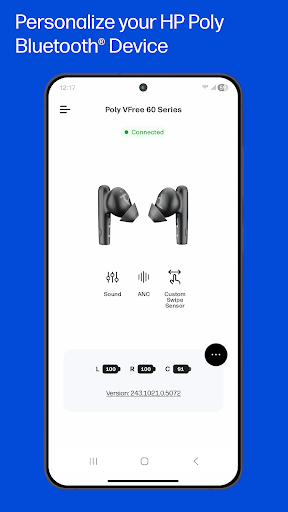
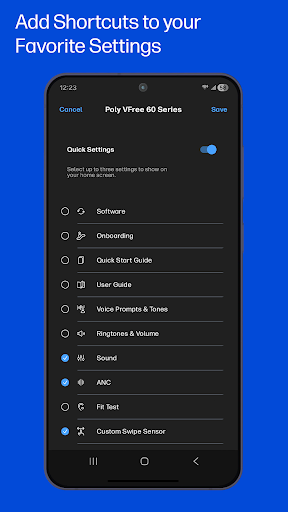
Picture a familiar workday: I finish listening to music, then need to join a call from my phone. With a supported Poly device, HP Poly Studio Mobile gives me a way to switch settings without hunting through the headset’s controls or a collection of menus. The app can put shortcuts to up to three favorite settings on its home screen, which makes that changeover feel more direct when I’m in a hurry.
The same idea works in reverse when the last meeting ends and I want to go back to listening. I can use the app to reach device settings such as noise cancellation or bass, depending on what the device supports. It is not a replacement for the call or music app itself; it is a companion for adjusting the connected Poly hardware. That distinction keeps its job focused and fairly easy to understand.
A companion, not a call app
Compared with opening Android’s Bluetooth settings or relying only on physical headset controls, this app is aimed at device personalization and management. It also brings together guides, support information, and over-the-air software updates for supported devices. That makes it a more useful stop when I want to change a preference or check how a particular feature works, rather than simply connect headphones and start listening.
It is not a general-purpose audio player, video meeting service, or universal control panel for every Bluetooth accessory. The supported-device list centers on Poly Voyager headsets and Poly Sync speakerphones, so the app makes most sense if your hardware is on that list. If I were shopping for a new headset or just needed basic Bluetooth pairing, I would not install it expecting the app itself to supply those things.
Make the controls yours
A small setup habit can make the app more useful: choose the settings I reach for most and put them in the home-screen shortcuts. The app allows up to three, so I’d favor preferences that match my routine, such as noise cancellation for calls or bass for music where available. That keeps the controls I actually use close at hand instead of turning every adjustment into a search.
I’d also treat the guides and update tools as part of occasional device upkeep, not something to check every day. A quick look at the relevant guide can help when I first use a supported device, while updates are available over the air through the app. For a company-managed device, it is worth remembering that telemetry and configuration policies depend on the organization enabling those capabilities.
More From Our News Desk

Zoom Meetings, Google Meet, or Teams: Which Is Easiest to Join?

How I Build a Free Streaming Lineup With Tubi

Why Crunchyroll Is the Default Anime App for So Many Fans

YouTube TV: A Practical Guide to Cutting Cable

Rummikub and the Small Comfort of Phone Games

TeamViewer Remote Control or AnyDesk for Helping Family?
Who will get the most from it
I’d recommend HP Poly Studio Mobile to someone who already owns a supported Poly Bluetooth headset or speakerphone and wants more convenient access to its settings. It seems particularly well suited to people who move between work calls, music, and commuting, since those routines can make quick setting changes and device help genuinely handy. The Quick Start Guides, Fit Tests for applicable devices, and user guides also give new owners a place to begin.
It may not suit someone with a different brand of headphones, someone who only needs basic Bluetooth pairing, or anyone expecting a standalone communications app. The organizational tools are also relevant only when enabled by a company, so personal users need not treat them as a central reason to install it. I’d check the supported-device list before downloading; without compatible hardware, there is little reason to keep the app around.
HP Poly Studio Mobile is published by HP Inc. and is available on Google Play. It has over one million installs and a 3.2-star rating from about 39,000 ratings. Google Play classifies it for Everyone. The app is free to download, with no in-app purchases or ads recorded in the provided app details.
The current version shown is 5.2.0. Its release date is July 21, 2011, and the recorded last update is August 4, 2026. The minimum Android version is not included in the available app details, so I’d check the Google Play page for the requirement that applies to a particular device.
Useful Controls for Poly Devices
A focused first impression
When I first open an app like this, I want to know whether it will help with the device I already own. HP Poly Studio Mobile is clear about its scope: it is for supported HP Poly Bluetooth products, not every headset in my drawer. The supported list includes several Voyager headset families and Poly Sync speakerphones, giving prospective users a practical way to check compatibility before they build the app into a routine.
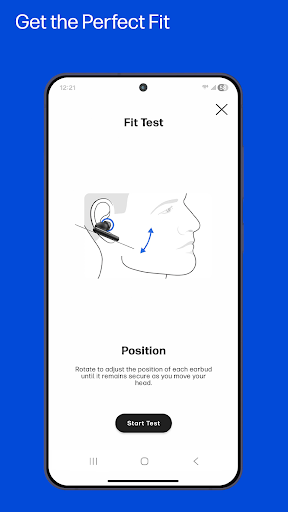
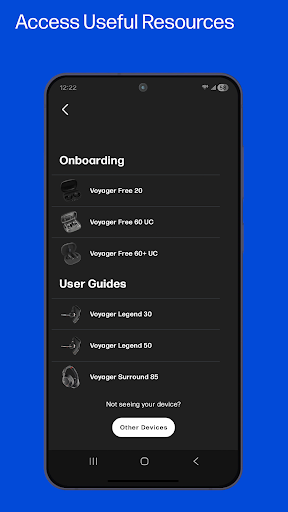
Getting started is framed around the latest HP Poly Bluetooth device, with Quick Start Guides available to help new owners. Fit Tests are offered for applicable devices, rather than presented as a universal feature. That careful distinction matters: someone can use the app for device help, but the exact setup tools depend on which supported product they have.
Useful between meetings
The core experience is about making device preferences easier to reach. Rather than treating a headset as something that only has an on/off state, the app gives supported devices a place for personalization and management. The option to put as many as three favorite settings on the home screen is a practical touch for a routine that alternates between calls and listening.
I like that the promised use is specific rather than sprawling. Noise cancellation for a work call and a bass adjustment for music are examples of the kinds of settings the app can bring closer, although what is available depends on the connected device. The app’s role stays in the background: make adjustments, then get back to the conversation or playlist.
Guides, updates, and locating
One standout is the mix of device controls with support material. Quick Start Guides can help with initial setup, while detailed user guides and support information give owners a reference when they need one. Fit Tests are included for applicable devices. I’d find those resources most useful at the start of ownership or when I need a reminder, rather than as features I would open constantly.
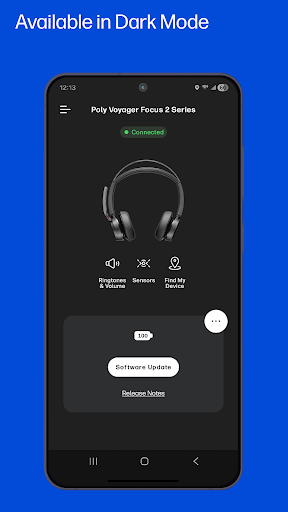
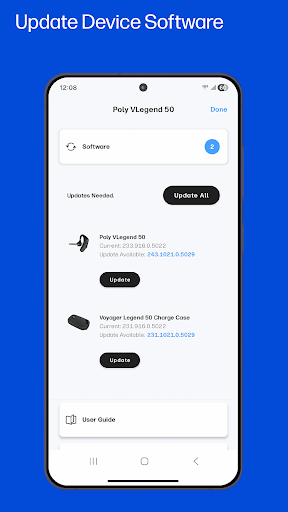
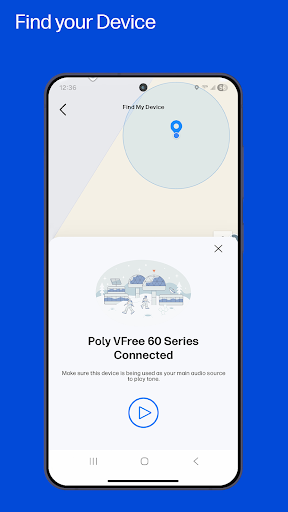
The app also supports over-the-air software updates for devices and includes a Find My Device feature to help locate a misplaced device. Those are useful complements to everyday settings: updates can be handled through the app, and the locating tool addresses the small but frustrating moment when a headset has gone missing. The descriptions do not make either feature a substitute for the device itself being supported.
A simple weekly routine
For a work-from-home routine, I’d start by checking that my Poly device appears among the supported products, then use the available guide to get familiar with its setup. After that, I’d add the settings I reach for most to the home-screen shortcuts. Before calls, I could use the relevant sound preference; when the workday shifts back to music, I could choose a different one if my device offers it.
I would keep the app in mind for occasional maintenance, too. If an over-the-air update is available for the device, the app is the place to manage it. If I misplace the headset, Find My Device may help locate it. This is a modest workflow, but that is the point: a companion app earns its keep by saving a few steps at the moments those steps matter.
Compatibility is the boundary
The most important limitation is the supported hardware list. This is not a universal accessory manager, and owning a Bluetooth device alone does not make the app relevant. The listed products are specific Poly Voyager and Poly Sync models and series. I’d confirm the exact device name before installing, especially if a product name is similar but not an exact match.
Some features are conditional, too. Fit Tests apply only to certain devices, while organizational telemetry and configuration policies depend on a company enabling them. The app’s overall Google Play rating is 3.2 stars, so I would keep expectations measured and consider my own device and needs rather than assuming every user will have the same experience. For a compatible owner, its focused controls remain the main reason to try it.
HP Poly Studio Mobile makes the most sense as a practical companion for people already using supported Poly hardware. Shortcuts for favorite settings, device guides, updates, and Find My Device cover useful parts of ownership without pretending to replace the apps used for calls or music.
I’d recommend it if you own a supported Voyager or Sync device and want its settings and help resources close at hand. If your audio gear is from another brand, or you only need basic Bluetooth pairing, you can safely look elsewhere. Compatibility is the deciding factor.
HP Poly Studio Mobile Frequently Asked Questions
What is HP Poly Studio Mobile used for?
HP Poly Studio Mobile is a companion app for personalizing and managing supported HP Poly Bluetooth devices. It can provide shortcuts to favorite settings, device guides, support information, over-the-air updates, and Find My Device. Fit Tests are available for applicable products. It is not a call or music app; it helps manage the compatible hardware used with those services.
Which phones and devices work with HP Poly Studio Mobile?
The app is available on Android through Google Play and is intended for supported HP Poly Bluetooth devices. Its listed products include Poly Voyager headsets and Poly Sync speakerphones. Check the supported-device list and Google Play details for your exact model and phone, since compatibility and device requirements can vary.
What Android version does HP Poly Studio Mobile require?
The minimum Android version can vary, and the available app details do not give a specific requirement. Check the Google Play page on the device you plan to use before installing. The app is designed to manage supported HP Poly Bluetooth devices, so phone compatibility and headset compatibility are both worth considering.
Does HP Poly Studio Mobile cost money?
The app is free to download, and the available app details show no in-app purchases or ads. It is a companion for supported HP Poly hardware, so the app’s usefulness depends on owning a compatible device. Check Google Play for current availability and any details that may change.
Is HP Poly Studio Mobile worth trying for casual users?
I’d try it if you own a supported Poly headset or speakerphone and want convenient access to settings, guides, or updates. It is less useful if you have another brand or only want basic Bluetooth pairing. Some capabilities, including Fit Tests and company management features, depend on the device or organization.
Pros
- Home-screen shortcuts put up to three frequently used device settings within easy reach.
- Combines device guides, support information, and over-the-air updates in one companion app.
- Find My Device can help when a supported headset or device goes missing.
- Free to download, with no in-app purchases or ads recorded.
Cons
- Its usefulness depends on owning a device from the supported Poly product list.
- Fit Tests and organizational management features are conditional rather than universal.
- A 3.2-star Google Play rating suggests the experience may not satisfy every user.
- Category
- Tools
- Version
- 5.2.0