Hive
- 55.73K
- 2.3
- Installs
- 1.00M
- Price
- Free

Screenshots

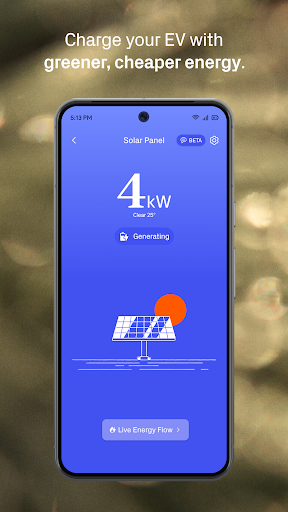
Analysis by Reviewed APKs
Hive is a smart-home control app for people with compatible Hive devices, from thermostats and radiator valves to lights, plugs, EV charging and solar equipment. It brings everyday controls and energy information into one place, which is appealing if you want to adjust your home from your phone rather than manage each device separately. I like the practical focus, though its usefulness depends heavily on the Hive products you own.
A More Comfortable Evening
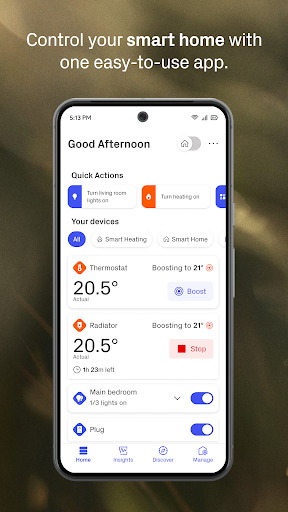
Picture arriving home on a chilly evening and wanting the living room warm without heating every room all day. With a Hive thermostat and radiator valves, the app can put heating schedules and temperature boosts within reach, while its dashboard can be personalized to show frequently used devices first. That makes the basic job straightforward: check the controls on your phone, make a small adjustment, and get on with dinner instead of heading to the thermostat.
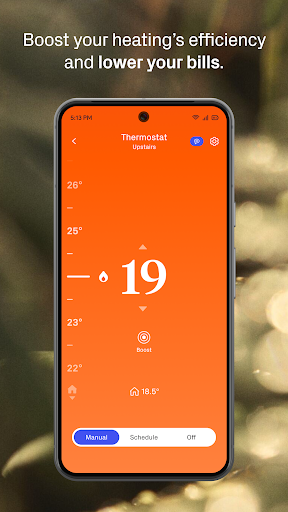
I also see the value in the less dramatic moments. An alert can help catch heating left on by mistake, while Holiday Mode and Frost Protection address two different concerns when the usual routine changes. These tools do not remove the need to think about your home’s setup, but they give connected Hive owners a way to manage common heating decisions remotely and make schedules part of everyday life.
A Hub for Hive Devices
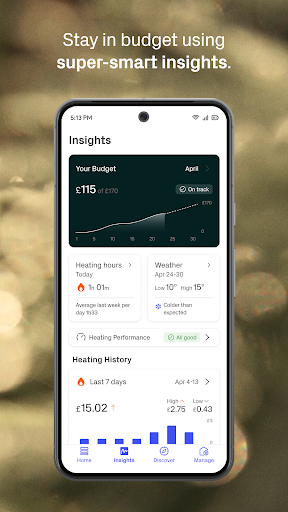
Hive makes the most sense as a control point for its own connected-home range. Instead of opening different controls for heating, lights, plugs or EV charging, owners can bring supported devices into one app and personalize the dashboard around what they use most. Trends adds an energy-focused layer, with history and budget tracking among the tools described for monitoring use and looking for ways to save.
That focus also defines what Hive is not. It is not a general-purpose social app, team workspace or standalone energy comparison service, and downloading it alone does not provide smart-home hardware. If you do not own or plan to use compatible Hive equipment, much of its appeal is beside the point. People already invested in another smart-home ecosystem may also prefer to keep using the controls built around their existing devices.
Build Small Useful Habits
A little dashboard housekeeping can make the app feel more useful. I would put the controls I reach for most—perhaps heating and a frequently used plug—near the front, rather than treating every device as equally important. Then I would check schedules when the household routine changes, such as a different work pattern or a trip away, so yesterday’s settings are not quietly running the show.
For energy awareness, Trends is best approached as a regular check-in rather than a screen to stare at every day. Looking at history and budgets together can help make usage easier to follow, while smart radiator valves can support a room-by-room approach. If the home also has Hive EV charging or solar equipment, keeping those controls in the same routine may make it easier to see how the connected parts fit together.
More From Our News Desk

Zoom Meetings, Google Meet, or Teams: Which Is Easiest to Join?

How I Build a Free Streaming Lineup With Tubi

Why Crunchyroll Is the Default Anime App for So Many Fans

YouTube TV: A Practical Guide to Cutting Cable

Rummikub and the Small Comfort of Phone Games

TeamViewer Remote Control or AnyDesk for Helping Family?
Who Hive Suits Best
I would recommend Hive to people who already have Hive heating or other compatible equipment and want one phone-based place to manage it. Thermostat owners get the clearest everyday value from schedules, temperature boosts, alerts and holiday settings. People with a broader setup may appreciate having lights, plugs, sensors, EV charging or solar controls alongside heating, plus dashboard personalization and energy information.
It may be a poor fit if you are looking for a smart-home app before choosing any hardware, or if your devices belong to a different system. The app’s Google Play rating is 2.3 from around 56,000 ratings, so I would weigh that feedback alongside your own device needs rather than assuming the experience will suit everyone. People who prefer manual controls may also have little reason to add another app to their routine.
Hive is a free Android Lifestyle app from Centrica Hive Ltd. Google Play shows over one million installs and a 2.3-star rating from around 56,000 ratings. The app is rated Everyone. Its store price is $0, and the provided app details show no in-app purchases or ads.
The supplied version number is 15.07.1. The app was released on October 21, 2013, and its recorded last update is October 27, 2026. A minimum Android version is not specified in the available app details, so check Google Play for device compatibility before installing.
Making Connected Home Controls Practical
Getting Oriented
When I first opened Hive, the most useful way to think about it was as a remote for a connected home, not as a complete smart home by itself. Its purpose becomes clearer when you have a compatible device to manage: the app brings controls and energy-related information together, while the hardware does the actual heating, lighting or charging.
The personalizable dashboard is a sensible starting point. Putting the most-used devices first can reduce the amount of hunting around during an ordinary day, especially when the household has more than one kind of Hive equipment. I would begin with the controls that matter most and add other parts of the setup to my routine as needed, rather than trying to make every feature central from day one.
Daily Controls That Matter
Heating is the clearest day-to-day use. Schedules let you set energy-conscious patterns, while a temperature boost handles the occasional moment when the planned setting is not enough. Alerts about heating left on can be useful when plans change, and Holiday Mode gives a dedicated option for time away. These are small controls, but they address decisions people make repeatedly rather than asking them to learn an elaborate system.
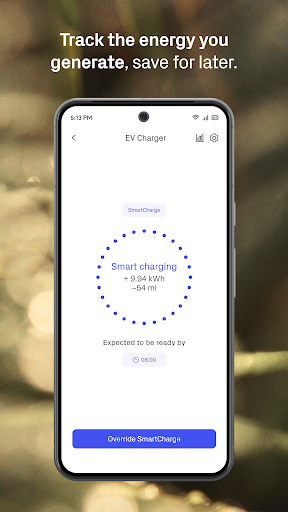
The experience can extend beyond the thermostat if the home has other Hive devices. The app describes control for lights, plugs and motion sensors, as well as EV charging and solar. That breadth can make one dashboard more convenient, but the actual usefulness depends on which products are installed. I would judge the app by the controls I need most, not by the full range of equipment it can support.
Energy Tools and Devices
Trends is one of the more distinctive parts of the described app because it connects device control with energy awareness. It can show history, track budgets and surface ways to save. Those tools give users another reason to open the app beyond changing a temperature, although the value comes from using the information as a guide to household habits rather than expecting a screen to make decisions on its own.
Heating features are fairly specific: energy-saving schedules, temperature boosts, alerts, Frost Protection and Holiday Mode are all described. Smart Hive Radiator Valves add room-level control, so you can avoid heating rooms you are not using. Hive Heating Plus is mentioned as an upgrade with additional insight tools, budget tracking and personalized recommendations; its availability and terms are worth checking in the store or with Hive.
A Weekly Home Check-In
A practical routine might start with a quick dashboard check on a Sunday evening. I would look at the heating schedule for the week, adjust it if plans have changed, and check whether Holiday Mode is appropriate for any time away. If I had radiator valves, I would consider which rooms actually need heat, instead of relying on one setting for the whole home.
Once in a while, I would open Trends to review history and budget information. Owners with smart plugs can use them to monitor how much energy appliances use, while EV charging users can check spending and receive updates about charging progress. The point is not to turn home management into a second job; it is to make a few useful adjustments using information already gathered in the app.
Keep the Limits in View
Hive’s biggest limitation is also its basic premise: the app is most useful when paired with Hive hardware. It cannot, on its own, provide smart heating, room-level radiator control, connected lighting or EV charging. Before building a routine around it, I would make sure the particular devices I want to control are compatible and that the app offers the controls I expect for that setup.
The breadth of the product range can also make the overall experience feel uneven from one household to another. A thermostat owner may mainly need schedules and temperature changes, while a home with several connected products has more reason to use the dashboard and Trends. Google Play’s 2.3-star rating is a reminder to read current user feedback and consider how the app works with your particular devices before committing.
Hive is a practical companion for a Hive-equipped home, especially if heating schedules, remote adjustments and energy-use check-ins are part of your routine. I like that the app’s purpose is easy to understand and that the dashboard can prioritize frequently used devices. Its appeal is much narrower if you do not have compatible hardware.
I would try Hive if I already owned Hive devices or was choosing them for a connected-home setup. For everyone else, I would first compare the hardware and check recent Google Play feedback. The app can bring useful controls together, but the value comes from the devices and habits built around it.
Hive Frequently Asked Questions
What is the Hive app used for?
Hive is used to control compatible Hive smart-home products from an Android phone. Depending on the equipment in your home, that can include thermostats, radiator valves, lights, plugs, sensors, EV charging and solar. The app also describes dashboard customization and Trends tools for viewing history and tracking budgets.
Which phones and devices can run Hive?
Hive is an Android app available through Google Play. The supplied app details do not give a minimum Android version, and compatibility can vary by device and software version. Check the current Google Play information on your phone before installing, and make sure your Hive equipment is supported.
Does Hive cost anything to download?
The app is free to download on Google Play, and the supplied details show no in-app purchases or ads. Hive’s connected-home features depend on having compatible products, and some services or equipment may have separate terms. Check the current store information and the details for the Hive products you plan to use.
Can I use Hive without Hive products?
Hive is designed to manage Hive smart-home equipment, so its practical value depends on having compatible devices. The app alone does not provide a thermostat, lights, plugs, EV charger or solar equipment. If you already use another smart-home system, check its device compatibility and available controls before choosing Hive.
Is Hive a good fit for every household?
It is most relevant to households that want to manage compatible Hive products, especially heating, from a phone. People without Hive equipment may find little reason to use it, while those with several supported devices may get more from the shared dashboard and energy tools. Check Google Play feedback and device requirements for your setup.
Pros
- Brings compatible Hive heating, lighting and other device controls into one app.
- Dashboard personalization can put frequently used devices within quicker reach.
- Heating schedules, boosts, Holiday Mode and Frost Protection cover practical routines.
- Trends includes energy history and budget-tracking tools.
Cons
- Useful controls depend on owning compatible Hive equipment.
- The Google Play rating is 2.3 stars from around 56,000 ratings.
- The minimum Android version is not specified in the supplied app details.
- Category
- Lifestyle
- Version
- 15.07.1











