History Eraser: Privacy Check
- 198.92K
- 4.2
- Installs
- 10.00M
- Price
- Free
Screenshots
Analysis by Reviewed APKs
History Eraser: Privacy Check is a guided checklist for finding and reviewing places where search, browsing, app, and other activity data may be stored. I found its approach refreshingly practical: it points you to the relevant settings rather than trying to manage most data itself. It suits people who want a regular privacy checkup without hunting through a maze of phone and account menus.
A Checkup Between Errands
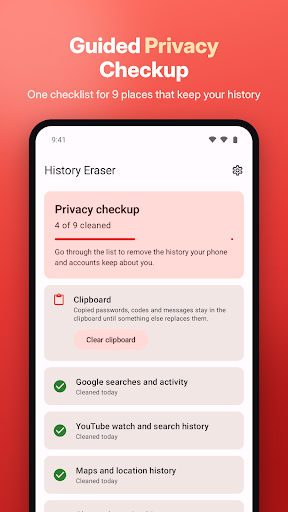
When I first opened History Eraser, I pictured using it during a quiet moment at home, not as a tool I would need to monitor constantly. The checklist makes that sort of occasional review feel manageable. I could work through items such as Google searches, YouTube history, and Chrome browsing data, with each entry explaining what it covers and guiding me toward the place where I can review it.
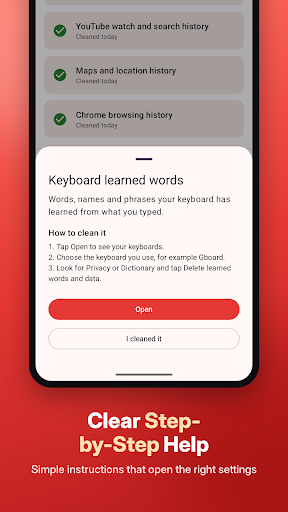
The useful part is the handoff. Tapping a checkup item takes me to the relevant app, website, or system screen, where I make the decision and clear data myself. If I have copied a private code or message, the clipboard option is different: History Eraser can clear that directly with one tap. The overall process feels more like a guided set of errands than a sweeping, mysterious cleanup.
A Guide, Not a Cleaner
History Eraser sits between manually searching through settings and using a cleaner that claims to handle everything automatically. Its checklist brings several destinations together, then sends me to the official screen for each one. That distinction matters: for most items, the app offers directions rather than taking control of the underlying history. I stay responsible for the final choice, which makes the tool more of a navigator than an all-purpose deletion button.
It is not a browser, a full device-management dashboard, or a substitute for changing privacy settings in the services I use. It covers nine checkup items, including Google and YouTube activity, Maps history, Chrome data, downloaded files, and the advertising ID setting. That focused scope is helpful if I want a guided review, but less compelling if I expect one tap to remove every trace across all my accounts.
Make the Checklist a Habit
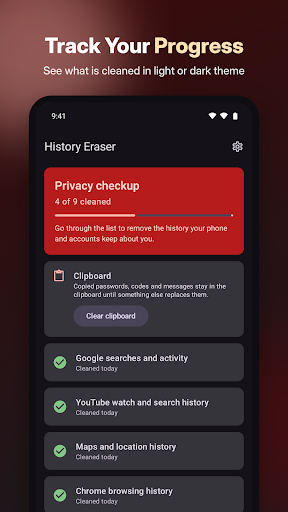
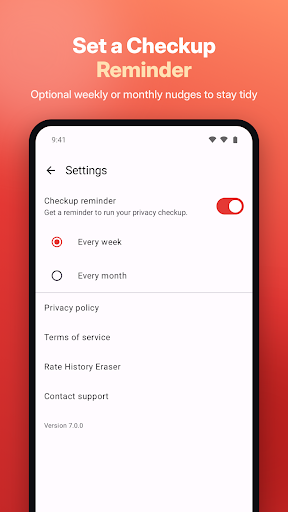
I would get the most from History Eraser by treating it as a recurring checklist, not something to open only after a privacy scare. Its weekly or monthly reminders give me a nudge, while the progress count helps me see how much of the review I have done. I can tackle a few items at a time instead of turning the whole checkup into a project.
The cleaned markers and last-reviewed information also make it easier to pick up where I left off. For example, I might check browser and search histories one evening, then review app storage or downloads another day. Since the app's instructions lead to different destinations, keeping the checklist as my starting point saves me from remembering which settings screen I used last time.
More From Our News Desk

Zoom Meetings, Google Meet, or Teams: Which Is Easiest to Join?

How I Build a Free Streaming Lineup With Tubi

Why Crunchyroll Is the Default Anime App for So Many Fans

YouTube TV: A Practical Guide to Cutting Cable

Rummikub and the Small Comfort of Phone Games

TeamViewer Remote Control or AnyDesk for Helping Family?
Who Will Find It Useful
I would recommend History Eraser to people who use several Google services and want a straightforward way to revisit their activity settings. It is especially useful for anyone who finds privacy menus scattered or hard to remember. The explanations, direct links to the relevant screens, and simple progress tracking make a periodic review feel less intimidating without pretending that every service works the same way.
It may not suit someone looking for automatic, comprehensive deletion, since most cleanup happens after the app takes you to another screen. It is also less useful if the listed services and data types are not part of your routine. I like that the app says it does not read, upload, or delete most history itself, but users who expect a cleaner to do the work for them should understand that difference.
History Eraser: Privacy Check is made by INFOLIFE LLC and is listed in Google Play in the Tools category. It has over 10 million installs and a 4.2-star rating from about 199,000 ratings. Google Play gives it an Everyone content rating. The app first appeared on January 19, 2011, and the current version is 7.0.0.
The app is free to download, contains ads, and has no in-app purchases. Its last update was October 28, 2026. The Android version requirement is worth checking on Google Play, since it can vary with the device and app version. The app description says checkup progress and reminder settings stay on the phone, and that no account is required.
A Guided Route Through Privacy Settings
A Clear Starting Point
When I first opened History Eraser, the checklist made the purpose easy to understand: this is a place to begin a privacy review, not a new service that stores all my activity. Each entry has a short explanation and instructions, so I can see why I might want to visit a particular setting before tapping through.
The setup sounds intentionally light. The description says no account is required, and the app does not ask for invasive permissions such as access to SMS, call logs, files, accessibility services, or the app list. That fits the app's role as a guide. It also means I need to be comfortable completing most of the work in the destinations it opens.
The Everyday Checkup
In day-to-day use, the checklist is the main attraction. I can start with an item such as Chrome browsing history, read what it covers, then open the relevant screen to handle cookies, site data, or saved form data. Other entries point to their own destinations, including Google My Activity and YouTube history. This saves some menu hunting while leaving the actual cleanup in my hands.
That extra step is both the app's defining strength and its main limitation. I am not tapping one universal button and watching everything disappear; I am following a guided route through different settings. For a careful review, that makes sense. When I only want to clear copied information quickly, though, I can use the clipboard option, which is the one item the app clears itself.
Nine Places to Review
The checklist spans nine areas: Google searches and activity, YouTube watch and search history, Google Maps searches and location history or Timeline, Chrome browsing data, and Google Play Store search history on the phone. It also covers keyboard learned words, app cache and storage through the system app list, downloaded files, and the advertising ID setting. Seeing these categories together helps me remember that activity can live in more than a browser.
The clipboard tool stands apart from those guided destinations. It can clear copied passwords, codes, and messages with one tap, which makes sense for a quick, targeted action. I also appreciate the distinction between data the app clears and data I manage elsewhere. The app does not read, upload, or delete my history itself, according to its description; its job is to guide the checkup.
A Routine That Sticks
A practical routine would be to set a weekly or monthly reminder, then review a handful of items when it arrives. I might start with search and video activity, move to Maps or Chrome on another occasion, and leave downloaded files or app storage for when I have more time. The progress indicator, such as a count of cleaned items, gives the routine a visible stopping point.
I would also use the last-reviewed information to avoid repeating the same checks simply because I cannot remember when I last opened them. Marking items as cleaned turns the list into a lightweight record of my own checkup. The app says progress and reminder settings stay on the phone, which makes this tracking feel appropriately local for a tool centered on privacy housekeeping.
Keep Its Scope in Mind
The biggest limitation is that the app cannot make all the decisions or perform all the deletions for me. Most checklist items open a separate app, website, or system setting, so the experience depends on following those instructions and completing the action there. That is a sensible approach for a guide, but it can feel less convenient than the name might suggest to someone expecting automatic history removal.
Its coverage is specific rather than universal: nine checkup items plus clipboard clearing. It is not presented as a way to clean every service, remove all device data, or manage privacy settings from one central control panel. Ads are present, too. I would approach it as a useful reminder and map for periodic housekeeping, while using the destination screens to decide what I actually want to clear.
History Eraser: Privacy Check makes scattered privacy settings easier to revisit by gathering nine review items in one guided checklist. I like that it explains where data lives and sends me to the relevant screen instead of obscuring the process. The clipboard shortcut, progress markers, and reminders add useful touches without changing the app's basic role.
I would try it if I wanted a simple routine for reviewing search, browser, app, and related activity. I would skip it if I expected automatic, one-tap cleanup across every service. As a practical guide with a clearly limited scope, it is useful for staying organized and keeping the final decisions in my own hands.
History Eraser Frequently Asked Questions
What is History Eraser: Privacy Check used for?
History Eraser: Privacy Check is a guided privacy checklist for reviewing places where searches, browsing, app data, and other activity may be stored. It explains each item and opens the relevant settings screen, app, or website so you can clear data there. Clipboard clearing is the exception: the app can clear copied content directly with one tap.
Which devices can run History Eraser: Privacy Check?
History Eraser: Privacy Check is an Android app available through Google Play. The Android version requirement can vary with the device and app version, so check the Google Play store listing for the requirement that applies to your phone. The app description also says its checkup progress and reminder settings stay on the phone.
What Android version does History Eraser require?
The Android version requirement can vary, so check History Eraser: Privacy Check's Google Play store listing for the current requirement and compatibility with your device. The app's current version is 7.0.0. Its checklist takes you to relevant app, website, or system screens to complete most cleanup actions.
Does History Eraser: Privacy Check cost money?
History Eraser: Privacy Check is free to download on Google Play and contains ads. It does not offer in-app purchases. Store details can change over time, so the Google Play listing is the best place to check current availability and any changes to its pricing or advertising.
Is History Eraser: Privacy Check right for me?
It may suit you if you want reminders and step-by-step guidance for reviewing activity across Google services, Chrome, apps, downloads, and other listed areas. Most cleanup happens in the destination settings rather than automatically in the app. If you want a single button to remove all history, this guided approach may not be what you expect.
Pros
- Brings nine privacy checkup items together in one guided checklist.
- Explains each item and opens the relevant app, website, or setting.
- Offers clipboard clearing, progress tracking, and recurring reminders.
- No account is required, and checkup progress stays on the phone.
Cons
- Most data must be cleared manually in the destination screen.
- Coverage is limited to the listed checkup items and clipboard.
- Contains ads, which may interrupt an otherwise simple utility.
- Category
- Tools
- Version
- 7.0.0











