Health Connect
- 94.01K
- 2.7
- Installs
- 500.00M
- Price
- Free

Screenshots
Analysis by Reviewed APKs
Health Connect is an Android utility that lets compatible health, fitness, and wellbeing apps share selected data through one on-device place. I see it as useful groundwork for people who already use more than one tracking app, rather than another app to open for daily coaching or charts. Its privacy controls are practical, though the benefit depends on the other apps you use and the data you choose to share.
When Apps Need to Share
When I first looked at Health Connect, I thought of a familiar routine: checking activity in one app and sleep in another, then wishing the information could travel between them. Health Connect is designed to help with that handoff. It stores health and fitness data from apps in one place on the device, so participating apps can share selected information instead of keeping every record in a separate corner.
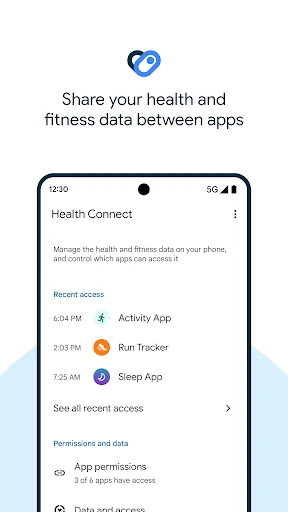
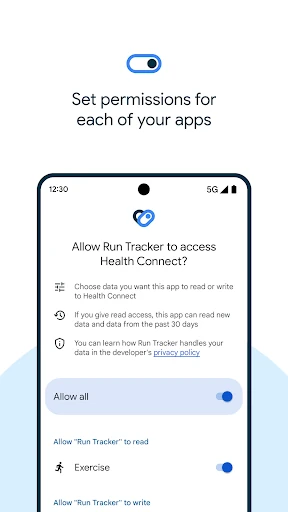
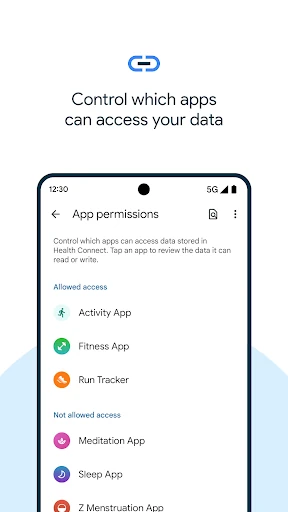
The useful part is the choice involved. Before a new app gets access, I can review what it wants and decide what to share. If I later change my mind, I can revisit those permissions or see which apps have accessed data recently. That makes the setup feel less like handing over a whole account and more like deciding, category by category, what belongs in the exchange.
A Bridge, Not a Tracker
Health Connect makes the most sense alongside health or fitness apps that already do the tracking. Its job is to provide a shared place for data and give me controls over access; it is not itself a replacement for every activity, sleep, or nutrition app. That distinction matters. I would not install it expecting a polished personal dashboard, reminders, health tips, or a new set of workouts.
Compared with switching between separate apps and treating each one as an island, a shared data layer can make a multi-app setup feel more connected. But it does not guarantee that every app will exchange every kind of information. The practical payoff depends on whether the apps I use support Health Connect and what information I allow them to share. It is infrastructure, not a complete health service.
Small Habits That Help
I would start by reviewing access whenever I connect an app, rather than approving everything in a hurry. Choosing only the data categories that make sense for that pairing keeps the arrangement easier to understand later. For example, if I am linking apps for a particular activity or sleep routine, I can focus on the relevant categories instead of assuming every app needs broad access.
A quick permission check after adding a new app is another sensible habit. Health Connect lets me revisit privacy settings and see which apps recently accessed data, so I can use that view when something changes in my routine. If I stop using an app, I would also take a moment to review its access. These are small steps, but they make a shared data setup easier to manage.
More From Our News Desk

Zoom Meetings, Google Meet, or Teams: Which Is Easiest to Join?

How I Build a Free Streaming Lineup With Tubi

Why Crunchyroll Is the Default Anime App for So Many Fans

YouTube TV: A Practical Guide to Cutting Cable

Rummikub and the Small Comfort of Phone Games

TeamViewer Remote Control or AnyDesk for Helping Family?
Who Gets the Most From It
I would recommend Health Connect to Android users who already rely on multiple compatible health, fitness, or wellbeing apps and want a clearer way to manage the information those apps share. It is especially appealing to someone who prefers to make deliberate permission choices instead of repeatedly guessing which app can see what. The on-device storage and offline operation also suit people who want this shared data kept on their device.
It may feel unnecessary if I use just one tracking app, or if my apps do not support the kinds of sharing I want. I would also look elsewhere if I wanted Health Connect itself to provide coaching, reminders, medical guidance, or a single all-in-one tracking experience; that is not its role. The store rating is 2.7 stars, so I would approach it as a practical utility whose usefulness depends heavily on my app setup.
Health Connect is published by Google LLC and falls under Health & Fitness. On Google Play it has over 500 million installs and a 2.7-star rating from about 94,000 ratings. The app is free, with no in-app purchases and no ads. Its content rating is Everyone, and the listed release date is November 10, 2022.
The listed version is 2026.10.01.00.release, and the last update date is October 8, 2026. Health Connect stores shared health and fitness data on the device and offline. The Android version requirement is worth checking on Google Play, since it can vary with device and app updates.
A Quiet Layer Behind Your Health Apps
A Utility in Settings
My first impression is that Health Connect is more of a settings utility than a destination app. The normal route is through Android Settings, under Apps and then Health Connect; it can also be reached from Quick Settings. That placement suits its behind-the-scenes role. I would not expect to spend a long session browsing it the way I might with a dedicated activity tracker.
The setup makes most sense when I already have another health or fitness app in mind. Health Connect is there to manage the shared data and the permission choices around it. That means the first useful step is less about exploring a collection of standalone tools and more about understanding what I want two apps to exchange.
Sharing in Daily Use
Day to day, the experience is about allowing and managing access, not manually recreating the same record in multiple places. Health Connect keeps data from apps together on the device, giving participating apps a shared point to work from. When that arrangement fits my routine, I can spend less time thinking about where a piece of activity or wellbeing information originated.
I would still keep expectations measured. Health Connect is a layer connecting apps, so it does not make every app behave identically or promise that each will use the same categories. The sharing works best when the apps involved support it and when I have reviewed their access. It can simplify an existing setup, but it does not remove the need to understand that setup.
Control Over Access
The strongest feature for me is being able to choose what I share. Before a new app can access data, Health Connect lets me review the request and select what I am comfortable allowing. That is a more useful approach than treating a connection as an all-or-nothing decision, particularly when I am only trying to link apps for one part of a routine.
The other standout is the ability to revisit those decisions. If I want to adjust privacy settings or check which apps have accessed data recently, I can find those controls in Health Connect. I like that this makes permission management an ongoing task rather than a one-time screen I forget about. It gives the utility a clear purpose even when I am not actively tracking anything.
A Simple Review Routine
A practical routine would be to connect only the apps I intend to use together, review each access request, and allow the categories that support that pairing. After a few days of using the apps, I could return to Health Connect to check recent access and make sure the arrangement still makes sense. This is not a daily chore; it is a tidy check when my app setup changes.
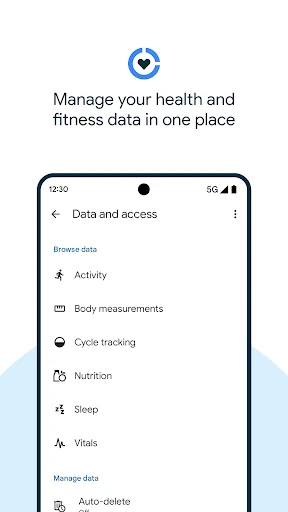
I would repeat that check when adding or dropping a health app, or when I change the way I track activity, sleep, nutrition, or vitals. Those are the kinds of areas the app describes as useful for sharing. Keeping the review tied to a real change makes it manageable, while helping me avoid leaving old permissions in place simply because I once tapped through them.
Keep Expectations Grounded
The main limitation is dependence on other apps. Health Connect can only help with the sharing those apps support, and the value I get will vary with my existing tools. If I want one app to present every detail in a unified dashboard, I should not assume this utility will do that for me. Its focus is bringing data together for management and sharing, not replacing the apps that collect it.
There is also a little ongoing responsibility: I need to make thoughtful choices about access and revisit them when my setup changes. That is a reasonable trade-off for a tool centered on privacy controls, but it may feel like extra housekeeping to someone who wants a completely hands-off experience. And with a 2.7-star Google Play rating, I would keep expectations practical rather than assume the utility will solve every app-compatibility frustration.
Health Connect is a useful, low-profile option for Android users who want compatible health and fitness apps to share selected data while keeping permission choices in view. I like its focused role and on-device approach. The catch is that it is only as helpful as the apps I already use and the sharing they support.
I recommend trying it if you have a clear reason to connect multiple apps and are comfortable reviewing access. If you want a standalone tracker, coaching, or a full health dashboard, this is not the right fit. Think of it as a practical bridge: valuable for the right setup, easy to overlook for everyone else.
Health Connect Frequently Asked Questions
What is Health Connect used for?
Health Connect lets health, fitness, and wellbeing apps share selected data through a shared place on the device. It also lets you review what a new app wants to access, adjust privacy settings, and check which apps recently accessed data. It manages connections and permissions rather than serving as a standalone tracker or coaching app.
Which devices can use Health Connect?
Health Connect is an Android app, and its settings can be opened through Settings or Quick Settings. Whether it is available on a particular device and which Android version it requires can vary, so check the Google Play store listing for the current requirements. Its usefulness also depends on whether the other health apps you use support sharing through it.
Does Health Connect cost money?
Health Connect is free on Google Play, with no in-app purchases or ads. The app itself provides controls for managing data sharing between compatible health and fitness apps. If you are considering another app to use alongside it, that app may have its own terms or costs, so check its store information separately.
Does Health Connect provide health advice?
Health Connect is described as a way to share and manage health, fitness, and wellbeing data from other apps. It is not presented as a source of medical advice, coaching, reminders, or health tips. I would choose it for permission controls and app-to-app data sharing, not as a replacement for a tracker or professional guidance.
Who should try Health Connect?
It is best suited to Android users who already use multiple compatible health or fitness apps and want control over what those apps share. It may not add much for someone who uses one app or whose apps do not support the desired sharing. Check Google Play for current device requirements and app details before installing.
Pros
- Lets users choose which health data categories apps may access.
- Keeps shared health and fitness data on the device and offline.
- Provides a place to review recent app access and privacy settings.
- Free to use, with no ads or in-app purchases.
Cons
- Its usefulness depends on other apps supporting Health Connect.
- It is a data-sharing utility, not a standalone tracker or coaching app.
- Users need to review permissions as their app setup changes.
- Category
- Health & Fitness
- Version
- 2026.10.01.00.release