Map My Run GPS Running Tracker
- 456.14K
- 4.8
- Installs
- 10.00M
- Price
- Free
Screenshots


Analysis by Reviewed APKs
Map My Run GPS Running Tracker records runs with GPS, maps routes, and keeps pace and distance in view, with options for treadmill sessions and broader activity tracking too. I see it suiting casual joggers who want a clear record as well as runners following a plan. After considering its tracking, coaching, and social tools, my overall take is that it offers useful depth, though some extras sit behind a paid upgrade.
A Run With Useful Context
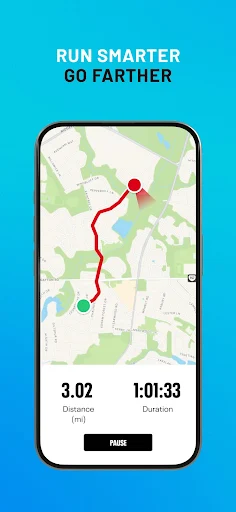
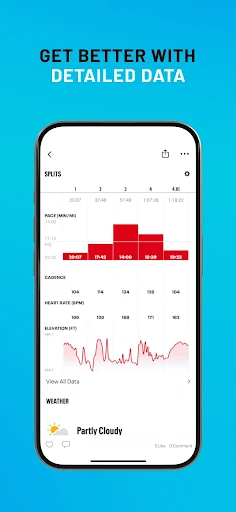
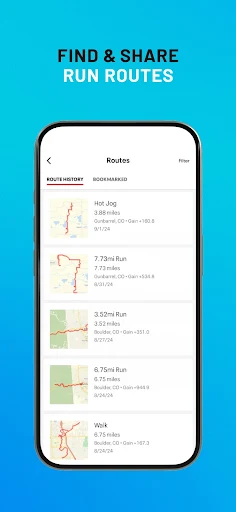
When I first opened Map My Run, I pictured a familiar weekday routine: change into running shoes, head out for a loop, and check afterward how far I went. GPS tracking is the app’s central job. It can record a route along with distance, pace, elevation, and calories, turning a run that might otherwise blur into a few numbers and a map I can revisit.
For a run where I’m trying to keep a steady effort, real-time audio feedback can call out details such as distance, duration, pace, and heart rate. That means I can spend less time looking at a screen while moving. The app also supports treadmill tracking and step-counting, so the basic idea is not limited to outdoor routes. GPS use in the background may reduce battery life, a practical detail worth remembering before a longer outing.
More Than A Route Log
A simple GPS tracker is enough for someone who only wants a route and a distance total. Map My Run goes further by combining tracking with training plans, audio updates, saved routes, activity options beyond running, and community features. That breadth may appeal if I want one place to support a running habit as it develops, rather than moving between a map recorder and a separate coaching tool.
It is still best understood as a fitness tracker and training companion, not a replacement for a dedicated navigation service or a general-purpose health record. The description covers running, treadmill sessions, walking, cycling, yoga, gym workouts, and many other activities, but running remains the focus. Some advanced coaching and tracking tools are tied to MVP Premium, so it may not suit someone who expects every feature to be included at no cost.
Small Habits, Better Records
I’d get more from Map My Run by making recording part of the routine: start tracking before setting off, then save the route and compare future outings. A short familiar loop is useful for noticing whether pace or distance changes over time, while a new route can make the map itself part of the appeal. Audio feedback can help keep attention on the path instead of the phone.
For a more structured stretch of training, the app offers plans for distances including 5K, 10K, half marathon, and marathon, plus custom goals. I’d choose a goal that matches what I actually want from the next few weeks and use the tracking as a record, not as pressure to chase every number. Connecting supported devices or services such as Garmin and Google Fit can also bring workout information together.
More From Our News Desk

Zoom Meetings, Google Meet, or Teams: Which Is Easiest to Join?

How I Build a Free Streaming Lineup With Tubi

Why Crunchyroll Is the Default Anime App for So Many Fans

YouTube TV: A Practical Guide to Cutting Cable

Rummikub and the Small Comfort of Phone Games

TeamViewer Remote Control or AnyDesk for Helping Family?
Who May Enjoy It
I’d recommend Map My Run to people who like seeing a record of their outdoor runs and want more than a stopwatch. Beginners can use the route and distance tracking to build a simple habit, while experienced runners may appreciate training plans, pace feedback, and activity history. The mix of indoor and outdoor tracking also makes it relevant to someone whose routine shifts between a neighborhood run and treadmill workouts.
It may be less appealing to someone who wants only a minimal tracker with no community or coaching extras, or who prefers not to use GPS while exercising. Runners who want the full set of premium training tools should also weigh the cost of an in-app upgrade. Since continued GPS activity can use more battery, people planning long sessions may want to keep their phone’s charge in mind.
Map My Run GPS Running Tracker is a Health & Fitness app from MapMyFitness, Inc. On Google Play, it has more than 10 million installs and a 4.8-star rating from about 456,000 ratings. It is free to download, with in-app purchases priced from $5.99 to $39.99 per item, and it contains ads. Its content rating is Everyone.
The supplied app details give version 26.11.1, a release date of September 9, 2010, and a last update date of October 29, 2026. No minimum Android version is provided in those details, so check Google Play for device compatibility before installing. Pricing and purchase options can change, so the current store page is the place to confirm them.
How Map My Run Fits A Real Routine
Getting Started
My first impression is of an app built around recording movement, with the map and running statistics doing the most obvious work. The premise is straightforward: track a workout, then use the recorded route and measurements to understand what happened. That makes it approachable for someone who has never kept a running log, while the training and connected-device options hint at extra depth.
I’d begin with a short, familiar outdoor run rather than trying to configure every option at once. GPS tracking is the core outdoor use, and the app also describes treadmill tracking and step-counting for indoor sessions. Because the Android requirement can vary by device and is worth checking in Google Play, I’d confirm compatibility there before relying on it for a particular phone.
The Everyday Tracking
Day to day, the appeal is having a route and a set of numbers attached to each run. Distance and pace are easy to understand, while elevation and calories add context for people who like a fuller workout record. Audio updates can report distance, duration, pace, and heart rate in real time, making the phone less central during a run.
Not every workout needs to be an outdoor jog. Map My Run describes support for treadmill sessions and more than 600 activities, including walking, cycling, yoga, and gym workouts. That range could make it useful for a mixed routine, although the app’s identity and strongest focus remain running. Background GPS may reduce battery life, so I’d consider that when planning a longer session.
Coaching And Connections
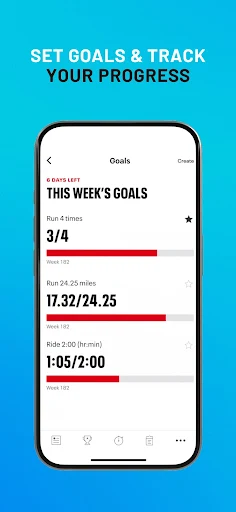
Training plans are one of the features that give the app a purpose beyond simply collecting miles. The described plans cover 5K, 10K, half-marathon, and marathon goals, with adaptive coaching intended to respond as fitness changes. Custom goals and feedback for endurance and performance can help bring a bit of structure to a routine that otherwise depends on deciding each day what to do.
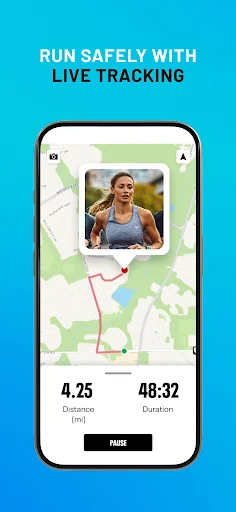
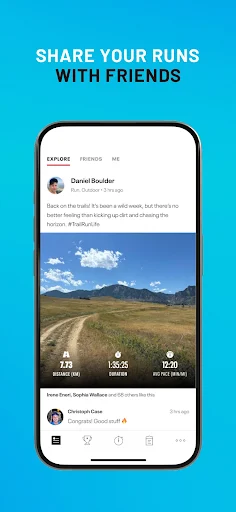
The app also describes syncing with Garmin, Google Fit, other wearables, Bluetooth devices, and heart-rate monitors. Community tools include finding friends, sharing progress, joining virtual challenges, and following other runners. MVP Premium adds features such as live tracking and heart-rate-zone analysis. These options broaden the experience, but they are not essential to the simple task of recording a route.
A Practical Weekly Rhythm
A sensible way to use Map My Run is to record a few regular outings and then look for patterns across them. I might keep one familiar route for comparison and save a different route when I want a change of scenery. If I’m following a training plan, the recorded distance and pace can give context to each session without turning every run into a test.
On treadmill days, I’d use the indoor tracking options rather than expecting an outdoor map to tell the whole story. For a goal-driven block of training, I’d choose a plan that fits the distance I’m aiming for and use audio feedback when it helps me stay focused. Connecting a supported wearable or service may help keep workout information together, depending on the devices I already use.
Limits To Keep In Mind
The biggest practical consideration is that the app offers more than the free download alone: it contains ads and has in-app purchases. Several of the more advanced coaching and tracking features are described as MVP Premium tools, so someone who wants those options should check the current purchase terms before building a routine around them. The broad feature set may also feel like more than a casual runner needs.
GPS tracking can affect battery life when it continues in the background, which matters on long outings or when a phone is already low on charge. The app’s many activity types and connected features are useful in principle, but they do not make it a dedicated navigation app or a substitute for every fitness service. I’d treat it as a running-focused log and coach, and use only the parts that genuinely support my routine.
Map My Run’s strongest case is its combination of route recording, running metrics, audio feedback, and structured training options. I like that it can serve a simple jog log while also offering a path toward plans, devices, and community features. The trade-offs are ads, paid extras, and the battery demands of background GPS.
I’d recommend trying it if you want a running record that can grow with your goals, especially if route maps and pace feedback matter to you. If all you need is a bare-bones timer, its wider feature set may be unnecessary. Check the current Google Play page for compatibility and purchase details before deciding.
Map My Run GPS Running Tracker Frequently Asked Questions
What is Map My Run GPS Running Tracker used for?
Map My Run records runs using GPS and can show route, distance, pace, elevation, and calories. It also describes treadmill tracking, step-counting, audio workout feedback, training plans, and support for many other activities. Community and connected-device options add more ways to use it, while running remains its main focus.
Can I use Map My Run on my Android phone?
Map My Run GPS Running Tracker is available on Google Play for Android devices. The minimum Android version may vary or depend on the device, so check the current Google Play listing for the requirement before installing. The app description also mentions syncing with Garmin, Google Fit, and other wearables.
Does Map My Run cost money?
The app is free to download and contains ads. It offers in-app purchases, with supplied prices ranging from $5.99 to $39.99 per item. Purchase options and prices may change, so check the current Google Play listing for the latest details before buying an upgrade.
Does Map My Run need a particular Android version?
The supplied app details do not give a minimum Android version. Requirements can vary as the app and devices change, so the Google Play listing is the best place to check compatibility for your phone. The description notes that continued GPS use in the background may reduce battery life.
Who is Map My Run suitable for?
It may suit beginners who want to log routes and distance, as well as more experienced runners interested in training plans, pace feedback, and connected devices. It also covers treadmill tracking and many other activities. People who want only a minimal timer or all advanced tools without paid extras may prefer another approach.
Pros
- GPS route tracking combines distance, pace, elevation, and calorie information.
- Treadmill tracking and support for many activities suit varied workout routines.
- Training plans and audio feedback add structure for goal-focused runners.
- Wearable connections and community options extend the basic run log.
Cons
- Ads and in-app purchases may frustrate runners seeking a fully free experience.
- Background GPS can reduce battery life during longer sessions.
- The broad selection of features may feel excessive for basic tracking.
- Category
- Health & Fitness
- Version
- 26.11.1











