Great Clips Online Check-in
- 702.37K
- 4.9
- Installs
- —
- Price
- Free

Screenshots
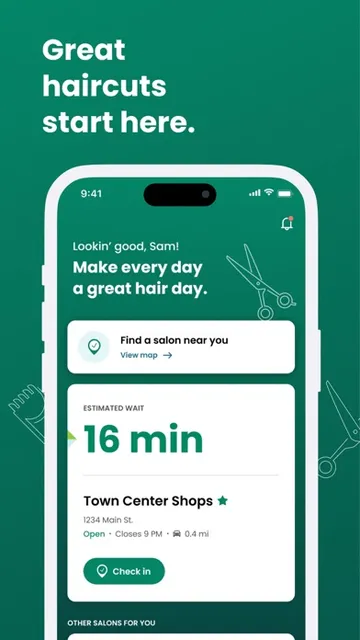
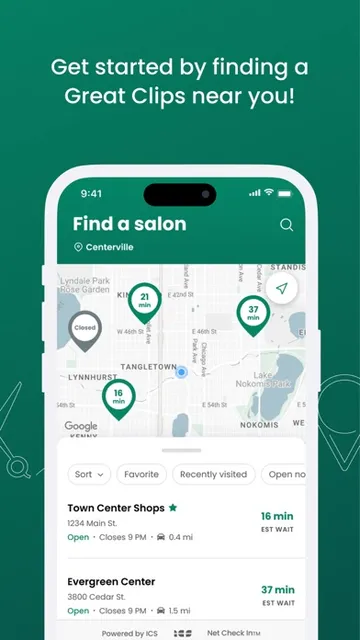
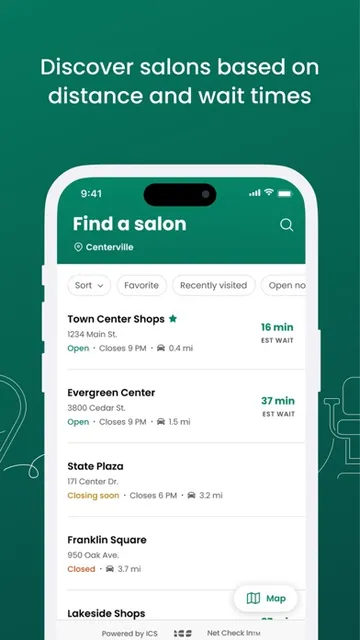
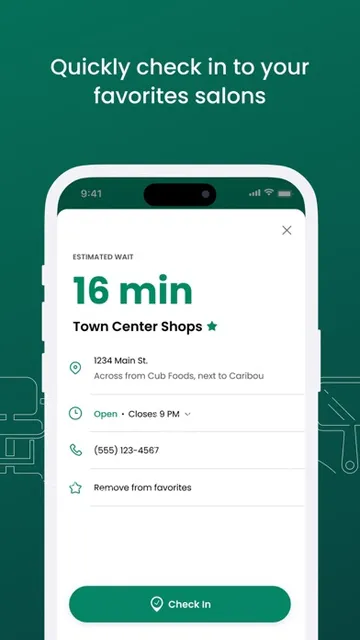
Analysis by Reviewed APKs
Great Clips Online Check-in helps me see estimated waits at nearby Great Clips salons and join a waitlist before I arrive. It suits people who want a haircut without spending extra time sitting in the salon, especially when their day is already tightly scheduled. I like that the basic check-in is straightforward and does not require creating an account. The main caveat is that wait estimates are just estimates, not appointments.
A shorter salon wait
When I want a quick haircut between errands, the first useful question is whether a nearby salon looks manageable or already has a long wait. Great Clips Online Check-in shows estimated waits for salons near me, so I can compare options before leaving home. I choose a location, enter my name and phone number, and check in. That puts me on its waitlist while I finish what I was doing.
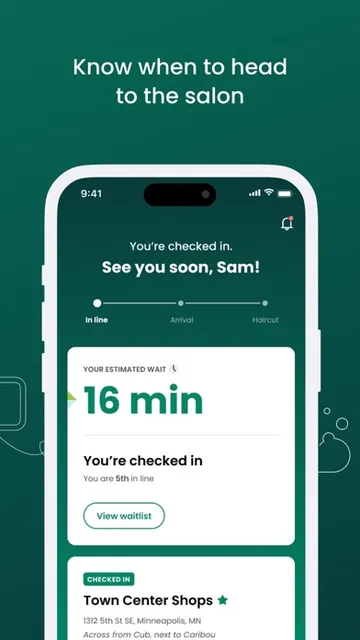
After checking in, I can watch the estimated wait time and my place in line. ReadyNext text alerts can let me know when the estimate reaches 15 minutes, which gives me a practical cue to head over. When I arrive, I still need to tell the salon staff I’m there. I find that distinction helpful: the app starts the process, but the salon confirms my arrival.
A waitlist tool, not booking
The app’s focus is narrower than a general salon-booking service. It helps me find a Great Clips salon, check its current estimated wait, and join the waitlist remotely. There’s no account or email required for that check-in, which keeps the process light. I see it as a useful alternative to walking into a salon without knowing the wait, rather than a tool for planning a detailed appointment weeks ahead.
It also isn’t a way to select a stylist in advance. The estimate assumes the next available stylist, and requesting someone specific after arriving may mean a longer wait. Online check-in covers services other than perms and formal updos; those often require an appointment, so calling the salon is the sensible next step. If I need a more customized booking arrangement, this focused waitlist may not cover it.
Small habits that help
I’d make checking the estimate part of deciding when to leave, rather than treating the number as a fixed appointment time. The app lets me see my place in line and follow the estimate after checking in. If the 15-minute text cue would help me time the trip, I can sign up for ReadyNext. I still leave room for the estimate to change and aim to arrive before I’m next.
Saving a favorite salon makes a repeat visit quicker, especially if I usually go to the same location near home or work. I’d also check the salon’s opening hours before relying on online check-in: it is available during open hours, with a short restriction at opening and a cutoff before closing. If plans change, I can cancel the check-in from the salon shown on the home screen.
More From Our News Desk

Zoom Meetings, Google Meet, or Teams: Which Is Easiest to Join?

How I Build a Free Streaming Lineup With Tubi

Why Crunchyroll Is the Default Anime App for So Many Fans

YouTube TV: A Practical Guide to Cutting Cable

Rummikub and the Small Comfort of Phone Games

TeamViewer Remote Control or AnyDesk for Helping Family?
Who will find it useful
I’d recommend Great Clips Online Check-in to people who use Great Clips and want a better sense of the wait before heading out. It fits errands, a lunch break, or a family stop when sitting around at the salon is the part I’d most like to avoid. The no-profile check-in is a plus for occasional visitors, while saving a favorite location can make regular visits feel less repetitive.
It may not suit someone who wants a confirmed appointment, advance stylist selection, or a tool for comparing independent salons. The wait estimate is based on the next available stylist, and requesting a particular stylist at the salon can extend the wait. It is also tied to Great Clips locations, so its usefulness depends on having a participating salon that works for your route and timing.
Great Clips Online Check-in is a free Lifestyle app from Great Clips for iPhone and iPad. On the App Store, it has a 4.9-star rating from about 702,000 ratings. Its content rating is 12+. The current version in the supplied store information is 6.91.0.
The app was released on February 2, 2011, and its most recent update in the supplied information is dated October 26, 2026. It requires iOS 18.0 or later. The listed price is $0.00. The supplied facts do not give an in-app purchase or advertising detail, so those are worth checking on the App Store if they matter to your decision.
Making the Wait Easier to Manage
A simple first impression
When I first opened Great Clips Online Check-in, the purpose was easy to grasp: find a salon, look at its estimated wait, and check in if the timing works. That focused setup is welcome when all I want is to get a haircut without adding a long wait to the day. The app asks for a name and phone number as part of check-in, but the described process does not require an account, email, or profile.
The steps are practical rather than elaborate. I search for a salon, choose one, tap Check In, enter my details, then check in again to join the waitlist. Once I’m in, the app shows an estimated wait and my place in line. It feels like a small utility for a specific errand, not an app that needs much setup before it can be useful.
Following the wait
Day to day, the main experience is watching the estimate after I’ve joined the line. That can help me decide whether to stay nearby or begin heading toward the salon. The number is based on current salon conditions, but it remains an estimate and assumes the next available stylist. I treat it as a timing aid, not as a promise that I’ll be seated at an exact minute.
A detail I appreciate is that checking in online doesn’t mean I can arrive whenever I like and skip the last step. I need to tell the stylists when I get there so they can confirm my information and complete the check-in. If I’m running late, the salon keeps my name on the list for a short period, but I wouldn’t plan a tight schedule around that allowance.
Useful details beyond check-in
ReadyNext is one of the more practical touches. I can sign up for a text alert when my estimated wait reaches 15 minutes, giving me a cue to start toward the salon instead of repeatedly checking the app. It’s especially useful if I’m finishing an errand nearby. I still need to keep the estimate in perspective and arrive before my turn.
Saving a favorite salon is another small convenience for repeat visits. Rather than treating each haircut as a fresh search, I can keep the location I tend to use close at hand. I also like that the app includes a cancellation option: after checking in, the salon appears on the home screen, where I can cancel if plans change.
A routine that fits errands
A realistic routine would be to check the nearby waits before leaving work or home, choose a location that fits my route, and join its waitlist while I finish a nearby task. I’d watch the countdown and use the ReadyNext text cue if I want an extra nudge. On arrival, I’d tell the staff I’m there rather than assuming the online step has completed everything.
Timing matters. Online check-in is available during salon hours, except for the first five minutes after a location is scheduled to open, and it closes to online check-ins 30 minutes before closing. I’d plan around those limits, especially for an evening stop. If a salon’s service or timing needs are less routine, calling ahead is a better fit than relying on the app alone.
Limits to keep in mind
The biggest limitation is that the wait shown is an estimate for the next available stylist. It doesn’t publish stylist schedules, and the app doesn’t let me choose a stylist as part of the online check-in described here. If I request a particular person after arriving, the wait may be longer. That makes the app helpful for flexible haircut plans, but less suited to visits built around one stylist.
Online check-in also isn’t available for perms and formal updos. The description says those services often require appointments and advises calling the salon to ask; not every salon offers perms. The app’s usefulness also depends on a Great Clips location that works for me. These boundaries are clear, but they mean I should match the service and timing to what the app actually handles.
Great Clips Online Check-in does one useful job: it lets me check estimated waits and join a Great Clips salon’s waitlist before I arrive. I like the no-profile process, saved favorite location, and optional 15-minute text alert. Its estimates and arrival confirmation still require a little flexibility, but the overall idea makes an ordinary haircut errand easier to time.
I’d recommend it to Great Clips customers who are comfortable with a waitlist rather than a scheduled appointment and want to spend less time waiting inside. If I need a specific stylist, a service that requires an appointment, or a salon outside the Great Clips network, I’d look for another way to arrange the visit.
Great Clips Online Check-in Frequently Asked Questions
What is Great Clips Online Check-in used for?
Great Clips Online Check-in shows estimated wait times at nearby Great Clips salons and lets customers join a salon’s waitlist remotely. After checking in, you can follow your estimated wait and place in line. You still need to let the salon staff know when you arrive so they can confirm your information and finish the check-in.
Which devices can run Great Clips Online Check-in?
The app is for iPhone and iPad and requires iOS 18.0 or later. The app description also says online check-in is available through greatclips.com on any internet-connected device, including a computer or tablet. A person without internet access can walk into a salon and add their name to the list.
What iOS version does Great Clips Online Check-in require?
The supplied App Store information gives iOS 18.0 as the minimum requirement. If you have an older iPhone or iPad, check the current App Store compatibility details for your device before installing, since requirements can change with future app updates.
Does Great Clips Online Check-in cost money?
The app is listed as free, with a price of $0.00. The supplied store information does not provide details about in-app purchases or advertising, so check the App Store page for current information if either could affect your choice.
Who is Great Clips Online Check-in best for?
It is best for Great Clips customers who want to see an estimated wait and join a salon waitlist before arriving. It may be less suitable if you need an appointment, want to choose a stylist in advance, or need a service such as a perm or formal updo. Those services may require calling the salon.
Pros
- Shows estimated waits at nearby Great Clips salons before you head out.
- Lets you join a waitlist without creating an account or profile.
- Optional ReadyNext texts provide a cue when the estimate reaches 15 minutes.
- Saved favorite salons and in-app cancellation simplify repeat visits and changed plans.
Cons
- Wait times are estimates based on the next available stylist, not appointment times.
- Requesting a particular stylist after arrival may mean waiting longer.
- Online check-in excludes perms and formal updos and has opening and closing limits.
- Category
- Lifestyle
- Version
- 6.91.0











