GameSir
- 7.93K
- 2.4
- Installs
- 1.00M
- Price
- Free

Screenshots
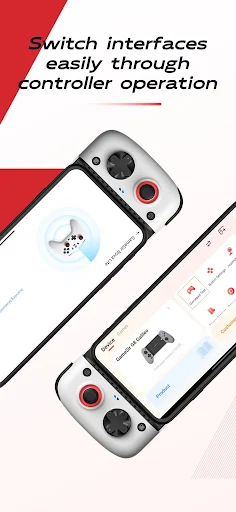
Analysis by Reviewed APKs
GameSir is a companion app for using supported controllers with mobile games, including titles that do not offer gamepad controls on their own. It is aimed at players who would rather use physical buttons and sticks than rely on touch controls. I like the practical idea: bring controller setup and game access together. The trade-off is that the experience depends on configuring controls for each game.
A Game Night With a Controller
When I settle in for a mobile game with a controller, the first question is whether that game supports one. GameSir is designed to help when the answer is no: its key-mapping technology lets a controller operate games that lack native gamepad support. I can picture opening the app before a play session, choosing a game and working with a control layout rather than reaching for the screen whenever an action is needed.
The app also brings game access and peripheral management into the same place. Its Game Management and Recently Played features are intended to make it easier to return to games, while device switching and configuration management address the controller side of the routine. That combination makes sense for someone who plays several mobile games with a pad. It is less compelling if touch controls already feel comfortable or a gamepad is rarely part of the setup.
A Bridge, Not a Game
The obvious alternative is simply using a game's built-in controller support, when it has it. GameSir's particular role is to add mapped controller operation to games that do not support gamepads directly, while also offering preset configurations for a range of popular mobile games and room for personal configurations. That makes it a bridge between a controller and mobile titles, not a replacement for the games themselves.
I would not approach GameSir as a game store, a collection of games, or a shortcut that removes all setup from controller play. The app is about managing peripherals and mapping inputs, so results depend on the game and the configuration. It also is not aimed at someone who only wants to tap through a casual game. Players already happy with touch controls may see little reason to add another layer.
Make Setup Repeatable
A useful habit is to treat a controller layout as part of getting a game ready, rather than something to improvise every time. GameSir offers official preset configurations for a variety of popular mobile games as well as customizable personal configurations. I would start with a relevant preset where available, then adjust the buttons or sticks to suit how I play instead of assuming one layout will feel right for every title.
If I use more than one peripheral, keeping device switching and configuration management in mind can make the next session less of a reset. The app describes controls for buttons, joysticks, vibration and triggers, so it is worth thinking about which of those matter for a particular game. Recently Played can also be handy for getting back into a familiar title without treating the app as a general-purpose launcher.
More From Our News Desk

Zoom Meetings, Google Meet, or Teams: Which Is Easiest to Join?

How I Build a Free Streaming Lineup With Tubi

Why Crunchyroll Is the Default Anime App for So Many Fans

YouTube TV: A Practical Guide to Cutting Cable

Rummikub and the Small Comfort of Phone Games

TeamViewer Remote Control or AnyDesk for Helping Family?
Who Will Get the Most From It
I would recommend GameSir to mobile players who already own or use a controller and want to try it with games that lack native gamepad controls. The mapping tools, preset configurations and peripheral management are directly relevant to that job. It may also appeal to players who switch between controllers or like making a personal layout instead of settling for a default arrangement.
It may not suit someone who prefers touch controls, plays only games with satisfactory built-in gamepad support, or expects every title to work without configuration. Controller mapping is the central idea, so there is some setup involved in making it useful. The app's Google Play rating is 2.4 from about 7,900 ratings, a low score worth weighing alongside its feature set and your own controller needs.
GameSir is a free Android tools app from Guangzhou Chicken Run Network Technology Co.,Ltd. Google Play shows over one million installs and a 2.4-star rating from 7,935 ratings. It is marked Everyone, contains no ads and offers no in-app purchases. The listed version is 5.9.21.
The app's release date is August 26, 2020, and its listed last update is October 19, 2026. A minimum Android version is not provided in the supplied app details, so check Google Play for device compatibility before installing. The listed price is zero, with no in-app purchase costs to factor into the setup.
How GameSir Fits Into Controller Play
Getting Started
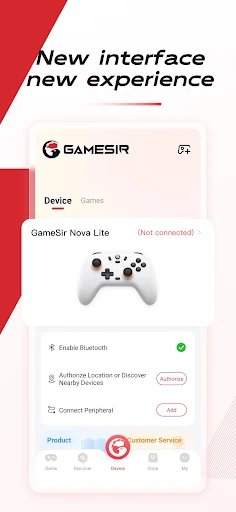
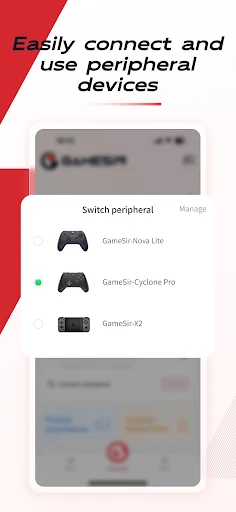
My first impression is that GameSir is built around a specific task rather than broad mobile gaming advice: connect and manage a peripheral, then make controller input useful in a game. The updated peripheral management page is described as making connection easier and supporting multi-device switching. That focus is welcome for players who want to spend more time playing and less time keeping track of their controller setup.
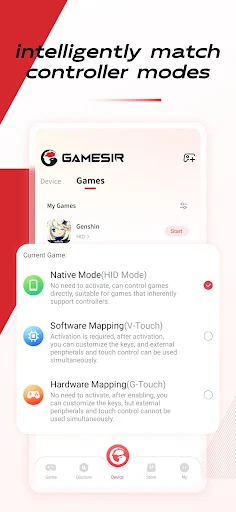
The app's core premise is that mapping can let a controller operate games without native gamepad support, without complex activation steps or root. I would still expect to spend some time selecting a game and configuring controls. The description emphasizes presets and personal configurations, which gives the process a starting point without suggesting that one setup automatically fits every game or player.
The Everyday Experience
Day to day, the appeal is having controller-related tasks collected in one app. GameSir includes game management, a Recently Played area and device configuration management, alongside the mapping tools. Those pieces support a straightforward rhythm: find the game, check the active peripheral and configuration, then get into play. For a regular controller user, that can be a more natural routine than treating each game session as a fresh experiment.
The practical experience still centers on how a mapped layout feels in a particular title. A game designed around touch controls may call for more thought than one with familiar gamepad-style actions. I would take a little time to check button and joystick assignments rather than assuming the first layout is ideal. The app's controls for vibration and triggers also give users settings to consider where those functions are relevant.
Useful Configuration Tools
Presets are one of the more approachable parts of the feature set. GameSir provides official configurations for a variety of popular mobile games, which can save a player from beginning with a blank layout. The other side of that flexibility is personal configuration: users can adjust their own setup rather than being limited to a preset. That balance is useful when a default arrangement is close but not quite comfortable.
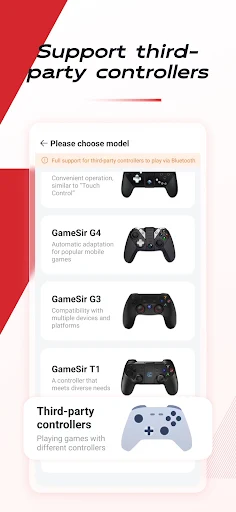
Peripheral controls go beyond a basic list of connected devices. The app describes management for buttons, joysticks, vibration and triggers, and it supports switching among multiple devices. It also says it supports third-party controllers. Those options make the app relevant beyond a single fixed controller arrangement, though users will still want to check how their own hardware behaves with the games they play.
A Simple Session Routine
For an evening session, I would start by opening GameSir and checking the peripheral I plan to use. If I am returning to a familiar game, Recently Played offers a direct path back to it. From there, I would look for a relevant preset configuration or select my own saved setup, then take a moment to confirm the buttons and stick controls before settling in.
If I move from one controller to another, the device-switching and configuration features are the parts I would keep in the routine. That is especially sensible when different peripherals call for different layouts. For a game played in landscape mode, GameSir says it supports controller operation in that orientation. A small pre-game check can make the session feel more consistent without turning setup into the main event.
Limits to Keep in Mind
Mapping is useful, but it does not make every mobile game identical to a game designed with a controller in mind. Some players may prefer touch input, and a configuration that suits one title may not suit another. GameSir offers presets and customization, but that still means the player has to choose or adjust a layout. I would think of it as a practical tool, not a promise of a perfect setup for every game.
The app's description says it needs permissions that match the games being played, because of how its operation works. That is worth considering before using a mapping tool, particularly if permission prompts are something you prefer to keep to a minimum. The low Google Play rating is another reason to approach it with realistic expectations and check compatibility for your controller and Android device before relying on it.
GameSir has a clear purpose: help controller users manage peripherals and map controls for mobile games that do not support gamepads directly. Presets, personal configurations and multi-device management give it useful depth for regular players. It is not a must-have for everyone, and setup remains part of the deal.
I would try it if I already used a controller with mobile games and wanted a single place to manage configurations. Players satisfied with touch controls can safely skip it. Given the low Google Play rating, I would check the store details and compatibility before making it part of my regular gaming routine.
GameSir Frequently Asked Questions
What is the GameSir app used for?
GameSir helps manage controller peripherals and use key mapping to operate mobile games that do not support gamepads directly. It offers preset configurations for a variety of popular games, customizable personal configurations, and controls for buttons, joysticks, vibration and triggers. It also includes Game Management and Recently Played features.
Which devices can run GameSir?
GameSir is an Android app available through Google Play. The supplied details do not give a minimum Android version, and controller compatibility can depend on the device and peripheral. Check the Google Play details and your controller's compatibility information before installing or planning to use it.
What Android version does GameSir require?
A minimum Android version is not provided in the app details available here, so I would check Google Play for the current requirement and device compatibility. The listed app version is 5.9.21. Requirements may change, so the store information is the best place to confirm what applies to your phone or tablet.
Does GameSir cost money or include purchases?
GameSir is listed as free on Google Play, with no in-app purchases and no ads. The listed price is zero. Store details can change over time, so it is worth checking the current Google Play page if you want to confirm the latest pricing before installing.
Who should use the GameSir app?
It is most relevant to Android players who use a controller and want to map inputs for games without native gamepad support. Players who prefer touch controls or only play titles with suitable built-in controller support may not get much from it. It is also worth checking the Google Play rating and controller compatibility before deciding.
Pros
- Maps controller inputs for games that lack native gamepad support.
- Offers official presets alongside customizable personal configurations.
- Includes peripheral management and multi-device switching.
- Supports third-party controllers and landscape-mode operation.
Cons
- Control mapping still requires choosing or adjusting a configuration.
- The Google Play rating is low at 2.4 stars.
- Minimum Android requirements are worth checking before installation.
- Category
- Tools
- Version
- 5.9.21