File Manager & Browser
- 55.02K
- 4.5
- Installs
- —
- Price
- Free

Screenshots

Analysis by Reviewed APKs
File Manager & Browser is a file-organizing and document-viewing app for iPhone and iPad. It suits people who want to keep a mix of documents, media and compressed files together, with ways to move files in and out and connect cloud services. My overall take is that it aims to be a practical pocket file cabinet: useful when you need more than a basic viewer, though its broad toolset may be more than a casual user needs.
A place for everyday files
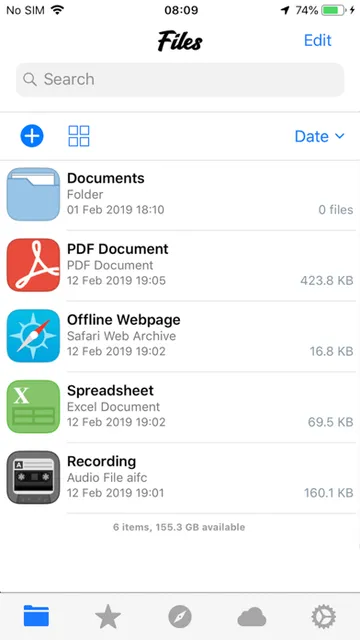
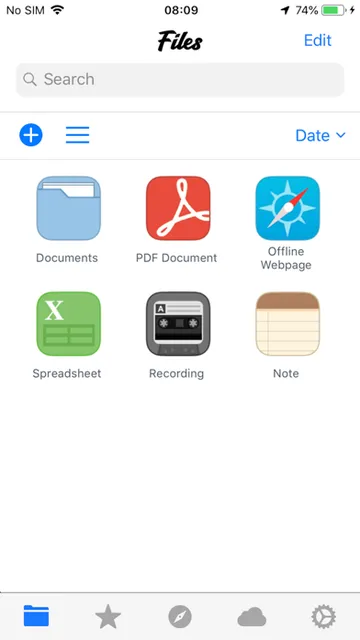
Imagine you have a PDF to read, a spreadsheet to check and a ZIP archive someone sent you. Instead of treating each item as a separate problem, File Manager & Browser is built to let you view several kinds of files in one app. It supports images, audio, video, PDFs, Word and Excel documents, along with ZIP and RAR files. That range makes it a plausible stop when a file arrives and you want to inspect it promptly.
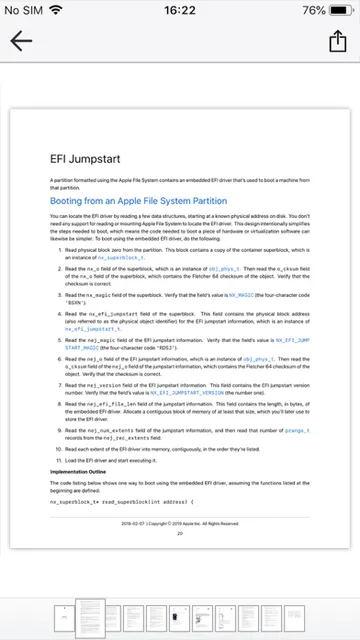
I would use it as a catch-all during a busy day: bring in a document, find it later with search or sorting, and open it in the app that makes the most sense. The built-in PDF reader and music player cover some common viewing and listening needs, while the “Open in” option lets other apps handle files too. It is less about a single file type and more about having several kinds within reach.
Beyond a basic viewer
Compared with opening each file directly in a dedicated reader or media app, File Manager & Browser puts organization and file movement at the center. It can copy or move multiple files, create and extract ZIP archives, and sort by name, date, size or kind. Cloud connections and computer-transfer options also make it more than a simple place to preview an attachment. The appeal is having a few useful file chores under one roof.
That does not make it a replacement for every specialist app. Its supported formats include Microsoft Office and Apple iWork documents, but the description presents it as a way to view and manage files, not as a full productivity suite for creating and editing them. It is also not a general cloud-storage service: Dropbox, OneDrive and other cloud connections are part of its file workflow, rather than the whole point of the app.
Small habits that help
A little sorting discipline can make a file manager more useful than a dumping ground. If I have collected a mix of receipts, work documents and media, sorting by kind or date gives me another route to the file I need. Search is handy when I remember a filename but not where I put it. These are simple tools, but they can save repeated browsing when the app is holding several types of content.
For a larger transfer, I would consider the options before starting: iTunes USB File Sharing, Wi-Fi transfer from a PC or Mac, or a connected cloud service. For sharing a single item, the app supports email, Bluetooth and Facebook, while “Open in” can hand a file to another app. Passcode protection is available for files that need an extra layer of privacy within this workflow.
More From Our News Desk

Zoom Meetings, Google Meet, or Teams: Which Is Easiest to Join?

How I Build a Free Streaming Lineup With Tubi

Why Crunchyroll Is the Default Anime App for So Many Fans

YouTube TV: A Practical Guide to Cutting Cable

Rummikub and the Small Comfort of Phone Games

TeamViewer Remote Control or AnyDesk for Helping Family?
Who may find it useful
I would recommend File Manager & Browser to iPhone and iPad users who regularly handle mixed file types and want ways to view, sort, transfer and share them from one place. It is especially relevant if you encounter PDFs alongside Office or iWork documents, or occasionally need to open compressed archives. People moving files between a computer and a mobile device may also appreciate the listed Wi-Fi and iTunes File Sharing options.
It may be less appealing if you only open the occasional attachment and already have a comfortable routine with separate apps. Anyone looking for a full document-editing suite should keep in mind that the described focus is file management and viewing. And if you prefer not to use cloud connections, transfer tools or a broader collection of file utilities, its range could feel unnecessary rather than helpful.
File Manager & Browser is made by TapMedia Ltd and is available for iPhone and iPad through the Apple App Store. The minimum operating-system requirement is iOS 10.0. The App Store rating is 4.5 out of 5, based on 55,021 ratings. The app first appeared on May 25, 2012, and its listed latest update was April 20, 2021.
The app is free to download. Its description also offers access to the TapMedia PRO bundle through a monthly subscription, with a one-week free trial; subscription renewal is automatic unless turned off. Prices can change, so I would check the App Store purchase details before subscribing. The content rating is 17+. The listed version is 3.6.
A flexible file cabinet for iPhone
Getting started
When I first opened an app with this many file jobs in mind, the important question was whether it could fit into an existing routine rather than demand a new one. File Manager & Browser is designed to accept files through several routes: cloud services, iTunes USB File Sharing and Wi-Fi transfer from a PC or Mac. That gives it a role whether the file starts on a computer, in cloud storage or on the device.
Its format support helps define what to try first. A PDF can go through the integrated reader, music can use the built-in player, and Office or iWork documents are among the supported types. ZIP files can be created or extracted, and the app also supports RAR files. I would start with the file I actually need to handle, then decide whether the built-in tools cover the task.
The daily file routine
The everyday value is in reducing little bits of app-hopping. When a document needs a quick look, an integrated reader can be convenient; if a different app is better suited, “Open in” provides another route. For a growing collection, search and sorting by name, date, size or kind offer practical ways to narrow things down. None of those functions is flashy, but together they address the ordinary problem of locating and using a file.
The management tools also cover the occasional cleanup. The description supports copying and moving multiple files, which is more useful than treating every item as a one-off. Creating and extracting ZIP archives adds a familiar way to bundle or unpack content. I would think of these as basic maintenance tools for a file collection, not as a promise that the app will automatically organize everything for me.
More than local storage
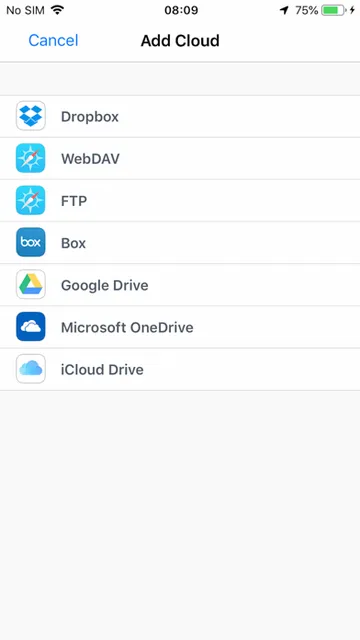
Cloud connections are one of the more useful parts of the pitch. The app names Dropbox and OneDrive, along with support for multiple cloud services. That can make it easier to reach files stored elsewhere without making cloud access the app’s entire purpose. The description does not specify every service or detail of how each connection works, so I would check the available options in the app before building a workflow around a particular provider.
The transfer choices add another layer. Wi-Fi transfer from a PC or Mac and iTunes USB File Sharing give users computer-to-device routes, while sharing options include email, Bluetooth and Facebook. Passcode protection is also listed for files. These features serve distinct needs—moving content, sending it on, and restricting access—rather than being variations on the same file-viewing function.
A useful weekly reset
One sensible routine would be to bring in a few files during the week, use search or sorting when something needs attention, and move or share items as required. If several documents arrive together, sorting by kind or date can help separate the immediate task from older material. When a bundle needs unpacking, ZIP extraction is available; when a group needs packaging, the app can create ZIP files.
For example, I might transfer a document from a computer over Wi-Fi, check it in the app, then use “Open in” if another app is better for the next step. A file I want to send could go out by email or another supported sharing option. This is a modest workflow, but it shows where the app’s variety matters: it can connect viewing, organization and transfer in one sequence.
Keep the scope in mind
The breadth is also the main trade-off. Someone who only needs to read an occasional PDF may not get much from cloud connections, computer transfers, archive tools and multiple sharing options. Conversely, people expecting a complete office editor should not confuse support for Office and iWork documents with a claim that the app replaces those productivity tools. Its described strengths are handling and viewing files.
There are practical details worth checking before settling on it for a particular setup. The app requires iOS 10.0 or later, and cloud-service availability can depend on what the app currently supports. The free download also sits alongside a TapMedia PRO subscription offer, so anyone considering the trial should review the subscription terms and price shown by Apple before proceeding.
File Manager & Browser makes a practical case for itself by combining broad file support with search, sorting, transfers, cloud connections and basic archive handling. I like that it can serve as a bridge between viewing a file and moving it somewhere more appropriate, rather than forcing every task into one tool.
I would try it if file handling is a regular part of using my iPhone or iPad, especially when documents and media arrive from different places. For occasional attachment viewing or full-scale document editing, I would look elsewhere or stick with existing apps. Its usefulness depends on how often you need a file cabinet, not just a reader.
File Manager & Browser Frequently Asked Questions
What is File Manager & Browser used for?
File Manager & Browser is for viewing and managing files on iPhone and iPad. It supports images, audio, video, PDFs, Office and iWork documents, and ZIP and RAR files. It also offers file search and sorting, moving and copying, archive tools, cloud connections, computer transfers and sharing options.
Which devices can run File Manager & Browser?
The app is described for iPhone and iPad and is available through the Apple App Store. Its minimum requirement is iOS 10.0. For device-specific compatibility details, check the app’s current App Store information, since requirements and availability can vary.
What iOS version does File Manager & Browser require?
The listed minimum operating-system requirement is iOS 10.0. That requirement applies to the iPhone and iPad app, rather than an Android version. I would check the App Store before installing to confirm compatibility details for a particular device and the current release.
Is File Manager & Browser free?
The app is free to download. Its description also offers a monthly TapMedia PRO bundle subscription with a one-week free trial, and says subscriptions automatically renew unless canceled. The price may vary, so check the App Store purchase information and terms before starting a trial or subscription.
Who should use File Manager & Browser?
It may suit iPhone and iPad users who regularly handle different file types and want viewing, organization, transfer and sharing tools together. It may be unnecessary for someone who only opens occasional attachments, and it is not described as a full document-editing suite. Its fit depends on your file-management habits.
Pros
- Supports a wide range of common documents, media files and compressed archives.
- Combines search, sorting, copying, moving and ZIP tools in one app.
- Offers cloud connections and transfer options from a PC or Mac.
- Includes an integrated PDF reader and music player.
Cons
- Its many tools may be unnecessary for users who only view occasional attachments.
- Office and iWork support is described for handling files, not full document editing.
- A monthly TapMedia PRO subscription is offered alongside the free download.
- Category
- Tools
- Version
- 3.6











