Feit Electric
- 15.38K
- 2.3
- Installs
- 1.00M
- Price
- Free

Screenshots
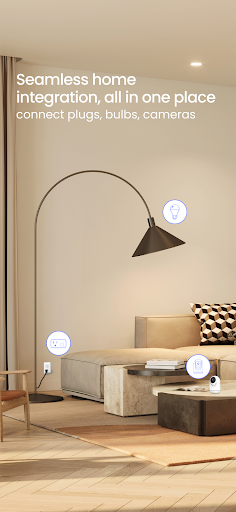
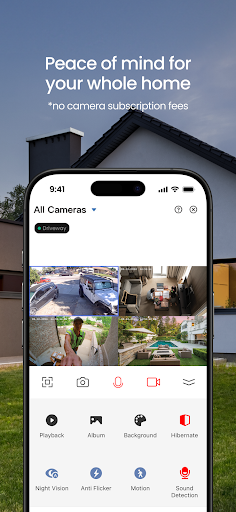
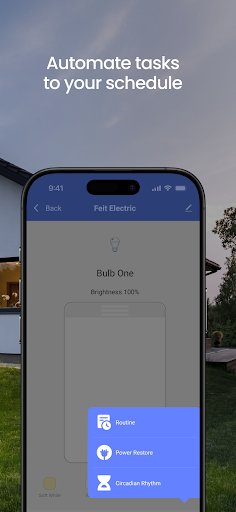
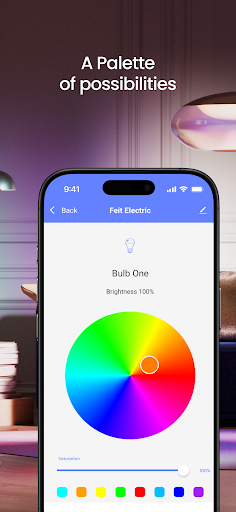
Analysis by Reviewed APKs
Feit Electric is a companion app for controlling Feit Electric LED Smart WiFi bulbs from a phone. It covers the useful basics: switching lights on and off, dimming, grouping bulbs, setting schedules, and adjusting color when a bulb supports it. I see it as a practical choice for people already using compatible Feit bulbs, though its modest Google Play rating makes it worth approaching with realistic expectations.
A More Convenient Evening
When I first thought through the app’s everyday role, I pictured getting home with my hands full and wanting the entry lights on before I reach the switch. With a Feit smart bulb connected, the app is meant to let me switch it on from my phone. Later, I could dim a compatible bulb for a quieter evening, rather than getting up to adjust it manually.
A simple routine is where the app’s core job makes the most sense. I could group the living room bulbs, set a schedule for a regular weekday, and use a timer when I want a light to turn off after a while. The appeal is not a complicated lighting project; it is having a few routine controls close at hand instead of relying on a wall switch.
A Companion, Not a Hub
Feit Electric is built around Feit Electric LED Smart WiFi bulbs, so it is a focused companion rather than a general smart-home control center. The bulbs connect directly to home Wi-Fi, and the app handles everyday light controls. If I already own compatible bulbs, that straightforward scope is useful. If I am shopping for a broader system to manage many kinds of devices, this app is not presented as that kind of tool.
There is some overlap with using a voice assistant: the listed bulbs can also work with Amazon Alexa or Google Assistant, so voice commands are another way to control them. The app remains useful for settings such as groups, timers, schedules, dimming, and supported color adjustments. I would not treat it as a way to control ordinary bulbs or other brands; its stated purpose is Feit’s smart WiFi lighting.
Small Ways to Make It Useful
I would start by giving a group a clear purpose, such as the lights I tend to use together in one room. That keeps the day-to-day choice simple: one group action instead of adjusting bulbs individually. For a compatible bulb, I would also try a comfortable brightness or color setting for a regular activity, so the controls solve a small recurring annoyance rather than becoming another thing to configure.
Schedules and timers are most useful when they match routines I already follow. A schedule can suit a light I usually want on at a particular time, while a timer works for a one-off reminder to switch it off. I would keep the setup modest at first and add controls only when they prove useful. The app’s value is in these repeatable basics, not in endlessly tweaking a lighting scene.
More From Our News Desk

Zoom Meetings, Google Meet, or Teams: Which Is Easiest to Join?

How I Build a Free Streaming Lineup With Tubi

Why Crunchyroll Is the Default Anime App for So Many Fans

YouTube TV: A Practical Guide to Cutting Cable

Rummikub and the Small Comfort of Phone Games

TeamViewer Remote Control or AnyDesk for Helping Family?
Who Will Get the Most From It
I would recommend Feit Electric to someone who has Feit Electric LED Smart WiFi bulbs and wants a phone-based way to manage them. The combination of on/off control, dimming, groups, timers, and schedules covers common household needs without asking the user to build a complex system. Color and color-temperature adjustments add another option, provided the particular bulb supports them.
It may be a poor fit for someone who does not use Feit bulbs, wants a single app for a range of smart-home brands, or expects extensive automation features beyond the listed controls. I would also keep the Google Play rating in mind before making it central to a daily routine. The app is best judged as a focused control companion, not as a reason on its own to buy into a lighting setup.
Feit Electric is developed by Feit Electric and is listed in the Tools category on Google Play. It has over one million installs and a 2.3-star rating from around 15,000 ratings. Those figures provide useful context for prospective users, though ratings reflect a range of experiences and do not tell me exactly how the app will perform with a particular bulb or home Wi-Fi setup.
The app is free to download, with no in-app purchases or ads indicated in the provided store facts. Its content rating is Everyone. The current version given is 4.1.8; it was released on January 11, 2018, and its latest update is dated April 23, 2026. The minimum Android version is not included in the available facts, so check Google Play for device compatibility.
Everyday Control for Feit Smart Bulbs
Getting Started
My first impression is that this app has a very specific assignment: connect a Feit smart bulb to home Wi-Fi, then make everyday lighting controls available on a phone. The setup is described as simple, with the bulb connecting directly to the home network. That direct connection keeps the basic idea easy to understand: the app is for the bulb, rather than a separate lighting hub.
Before relying on it, I would make sure the bulb is one of the Feit Electric LED Smart WiFi bulbs the app is designed to manage. From there, I would begin with one light and test the basic on/off control. Starting small is sensible with any connected lighting setup, and it gives me a chance to see whether the controls suit my home before arranging groups or schedules.
The Daily Controls
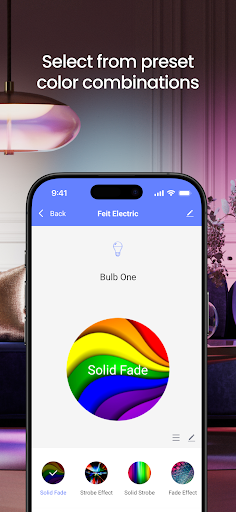
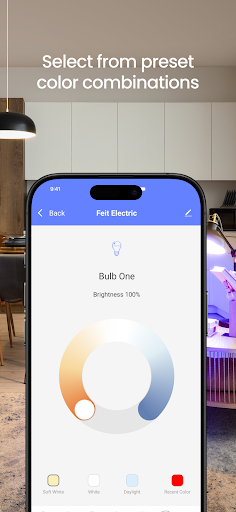
The core experience is a set of practical light adjustments. I can use the app to turn a bulb on or off and dim it, then organize lights into groups when I want several to behave together. These are the kinds of controls that matter in ordinary use: changing a room’s brightness during the day, or switching a group off without walking around to each bulb.
Timers and schedules extend that simple control into routines. A timer is handy for a light I want on temporarily, while a schedule can handle a repeated time-based task. I like that these functions are easy to imagine using without needing a special occasion. They are small conveniences, though their usefulness depends on having compatible bulbs connected and on choosing settings that match how I actually use the room.
Color and Voice Options
Color control is conditional, not universal: the app can customize color or tune color temperature if the bulb supports those features. That distinction matters, since I would not assume every Feit bulb offers every adjustment. For a bulb that does, those controls can make the app more than a remote switch, letting me adapt the light to a preferred look or warmth.
The product description also says the Wi-Fi bulbs can work with Amazon Alexa or Google Assistant for voice commands. That gives users another way to handle straightforward changes when reaching for a phone is inconvenient. I see voice control as a complement to the app, not a replacement for its schedules, timers, or group controls. The app’s strongest point remains having those lighting options collected in one place.
A Simple Home Routine
For a practical routine, I would put the lights I regularly use together into a group and use that group for the usual evening switch-on. If a bulb supports dimming, I could lower its brightness for the later part of the night. A schedule could take care of a repeated lighting time, while a timer would be better for an occasional situation where I want the light to turn off without remembering.
I would avoid making the setup more elaborate than necessary. A couple of clearly chosen groups and one useful schedule are easier to live with than a collection of settings I forget about. If I use a voice assistant with the bulbs, I could reserve voice commands for quick changes and keep the app for configuring the controls. That division keeps the routine practical rather than fussy.
Keep Expectations Grounded
The biggest limitation is the app’s narrow compatibility focus: it is described as controlling Feit Electric LED Smart WiFi bulbs, not lighting products in general. Some functions also depend on the bulb itself, particularly color and color-temperature adjustment. I would check that a specific bulb supports the feature I want rather than assuming every control applies to every product.
The Google Play rating is 2.3 stars from around 15,000 ratings, a clear reason to temper expectations. A rating alone cannot explain what individual users experienced, but it is relevant context for an app I might use regularly. I would try the basic controls with the bulbs I have and see how well the setup fits my routine before depending on it for more.
Feit Electric covers the basics I would want from a dedicated smart-bulb companion: phone controls, dimming, groups, timers, schedules, and supported color adjustments. Its focus is also its main boundary. It is designed for Feit’s Wi-Fi bulbs, not for managing a whole mixed-brand smart home.
If you already own compatible Feit bulbs and want simple routine controls, it is worth trying. I would check compatibility and keep the modest store rating in mind. If you are choosing an app for a wider smart-home setup, this focused lighting tool may not be the right fit.
Feit Electric Frequently Asked Questions
What is the Feit Electric app used for?
Feit Electric is used to control and manage Feit Electric LED Smart WiFi bulbs. Its listed functions include switching lights on and off, dimming, making groups, setting timers or schedules, and adjusting color or color temperature when a bulb supports those options. The bulbs can also work with Amazon Alexa or Google Assistant for voice commands.
Which phones and devices support Feit Electric?
The provided store information identifies Feit Electric as an Android app on Google Play. The app is described as controlling Feit Electric LED Smart WiFi bulbs, which connect directly to home Wi-Fi. Check the Google Play store page for current device compatibility and requirements, since those details can vary.
What Android version does Feit Electric require?
The minimum Android version is not provided in the available app facts. For the current requirement, check Feit Electric’s Google Play store page on the device you plan to use. The app is intended to manage compatible Feit Electric LED Smart WiFi bulbs connected to your home Wi-Fi.
Is Feit Electric free, and does it have purchases?
Feit Electric is listed as free to download, with no in-app purchases or ads indicated in the provided store facts. Store details can change, so the Google Play page is the best place to check current terms before downloading. The app is designed to work with Feit Electric LED Smart WiFi bulbs.
Is Feit Electric a good fit for my home?
It may suit you if you have compatible Feit Electric LED Smart WiFi bulbs and want phone controls for dimming, groups, timers, schedules, or supported color settings. It is not presented as a general controller for other brands or device types. Google Play shows a 2.3-star rating from around 15,000 ratings, which is useful context when deciding.
Pros
- Covers everyday bulb controls, including on/off switching, dimming, groups, timers, and schedules.
- Compatible bulbs connect directly to home Wi-Fi, without a separate lighting hub described.
- Supports color or color-temperature adjustments when the particular bulb offers them.
- Can work alongside Amazon Alexa or Google Assistant voice commands.
Cons
- Designed for Feit Electric LED Smart WiFi bulbs rather than general smart-home control.
- Color and color-temperature controls depend on the capabilities of the individual bulb.
- Its 2.3-star Google Play rating suggests setting measured expectations.
- Category
- Tools
- Version
- 4.1.8











