Extra Space Storage
- 11.65K
- 4.2
- Installs
- 1.00M
- Price
- Free
Screenshots

Analysis by Reviewed APKs
Extra Space Storage is a companion app for people who already rent a unit with the company. It brings account payments, facility details and, at participating locations, phone-based gate and unit access together. I like its practical focus: it is meant to make a storage visit or monthly bill a little easier, rather than replace the whole process of choosing and renting a unit.
A Smoother Storage Visit
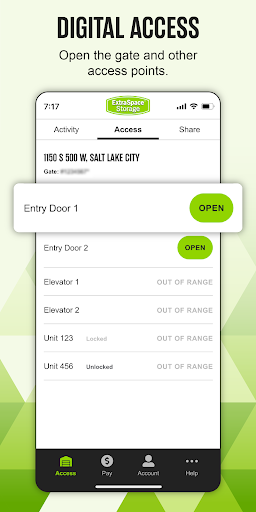
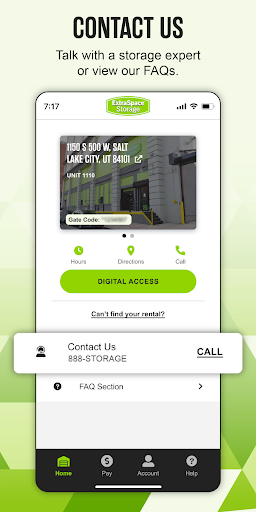
Picture a Saturday trip to pick up a box of winter clothes. Instead of searching old messages for the facility address or trying to remember a gate code, I can open Extra Space Storage and find the facility details and code from the home page. At participating facilities, Bluetooth access can open the gate from the phone, which is a useful alternative to entering the code on a keypad.
Once inside, the app can also show real-time access activity for a unit at participating facilities. That could be handy if I have shared access with a family member or mover and want a clearer sense of when the unit was accessed. The main benefit is less scrambling around during an ordinary visit; the app keeps several small but relevant storage tasks close at hand.
A Companion, Not A Marketplace
The app makes the most sense after someone has an Extra Space Storage account and unit. Its emphasis is on managing that relationship: checking facility information, paying a bill, updating account details and using supported digital access. For those tasks, it offers a more direct route than relying on paper notes, a keypad code kept in a text thread, or a separate trip to ask a question.
It is not presented as a broad storage-search or comparison tool. I would not choose it expecting to browse providers, compare unit prices, or plan a move from start to finish. Its usefulness also depends on the facility: Bluetooth gate access, activity tracking and sharing access are described for participating locations. People who prefer handling everything in person may not need another account app.
Small Habits That Help
I would make a quick check of the app part of the routine before leaving for a storage run. Confirming the address, operating hours and contact information can prevent a wasted drive, while having the gate code on the home page saves a last-minute search. If the location supports Bluetooth access, it is worth opening the app before reaching the gate rather than fumbling with the phone at the keypad.
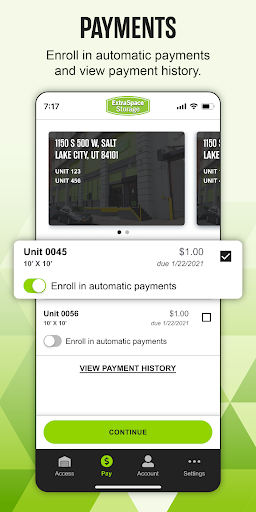
For account upkeep, the app supports single payments when a bill is due and Easy Pay setup, as well as updating account information. I would pick the payment approach that fits my own routine and check the account periodically. If other people need access, the sharing option at participating facilities can provide access without handing over a code or keys.
More From Our News Desk

Zoom Meetings, Google Meet, or Teams: Which Is Easiest to Join?

How I Build a Free Streaming Lineup With Tubi

Why Crunchyroll Is the Default Anime App for So Many Fans

YouTube TV: A Practical Guide to Cutting Cable

Rummikub and the Small Comfort of Phone Games

TeamViewer Remote Control or AnyDesk for Helping Family?
Who Will Find It Useful
I would recommend Extra Space Storage to current customers who like keeping practical account tasks on their phone. It is especially relevant if I visit my unit often, want the facility's details handy, or would rather manage payments and account information without switching to another channel. At a participating facility, digital gate access and access sharing can make visits with family, friends or movers easier to coordinate.
It may be less compelling for someone who rarely visits their unit and is already comfortable managing payments another way. Prospective renters looking for a tool to compare storage companies or explore unit options should also look elsewhere for that purpose; the described app centers on customer and facility management. And if a location does not support Digital Access, some of the most distinctive visit-related features will not apply.
Extra Space Storage is developed by Extra Space and is listed in the Tools category on Google Play. The app has more than one million installs and a 4.2-star rating from about 11,600 ratings. It is free to download, with no in-app purchases or ads. Its content rating is Everyone, making the store's age classification straightforward.
The current version provided is 10.0.7. The app was released on January 6, 2021, and its last update is dated October 27, 2026. An Android minimum version is not included in the available app facts, so I would check Google Play for the requirement shown for a particular device before installing.
Storage Tasks, Without The Scramble
A Practical First Impression
When I first opened Extra Space Storage, the clearest idea was that it belongs in the pocket of someone with a unit, not on the phone of someone casually researching storage. The home page's gate-code placement is a sensible touch: that is exactly the sort of detail people may need while standing outside a facility, rather than something they want to dig through an account screen to find.
The app's setup and account features are described around access to My Account, where customers can handle payments and update their information. I would expect the experience to be most useful once the account and facility relationship are already in place. The available feature description does not suggest a long onboarding journey or a need to learn a complicated set of tools.
Everyday Account Management
For day-to-day use, the app combines administrative chores with details for visiting the facility. I can see why that combination matters: a bill may need attention on a quiet evening at home, while the address, hours or gate code matter on the way to the unit. Keeping both kinds of tasks in one company app can reduce the number of places I need to check.
Payments can be made as a single payment when the bill is due, or customers can set up Easy Pay. The app also allows account information to be updated. These are familiar, practical tools rather than an elaborate budgeting system, and that is appropriate for the job. The value is convenience and access to account functions, not detailed financial planning.
Digital Access Has Limits
Bluetooth gate access is the feature that most changes the feel of a storage visit. At participating facilities, the phone can open the gate without using the keypad. It is a small change, but it can be welcome when I have boxes in hand or when entering a code would be awkward. The gate-code option remains useful as a separate way to keep that information available.
At participating facilities, the app can also track access activity for a unit in real time and share access with family, friends or movers without giving out the access code or keys. Those capabilities make the app more than a bill-payment shortcut. Still, participation matters: I would check whether my particular facility offers Digital Access rather than assume every location has the same controls.
A Simple Monthly Routine
A low-effort routine could start with checking the account around the time a bill is due. I can use the app to make a single payment, or set up Easy Pay if that suits how I prefer to manage the bill. While I am there, updating account information keeps the account details from becoming an afterthought that only gets handled when something needs fixing.
Before a planned visit, I would check the facility address, operating hours and contact information, then bring up the gate code or use Bluetooth access if the location supports it. If a mover or relative needs to visit, the sharing feature may be useful at participating facilities. This is not a complicated workflow; it is a few small checks that can make a storage errand less fiddly.
Keep The Scope In Mind
The biggest limitation is that some access features depend on the facility. Bluetooth gate opening, real-time access activity and sharing access are all described for participating locations, so the app cannot guarantee the same experience at every site. Customers unsure about Digital Access can check the company website or call their store manager, as the app information recommends.
There is also a clear boundary around what the app is for. Its described strengths are customer account management and access to an existing storage facility, not comparing providers or planning every part of a move. If I only need occasional storage and rarely interact with my account, the convenience may be modest. It earns its place through useful shortcuts, not a long list of unrelated extras.
Extra Space Storage is a focused utility for customers who want account management and facility access in one place. I appreciate the useful mix of payment tools, facility details and, where supported, digital access features. The home-page gate code is a particularly practical detail for anyone who visits regularly.
I would recommend it to current Extra Space Storage customers who prefer handling routine tasks on a phone, especially those at a facility with Digital Access. It is less necessary for occasional users or people hoping to shop around for storage. Before relying on phone access, check what your own facility supports.
Extra Space Storage Frequently Asked Questions
What is the Extra Space Storage app used for?
Extra Space Storage is for customers managing an Extra Space Storage account and facility. It provides facility address, hours and contact details, keeps the gate code accessible, and supports payments and account updates. At participating facilities, it can also support Bluetooth gate access, access activity tracking and sharing access with others.
Which devices can run Extra Space Storage?
Extra Space Storage is an Android app available through Google Play. The Android version requirement can vary as the app and device software change, so check the Google Play page for the current requirement before installing. The provided app information does not describe an iOS or desktop version.
Does Extra Space Storage cost money?
The app is free to download on Google Play. The provided facts say it has no in-app purchases and contains no ads. That describes the app itself; for details about a storage account or facility, customers should refer to their account or contact their Extra Space Storage facility.
Can Extra Space Storage open my facility gate?
At participating facilities, the app uses Bluetooth technology to open the gate without entering a code on the keypad. It also keeps the gate code on the home page. Digital Access is not described as available everywhere, so check with your facility or store manager about the features it supports.
Is Extra Space Storage useful for occasional customers?
It can still help occasional customers find facility details, access the gate code and manage payments or account information. Its value is greater for people who visit regularly or whose facility supports Digital Access. If you only need to compare storage providers, the app's described focus is not that kind of search.
Pros
- Keeps facility address, hours, contact details and gate code readily available.
- Supports single payments, Easy Pay setup and account information updates.
- Offers Bluetooth gate access and access sharing at participating facilities.
- Free to download, with no in-app purchases or ads.
Cons
- Digital access and activity features depend on facility participation.
- The app focuses on existing Extra Space Storage customers, not provider comparisons.
- Less useful for customers who rarely visit or manage their account.
- Category
- Tools
- Version
- 10.0.7











