Cx File Explorer
- 353.89K
- 4.7
- Installs
- 10.00M
- Price
- Free
Screenshots


Analysis by Reviewed APKs
Cx File Explorer is an Android file manager for people who want to organize local files, check storage use, and reach shared or cloud storage from one place. I like that it covers practical file tasks without making its purpose hard to understand. It can suit anyone who regularly moves files around, though its wider set of connections will matter more to some people than to others.
A File-Day Scenario
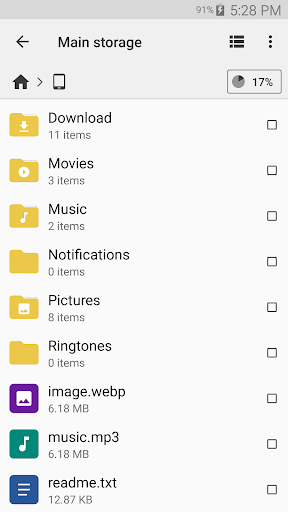
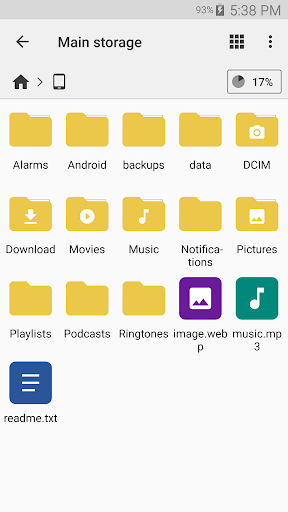
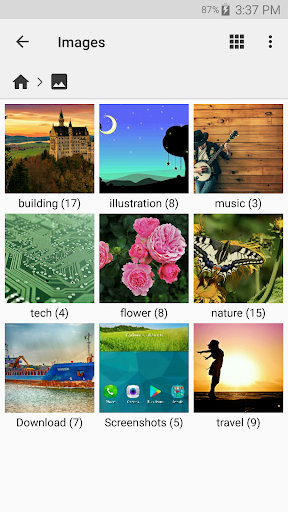
When I first opened Cx File Explorer, I thought about the small jobs that tend to pile up on a phone: finding a downloaded document, moving photos into a folder, or clearing space before saving something new. The app is built for those chores. I can browse internal or external storage and copy, move, rename, compress, extract, share, or delete files without treating each task as a separate project.
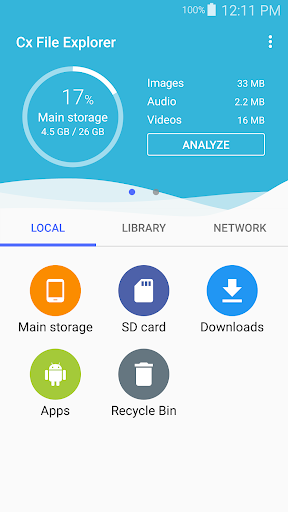
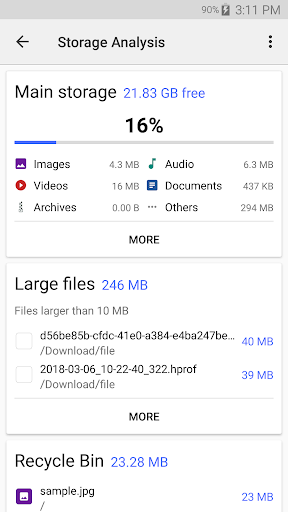
A realistic use might be sorting a batch of files after a busy week. I can find the items I need, create a folder, and move them into it, then check the storage analysis if the phone feels crowded. The recycle bin offers another place to manage deleted items. That combination makes Cx useful for both routine tidying and the occasional deeper cleanup, without requiring a desktop computer.
More Than Local Folders
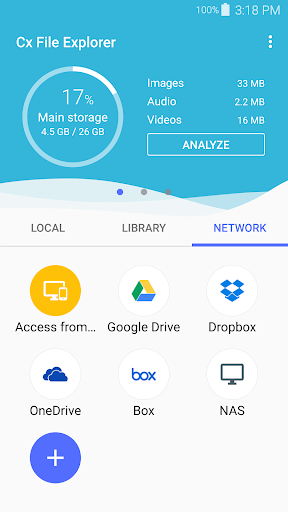
The obvious alternative is a basic file browser that stays focused on folders stored on the device. Cx File Explorer goes further: its description includes cloud storage management and access to remote or shared storage through FTP, FTPS, SFTP, SMB, WebDAV, and LAN. It also supports Android phones, tablets, and TVs. That breadth is helpful if files live in several places, but people who only need to open a download may not use much of it.
I would think of Cx as a practical organizer, not as a replacement for every app that handles content. Its job is to manage files and storage, including installed apps, rather than to turn a phone into a full desktop workspace. Nor is storage cleanup a reason to delete things blindly: the tools help identify and manage files, while choosing what to keep remains up to me.
Small Habits That Help
I get more value from a file manager when I use it before things become messy. Creating a few clear folders and moving files into them as I go is easier than searching through a crowded download area later. Cx supports creating folders, renaming items, and sharing files, so those small organizing habits fit naturally into its core toolkit.
For a quick storage check, I would use the visual analysis to see how space is being used, then review possible cleanup targets rather than removing items on autopilot. The storage cleaner can look for junk files, duplicate files, and unused apps, while the recycle bin is available for managing deleted items. If I regularly use remote storage, checking those connections during an ordinary file task can also save a separate trip.
More From Our News Desk

Zoom Meetings, Google Meet, or Teams: Which Is Easiest to Join?

How I Build a Free Streaming Lineup With Tubi

Why Crunchyroll Is the Default Anime App for So Many Fans

YouTube TV: A Practical Guide to Cutting Cable

Rummikub and the Small Comfort of Phone Games

TeamViewer Remote Control or AnyDesk for Helping Family?
Who May Find It Useful
I would recommend Cx File Explorer to Android users who often move, rename, or share files and want a clearer view of device storage. It has particular appeal if your routine includes external storage, cloud files, or a home network share, since it can manage local content alongside those other locations. The familiar file-manager approach should also make sense to people who prefer folders over relying entirely on individual apps.
It may be more than you need if you rarely browse files and are happy with the simple file access built into your usual apps. Remote-storage options are useful only if you have a reason to connect to them, and cleanup suggestions still require a little judgment. I would also look elsewhere if what you want is a dedicated document editor or media player rather than a tool for organizing and managing files.
Cx File Explorer is developed by Cx File Explorer and is listed as a Tools app on Google Play. It has over 10 million installs and a 4.7-star rating from around 354,000 ratings. The app is free, with no in-app purchases or ads according to the supplied store facts. Its content rating is Everyone.
The supplied app facts give version 2.8.1, a release date of July 11, 2018, and a last update date of October 3, 2026. No minimum Android version is included in those facts, so I have not stated one. Compatibility can depend on the device and current store information, which is worth checking before installing.
A Closer Look at Everyday File Work
A Clear Starting Point
When I first opened Cx File Explorer, the strongest impression was its stated focus on a clean, intuitive interface. That matters for a utility app: file management can feel fiddly when every action requires hunting through menus. Cx aims to put everyday browsing and management in reach, while still offering more than a bare list of folders.
The app is designed for Android phones, tablets, and TVs, so it is not framed as a phone-only tool. The basic idea is easy to understand across those devices: browse files, manage them, and get a better sense of storage use. The first useful step is simply locating the files and storage areas that are relevant to your own routine.
The Daily File Routine
For ordinary file work, Cx covers the actions I expect to reach for most: copying and moving, renaming, compressing and extracting, deleting, creating folders, and sharing. Those are practical verbs rather than flashy features, and that is the point. If I download something and need to put it somewhere sensible, the app is set up to handle that sort of housekeeping.
It also supports both internal and external storage on the device. That gives the app a useful role when files are split between phone storage and removable storage, rather than gathered in one place. I would still approach deletion carefully, especially when tidying quickly; a file manager makes actions easier, but it cannot decide which personal files are expendable.
Connections and Storage Tools
The standout feature set is the range of places Cx can work with. Its description says it can manage cloud storage and access remote or shared storage using FTP, FTPS, SFTP, SMB, WebDAV, and LAN. For someone who already uses those kinds of locations, having them within a file manager can make routine transfers and browsing feel less scattered.
Storage analysis is another useful distinction. Cx presents a visual view of space usage, and its cleaner can identify junk files, duplicate files, and unused apps. The recycle bin adds a way to manage deleted items. These are tools for understanding and organizing storage, not a promise that every suggested cleanup is automatically the right choice for every device.
A Simple Weekly Check
One practical routine would be to spend a few minutes once a week sorting recent downloads and checking what is taking up space. I would move files that belong together into folders, rename anything likely to be hard to recognize later, and share or delete items only when I know what they are. Cx supports those basic actions without requiring a separate app for each one.
If storage starts getting tight, I would then look at the visual analysis and use the cleaner as a guide to possible clutter. Reviewing duplicate files or unused apps can be a reasonable starting point, but I would pause before removing anything important. The recycle bin is also relevant to that process, since it gives deleted items a separate place to manage.
Keep the Scope in Mind
Cx File Explorer is broad, but the core remains file and storage management. Its support for remote protocols will not be especially valuable if all your files stay on the device, and the app is not described as a document editor or a dedicated media app. I would choose it for organizing and locating content, not expect it to replace the tools that create or deeply edit that content.
The cleanup side also deserves a measured approach. Finding junk, duplicate files, or unused apps can help surface candidates for review, but a cleanup tool cannot know the personal importance of every item. Likewise, the number of connection types is useful only when they match the storage you already use. The best fit is someone who wants these options available and will use them deliberately.
Cx File Explorer makes a sensible case for itself by combining everyday folder tasks with storage analysis and access to several kinds of shared or cloud storage. I like that the usefulness is not limited to one dramatic feature; it comes from having common chores and less frequent connections under the same roof.
I would recommend it to Android users who actively manage files or want a better view of device storage. If you only open the occasional attachment, a simpler setup may be enough. For regular file tidying, though, Cx offers a practical toolkit without requiring a complicated workflow.
Cx File Explorer Frequently Asked Questions
What is Cx File Explorer used for?
Cx File Explorer is an Android file manager for browsing and organizing files on a device, including internal and external storage. It can copy, move, rename, compress, extract, delete, create, and share files or folders. It also includes visual storage analysis, cleanup tools, app management, and access to cloud or remote storage.
Which devices can run Cx File Explorer?
Cx File Explorer is an Android app, and its description names Android phones, tablets, and TVs as supported device types. The minimum Android version is not included in the supplied app facts, so compatibility can depend on the device and current release. Check the Google Play store details for the requirements that apply to your device.
Does Cx File Explorer cost money?
The supplied Google Play facts describe Cx File Explorer as free, with no in-app purchases and no ads. Store details can change over time, so it is worth checking the current Google Play page before installing if pricing or purchasing options are important to you.
Can Cx File Explorer connect to shared storage?
Yes. Its description says it can access cloud storage and remote or shared storage through FTP, FTPS, SFTP, SMB, WebDAV, and LAN. It also says a PC can access the mobile device using FTP. Whether a particular connection fits your setup depends on the storage service or network you use.
Is Cx File Explorer a good fit for everyone?
It is a good fit for Android users who regularly organize files, check storage, or work with cloud and shared storage. People who only need to open occasional files may not use its broader tools. It is a file manager and storage utility, rather than a dedicated editor or media player.
Pros
- Handles common file tasks, from moving and renaming to compressing and sharing.
- Includes visual storage analysis and tools for reviewing potential clutter.
- Supports cloud and several remote or shared storage connection types.
- Works across Android phones, tablets, and TVs.
Cons
- Its wider connection options may be unnecessary for simple local file browsing.
- Cleanup suggestions still need careful review before removing anything.
- It is a file manager, not a dedicated document or media editor.
- Category
- Tools
- Version
- 2.8.1











