Color Picker: Find Name & Code
- 5.79K
- 4.2
- Installs
- 1.00M
- Price
- Free

Screenshots
Analysis by Reviewed APKs
Color Picker: Find Name & Code turns a phone camera or saved image into a practical way to identify colors and collect their codes. I found it best suited to designers, developers, artists, and anyone who often needs to move between a visual reference and a usable color value. It goes well beyond a basic picker, though its extensive measurement tools make it more technical than some casual users may need.
From Reference to Code
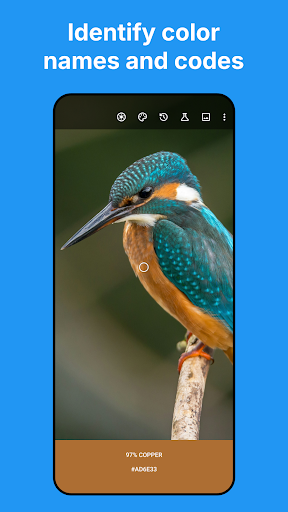
When I first used the camera picker, I pictured a familiar everyday problem: matching a color I had spotted in a shop, a printed image, or a room to a value I could use later. The app can analyze a live camera view or a saved image, then identify a color name and show its code. I could adjust the sampling area, which is useful when the target is small or the surrounding colors might affect the result.
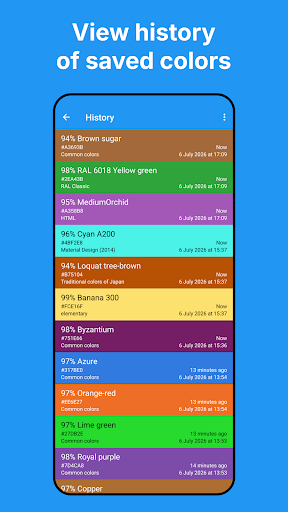
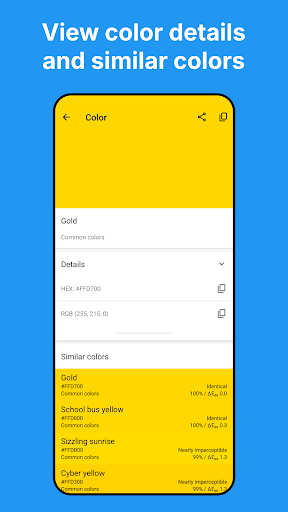
For a web task, I would capture a shade from an image, note its HEX or RGB value, and keep the result in the app’s history for later reference. If I wanted to compare nearby options, the detailed color view can show similar colors and their Delta E differences. The process connects visual inspiration to practical color data without requiring me to type a code from scratch or guess a name.
More Than a Simple Picker
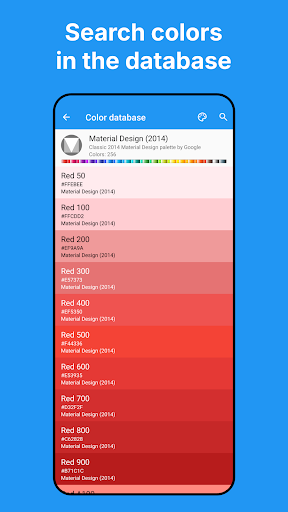
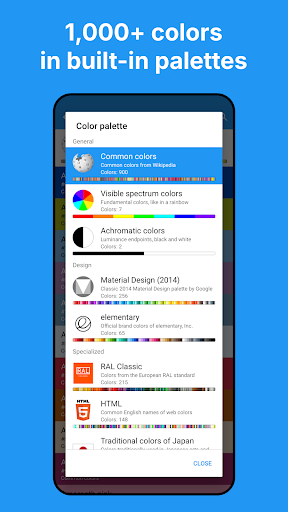
A basic color picker usually answers one question: what code does this pixel represent? This app handles that job, but it also offers a searchable database of built-in color collections, custom palettes, saved history, and several color models. That makes it more useful when I need to compare, organize, or revisit colors rather than simply copy one value and move on.
It is not a full design or image-editing app, and it does not replace careful physical color matching. The description warns that displayed samples can differ from the originals and that the tool is not intended for high-accuracy matching. I would use it to explore and record color references, not to make a final call where exact material or print matching is essential.
Small Habits, Better Results
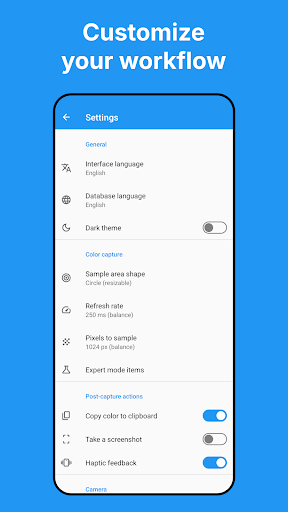
I would start by deciding whether I need a single-pixel reading or an average across a larger area. Resizing the sampling area can help avoid picking up a stray edge or nearby shade. The settings also let users adjust the number of pixels sampled, balancing processing speed against precision. Those small choices matter more than rushing a capture, especially when the image has texture or uneven lighting.
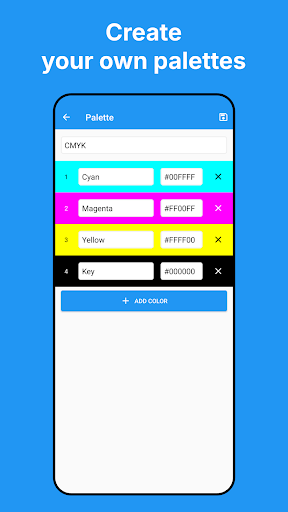
For repeated work, custom palettes and color history provide a tidy place to keep useful references. The app can copy a captured HEX code automatically, and users can save colors, share selections, or import and export history and palettes through CSV. I would also search the database by color name or HEX when I already have a value and want to find a named entry or browse related collections.
More From Our News Desk

Zoom Meetings, Google Meet, or Teams: Which Is Easiest to Join?

How I Build a Free Streaming Lineup With Tubi

Why Crunchyroll Is the Default Anime App for So Many Fans

YouTube TV: A Practical Guide to Cutting Cable

Rummikub and the Small Comfort of Phone Games

TeamViewer Remote Control or AnyDesk for Helping Family?
Who Will Get the Most From It
I would recommend Color Picker: Find Name & Code to people who regularly work with color values: UI and web designers, developers, artists, and painters looking for a quick way to capture and organize references. The mix of live camera analysis, image sampling, code formats, searchable collections, and history gives it room to fit into an ongoing workflow rather than being useful for only one quick lookup.
It may feel like more tool than someone needs if they only want an occasional color name. Expert Mode and its scientific measurements add useful depth for people who want that data, but they also make the app more technical than a bare-bones picker. Anyone relying on exact real-world color matching should keep the app’s own warning in mind: screen samples can vary from the original.
Color Picker: Find Name & Code is an Android tools app by Mikhail Gribanov. Google Play shows over 1 million installs and a 4.2-star rating from about 5,800 ratings. It is free to install, contains ads, and offers in-app purchases priced at $4.99 per item. Its content rating is Everyone.
The supplied app details give version 11.1.1, a release date of September 15, 2016, and a last update date of July 7, 2026. A minimum Android version is not included in the available app details, so check Google Play for the requirement that applies to your device.
A Closer Look at Color Workflows
Getting Started
My first impression is that this is a working tool rather than a novelty camera filter. The central idea is easy to grasp: point the camera or choose an image, sample a color, then inspect its name and values. That makes the first task approachable even if the app’s deeper options are unfamiliar.
The adjustable sampling area is a sensible early control to learn. A single pixel and an average across a circular or square region can produce different readings, particularly in a photo with texture. I would try both on a stable reference before building a routine around the results. The app also lets users tune how many pixels are sampled in settings.
Everyday Color Capture
In day-to-day use, the camera and saved-image options cover two different kinds of work. The live feed suits a quick observation, while analyzing an image is handy when a reference is already in a gallery or another app. Sharing images into the app can make that second route easier, and text shared from other apps can be searched against its color database.
Once I have a reading, I can keep it in history, save an individual color, or share selections. Automatic HEX copying is especially convenient when the next step is entering a value somewhere else. It removes a small bit of repetitive handling, though I would still check that the sampled region and displayed code are the ones I intended to use.
Technical Tools That Stand Out
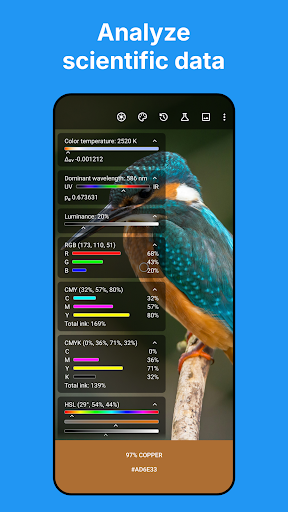
Expert Mode is the biggest step beyond a basic picker. It can show color temperature in Kelvin, dominant wavelength in nanometers, and luminance, alongside values in models including HEX, RGB, CMY, CMYK, HSL, HSV, RYB, CIE LAB, and CIE XYZ. Users can expand data rows and adjust which elements appear, so the overlay can be tailored rather than treated as one fixed panel.
The built-in database is another useful strength, with collections ranging from common colors and the visible spectrum to Material Design, RAL Classic, HTML, and traditional Japanese colors. Custom palettes let users create their own libraries. The app also describes real-time color matching using the CIEDE2000 algorithm, and detailed views can show Delta E differences between similar colors.
Camera controls add more room to adjust a capture: users can toggle the flashlight and change focus, exposure, and white balance, as well as cycle through available cameras, including external ones. For users who want to connect color readings to other tools, the app can stream JSON color data from the camera feed to a PC or device on the same local Wi-Fi network.
A Practical Project Routine
For a small design task, I would begin with a reference image, sample a few candidate shades, and save the useful readings to history. I could then compare similar colors in the detailed view and organize final choices in a custom palette. Searching by a known HEX value is also handy when I want to check how it appears in one of the app’s built-in collections.
When the values need to move between devices or into a project, I could share selected colors or export a palette and history as CSV. If I am working at a computer, the local web server option can stream camera color data over local Wi-Fi. These features make the app more than a one-off lookup tool, particularly for workflows that involve collecting and reusing several shades.
Limits to Keep in View
A camera reading depends on what the phone sees, and the app explicitly cautions that displayed samples may vary from the original. Lighting, the screen, and the chosen sampling area are practical reasons to treat a reading as a reference rather than an exact physical match. The developer also says the app is not intended for high-accuracy matching.
The number of formats and measurements can be a lot to take in if all I need is a quick RGB value. Fortunately, many of those details are optional or can be adjusted in settings, but casual users may still prefer a simpler interface. The app contains ads and offers in-app purchases, too, so those are worth considering before settling into regular use.
Color Picker: Find Name & Code is a capable companion for turning camera views and images into searchable, reusable color references. Its strongest qualities are the range of color models, practical history and palette tools, and options for both quick capture and deeper analysis. I would keep its sampling caveat in mind rather than treating a phone screen as a physical color standard.
I would recommend trying it if color identification is part of your regular creative or development work, especially if you value saved palettes and detailed measurements. For occasional casual lookups, its depth may be unnecessary. It is a more complete choice than a single-purpose picker, provided you are comfortable with a technical toolkit and an ad-supported free app.
Color Picker Frequently Asked Questions
What is Color Picker: Find Name & Code used for?
Color Picker: Find Name & Code identifies colors from a live camera view or saved images and provides names and values such as HEX and RGB. It also includes searchable color collections, custom palettes, saved history, and optional detailed measurements. It is intended for working with color references; its samples may differ from the original and are not meant for high-accuracy matching.
Which phones can run Color Picker: Find Name & Code?
The app is available for Android through Google Play. The minimum Android version can vary by release or device, so check the Google Play page for the requirement that applies to your phone. The app description also mentions sharing images from a gallery or other apps, and support for external cameras among available camera options.
Does Color Picker: Find Name & Code cost money?
Color Picker: Find Name & Code is free to install and contains ads. It also offers in-app purchases priced at $4.99 per item. The exact purchase options may vary, so check Google Play for current details before buying. The app’s free installation makes it possible to try its color identification tools before deciding whether any purchase suits your needs.
Can Color Picker: Find Name & Code match paint exactly?
The app can sample colors from a camera feed or image and show their names and values, but it cautions that displayed samples may vary from originals. It is not intended for high-accuracy matching. I would treat its readings as useful references for exploration and organization, rather than as a final physical color match.
Is Color Picker: Find Name & Code suitable for beginners?
A beginner can use the core camera or image sampling to find a color name and code, but the app also includes technical modes, many color models, and adjustable camera controls. That depth is useful for people who work with color regularly, while someone needing only an occasional lookup may prefer a simpler picker. Google Play gives it an Everyone content rating.
Pros
- Samples colors from live camera views and saved images.
- Offers searchable collections, custom palettes, and color history.
- Supports many color models and optional scientific measurements.
- Can copy HEX values and export palette data as CSV.
Cons
- The technical options may feel excessive for simple color lookups.
- Camera samples can differ from the original color.
- The app contains ads and offers in-app purchases.
- Category
- Tools
- Version
- 11.1.1











