Blink Home Monitor
- 224.05K
- 4.4
- Installs
- 10.00M
- Price
- Free

Screenshots

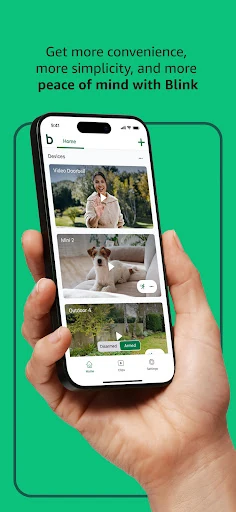
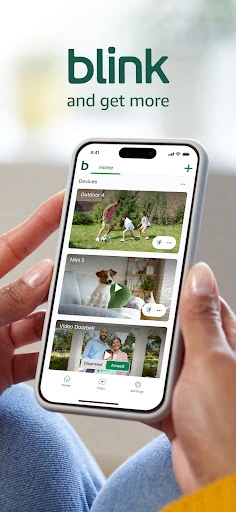
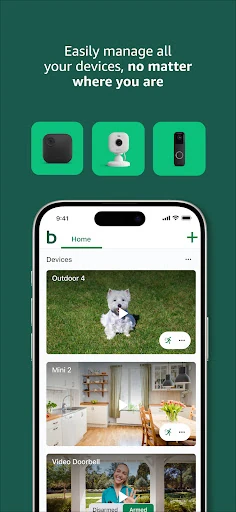
Analysis by Reviewed APKs
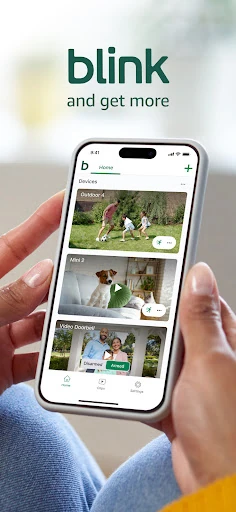
Blink Home Monitor is the phone companion for Blink security cameras, giving you a way to check live views, talk through supported cameras, and respond to motion alerts. It suits people who already own Blink equipment and want a straightforward view of home activity while away or moving around the house. I like its practical focus: it connects useful camera controls with everyday monitoring, though it depends on having compatible Blink hardware.
A Quick Check From Away
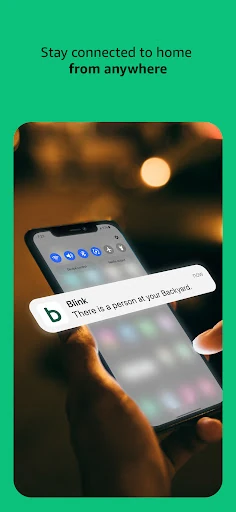
Picture leaving home for the day and wondering whether a delivery has arrived. With a Blink camera set up, the app can show a live view, and two-way audio lets you speak to someone near the camera. If motion alerts are enabled, a notification can prompt you to open the app and check what happened. That makes the phone a convenient monitoring point without requiring you to be standing near a separate screen.
The same basic routine works at home. I might check on a pet from another room, glance at a camera view after hearing a noise, or use a motion notification as a cue to look outside. Infrared night vision helps with viewing in low light, while customizable alerts and activity zones can help reduce notifications from areas I do not care about. The useful part is being able to check and respond without turning every alert into a trip to the door.
A Camera Companion, Not a Camera
Blink Home Monitor is best understood as the control and viewing app for Blink cameras, rather than a stand-alone home security system. Its role is to bring live viewing, alerts, and camera interaction to a phone. That is a different proposition from a general-purpose smart-home dashboard or an app that turns a phone into a security camera. If you are considering it, the key question is whether Blink hardware fits your home and monitoring needs.
It can make more sense than a basic camera viewer if you want motion alerts, two-way audio, and controls for supported Blink devices in one place. The description also covers Alexa voice control for live view and arming or disarming a system. But this is not a solution for someone with no compatible cameras, and it is not a substitute for a staffed monitoring service. Its usefulness depends on the hardware and features you choose.
Make Alerts More Useful
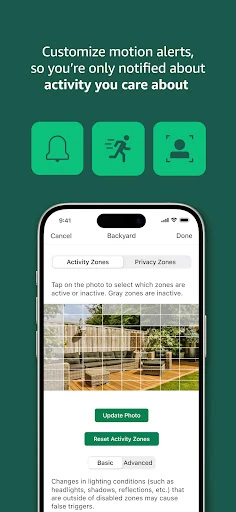
A little setup can make everyday monitoring feel less noisy. I would start by deciding which areas deserve alerts, then use motion and privacy zones where available to focus attention. For example, a camera aimed at an entryway may be more useful when its activity area excludes a busy sidewalk. These controls are there to tailor what reaches your phone, rather than treating every movement in the camera’s view as equally important.
It also helps to make checking a camera part of an existing routine. I might look at a live view when leaving for work, use a notification to decide whether a delivery needs attention, or check in on a pet at a quiet moment. If I use Alexa-enabled devices, voice controls can provide another way to reach supported functions. The best workflow is a modest one: set up the cameras, tune alerts, and check views when there is a reason.
Reads About Blink Home Monitor
More From Our News Desk

Zoom Meetings, Google Meet, or Teams: Which Is Easiest to Join?

How I Build a Free Streaming Lineup With Tubi

Why Crunchyroll Is the Default Anime App for So Many Fans

YouTube TV: A Practical Guide to Cutting Cable

Rummikub and the Small Comfort of Phone Games

TeamViewer Remote Control or AnyDesk for Helping Family?
Who Will Find It Useful
I would recommend Blink Home Monitor to people who own, or are planning to buy, compatible Blink cameras and want to keep an eye on home activity from a phone. The combination of live view, motion alerts, night viewing, and two-way audio covers common needs like checking an entryway or seeing what a pet is doing. People with Alexa-enabled devices may also appreciate being able to use voice control for supported camera and system functions.
It may be a poor fit if you do not have Blink hardware, want one app to manage a wide range of unrelated security brands, or expect professional monitoring. A camera app can show and help you respond to activity, but it is not the same as a staffed security service. Likewise, anyone who prefers not to receive motion alerts may need to spend time adjusting notification areas and habits before the app feels useful rather than distracting.
Blink Home Monitor is developed by Immedia Semiconductor and is a Tools app for Android. Google Play shows over 10 million installs and a 4.4-star rating from around 224,000 ratings. The app is free, with no in-app purchases or ads reported in the supplied store facts. Its content rating is Everyone, and the listed version is 61.0.
The app was released on January 7, 2016, and its listed last update is October 15, 2026. A minimum Android version was not provided in the supplied facts, so check Google Play for the requirement that applies to your device. Blink Home Monitor is intended to work with Blink cameras; the app alone does not provide the camera hardware needed for live monitoring.
How Blink Fits Into Daily Home Checks
First Look and Setup
When I first open an app like this, I want to know what it can actually do with the cameras around my home. Blink Home Monitor’s purpose is clear: use a phone to see and speak to people or pets, receive motion alerts, and manage supported camera features. The important first step is having Blink hardware to connect. Without it, the app’s central job—showing camera views and responding to activity—has nothing to work with.
The camera lineup described by Blink includes wireless, wired, and plug-in options, with products for indoor and outdoor use. That variety gives the app a role across several camera setups instead of tying it to just one placement. Some cameras also have features such as infrared night vision, floodlights, or pan-and-tilt movement. The exact controls available depend on the camera in use, so it is sensible to choose hardware around the view and location you need.
The Everyday Camera Check
Day to day, the app is most valuable when it turns an alert into a quick, useful check. A motion notification can send me to a camera view, where I can see what is happening and use two-way audio on a supported camera. That is a practical way to check an entry or communicate with someone nearby. Rather than watching a live feed all day, I can let alerts guide the moments when I open the app.
Live viewing and alerts serve different purposes. A live view is useful when I want to look in on a room or outdoor area right now; motion alerts can draw my attention when activity happens. Customizable motion alerts and activity zones help shape that experience. I would expect to spend a little time deciding what should count as relevant movement, especially if a camera faces an area where routine activity might otherwise trigger frequent notices.
Features With a Purpose
The most appealing features are the ones that support a specific task. HD live view and two-way audio make a camera more interactive than a silent picture, while infrared night vision is useful when lighting is low. For cameras with compatible capabilities, the app can also show different kinds of views or provide controls suited to the device. These are practical tools, not reasons to expect every Blink camera to offer every feature.
Zones are another useful part of the package. Activity and privacy zones let you tailor what the camera watches or what movement prompts an alert, helping keep attention on the areas that matter. The description also notes Alexa-enabled device support for functions such as engaging live view and arming or disarming a system. Those voice controls are an extra option for compatible setups, rather than a requirement for using the phone app.
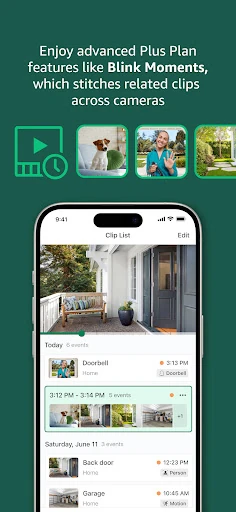
Some features rely on a Blink Subscription Plan. The description says a plan can provide cloud clip saving and sharing, continuous live view sessions of up to 90 minutes, and advanced features such as person detection. That distinction matters when comparing what the app can do on its own with services tied to a separate plan. I would check the current plan terms and device compatibility before treating those extras as part of the basic experience.
A Routine That Stays Simple
A realistic routine might begin with a camera covering the main entrance and notifications set for the activity I care about. When an alert arrives, I can open the app, check the live view, and speak through the camera if that is useful. Later, I might check a room where a pet spends time. The goal is not to monitor constantly; it is to make a quick check available when an event or ordinary question gives me a reason.
For a home with several camera locations, I would keep the setup understandable. Entryways, indoor rooms, and outdoor areas have different patterns of movement, so alert preferences may need to differ as well. Where available, activity zones can keep a camera’s attention on a particular part of the view. I would revisit those choices after a few days of notifications rather than trying to perfect them all at once.
Voice control can fit into the routine for people who have an Alexa-enabled device. Asking for a supported live view or using voice to arm or disarm a system can be convenient when a phone is not in hand. It is optional, though. The core phone-based experience remains the main reason to use Blink Home Monitor, and the value of voice commands depends on the rest of the household setup.
Limits to Keep in Mind
The biggest limitation is also the most basic: this app depends on Blink cameras. It cannot provide a live view of a space without compatible hardware, and the camera models described do not all have identical capabilities. A buyer should match the camera to the location and desired features, then treat the app as the way to view and manage that equipment. People already invested in another camera brand may find that this app does not address their setup.
Some advertised capabilities are tied to a subscription plan, including cloud clip saving and sharing, longer continuous live view sessions, and person detection. The plan is sold separately, so those features should not be assumed to come with the free app. Camera placement and notification settings also affect how helpful alerts feel. A busy view can mean more interruptions unless zones and alert preferences are adjusted to suit the space.
Finally, this is a home-monitoring tool, not a promise that someone is watching the property for you. It helps you check camera activity and interact with supported devices, but the experience still relies on your own attention and setup. If you want a service that responds on your behalf, compare that need with what Blink’s cameras and app are designed to provide before relying on them as your only approach.
Blink Home Monitor makes the most sense as a companion for people who want to check compatible cameras from their phones. Live view, two-way audio, night vision, and customizable alerts cover familiar household needs, while Alexa support adds another way to reach some controls. Its strengths are practical and easy to understand; its limits mostly come down to hardware compatibility and subscription-dependent extras.
I would try it if Blink cameras are already part of your home or you are choosing a camera system with these features in mind. I would look elsewhere if you need broad support for other camera brands or professional monitoring. For the right setup, it offers a useful way to check what is happening without making home monitoring an all-day task.
Blink Home Monitor Frequently Asked Questions
What is Blink Home Monitor used for?
Blink Home Monitor is used with Blink cameras to view live video, receive motion alerts, and interact with people or pets through two-way audio on supported cameras. It also offers controls such as customizable alerts and activity or privacy zones. Some capabilities depend on the camera model, and some advanced functions require a Blink Subscription Plan.
Which devices can run Blink Home Monitor?
Blink Home Monitor is an Android app on Google Play. It is intended for use with Blink cameras, and compatible Alexa-enabled devices can provide voice access to certain functions. The minimum Android version may vary by release and device, so check the Google Play store page for the requirement that applies to your phone or tablet.
Does Blink Home Monitor cost anything?
The app is free on Google Play, and the supplied store facts report no in-app purchases or ads. Blink also describes subscription plans for extras such as cloud clip storage and sharing, continuous live view sessions, and person detection. Plan availability, terms, and pricing can vary, so check the store and Blink’s current plan information.
Does Blink Home Monitor work without a camera?
The app is designed to view and manage Blink camera activity, so its main purpose requires compatible Blink hardware. It does not turn a phone into a Blink security camera. If you are choosing equipment, check that the camera model supports the placement and features you want, since capabilities differ across the Blink lineup.
Who should use Blink Home Monitor?
It is a good fit for people with Blink cameras who want phone-based live viewing, motion alerts, and two-way communication with supported devices. Alexa voice control may also suit households with compatible devices. It may not suit people without Blink hardware, those seeking a broad multi-brand camera app, or anyone expecting professional monitoring.
Pros
- Live view and two-way audio make it possible to check in and respond from a phone.
- Customizable motion alerts and zones can help focus attention on relevant activity.
- Supports camera features such as infrared night vision and Alexa voice control.
- Free app with no ads or in-app purchases in the supplied store facts.
Cons
- Requires compatible Blink cameras, so it has little use as a stand-alone app.
- Some useful features, including cloud clips and person detection, require a separate plan.
- Camera capabilities vary, so the experience depends on which Blink devices you own.
- Category
- Tools
- Version
- 61.0











