Be My Eyes
- 34.05K
- 4.3
- Installs
- 5.00M
- Price
- Free

Screenshots
Analysis by Reviewed APKs
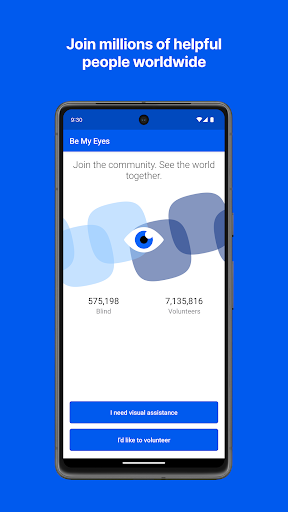
Be My Eyes helps people who are blind or have low vision get visual assistance through a smartphone. It brings together live calls with volunteers, image descriptions from Be My AI, and support from company representatives. I like that it offers different ways to ask for help, from checking a label to understanding a screen. It suits people who want practical, on-demand visual support, though it is not a replacement for every kind of assistance.
Help With a Small Task
Imagine standing in the kitchen with two similar packages and wanting to check which one has the cooking instructions you need. Be My Eyes gives you a few ways to get visual help: contact a volunteer for a live call, send an image to Be My AI, or look for support from a company representative. That choice makes the app feel relevant to ordinary moments, not just unusual emergencies.
What stands out to me is how concrete the examples are. The app can help with reading product labels and expiration dates, identifying clothing, using appliances, or making sense of a digital display. These are small tasks that can interrupt a routine when visual information is hard to access. Having several kinds of help in one app gives users options for deciding how to handle the task at hand.
More Than a Volunteer Call
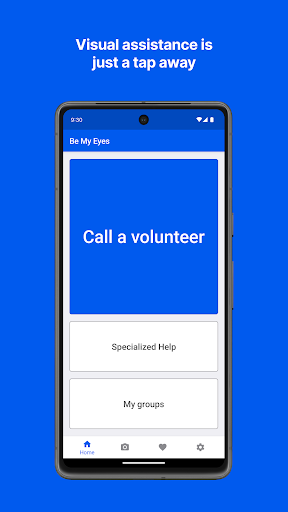
A live volunteer call is the most direct alternative to asking someone nearby for visual help. Be My Eyes broadens that approach with Be My AI, which answers questions about images, and Specialized Help, which connects users with company representatives. The three options address different needs: a person can provide live assistance, AI can describe an image conversationally, and company support can help with a product.
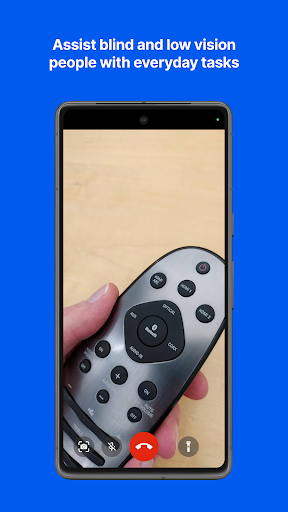
I would not treat the app as a general navigation tool or a substitute for every accessibility service. Its described uses center on getting visual information and product assistance, such as reading a label or navigating a TV menu. If a task needs help beyond what a volunteer, image description, or company representative can provide, this app may not be the right tool. That narrower purpose is useful to keep in mind.
Make Help Easy to Reach
A useful habit is to think about which kind of help fits before starting. For a quick look at an image, Be My AI may be a natural option; for a live question, a volunteer call offers another route. If the issue concerns a product, Specialized Help may be worth considering. Having these choices in the same app can make it easier to match the request to the situation.
I would also think of Be My Eyes as a practical tool to keep available for routine moments rather than something reserved for one specific task. Reading mail, checking instructions, and figuring out a screen all fit the kinds of uses described. The volunteer network supports 185 languages, while Be My AI can describe images in 36 languages. Those details may matter when choosing how to ask for help.
More From Our News Desk

Zoom Meetings, Google Meet, or Teams: Which Is Easiest to Join?

How I Build a Free Streaming Lineup With Tubi

Why Crunchyroll Is the Default Anime App for So Many Fans

YouTube TV: A Practical Guide to Cutting Cable

Rummikub and the Small Comfort of Phone Games

TeamViewer Remote Control or AnyDesk for Helping Family?
Who May Find It Useful
I would recommend Be My Eyes to blind and low-vision users who want another way to get visual information during everyday tasks. Its range covers both quick household questions and product-related help, with live volunteers, image descriptions, and company representatives available as distinct routes. The app is especially appealing if you value having options rather than relying on one kind of assistance for every situation.
It may be less suited to someone looking for a broad-purpose assistant unrelated to visual access, or for help that the app's described tools cannot provide. The experience also depends on choosing a useful route and communicating what needs to be seen or understood. Volunteers and Be My AI are described as available around the clock, but the app is best approached as one helpful resource among the tools a person may use.
Be My Eyes is a free Lifestyle app from Be My Eyes for Android. Google Play shows over 5 million installs and a 4.3-star rating from about 34,000 ratings. The app is rated Everyone. Its listed version varies with the device, and the release date is October 4, 2017.
The app contains no ads and does not offer in-app purchases. Its last update date is October 20, 2026. The minimum Android version is not included in the available app details, so check Google Play for the requirement that applies to your device. Be My Eyes describes its volunteer and AI assistance as free to use.
Three Routes to Visual Assistance
A Flexible First Step
When I first considered Be My Eyes, the most useful point was that it is not limited to one kind of help. The app combines volunteer assistance, an AI image describer, and a channel for company support. That framing makes it easier to understand what the app is for: getting visual information or help with a product, with a choice of who or what provides it.
The app is aimed at blind and low-vision users, and it describes support across a wide range of everyday situations. I would start by matching the request to one of the available routes rather than assuming every question belongs in the same place. That simple distinction helps set realistic expectations before relying on a particular kind of assistance.
Everyday Assistance
Day to day, the examples point to small moments when visual information is useful: reading a label, checking a date, sorting mail, or operating an appliance. Be My Eyes is built around getting help with those tasks through the phone. For a user who encounters these questions often, its practical focus may be more valuable than a large set of unrelated tools.
The volunteer option is described as a live connection, while Be My AI works with images sent through the app and responds with conversational descriptions. Those are meaningfully different experiences. One involves a volunteer, and the other uses AI to answer image-related questions. I like that users can consider which approach fits their task instead of treating assistance as one-size-fits-all.
Three Kinds of Help
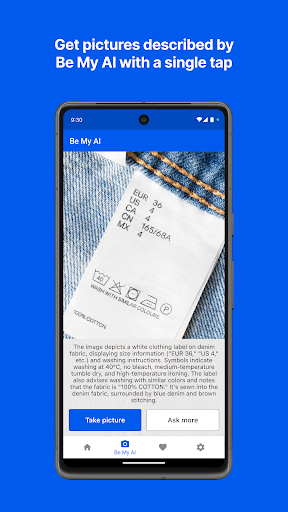
Be My AI is the feature that most clearly changes the shape of the app. A user can send an image and ask questions about it, with descriptions for a variety of tasks. The material gives examples such as checking makeup or translating text. That makes the image describer a separate option for situations where a conversational response about a picture is useful.
Specialized Help is another distinct part of the offering. It connects users with company representatives for product support, rather than asking a volunteer or AI to handle every product question. Alongside that, the volunteer network is described as operating in 185 languages, and Be My AI supports image descriptions in 36. Together, these options give the app a broader role than live calls alone.
A Routine That Fits
For a simple routine, I would keep the app in mind when a task depends on seeing information that is not otherwise accessible. A product label, cooking instruction, or screen menu can each prompt a different kind of question. The app's examples make it easy to picture those uses without stretching its purpose into areas it does not claim to cover.
Then I would choose the route that seems most suitable: a volunteer for live assistance, Be My AI for questions about an image, or Specialized Help for a company-related product issue. That approach keeps the interaction focused. It also helps explain why Be My Eyes includes several tools: the same broad need for visual assistance can arise in very different contexts.
Keep Its Scope in View
Be My Eyes is useful within a defined scope: it helps users access visual information and product support. It is not described as a universal assistant, and no single route will necessarily fit every request. The app's value depends on the task being something a volunteer, an image description, or a company representative can help address.
The AI option also needs to be understood for what it is: an AI-generated description and response to an image. A volunteer call is a different kind of assistance, and company support has its own product-focused purpose. Keeping those distinctions in view can help users choose a sensible option and avoid expecting each feature to do the same job.
Be My Eyes brings live volunteer assistance, AI image descriptions, and company support together in one practical app. I appreciate the focus on ordinary tasks, from reading instructions to figuring out a screen, and the choice of different ways to ask for help. It has a clear purpose and a useful range of tools within that purpose.
I would recommend it to blind and low-vision users looking for on-demand visual assistance with everyday tasks. It may not suit someone seeking a general-purpose tool or support beyond its described services. For the people it is designed to help, Be My Eyes is a thoughtful resource worth considering.
Be My Eyes Frequently Asked Questions
What is Be My Eyes used for?
Be My Eyes helps blind and low-vision users get visual assistance. Users can contact a volunteer for live help, send images to Be My AI for descriptions and answers, or connect with company representatives through Specialized Help. Examples include reading labels and cooking instructions, identifying clothes, using appliances, and navigating menus.
Which devices and platforms support Be My Eyes?
The app is available for Android through Google Play. The information provided here does not establish availability on other platforms, so check the relevant store for current options. Be My Eyes uses a smartphone to connect users with volunteers, provide AI image descriptions, or reach company representatives.
What Android version does Be My Eyes require?
The minimum Android version can vary and is worth checking on the Google Play page for Be My Eyes before installing. The listed app version also varies with the device. Checking the store on the device you plan to use is the best way to confirm the current compatibility details.
Does Be My Eyes cost money?
Be My Eyes is free on Google Play and has no in-app purchases or ads. The app describes its volunteer and AI assistance as free. Store details can change, so it is sensible to check the current Google Play information if you want to confirm the latest terms before installing.
Is Be My Eyes suitable for everyday tasks?
It is designed to help blind and low-vision users with visual information in everyday situations, including reading product labels, checking expiration dates, using appliances, and understanding screens. It may not suit someone looking for a general-purpose assistant or help outside the app's volunteer, image-description, and product-support services.
Pros
- Combines live volunteer calls, AI image descriptions, and company support in one app.
- Covers practical tasks such as reading labels, checking dates, and understanding screens.
- Volunteer assistance supports 185 languages, with Be My AI available in 36.
- Free to use, with no ads or in-app purchases.
Cons
- Its focus is visual assistance, not broad-purpose help for every kind of task.
- The volunteer, AI, and company-support options serve different needs and are not interchangeable.
- Minimum Android requirements can vary and should be checked in Google Play.
- Category
- Lifestyle











