Backup and Restore - APP
- 240.98K
- 3.1
- Installs
- 10.00M
- Price
- Free

Screenshots
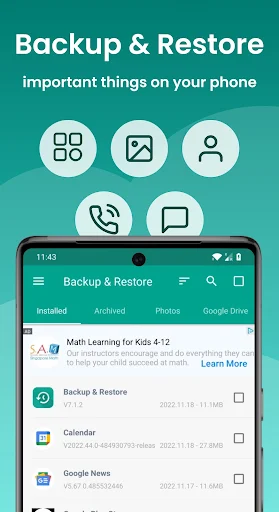
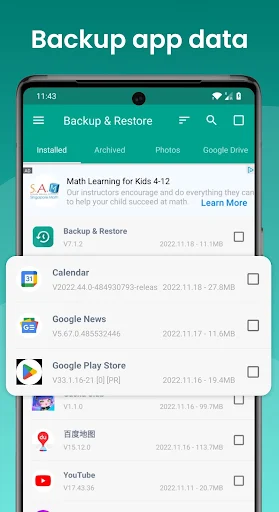
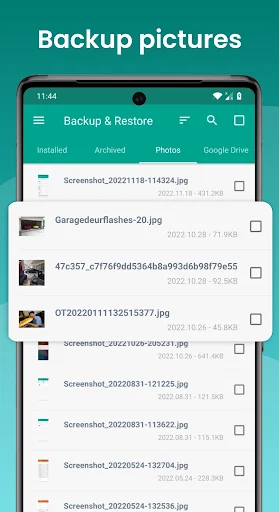
Analysis by Reviewed APKs
Backup and Restore - APP is a practical tool for saving copies of installed app files and photos, then moving or restoring those files when needed. I see it suiting Android users who want to keep older app versions, free up space, or pass an installation file to another device. Its focus is narrower than its name might suggest, but the batch and storage options make that focus useful.
A little breathing room
When I first opened Backup and Restore - APP, I imagined a familiar phone-cleanup evening: sort through apps I rarely use, save the ones I might want again, and remove a few to reclaim space. The app is built for that kind of job. It can make copies of app installation files and photos, with batches going to phone storage by default or to an SD card or USB storage where available.
That distinction matters when deciding what to save. I can preserve an app file for later, but the app does not copy that app’s personal data or settings. If I remove a game, for example, this tool can keep its installation file; it does not promise to bring back my progress. I would treat it as a way to manage files and versions, not as a complete phone migration.
A focused alternative
Compared with relying on an app store to find a particular version later, keeping a local copy can be handy when I want to avoid an unnecessary update or reinstall a version I saved earlier. Backup and Restore - APP also supports transferring and sharing app files and photos between Android devices, including through a private Wi-Fi hotspot. Cloud upload and download options are described for services such as Google Drive and Dropbox.
It is not a whole-device backup utility, a text-message archive, or a way to recover app accounts and settings. The developer is explicit that only app files can be backed up and restored, and that restoration works only for files saved beforehand. That narrow scope is the main trade-off. If I need a copy of personal app data, this is not the tool I would rely on.
Make saving routine
I would get more from the app by setting an automatic backup list for the apps I actually want to keep, rather than trying to remember everything before uninstalling. The app can automatically save newly installed apps to phone memory or an SD card, and it can notify me about backups and updates. That makes it more of a maintenance habit than an emergency button I open only after something goes wrong.
For a device change or a reset, I would first check where the saved files live and make a separate copy to an SD card or cloud storage. The description warns that phone-stored backups can be deleted during a factory reset. I would also look at the displayed backup size, time, and version before clearing anything, so I know what I am keeping and what I may need later.
More From Our News Desk

Zoom Meetings, Google Meet, or Teams: Which Is Easiest to Join?

How I Build a Free Streaming Lineup With Tubi

Why Crunchyroll Is the Default Anime App for So Many Fans

YouTube TV: A Practical Guide to Cutting Cable

Rummikub and the Small Comfort of Phone Games

TeamViewer Remote Control or AnyDesk for Helping Family?
Who may find it useful
I would recommend Backup and Restore - APP to Android users who like keeping older versions of apps, want to save installation files before removing seldom-used apps, or need to share an app file or photos with another device. Its batch tools and sorting by app name, date, or size can help anyone who regularly manages a crowded phone rather than handling each file one at a time.
I would steer away anyone expecting a complete backup of messages, contacts, settings, or progress inside apps. The app does not restore that personal data, and automatic cloud backup is not supported; automatic saving is limited to phone memory and SD cards. If a full device transfer is the goal, or managing files sounds like another chore, its specific strengths may not be enough.
Backup and Restore - APP is developed by Trustlook Security Lab and is categorized as a Tools app on Google Play. It is free to install, with in-app purchases priced from $0.99 to $19.99 per item, and it contains ads. Its content rating is Everyone. The app has more than 10 million installs and a 3.1-star rating from about 241,000 ratings.
The current version is 7.7.2. It was released on June 14, 2011, and the recorded last update is July 23, 2026. The supplied store details do not give a minimum Android version, so I would check the Google Play page on the device I plan to use. Compatibility and availability can depend on the phone and its software.
Keeping App Files Within Reach
A direct first impression
My first impression is that this is a utility with a clearly defined job, not a general-purpose phone safety net. It centers on app files and photos, with options to save, restore, transfer, and share them. That makes the basic idea easy to understand, even if the word “backup” can lead people to expect more than the app actually preserves.
Before relying on it, I would decide where I want files to go and try a small backup. Phone storage is the default for batch operations, while SD card and USB storage are also described. Cloud upload and download are available through services including Google Drive and Dropbox. A quick test helps establish which destination suits my device and routine.
The everyday workflow
The day-to-day value is in managing several files at once. I can back up, restore, transfer, or share in batches, then sort installed and archived apps by name, date, or size. Seeing a saved file’s size, time, and version is useful when I have kept more than one copy and need to distinguish an older version from a newer one.
Restoration is deliberately conditional: the file has to have been backed up before. I would not uninstall something first and assume the app can retrieve it later. The tool can also overwrite or downgrade app versions, which may help with version management, but that is a reason to check what I selected before proceeding rather than tapping through casually.
More than local copies
The standout extras are photo handling and device-to-device sharing. The app can back up and restore photos, and it can send or receive both photos and app files. A private Wi-Fi hotspot is one described transfer method, which gives the tool a role beyond simply filing copies away on one phone.
There are also options to upload and download through Google Drive and Dropbox, scan stored installation files, and scan for viruses. The app can show storage totals and usage, and holding an app lets the user check details. These features add useful context around file management, though they do not change the central limitation: personal data inside apps is outside its backup scope.
A sensible weekly check
A practical routine would be to review rarely used apps once a week, save the installation files I may want again, and check that my chosen destination has room. I could keep automatic backup enabled for a selected list, then glance at the saved versions and timestamps before removing anything from the phone. That is less dramatic than a full device backup, but it can prevent avoidable re-downloads.
If I were preparing to reset or replace a phone, I would move important copies off the device first. The description specifically cautions that backups can be lost in a factory reset and recommends SD card or cloud storage beforehand. I would also make sure the particular files I want are present, since the app can restore only earlier saved copies.
Keep expectations realistic
The biggest limitation is the boundary between an app file and the data created while using that app. This tool saves the former, not the latter. A saved game installation file is not the same as a saved game account or progress, and reinstalling an app does not guarantee a return to the same state.
Storage permissions can also affect the experience. The description notes restrictions on writing to SD cards for Android 4.4 and above, and says that access is granted only to Google and device manufacturers. Automatic backups cannot go to cloud storage. Those constraints make it worth testing the desired destination before depending on it for a cleanup or device reset.
Backup and Restore - APP does a useful, specific job: it helps manage copies of app files and photos, including batches, saved versions, and transfers. I like that the storage and version details support a careful routine. The low rating is a reason to read current user feedback, but the feature set itself is straightforward when expectations are set correctly.
I would try it if I wanted to preserve installation files, share them between Android devices, or keep photos and app copies organized. I would not choose it as my only safeguard for a phone, because it does not save personal app data or settings. For that narrower file-management task, it can earn a place in a regular cleanup routine.
Backup and Restore Frequently Asked Questions
What is Backup and Restore - APP used for?
Backup and Restore - APP saves and restores app installation files and photos, and it can transfer or share those files between Android devices. It supports batch operations, local storage, SD card or USB destinations, and cloud upload or download options. It does not back up app data or settings, so it is not a full phone backup.
Which devices can run Backup and Restore - APP?
Backup and Restore - APP is an Android app. The supplied details do not give a minimum Android version, and compatibility can vary by device and software. I would check its Google Play page from the phone I plan to use before installing, especially if I expect to write files to removable storage.
What Android version does Backup and Restore - APP require?
A minimum Android version is not provided in the available app details, so it is worth checking the Google Play page for current compatibility. The description does mention SD card writing restrictions on Android 4.4 and above, which may affect where files can be saved on some devices.
Does Backup and Restore - APP cost money?
The app is free to install and contains ads. It also offers in-app purchases priced from $0.99 to $19.99 per item. Store prices and purchase options can change, so I would check the Google Play page for the current details before buying anything.
Is Backup and Restore - APP suitable for a complete phone backup?
No. Backup and Restore - APP handles app installation files and photos, but it cannot back up or restore personal app data or settings. It can be useful for keeping app files or moving photos, but anyone who needs a complete device backup should look for a solution that explicitly covers the data they need. Suitability can depend on the device and use case.
Pros
- Batch tools make saving, restoring, and transferring multiple app files more convenient.
- Keeps details such as saved file size, time, and version visible.
- Supports photo handling and several local, removable, and cloud storage options.
- Automatic saving can cover a selected list of apps.
Cons
- Does not preserve personal data or settings inside apps.
- Automatic backup is limited to phone memory and SD cards, not cloud storage.
- SD card writing restrictions may complicate storage on some Android devices.
- Category
- Tools
- Version
- 7.7.2











