AJCloud
- 7.18K
- 4.6
- Installs
- —
- Price
- Free
Screenshots
Analysis by Reviewed APKs
AJCloud is a companion app for IP cameras that the service supports, letting me view a connected camera from my iPhone. It is aimed at people who want to check in on family, pets, or their home while away. I like that it combines live video with two-way audio and recorded clips, though its usefulness depends on having a compatible camera to connect.
A Quick Check From Away
I can imagine using AJCloud during an ordinary workday: after leaving home, I open the app to see whether the dog has settled down or whether someone has arrived. The live camera feed is the central point of the experience, and the app also supports two-way conversation. That makes it more useful than a silent peek when I want to speak to someone near the camera or get their attention.
If the app detects unusual motion, it can send an activity alert, giving me a reason to check the live view or review recorded video. I like that this turns a camera into something I can consult at a moment that matters, rather than a feed I have to keep open. It is a practical setup for occasional check-ins, although the camera itself needs to be supported by AJCloud.
A Camera Companion, Not a General Hub
AJCloud is best understood as the phone-side companion for compatible IP cameras. Its job is to show camera video, let me talk through the camera, notify me about unusual motion, and provide access to recorded footage. If I already have a camera that works with AJCloud, this is a focused way to check it from an iPhone instead of relying on a computer or being physically at home.
It is not a general smart-home control app or a substitute for a camera. The experience described here revolves around viewing and managing a supported IP camera, so it will not help someone who wants an app-only way to watch a room. I would also look elsewhere if I needed a broader home-control dashboard; AJCloud's appeal is its camera-specific role.
Make Check-Ins More Useful
A small routine can make the app easier to use: check the live image when there is a reason, then use the recorded video to revisit activity that has already happened. Motion alerts can serve as prompts to look in, rather than a reason to watch continuously. That is a calmer way to use a home camera during a busy day, especially when I only need a quick sense of what is happening.
I would also get familiar with pan, tilt, and zoom controls before relying on them during a hurried check-in. Moving the camera's view from the phone can help me inspect more of a space, while day and night vision support viewing in different lighting. Two-way audio is another feature worth trying in advance, so a short conversation feels straightforward when I actually need it.
More From Our News Desk

Zoom Meetings, Google Meet, or Teams: Which Is Easiest to Join?

How I Build a Free Streaming Lineup With Tubi

Why Crunchyroll Is the Default Anime App for So Many Fans

YouTube TV: A Practical Guide to Cutting Cable

Rummikub and the Small Comfort of Phone Games

TeamViewer Remote Control or AnyDesk for Helping Family?
Who will find it useful
I would recommend AJCloud to someone who owns an IP camera supported by AJCloud and wants to check in from an iPhone. Parents keeping an eye on children, people checking on pets, and homeowners who want motion alerts or recorded video are all plausible fits. The mix of live viewing, two-way audio, and camera movement covers several common reasons to open a camera app.
It may not suit someone who has no compatible camera or who expects a broad smart-home app with controls for many kinds of devices. The app's value is tied to its camera, so I would confirm compatibility before building a routine around it. People who prefer not to check video or receive motion notifications may also have little reason to keep a camera companion close at hand.
AJCloud is developed by Ajcloud Labs Inc. and is listed in the Lifestyle category on the Apple App Store. It is free to download, has a 4+ age rating, and requires iOS 13.0 or later. The current version is 2.0.26102202. The app was released on January 25, 2019, and its most recent update is dated October 22, 2026.
On the App Store, AJCloud has a 4.6 rating from 7,185 ratings. The provided store details list the app as free, with no price to download. I would check the App Store page for any current purchase or advertising details that may apply, since those details can vary.
A Closer Look at Everyday Camera Checks
A Camera-First Start
When I first opened AJCloud, the clearest thing about its purpose was its reliance on a supported IP camera. This is not a service that can show a home by itself; the camera supplies the picture, and the app brings that view to an iPhone. That makes compatibility the first practical question, before I think about alerts, video quality, or how often I might check in.
Once there is a compatible camera to work with, the core promise is easy to understand: view the home in real time from the phone. The feature set also includes camera management, so the app is intended to be more than a shortcut to a static image. I appreciate that the focus stays on the camera rather than trying to be a catch-all tool.
The Daily Viewing Loop
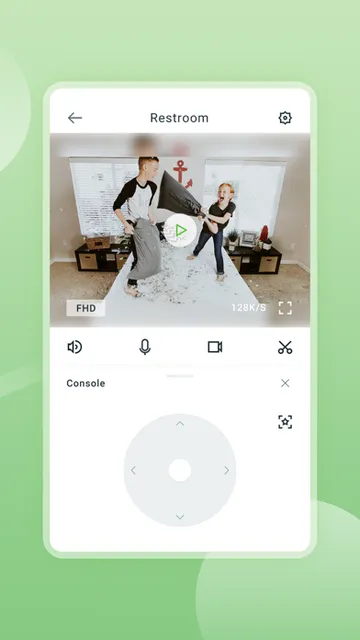
The day-to-day experience described by AJCloud centers on a few useful actions. I can open a live feed, look around using pan and tilt, zoom in for detail, and speak through two-way audio. For a quick check from the kitchen or while away from home, that is a sensible set of controls. The app also supports HD video and day and night vision.
Motion alerts add a second way into the experience. Instead of opening the app just to see whether anything has happened, I can receive a notification about unusual detected movement and then decide whether to view the live stream or review recorded video. That combination feels more practical than a live feed alone, though it still depends on having a camera and a reason to check.
Features That Earn Their Place
Two-way conversation is one of the features that makes this more than a viewer. If a family member is near the camera, I can use the app to talk rather than simply observe. I can also picture this being useful when checking on a pet, though the value depends on the situation and the camera's placement. The feature is most compelling when a quick word is more useful than another notification.
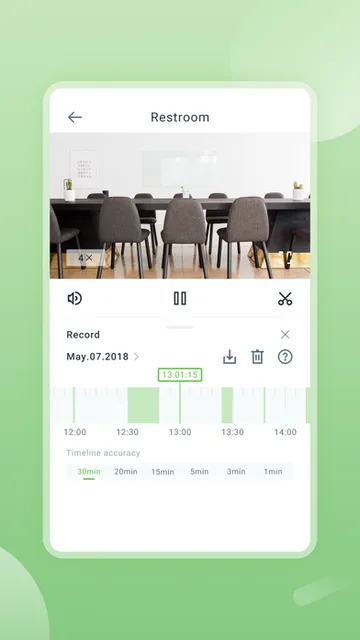
Pan, tilt, and zoom give me more control over what I see from the phone. They can help when the camera's initial angle misses part of a room or I want a closer look. The app also supports recorded-video review, so I can look back instead of relying only on the live moment. Together, these features address the everyday basics of remote camera use without stretching into unrelated tasks.
A Practical Check-In Routine
For a routine, I would start with the alert rather than repeatedly opening the live feed. If AJCloud reports unusual motion, I can check the camera and decide whether the situation calls for a conversation or a review of recorded video. For a non-urgent check, such as seeing how a pet is doing, a brief live look is likely enough. This keeps the app tied to a specific question instead of turning it into background viewing.
Before depending on the app while away, I would spend a little time at home testing the camera view, moving it with pan and tilt, and trying two-way audio. I would also check how recorded video appears in the app. Getting comfortable with those basics first makes it easier to use the controls naturally when I am out and want a quick, focused check-in.
Limits to Keep in Mind
The main limitation is also the app's defining boundary: AJCloud works with IP cameras it supports. If a camera is incompatible, the app's live viewing and other camera features will not be useful for that setup. I would verify camera compatibility before choosing AJCloud as my everyday option, rather than assuming that any IP camera will connect.
This is also a camera-focused experience, not a replacement for being present or a general-purpose home management tool. Alerts can point me toward activity, and recorded video can help me review it, but the app's role is to provide camera access and controls. Someone who wants unrelated device controls or has no interest in checking video may find the narrow focus less appealing.
AJCloud makes sense as a straightforward companion for a compatible IP camera. Live video, two-way audio, motion alerts, recorded-video review, and camera movement cover the most obvious reasons I would want remote access. Its focus is clear, and that is a strength when the camera is already part of my setup.
I would try it if I had an AJCloud-supported camera and wanted convenient iPhone check-ins. I would not choose it expecting a broad smart-home platform or a camera-free way to monitor a home. Check compatibility first; if it matches your equipment and routine, AJCloud has a useful set of camera tools in one place.
AJCloud Frequently Asked Questions
What is AJCloud used for?
AJCloud works with IP cameras it supports, bringing their live video to a phone. It also supports two-way conversation, unusual-motion activity alerts, recorded-video review, and pan, tilt, and zoom controls. It is intended for remote camera check-ins, such as looking in on family, pets, or activity at home.
Is AJCloud available on Android?
The store information provided is for the Apple App Store, and AJCloud requires iOS 13.0 or later. The supported experience described here is for iPhone use with compatible AJCloud IP cameras. For current platform availability or device compatibility, check the app's store page.
What iOS version does AJCloud require?
AJCloud requires iOS 13.0 or later according to its App Store details. It works with IP cameras supported by AJCloud, so the phone requirement is only one part of a suitable setup. Camera compatibility and any device-specific details are worth checking in the store.
Does AJCloud cost money?
AJCloud is listed as free to download on the Apple App Store. The provided details do not give further purchase or advertising information, and those details can vary over time. Check the current App Store page for the latest information about any costs associated with the app.
Is AJCloud a good fit for my home?
It may suit you if you have an IP camera supported by AJCloud and want to view live video, receive unusual-motion alerts, talk through the camera, or review recordings. It is less suited to someone without a compatible camera or someone looking for a broader smart-home control app.
Pros
- Combines live camera viewing with two-way conversation and recorded-video review.
- Motion alerts can prompt a focused check-in instead of constant viewing.
- Pan, tilt, and zoom offer useful control from the phone.
- Supports HD video with day and night vision.
Cons
- Useful only with IP cameras supported by AJCloud.
- Its camera-focused role may not suit broader smart-home needs.
- The app's value depends on having a compatible camera already.
- Category
- Lifestyle
- Version
- 2.0.26102202











