ADT+
- 12.03K
- 4.7
- Installs
- 100.00K
- Price
- Free
Screenshots
Analysis by Reviewed APKs
ADT+ is a home security and smart home app for people who use an ADT+ system and compatible devices. It brings security controls, camera viewing, alerts, and home automation into one place, with some services available only to eligible customers. My overall take is that it makes the most sense as a companion to an existing ADT setup, rather than as a standalone home-control app for everyone.
A Check-In From Anywhere
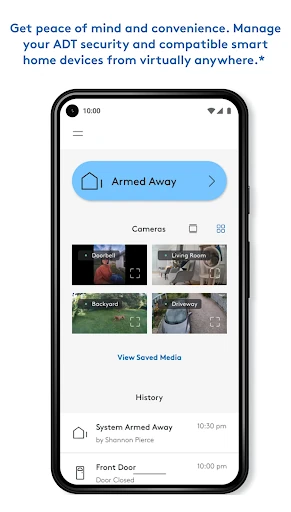
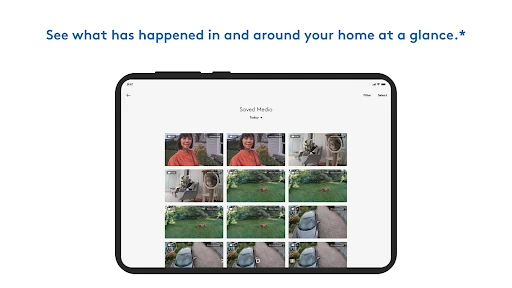
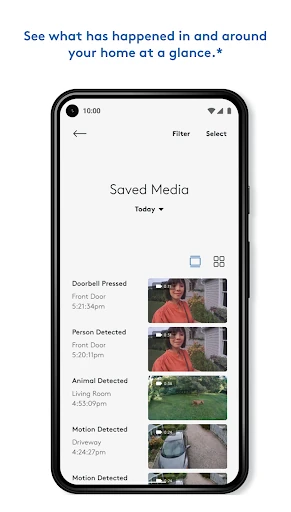
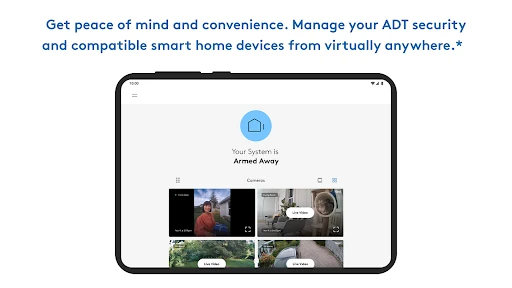
Imagine leaving home in a hurry and wondering later whether the security system is armed. ADT+ is built for that kind of check-in: open the app to see system status and arm or disarm it remotely. If compatible Nest cameras are part of the setup, the app can also show live video or recorded event history. That makes a quick look while out running errands a natural use for the app.
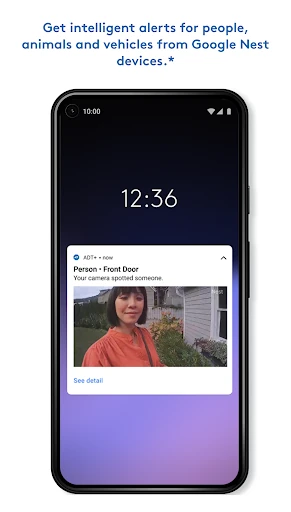
The same routine can cover more than the alarm. From the app, users can manage compatible devices such as smart locks, lights, thermostats, and garage doors. Personalized alerts can report events like arming and disarming, while custom alerts can arrive by push notification or email. I like the practical idea of one place to check before bed or while away, though what appears depends on the user's equipment and services.
A Companion, Not a Universal Hub
ADT+ is most useful for people already using an ADT+ home security system, especially those who also have compatible Nest cameras or smart devices. It combines security controls with video, access management, and automation instead of treating the alarm as an isolated product. For a household already invested in that setup, the app can reduce the need to switch between separate controls for everyday checks.
It is not a general-purpose smart home app that promises to manage every brand or device. Its described controls are tied to ADT+ and compatible products, and features such as Trusted Neighbor are limited to eligible customers. My Safety is included with a Pro Monitoring plan and is available in the United States, with a stated location exception. If someone only wants a camera viewer or basic lighting control, this broader security-focused app may be more than they need.
Make Alerts Work for You
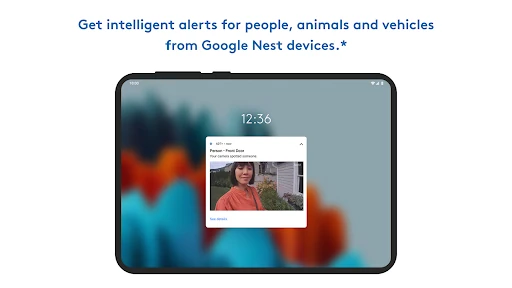
A useful way to get more from ADT+ is to decide which events actually deserve a notification. The app supports custom alerts delivered by email or push notification, including updates related to system activity and smart home devices. Setting these thoughtfully can make a quick check-in informative without turning every routine change into noise. The right choices will depend on the household and the devices connected.
Custom Rules can also automate security and compatible Z-Wave devices, so it is worth thinking through repeated routines rather than changing each control one at a time. For instance, a household might build rules around its usual security and smart-device habits. Camera users can pair that with occasional event-history checks, while people sharing access can explore Trusted Neighbor if eligible. Remote video and controls rely on working internet and Wi-Fi.
More From Our News Desk

Zoom Meetings, Google Meet, or Teams: Which Is Easiest to Join?

How I Build a Free Streaming Lineup With Tubi

Why Crunchyroll Is the Default Anime App for So Many Fans

YouTube TV: A Practical Guide to Cutting Cable

Rummikub and the Small Comfort of Phone Games

TeamViewer Remote Control or AnyDesk for Helping Family?
Who May Find It Useful
I would recommend ADT+ to ADT+ customers who want to check their security system while away and manage compatible home devices from their phone. It is particularly relevant for households with Nest cameras or doorbells, since the app supports live video, two-way talk, and video history. People who value event alerts or want to explore automation may also appreciate having those tools alongside security controls.
It may be a poor fit for someone without an ADT+ system or compatible equipment, since the app's central purpose is managing that ecosystem. Some features also have eligibility or plan conditions, so the whole feature set will not apply to everyone. If all you need is a simple camera app or a controller for unrelated smart devices, I would compare options designed specifically for that narrower job.
ADT+ is a free Android lifestyle app from ADT LLC ®. Google Play shows over 100,000 installs and a 4.7-star rating from 12,032 ratings. It is marked Everyone for content. The current version provided is 4.8.0.330951, with a release date of December 7, 2022, and a last update date of October 14, 2026.
The app is listed at no charge, with no in-app purchases and no ads. The supplied store facts do not give a minimum Android version, so check Google Play for the requirement that applies to your device. ADT+ features can depend on compatible equipment, eligibility, and service plans; the app description also notes that remote controls, notifications, and video features require working internet and Wi-Fi.
How ADT+ Fits the Home Routine
First Look and Setup
ADT+ has a clear job from the outset: bring ADT+ security and compatible smart home management together on a phone. When I first considered how I would use it, the most immediate task was checking system status, followed by the option to arm or disarm remotely. That focus makes the app easier to understand than a broad smart-home catalog, but it also means its value depends on the equipment at home.
Before relying on it for a routine, I would check which parts of my setup are compatible and which services apply to my account. The description names Nest cameras and doorbells, smart locks, lights, thermostats, garage doors, and Z-Wave devices for certain automation. Video, remote control, and mobile notifications need working internet and Wi-Fi, so a stable connection is part of the experience.
Everyday Controls
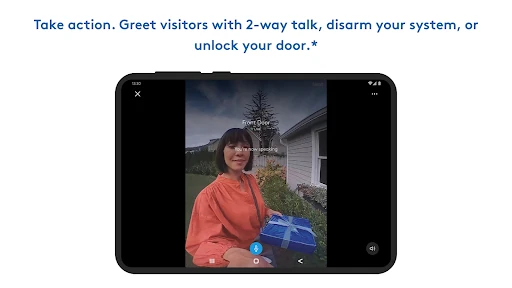
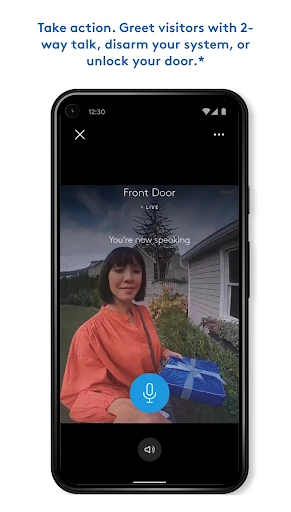
The everyday appeal is the ability to check and act without being in front of the home system. A user can review the security system's status and arm or disarm it from virtually anywhere. If compatible cameras are connected, live video and event history add another kind of check-in. Two-way talk with visitors through Nest Cams and Doorbells can be useful when someone arrives while the household is out.
Home controls extend the same convenience to compatible devices. The app describes switching lights on and off, operating smart locks, adjusting a thermostat, and opening or closing a garage door. I would treat these as practical remote controls rather than assume every household will see every option. The available functions depend on the connected devices, and remote use depends on an internet connection and Wi-Fi.
Features With a Clear Purpose
The camera tools are among the more concrete additions to the security controls. Users can stream live video and review event video history from Nest cameras, with two-way talk available for Nest Cams and Doorbells. That combination can help answer a simple question—what is happening at the door?—without opening a separate camera app, provided the compatible devices and connection are in place.
Custom alerts and Rules give the app a more personal side. Alerts can be set up and edited to arrive by email or push notification, while Rules can automate security and compatible Z-Wave devices. Trusted Neighbor is designed to offer temporary home access to eligible ADT+ customers. My Safety is another distinct service: it offers check-ins, discreet alerts, and access to monitoring agents for users with a Pro Monitoring plan, and is available in the United States except Milwaukee, Wisconsin.
A Simple Check-In Routine
A practical routine could start before leaving home: check system status, arm the system, and confirm any connected smart devices are set as intended. Later, if an alert arrives, the user can review the relevant camera footage or check live video where supported. That sequence gives the app a role in both departure and follow-up, instead of making it a place opened only when something feels wrong.
At home, a short evening check could include reviewing the alarm status and adjusting compatible lights, locks, or thermostat settings. Households with recurring habits can explore custom Rules rather than repeating each action manually. I would keep alerts focused on events worth noticing and make sure the household understands any access-sharing arrangements. These are small choices, but they help keep a security app useful rather than distracting.
Limits to Keep in Mind
ADT+ is built around an ADT+ system, and some of its most useful features depend on compatible devices or customer eligibility. The description does not present it as a universal controller for every smart home brand. Trusted Neighbor is limited to eligible customers, and My Safety requires a Pro Monitoring plan. Those conditions matter when deciding whether the app's full range matches a particular household.
Connectivity is another practical constraint. The app's description says working internet and Wi-Fi are required for features including mobile notifications, remote control, video streaming, and recording. Video and smart-device controls also depend on the relevant products being part of the setup. I would think of ADT+ as a convenient layer over a compatible system, not a substitute for the equipment or service behind it.
ADT+ brings security checks, compatible smart home controls, camera viewing, alerts, and some automation into one app. Its strongest case is a household already using ADT+ equipment that wants to manage the home while away. The feature set is useful, but it is not equally relevant to every user because device compatibility and service eligibility shape what is available.
I would suggest trying ADT+ if you are an ADT+ customer who wants a single place for routine checks and remote controls. If you are shopping for a standalone smart home or camera app, its ecosystem focus may feel restrictive. Before building a routine around it, check the devices and services attached to your setup.
ADT+ Frequently Asked Questions
What is the ADT+ app used for?
ADT+ lets users manage an ADT+ home security system from a mobile device, including checking status and arming or disarming remotely. It also supports compatible smart home controls, Nest camera video and history, personalized alerts, and custom Rules. Some services, including Trusted Neighbor and My Safety, have eligibility or plan requirements.
Which phones and devices support ADT+?
ADT+ is an Android app on Google Play. Its described controls work with an ADT+ security system and compatible products, including Nest cameras and doorbells and certain smart home devices. The minimum Android requirement can vary by app version or device, so check the Google Play store page for the requirement that applies to your phone.
What Android version does ADT+ require?
The Android version requirement can vary as the app is updated and across devices. Check the current Google Play store page before installing to see whether your phone meets the requirement. The app's remote controls, notifications, and video features also rely on working internet and Wi-Fi.
Does ADT+ cost money or include purchases?
ADT+ is listed as a free app, with no in-app purchases or ads in the supplied store details. Some services described in the app have separate eligibility or plan conditions: My Safety is included with a Pro Monitoring plan, while Trusted Neighbor is for eligible ADT+ customers. Check the store and your service details for current terms.
Is ADT+ useful without an ADT+ system?
ADT+ is primarily a companion for managing an ADT+ security system and compatible home devices, so it may not be useful to someone without that setup. Its fit also depends on which devices and services a household has. If you want a general smart home controller or standalone camera app, consider whether its ecosystem focus suits your needs.
Pros
- Combines ADT+ security controls with compatible smart home management.
- Supports Nest camera live video, event history, and two-way talk.
- Custom alerts and Rules can suit different household routines.
- Remote system checks and controls are useful while away.
Cons
- Many features depend on ADT+ equipment or compatible devices.
- Trusted Neighbor and My Safety have eligibility or plan conditions.
- Remote controls and video features require working internet and Wi-Fi.
- Category
- Lifestyle
- Version
- 4.8.0.330951











