SPYPOINT
- 57.90K
- 4.4
- Installs
- 1.00M
- Price
- Free

Screenshots
Analysis by Reviewed APKs
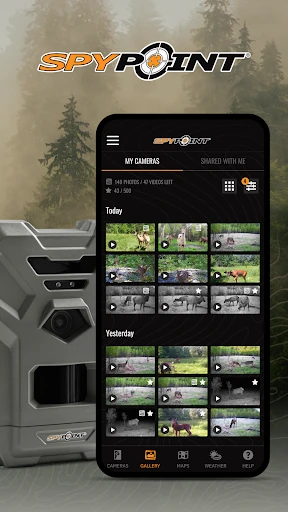
SPYPOINT is a companion app for managing compatible SPYPOINT cellular trail cameras and receiving the photos and videos they send. I see its appeal for hunters who want to check activity without making repeated trips to a camera. It brings camera status, image review, maps, weather and controls into one place. The main caveat is that the experience depends on a compatible camera and its transmission plan.
Checking a camera from home
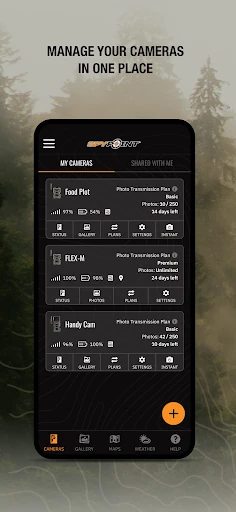
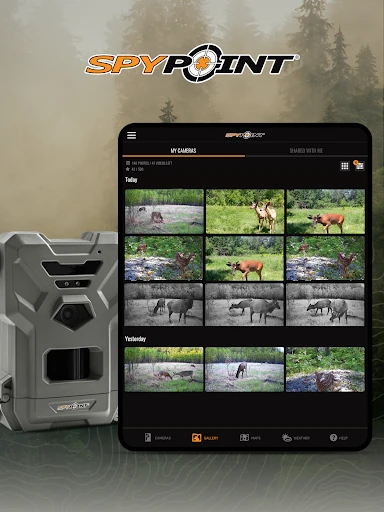
Picture an evening spent planning where to look before heading out. Instead of walking to every camera, I can open SPYPOINT and review images sent from compatible cellular cameras on my phone or tablet. A quick look at the latest activity can help me decide whether a spot deserves attention, while the camera status gives me a snapshot of signal strength, battery level and storage space.
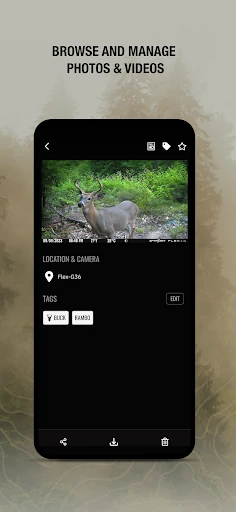
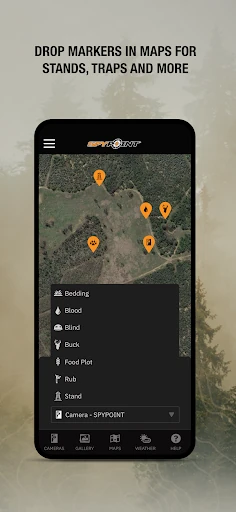
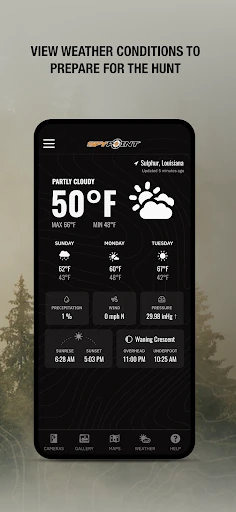
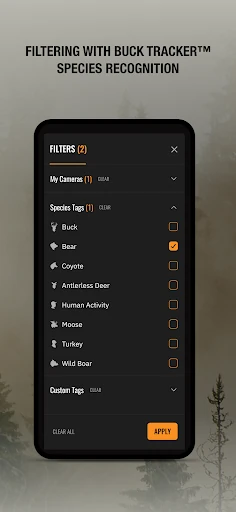
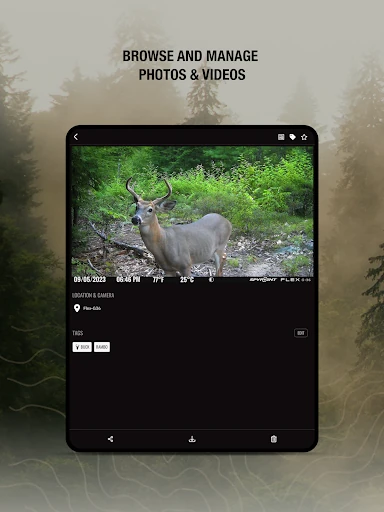
The practical appeal is less about turning a phone into a hunting tool and more about reducing routine trips to the field. I can save photos and videos that I want to revisit, and the app can sort images with automatically applied species tags. Maps and weather information sit alongside the camera information, making the app a useful place to review a few scouting details before I make plans.
A camera companion, not a camera
SPYPOINT makes the most sense if you already use, or plan to use, a compatible SPYPOINT cellular trail camera. It is designed to receive media and manage cameras remotely, rather than replace the camera itself. Compared with checking a camera's storage in person, receiving transmitted images can be more convenient, but it depends on the camera sending them and on having a transmission plan.
I would not treat it as a general photo organizer, a live outdoor navigation tool or a standalone hunting guide. Its maps and weather information are supporting features within a camera-management app. People using another camera brand, or anyone who simply wants to browse local photos, may find little reason to install it. The app's value is tied closely to the SPYPOINT camera setup.
Make reviews a small habit
A short, regular check-in is more useful than opening the app only when I am already preparing to leave. I can scan recent images, save the ones worth keeping and glance at battery, signal and storage status. That gives me a simple way to notice when a camera may need attention, without making every review into a long session.
For multiple cameras, I would make a consistent habit of checking each one and using the available photo filters to narrow a busy feed. Sharing camera feeds with other users can also help keep people working from the same images. Remote settings changes, firmware updates and on-demand requests are limited to FLEX series cameras, so I would check my model before building a routine around those controls.
More From Our News Desk

Zoom Meetings, Google Meet, or Teams: Which Is Easiest to Join?

How I Build a Free Streaming Lineup With Tubi

Why Crunchyroll Is the Default Anime App for So Many Fans

YouTube TV: A Practical Guide to Cutting Cable

Rummikub and the Small Comfort of Phone Games

TeamViewer Remote Control or AnyDesk for Helping Family?
Who may find it useful
I would recommend SPYPOINT to hunters who own compatible cellular trail cameras and want a straightforward way to review transmitted media and check camera status from a phone or tablet. It is particularly relevant if you manage more than one camera, want to save selected images, or appreciate being able to share a feed with other users. The everyday benefit is convenience, not a new reason to spend more time staring at a screen.
It may not suit someone without a compatible camera, or someone expecting every feature to work on every model. The app's transmission plan is also part of the setup: the free option covers 100 photos per month per camera, while receiving more photos or videos requires an upgraded plan. I would check camera compatibility and the plan details before relying on the app for a particular scouting routine.
SPYPOINT is developed by SPYPOINT and is available on Google Play for Android devices. The app has over one million installs and a 4.4-star rating from around 58,000 ratings. Its content rating is Everyone. The current version is 5.22.0, and the listed release date is March 4, 2016.
The app is free to download, and the store facts say it contains no ads and offers no in-app purchases. Separately, using a SPYPOINT cellular camera requires a transmission plan; the description says a free option provides 100 photos per month per camera, with upgraded plans for more photos or videos. The latest listed update was October 7, 2026.
A closer look at the camera workflow
Getting started
When I first opened SPYPOINT, I thought of it less as a standalone utility and more as the phone-side of a camera setup. Its basic job is clear: activate new cameras, receive their photos and videos, and provide a place to check their status. That focus is helpful if I already know what camera I am managing, but it makes the app less relevant to a casual user with no SPYPOINT gear.
The first practical step is getting a compatible camera connected to the service and choosing a transmission plan. From there, the app can show camera details such as signal strength, battery level and storage space. I would confirm the exact capabilities of a camera model before expecting every control to be available; some remote actions are specifically for FLEX series cameras.
Everyday image checks
The day-to-day experience revolves around checking what the cameras have sent. I can look through photos and videos on a smartphone or tablet, save items, and use species tags to sort or filter images. That makes a quick review more manageable when I am checking activity from several cameras rather than walking through files one by one.
I found the status information just as practical as the images. A glance at signal, battery and storage can help me keep track of whether a camera may need attention. The app also includes customizable maps and weather information, so I can keep those details close to the camera feed. It is a focused toolkit, not a general-purpose outdoor planning suite.
Remote controls and sorting
A useful standout is the option to manage multiple cameras in one app. I can review their feeds, share camera content with other users, and adjust notifications to suit how closely I want to follow activity. Those features are more meaningful when several people are sharing scouting duties or when a camera feed needs to be checked regularly.
For supported FLEX series models, the app can also change camera settings, update firmware remotely and request an on-demand photo or video with Instant Mode. These model-specific tools can save a trip when I need a fresh look, but they should not be assumed to work on every SPYPOINT camera. BUCK TRACKER AI technology applies species tags to help sort and filter photos.
A steady scouting routine
A simple routine could be to check the app at a set time, review new images from each camera, save anything worth comparing later and then glance at the status details. If a feed is shared, the same saved or recent images can help other users stay informed. This keeps the app connected to a real task instead of turning every notification into a reason to interrupt the day.
I would also keep transmission limits in mind while setting expectations. The free plan described for each camera covers 100 photos per month; more photos or videos call for an upgraded transmission plan. Thinking about how often I need new images can help me decide whether the free allowance fits my use. The app itself is free, but camera transmissions are a separate part of the experience.
Keep the model in mind
The biggest limitation is that SPYPOINT's usefulness depends on having a compatible cellular trail camera and a plan for receiving its images. Without that hardware, the camera controls and feed are not much of a reason to use the app. Even within the SPYPOINT range, features such as Instant Mode and remote updates are described for FLEX series models only.
There is also a practical distinction between downloading the app and receiving media from the field. The app is free and has no ads or in-app purchases according to its store facts, but the camera requires a transmission plan. The available free plan has a monthly photo limit, so anyone expecting frequent images or video should consider the plan requirements and their camera model before settling into a workflow.
SPYPOINT does a clear, practical job for people managing compatible cellular trail cameras. I like that images, camera status, sharing and useful sorting tools sit together, with some remote controls for supported FLEX models. The experience is less compelling without the right camera, and transmission limits are part of the real-world setup.
If you already use SPYPOINT cameras, I would give the app a try as a convenient way to review feeds and keep tabs on equipment. If you are choosing a camera system, check model compatibility and transmission-plan details first. It is a focused companion, not an all-purpose hunting app.
SPYPOINT Frequently Asked Questions
What is the SPYPOINT app used for?
SPYPOINT lets users manage compatible SPYPOINT cellular trail cameras and receive their photos and videos on a smartphone or tablet. It can also show camera status, maps and weather information, support photo saving and sorting, and provide camera sharing and notification controls. Some remote features are limited to FLEX series cameras.
What devices can run SPYPOINT?
SPYPOINT is available on Google Play for Android devices, and its description says it can deliver camera media to a smartphone or tablet. The minimum Android version can vary by release, so check the Google Play store listing on your device for the current requirement.
What Android version does SPYPOINT require?
The Android version requirement can vary with the app release and device. Check SPYPOINT's Google Play store listing for the requirement shown for your device before installing or updating.
Does SPYPOINT cost money to use?
The app is free to download, and its store facts show no ads or in-app purchases. However, each cellular camera requires a transmission plan to receive images. The description says a free option includes 100 photos per month per camera, while more photos or videos require an upgraded plan.
Is SPYPOINT suitable for someone without its camera?
It is mainly useful to people managing compatible SPYPOINT cellular trail cameras. Without one, the camera feeds and controls that form the app's core purpose will not be relevant. If you own a camera, check its model capabilities: features such as Instant Mode and remote settings changes are limited to FLEX series cameras.
Pros
- Brings camera photos, videos and status checks together in one mobile app.
- Supports managing multiple cameras and sharing feeds with other users.
- Automatically applied species tags help sort and filter camera photos.
- Free app download with no ads or in-app purchases.
Cons
- Its main features depend on owning a compatible SPYPOINT cellular camera.
- Receiving images requires a transmission plan, with a monthly limit on the free option.
- Some remote controls and on-demand requests are limited to FLEX series cameras.
- Category
- Sports
- Version
- 5.22.0