Da Fit
- 412.74K
- 3.6
- Installs
- 100.00M
- Price
- Free

Screenshots
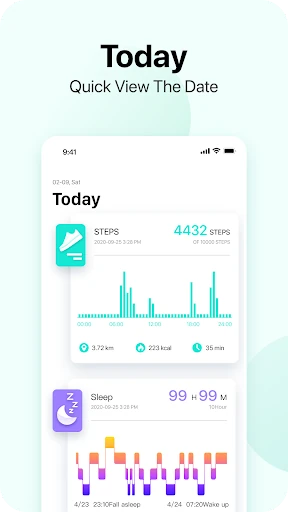
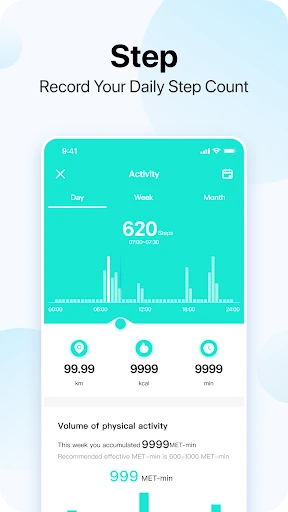
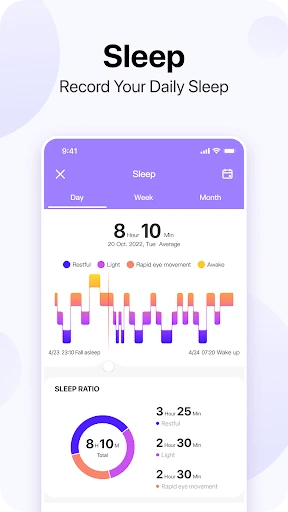
Analysis by Reviewed APKs
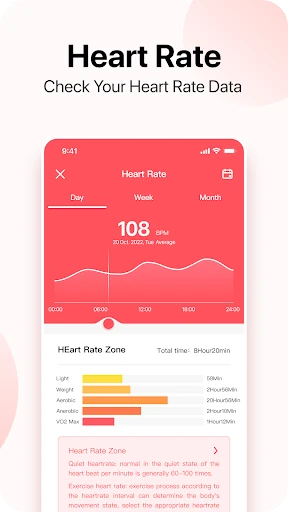
Da Fit is a companion app for a Da Fit Band, built around checking health data, reviewing sleep, and using a gentle alarm or call vibration. I see it as a practical everyday tracker for people who want a quick view of personal trends rather than a complicated training program. Its focus is clear, though how useful it feels depends on having a compatible band to wear.
A quieter morning check-in
When I imagine using Da Fit in a normal week, the appeal is less about studying charts for hours and more about having a small routine around the band. I would wear it through the day and night, then open the app in the morning to look over sleep quality and any health data it has tracked. That gives the day a simple starting point without turning a phone check into a big project.
The gentle alarm fits naturally into that routine. Rather than relying only on a phone alarm, I could set the band to wake me with a vibration, then check the app later when I am properly awake. I also like the option to have the band vibrate for incoming phone calls. Those are modest conveniences, but they suit the app’s role as a companion to something worn on the wrist.
A companion, not a coach
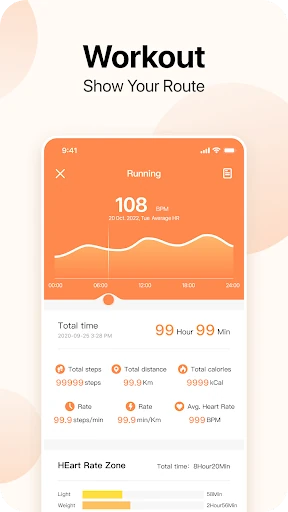
Da Fit makes the most sense alongside its band: the band gathers personal health data, while the app gives me a place to follow it and view trends. That is a different job from a standalone workout planner or a general wellness guide. The description points to tracking, sleep quality, trends, an alarm, and call vibration, so I would approach it as a useful dashboard rather than expecting a full coaching experience.
That distinction matters if you are choosing between apps. Someone who mainly wants a simple view of information collected by a wearable may find Da Fit’s focused purpose appealing. Someone looking for detailed exercise programs, elaborate goal-setting tools, or broad communication controls should be careful not to assume those are part of the package. The available description does not establish those features, and the app is most naturally evaluated with its band.
Make the check-in stick
A low-effort habit is to open Da Fit at the same time each day, perhaps while making coffee or winding down in the evening. Looking at trends regularly is more useful than opening the app once, scanning a number, and forgetting about it. The app is described as making personal data and trends easy to view, which suits short check-ins better than long sessions spent digging through screens.
I would also decide in advance which two functions I actually want from the band. For example, sleep tracking and a gentle alarm could make it part of a bedtime routine, while call vibration could be useful during a busy day when the phone is tucked away. Keeping the routine small helps the app stay practical. It is easier to continue checking a few relevant things than to turn every available reading into a daily assignment.
More From Our News Desk

Zoom Meetings, Google Meet, or Teams: Which Is Easiest to Join?

How I Build a Free Streaming Lineup With Tubi

Why Crunchyroll Is the Default Anime App for So Many Fans

YouTube TV: A Practical Guide to Cutting Cable

Rummikub and the Small Comfort of Phone Games

TeamViewer Remote Control or AnyDesk for Helping Family?
Who might enjoy Da Fit
I would recommend Da Fit to someone who already has a Da Fit Band, or is considering one, and wants an app for following the health data it tracks. The strongest fit is a person who likes a brief daily check-in, wants to review sleep quality, or would appreciate a band-based gentle alarm and incoming-call vibration. Its purpose is straightforward, which can be a plus for people who do not want a complicated wellness routine.
It may be a weaker match for someone who expects an app to work as a standalone fitness coach or who wants features beyond the ones described. You will need the band for the companion experience to make sense, and users who prefer not to wear a device day and night may not get as much from sleep tracking. I would also look elsewhere if a rich training program is the main thing you want.
Da Fit is an Android app in the Sports category, developed by MO YOUNG LIMITED. It has more than 100 million installs on Google Play and a 3.6-star rating from about 413,000 ratings. The app is free to download, and the provided store facts say it contains ads. It is rated Everyone, making its store content rating suitable for a broad audience.
The listed version is 2.9.25-97-gf8b4dff77d. Da Fit was released on December 14, 2017, and its most recent update in the provided facts is dated October 25, 2026. The minimum Android version is not included in the available app facts, so check Google Play for the requirement that applies to your device.
A wearable routine built around simple check-ins
A focused first impression
When I first consider Da Fit, its purpose is easy to grasp: it is there to help set, track, and follow data from a Da Fit Band. That focus is useful because a companion app should make the wearable’s information easier to revisit. The description specifically calls out sleep quality, personal-data trends, a gentle alarm, and vibration for incoming calls, giving a clear sense of the everyday jobs it is meant to support.
I would start by treating the band and app as a pair rather than expecting the app to provide a complete experience on its own. The supplied information does not spell out a detailed setup walkthrough, so I would keep expectations practical and follow the instructions provided with the wearable and in the app. Once the band is being worn and data is available, the main question becomes whether its information is useful in my daily routine.
Day-to-day tracking
The app’s central role is to let me follow personal health data over time. That can be useful in an ordinary way: checking in after a day at work, or looking back at a trend rather than relying on a single impression. Da Fit describes its trends as easy to view, which suggests a quick review is part of the intended experience. I would use that as a prompt for awareness, not as a reason to overread every change.
Sleep tracking adds a different kind of check-in. I could wear the band overnight and review how my sleep quality appears in the app the next day. That makes Da Fit relevant outside workouts, which is a sensible fit for a device worn throughout the day and night. The practical benefit is having a record to look at; the app description does not make it a substitute for professional interpretation of health information.
Small features with purpose
The gentle alarm is one of the more concrete ways Da Fit can become part of a routine. A band that vibrates to wake me offers a different option from an audible phone alarm, especially if I want to keep the morning quiet. I would not call that a dramatic change to a day, but small conveniences often matter most when they are easy to use consistently.
Incoming-call vibration is another practical addition. If my phone is in a bag or I am occupied with a task, a vibration on the band could help me notice a call. The described feature is specifically about incoming calls, so I would not assume it covers every kind of phone notification. Taken together, the alarm and call alert make the band a little more useful between health-data check-ins.
A simple weekly rhythm
A realistic routine could start at night: wear the band, use the gentle alarm if it suits the household, and let the device collect sleep data. In the morning, I would take a quick look at sleep quality, then move on with the day instead of lingering over the phone. Later in the week, I could review the easy-to-view trends and see whether there is anything worth paying attention to in my own routine.
During the day, call vibration can be helpful when I would rather not keep checking my phone. I would keep the number of app check-ins modest: a short morning glance and perhaps a weekly look at trends. This is not a claim that any particular schedule is required; it is simply a manageable way to use the functions described without making tracking feel like another chore.
Keep expectations grounded
Da Fit depends on a band for its central purpose, so it is not the right choice if you are looking for a phone-only health tracker. The experience also centers on following data and viewing trends. The provided description does not establish a workout coaching system or a detailed exercise-planning toolkit, so I would not choose it on the assumption that it will guide a training plan.
There is also a personal side to wearable tracking: not everyone wants to wear a device overnight or check health information each day. If that sounds like you, the sleep feature may not earn its place in your routine. And because the app is described as tracking personal health data, I would treat what it shows as information to review thoughtfully rather than reading more into it than the app promises.
Da Fit has a straightforward appeal: it helps people with a Da Fit Band follow personal data, check sleep quality, and use a couple of useful wrist-based conveniences. I like that the described features fit into ordinary moments instead of requiring a major commitment. Its value depends on the wearable and on whether quick trend reviews are something you will actually use.
I would recommend giving it a look if you want a companion for a Da Fit Band and prefer a simple check-in routine. I would be less enthusiastic if you need an independent fitness coach or expect a wide set of functions beyond tracking, sleep, alarms, and call vibration. For the right wearable owner, it has a clear, practical job.
Da Fit Frequently Asked Questions
What is Da Fit used for?
Da Fit is a companion app for using a Da Fit Band to set, track, and follow personal health data. Its described uses include checking sleep quality, viewing trends, setting a gentle alarm on the band, and having the band vibrate for incoming phone calls. The app is best understood as a place to follow data from the wearable.
Which phones and devices work with Da Fit?
Da Fit is an Android app, and its described purpose is to work with a Da Fit Band. The supplied information does not give a complete compatibility list for phones or band models. If you are checking a particular device, review the Google Play details and the wearable’s compatibility information before relying on a specific pairing.
What Android version does Da Fit require?
The minimum Android version is not included in the app facts provided here. Requirements can vary as the app and supported devices change, so check the current Google Play details for the Android version needed by your phone. The app is intended to accompany a Da Fit Band, which is also part of the practical compatibility question.
Is Da Fit free, and does it have in-app purchases?
Da Fit is free to download on Google Play, and the provided facts say it contains ads. They do not show in-app purchases. Store details can change, so check the current Google Play page for the latest information about costs, ads, and any purchase options.
Is Da Fit a good fit for me?
It may suit you if you have a Da Fit Band and want to review health data or sleep quality, use a gentle alarm, or notice incoming calls through band vibration. It may be less suitable if you want a standalone phone app or a detailed fitness coach. The best fit depends on your wearable and the routine you want.
Pros
- Combines health-data tracking with sleep-quality reviews and easy-to-view trends.
- A gentle band alarm can make waking up quieter than a phone alarm.
- Incoming-call vibration adds a practical reminder when the phone is tucked away.
- Free to download and focused on a few clear everyday uses.
Cons
- Its central purpose depends on having a Da Fit Band.
- The described features do not establish a full workout-planning or coaching experience.
- Ads are present, which may interrupt an otherwise simple check-in.
- Category
- Sports
- Version
- 2.9.25-97-gf8b4dff77d