WorkJam
- 15.51K
- 4.7
- Installs
- 1.00M
- Price
- Free

Screenshots
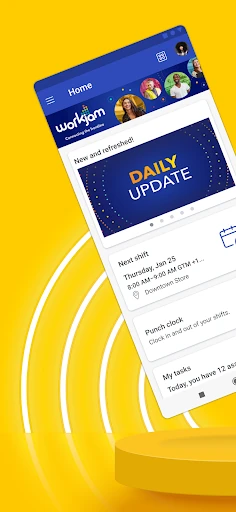
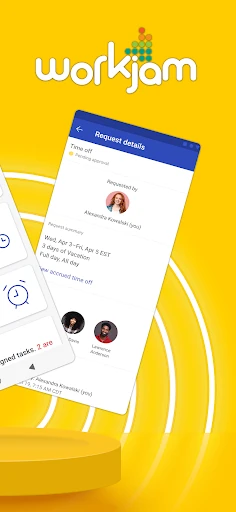
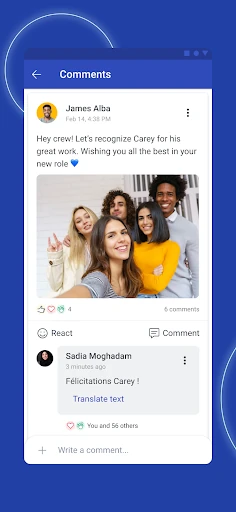
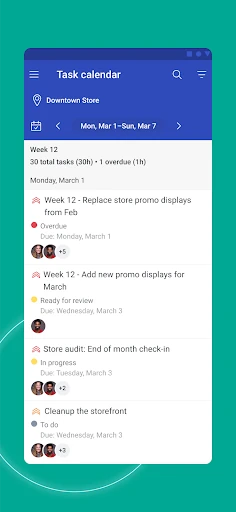
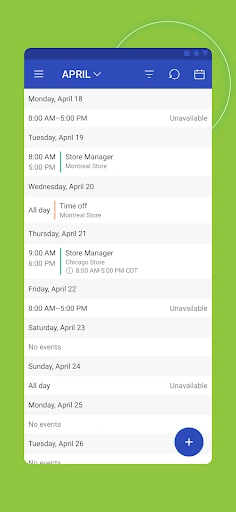
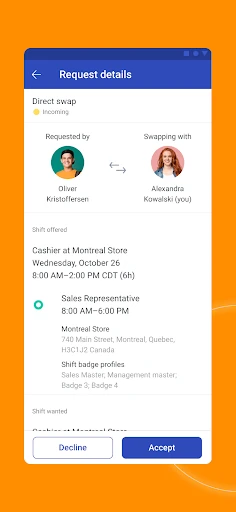
Analysis by Reviewed APKs
WorkJam brings work schedules, shift changes, workplace updates, tasks, and connections with managers and coworkers into one app. It is aimed at hourly employees whose employer uses the service, rather than anyone looking for a general calendar or team chat. After looking at what it puts together, my take is that WorkJam could make the day-to-day details of a shift job easier to keep track of, provided your workplace is set up for it.
Keeping a Shift Day Straight
Picture checking tomorrow’s shift while you’re winding down at home, then finding out that a change or extra time at work might affect your plans. WorkJam is designed to gather the schedule and workplace information your employer shares in one place. Instead of treating the shift as an isolated calendar entry, it connects that schedule with updates, tasks, and ways to reach managers or coworkers.
The appeal is practical more than flashy. I can see opening WorkJam before leaving for work to review an upcoming shift, or checking it during a break to catch up on an update or task. If a shift swap or the chance to pick up extra time comes up, the app is also meant to help manage those changes. What is available depends on the employer’s setup, but the central idea is a single work-focused stop.
A Work Hub, Not a Planner
A personal calendar is useful for appointments and reminders, and a general messaging app is handy for conversations. WorkJam has a narrower job: it brings together information and tools that an employer shares with its staff. That can be useful when your schedule, work updates, tasks, and contact with colleagues all belong to the same workplace routine. It is not a replacement for a personal planner or a universal messaging service.
That distinction matters before you install it. WorkJam requires your employer to use the service, so it is not an app you can independently adopt to organize any team. I would also avoid expecting it to handle every part of a job: the described focus is schedules, shift changes, work connections, recognition, tasks, and important information. For someone who only needs a basic calendar, that workplace tie-in may be more than they need.
Small Habits That Help
A simple routine can make a work hub more useful: check the schedule when planning the week, then take another look before each shift. That gives you a chance to notice changes your employer has shared and to review any relevant updates or tasks. I like the idea of keeping that check close to the moment it matters instead of trying to remember work details from a message seen days earlier.
It can also help to treat WorkJam as the place to look when a work question comes up. If you need to connect with a manager or coworker, or want to see whether a shift change or extra time is available, the app brings those work-related needs into the same space. There is no need to force it into every part of the day; a few purposeful checks around scheduling and work updates are the more natural fit.
More From Our News Desk

Zoom Meetings, Google Meet, or Teams: Which Is Easiest to Join?

How I Build a Free Streaming Lineup With Tubi

Why Crunchyroll Is the Default Anime App for So Many Fans

YouTube TV: A Practical Guide to Cutting Cable

Rummikub and the Small Comfort of Phone Games

TeamViewer Remote Control or AnyDesk for Helping Family?
Who May Find It Useful
I’d recommend WorkJam to hourly employees whose employer already uses it and who want a straightforward place to check shifts and workplace information. It is especially relevant if your routine involves changing schedules, possible shift swaps or extra time, tasks to keep up with, or regular communication with managers and coworkers. Having those pieces together may save the small effort of jumping between separate work-related tools.
It may be less appealing if your employer does not use WorkJam, since that is a requirement for using the app. It is also not aimed at people seeking a general-purpose calendar, a standalone social network, or a full employee-management system for their own business. The app’s value depends on the work information your employer makes available, so the experience will naturally vary from one workplace to another.
WorkJam is a Business app from WorkJam, Inc. On Google Play, it has more than 1 million installs and a 4.7-star rating from about 15,500 ratings. The app is free to download, and the provided store details show no in-app purchases or ads. Its content rating is Everyone, and the listed minimum requirement is Android 7.0.
The current version shown is 2026.1.15. WorkJam was released on September 3, 2015, and its most recent update in the provided details was January 21, 2026. The update notes describe bug fixes and performance improvements. These practical details sit alongside the app’s main condition: an employer must use WorkJam for employees to use it for workplace information and shift management.
A Closer Look at the Workday
Starting With the Schedule
My first impression is that WorkJam is organized around a real workday, not a broad productivity system. The starting point is the information an employer provides, with schedules and upcoming shifts at the heart of the described experience. That focus should make the purpose clear for employees who have been told their workplace uses the app: it is there to connect them with work details.
The important setup step is not a complicated personal configuration but having an employer that uses WorkJam. That requirement shapes the whole experience. When an employer shares schedules, updates, tasks, or other information through the platform, employees have a place to access those items. Without that workplace connection, the app does not serve as an independent scheduling tool.
The Everyday Check-In
Day to day, the core experience is about staying current. You can view your schedule, keep an eye on upcoming shifts, and manage changes such as swaps or picking up extra time. That makes WorkJam relevant not just when a schedule is first published, but whenever work plans need attention. The app’s value is in making those pieces part of one workplace routine.
I’d use it with a light touch: check the schedule while planning the week, then revisit it when a shift is approaching or a change needs attention. If there is a work update or task to review, it belongs in that same check-in. This is a practical pattern rather than a promise that every employer uses every tool; what appears in the app depends on what the employer shares.
More Than Shift Times
Schedules are the obvious anchor, but WorkJam also brings in workplace communication and information. The description says employees can connect with managers and coworkers, access updates and tasks, and see important information in one spot. That broader mix is useful because work rarely consists of a shift time alone; small updates and tasks can affect how the day goes.
Recognition is another part of the stated feature set. I appreciate that it sits alongside routine work details rather than defining the whole app. For an employee, the combination suggests a place for both practical coordination and acknowledgment of good work. I would keep expectations grounded in the employer’s implementation, though: the app offers a shared platform, while the workplace determines what it uses and shares.
A Weekly Work Routine
A workable routine might begin with a weekly schedule check. I would scan upcoming shifts, note where a change may be needed, and look over any updates or tasks the employer has shared. If an opportunity to swap a shift or pick up extra time is relevant, WorkJam is designed to help manage that as part of the same work-focused process.
Then, on the day of a shift, I’d make one brief check before heading out. That keeps the app tied to a real decision—what is coming up and whether there is anything to review—rather than turning it into another screen to inspect constantly. If a question comes up, the ability to connect with a manager or coworker gives the app another practical role in the routine.
The Employer Sets the Boundaries
The biggest limitation is also the clearest condition: your employer must use WorkJam. This is not a universal tool that can independently pull in schedules from any job. If your workplace is not on the platform, its central purpose does not apply. Even for participating workplaces, the information and functions available will reflect what the employer shares.
WorkJam also has a defined scope. It is built around work schedules, changes, communication, recognition, tasks, and updates, not every personal or professional need. I would not choose it as a replacement for a general calendar or expect it to cover tools that are not part of the described experience. Knowing that boundary helps set fair expectations: it is a workplace hub, not an all-purpose organizer.
WorkJam makes a sensible case for putting the moving parts of hourly work in one place: shifts, changes, workplace updates, tasks, and contact with colleagues. I like that the app’s purpose is easy to understand and tied to everyday needs rather than a long list of unrelated tools.
My recommendation is straightforward: if your employer uses WorkJam, it is worth trying as a workday companion. If you are looking for an independent planner or your workplace is not on the service, it is unlikely to be useful. Its strongest feature is the connection between the app and your employer’s actual work routine.
WorkJam Frequently Asked Questions
What is WorkJam used for?
WorkJam is used to access workplace tools and information shared by an employer. Employees can view schedules and upcoming shifts, manage changes such as swaps or picking up extra time, connect with managers and coworkers, access updates and tasks, and receive recognition. The exact experience depends on the employer, which must use WorkJam for the app to serve its workplace purpose.
Which devices can I use WorkJam on?
WorkJam is available as an Android app on Google Play. The provided requirements specify Android 7.0 as the minimum version. If you are checking compatibility for a particular device or want current availability details, those can vary and are worth checking on the Google Play store page.
What Android version does WorkJam require?
The listed minimum Android requirement for WorkJam is Android 7.0. The current version in the provided app details is 2026.1.15. Device compatibility can depend on the device and current store information, so check Google Play if you need to confirm whether your phone can install the latest version.
Does WorkJam cost money or include purchases?
WorkJam is free to download on Google Play. The provided details show no in-app purchases and no ads. Your employer must use WorkJam for you to access workplace information through it. Store details can change, so it is sensible to check the current Google Play page for the latest cost information.
Is WorkJam a good fit for every employee?
It is best suited to employees whose employer uses WorkJam and who want to keep up with shifts, schedule changes, tasks, updates, or work contacts. It may not suit someone looking for a general calendar or an app they can use independently with any employer. The app’s usefulness depends on what the workplace shares through the service.
Pros
- Combines shift schedules, workplace updates, tasks, and work contacts in one app.
- Supports managing shift swaps and opportunities to pick up extra time.
- Includes recognition alongside everyday work information.
- Free to download, with no ads or in-app purchases shown.
Cons
- Requires your employer to use WorkJam before it can serve its main purpose.
- Available tools and information depend on what the employer shares.
- Its workplace focus makes it less useful as a personal calendar or general organizer.
- Category
- Business
- Version
- 2026.1.15











