Wire - Secure Messenger
- 36.84K
- 3.5
- Installs
- 5.00M
- Price
- Free

Screenshots
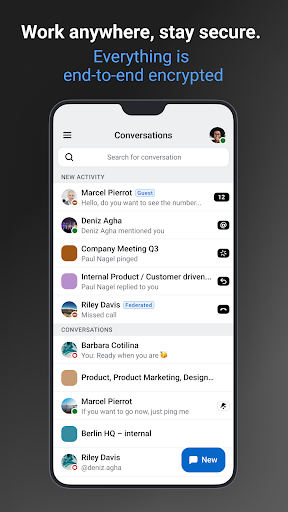
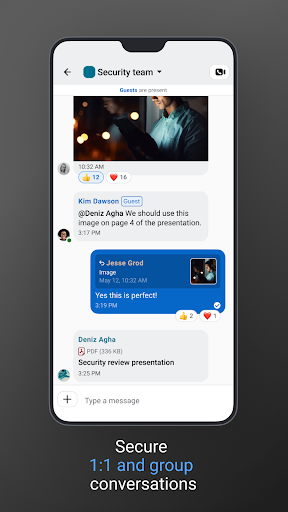



Analysis by Reviewed APKs
Wire - Secure Messenger is a messaging and collaboration app for people who want chats, calls, and file sharing in one place, with end-to-end encryption at its core. It makes the most sense for small teams and people who regularly coordinate with outside contacts, though friends and family can use its free version too. My overall impression is of a capable, privacy-minded work tool that takes a little thought to organize well.
A Busy Day, One Conversation
When I first opened Wire, I pictured a familiar workday: a team chat needs a quick answer, someone shares a document, and a colleague who is away from their desk needs a call. Wire is built to handle those exchanges in private or group conversations, with file and link sharing, audio and video messages, and calls all available in the same app. That makes it easier to keep a small project moving without bouncing between separate tools.
The useful detail is how the little interactions fit together. I can imagine replying to a specific message, mentioning a teammate, or reacting when a full answer would slow things down. If a conversation needs a more direct nudge, Wire also has a ping feature. For an outside partner, a guest room is intended for collaboration, including one-time conversations. It feels suited to real coordination, not just a stream of casual updates.
More Than a Personal Chat App
Compared with a basic personal messenger, Wire leans toward organized collaboration. It supports private and group conversations, video conferences, document sharing, guest rooms, and administrative controls. Those options are useful when a project involves several people or a supplier who is not part of the regular team. The free version is also described as an option for external business partners, friends, and family, so the app is not limited to a formal workplace.
That focus is also a boundary. Wire is not presented as a dedicated project-management system, document editor, or public social network; its job is to help people communicate and share information. If all I need is a lightweight chat for a close circle, some of its organization and administration options may feel like more than I need. But for teams that want conversations and calls together, its broader toolset has a clear purpose.
Small Habits, Cleaner Chats
Wire gives conversations a few ways to stay manageable as they accumulate. I would sort ongoing threads into custom folders by topic, then archive the ones that no longer need to sit in the main list. That is a modest habit, but it can make a difference when a work conversation, a family chat, and a short-lived partner discussion all compete for attention during the day.
For clearer exchanges, formatting, replies, and mentions can help separate an important instruction from the surrounding chatter. I would also use self-deleting messages for information that should not linger, and password-protected guest links when inviting an outside collaborator. Those choices work best as deliberate habits rather than automatic fixes: the point is to select the right tool for the conversation and keep sensitive information in view.
More From Our News Desk

Zoom Meetings, Google Meet, or Teams: Which Is Easiest to Join?

How I Build a Free Streaming Lineup With Tubi

Why Crunchyroll Is the Default Anime App for So Many Fans

YouTube TV: A Practical Guide to Cutting Cable

Rummikub and the Small Comfort of Phone Games

TeamViewer Remote Control or AnyDesk for Helping Family?
Who Wire Suits Best
I would recommend Wire to small teams, organizations, and independent workers who need a shared place for conversations, calls, and files and care about privacy features. It is especially relevant when communication includes external partners, since guest rooms are designed for bringing in people outside a regular group. People who want personal and work communication in one app may also appreciate support for multiple accounts on a device.
It may be less appealing if you want nothing beyond the simplest possible chat, or if your group is unlikely to use calls, file sharing, folders, or collaboration tools. Wire’s range of options rewards a little setup and routine; someone who only sends occasional messages might not get much value from that breadth. I would also check that the app’s requirements and available features suit your device and needs before moving an entire team over.
Wire - Secure Messenger is developed by Wire Swiss GmbH and is listed on Google Play in the Business category. It has more than 5 million installs and a 3.5-star rating from about 36,800 ratings. The app is free, with no in-app purchases or ads. Its content rating is Everyone, making the store’s rating suitable for a general audience.
The Google Play version is 4.37.1-48839-prod. Wire was released on December 2, 2014, and its listed last update is October 29, 2026. The Android version requirement is worth checking on Google Play, since it can depend on the device and current app release. Wire also describes versions for iOS, macOS, Windows, Linux, and web browsers.
How Wire Fits Into Everyday Collaboration
A Calm First Impression
Wire describes itself as simple to use and emphasizes a designed, customizable interface. On first opening it, I would start with the practical basics: find the conversations that matter, choose a suitable theme and text size, and work out which chats belong together. Color and appearance choices give the app some room to feel personal without changing its central role as a communication tool.
The setup question is less about learning a complicated system than deciding how to use it. A team may want private conversations for routine exchanges and a group thread for shared work, while an outside contact might be better served by a guest room. Thinking through those boundaries early can help prevent a new messaging app from turning into one long, hard-to-follow list.
The Everyday Exchange
The core experience brings several common ways of communicating together. A person can chat, share photos and files, send an audio or video message, or place a call. For a quick question, a text reply may be enough; when explaining something takes too long in writing, a call or recorded message can make the exchange feel more direct. The variety is useful because not every conversation needs the same format.
In a group, replies and mentions help connect an answer to the message that prompted it. Reactions offer a lighter acknowledgment, while a ping is available when someone needs to be drawn back to a conversation. I would still keep messages focused: having multiple ways to respond does not automatically make a busy thread clear. Used with a little care, though, these options help a team coordinate without making every update a meeting.
Privacy and Useful Extras
End-to-end encryption is central to Wire’s description of the service, and the app includes privacy-focused options alongside ordinary messaging. Self-deleting messages are intended for information that should not remain in a chat, and device fingerprints offer another security-related control. Guest links can be protected with passwords. These are useful choices to have available, though I would treat them as tools to manage rather than reasons to share sensitive material carelessly.
A few less ordinary features round out the collaboration side. Conversations can be organized into custom folders or archived, and users can share a location in a conversation or connect through QR codes. There are also sketches, animated GIFs, emojis, and message formatting. I like that the app covers both practical coordination and more casual exchanges, while keeping those extras optional rather than making them the main event.
A Routine That Stays Tidy
For a small project, I would begin the day by checking the relevant group conversation, replying directly to questions, and using a mention when one person needs to take a specific action. Documents and links can stay in the conversation where the team discusses them. If a question is easier to settle aloud, Wire’s calls and video conferences give the group another way to get aligned.
At the end of a project or workday, I would archive threads that have gone quiet and keep active topics in custom folders. A guest room can be useful for a short collaboration with a supplier or customer, instead of mixing that exchange into every internal conversation. This is a simple routine, but it makes Wire’s range of features feel purposeful: each tool has a place, and the conversation list stays easier to scan.
Limits to Keep in Mind
Wire’s broad feature set is a strength when a group needs it, but it may be unnecessary overhead for someone who only wants an occasional one-to-one chat. The organizational options also depend on the user taking the time to apply them. Folders and archiving can keep conversations orderly, but they will not decide which threads deserve attention or prevent a group from sending too many updates.
The app is positioned around communication and collaboration, not every part of running a project. Teams needing a specialized workflow may still need other tools alongside it. Device support is broad, but the Android version requirement can vary, so it is sensible to check Google Play before installing on an older phone. I would also agree on how the group will use guest rooms and privacy controls before relying on them for routine work.
Wire brings messaging, calls, file sharing, and team-oriented organization into one privacy-focused app. Its guest rooms, conversation controls, and cross-platform availability make it more flexible than a bare-bones chat tool, while its everyday messaging features keep it approachable for less formal use.
I would try Wire if my team wanted a shared communication space and would actually use its collaboration features. For a person seeking only the simplest personal messenger, it may be more app than necessary. The best fit is a group willing to use its organization and privacy options with a little intention.
Wire Frequently Asked Questions
What is Wire - Secure Messenger used for?
Wire is for messaging and collaboration, including private and group conversations, calls, video conferences, and sharing files, pictures, and links. It also offers features such as guest rooms, folders, message replies, and self-deleting messages. It can suit both work and personal conversations, but its strongest fit is coordinating with a team or outside contacts.
Which devices can I use Wire - Secure Messenger on?
Wire describes availability for Android and iOS, as well as macOS, Windows, Linux, and web browsers. The exact experience can differ between platforms and devices, so check the relevant store or Wire’s platform information for details about your particular device. On Android, Google Play is the place to check compatibility before installing.
What Android version does Wire - Secure Messenger require?
The minimum Android version can vary with the current release and the device. Check Wire - Secure Messenger on Google Play to see whether your phone meets the requirement. If you use another supported platform, consult its store or platform details for the corresponding system requirements.
Does Wire - Secure Messenger cost money?
Wire - Secure Messenger is free on Google Play, with no in-app purchases or ads. The app description also refers to a free version for external business partners, friends, and family. If you are considering a particular organizational setup or service, check the current store information for details that may vary.
Is Wire - Secure Messenger right for personal use?
It can work for friends and family, and the app includes familiar options such as chats, calls, photos, and audio messages. I would recommend it most to people who also value group collaboration, file sharing, and conversation organization. If you want only a very simple messenger, its additional work-focused tools may feel unnecessary.
Pros
- Combines chats, calls, video conferences, and file sharing in one app.
- Includes privacy controls such as self-deleting messages and password-protected guest links.
- Folders, archiving, replies, and mentions help organize team conversations.
- Supports Android, iOS, desktop systems, and web browsers.
Cons
- Its collaboration options may feel excessive for simple, occasional messaging.
- Keeping conversations organized still takes consistent effort from the user.
- Android compatibility should be checked for the specific device.
- Category
- Business
- Version
- 4.37.1-48839-prod











