Weave
- 519
- 2.4
- Installs
- 50.00K
- Price
- Free

Screenshots
Analysis by Reviewed APKs
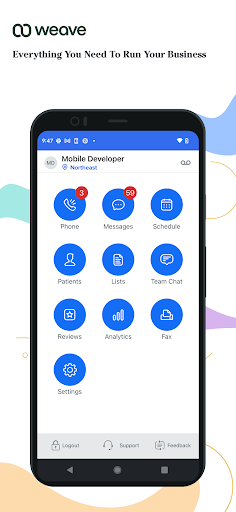
Weave is a mobile communication and practice-management app for teams that use Weave alongside their office phone system and practice software. It puts schedule details, patient information, calls, voicemails, and office-hour controls on a smartphone, which can be useful when I’m away from the front desk. My overall take: it has a clear workplace purpose, but it is built for running a practice, not keeping up with friends.
A Day Away From The Desk
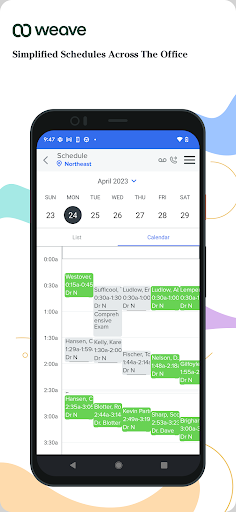
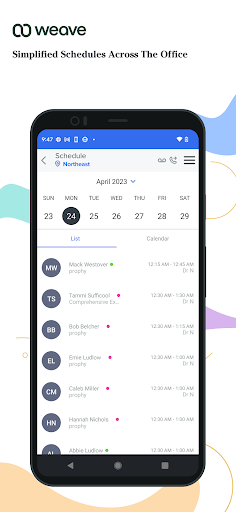
Picture a morning when I have stepped away from the office but still need a quick sense of the day’s appointments. Weave’s schedule view can show who is booked and the appointment type, so I can check the shape of the day without relying on a paper calendar at the front desk. That kind of glance is the app’s central appeal: it brings office information along when the person managing it is elsewhere.
If a patient needs a call or text, the app can use the office number rather than exposing my private phone number. I can also check call activity, listen to office voicemail, and manage call forwarding remotely. I like that these are practical work tasks rather than a pile of general-purpose chat features. It is the sort of mobile access that can help a practice stay reachable when its staff are not sitting beside the office phone.
A Practice Tool, Not A Messenger
Compared with a personal messaging app, Weave is organized around a practice’s schedule, patient list, and office phone activity. It is not a social network or a general-purpose way to keep in touch with friends. Its value depends on the work setup around it: the app is described as syncing with practice management software or an EHR and Weave’s office app, so it makes most sense as a companion to those tools.
That focus also draws a useful boundary. I would not choose Weave as a standalone appointment calendar or as a replacement for every system a practice uses. The listed features are about viewing and managing practice information and communicating through an office number. For a team already using the related Weave and practice systems, the mobile app can extend access; for someone outside that setting, much of its purpose falls away.
Small Habits That Help
I’d make the schedule view part of a simple check-in whenever I’m away from the office: see who is booked, note appointment types, then move on with the day. The patient list and relevant patient information are available too, which makes it easier to look up context when a work call comes in. Keeping those checks brief helps the phone remain a useful work companion instead of turning every spare moment into office time.
A second useful habit is to check the office phone activity and voicemail when it suits the day, rather than assuming a missed call will wait until I return. If the office’s hours or call routing need attention, the app also offers controls for changing hours and managing emergency call forwarding. I would treat those as deliberate updates, not something to tap casually, since they affect how the office communicates.
More From Our News Desk

Zoom Meetings, Google Meet, or Teams: Which Is Easiest to Join?

How I Build a Free Streaming Lineup With Tubi

Why Crunchyroll Is the Default Anime App for So Many Fans

YouTube TV: A Practical Guide to Cutting Cable

Rummikub and the Small Comfort of Phone Games

TeamViewer Remote Control or AnyDesk for Helping Family?
Who Might Find It Useful
I’d recommend Weave to practice staff or owners who already rely on the Weave office app and connected practice-management software or an EHR. The mobile access is most appealing to people who need to check schedules, patient information, calls, or voicemail while away from their desk. It could also suit a team member who wants to use the office number for patient calls and texts instead of sharing a personal number.
It may not suit someone looking for a personal messaging app, a general calendar, or a tool for managing work without the connected practice setup. The app’s purpose is quite specific, and its Google Play rating is modest, so I would look closely at whether its workflow matches the way a practice already operates. If the relevant office systems are not part of the picture, there may be little reason to install it.
Weave is a communication app from Weave Communications, Inc. On Google Play, it has over 50,000 installs and a 2.4-star rating from 519 ratings. The app is free, with no in-app purchases or ads according to the available app facts. Its content rating is Everyone, making the store age label straightforward even though the app itself is aimed at professional practice use.
The current version in the supplied app facts is 7.5.1. Weave was released on June 16, 2015, and its recorded last update is October 27, 2026. The app is for Android and is available through Google Play. The Android version requirement is not included among the supplied facts, so anyone with an older device should check the compatibility details on Google Play before installing.
Taking Practice Communication On The Go
First Impressions And Setup
When I first opened the idea of Weave, what stood out was its work-first focus. This is not trying to be a pocket-sized version of every business tool. The main promise is access to practice schedules and phone-related information while away from the office, with patient communication kept tied to an office number. That gives the app a clear job from the start, even if it is only relevant to a particular kind of workplace.
The app is described as syncing with a practice management system or EHR and with Weave’s office app. That context matters more than a long list of setup options: Weave’s mobile experience is meant to work within a connected office environment. I would think of it as an extension of a system the practice already uses, not a self-contained service that can create a full workflow by itself.
The Everyday Experience
Day to day, the useful loop is easy to understand: check the schedule, look at the patient information relevant to a work task, and respond through the office phone channel when needed. I like that the schedule includes both who is booked and appointment types, rather than reducing the day to a list of times. That can make a remote check more informative without needing to be physically at the office.
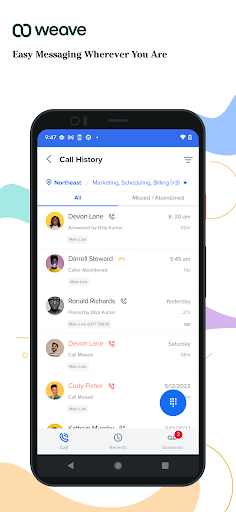
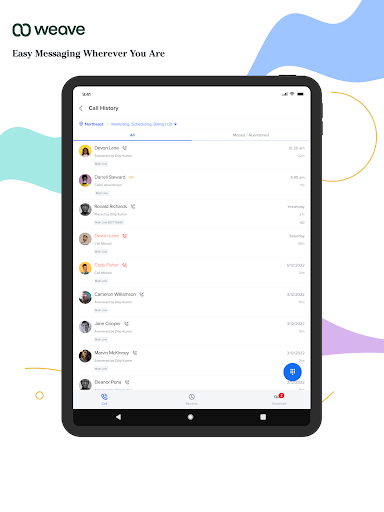
Phone activity adds another practical layer. The app can show office call history and activity, and it can provide access to voicemails, including the ability to listen to them remotely. I can see this helping when a team member is away from the front desk but still needs to keep track of incoming communication. It keeps the focus on continuity of office work, rather than adding extra personal messaging channels.
Office Number And Controls
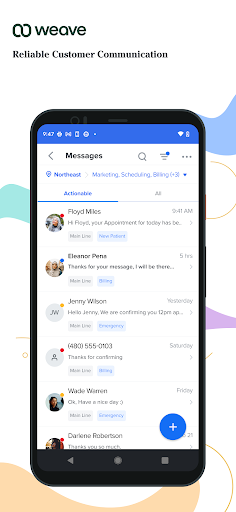
The standout communication detail is the ability to call and text patients using an office number, which helps keep a personal phone number private. That separation is a concrete convenience for staff who handle patient communication on the move. It also keeps the interaction associated with the practice rather than making it feel like a message from someone’s personal device.
The app also covers office-hour changes and call forwarding, including emergency call forwarding. Those controls are small features with an outsized practical role: how a call is routed or when the office is open affects how people reach the practice. Weave’s description also includes access to recorded calls, along with the option to listen to them remotely, giving users another way to review office phone activity.
A Useful Check-In Routine
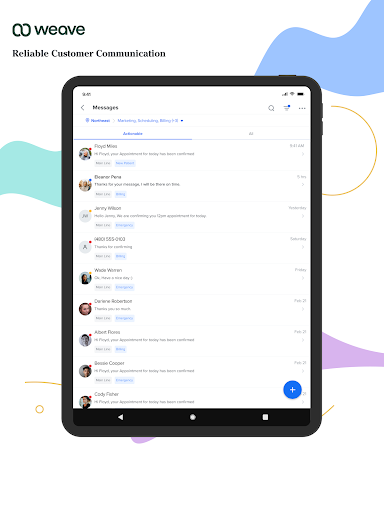
A sensible routine would be to make one quick schedule check before leaving the office, then use the app as needed to handle a patient call or text through the office number. If a message comes in while I am away, I can review voicemail or phone activity rather than relying on memory or waiting until I return. This is not about being constantly on call; it is about having relevant office information available when a task genuinely needs attention.
I would keep office-hour and forwarding changes as a separate, intentional check. For example, when a practice needs to adjust how it handles calls, the app provides a way to manage those settings remotely. Pairing that with a glance at the schedule can make the mobile workflow feel orderly: check what is happening, handle the immediate communication, and leave the larger office settings alone unless they need updating.
Limits To Keep In Mind
Weave’s focus is also its main limitation. The app is designed around practice schedules, patient information, and office calling, so it will not offer much to someone who needs a general productivity or personal communication tool. Its usefulness also depends on the connected practice software and Weave office setup described for the app. I would make sure that environment is already part of the workflow before expecting the mobile app to stand on its own.
There is also a practical balance to consider when taking office calls and messages onto a personal smartphone. Using the office number helps protect a private number, but mobile access can make it easier to bring work into personal time. I would use the schedule, voicemail, and forwarding tools with a clear sense of when I need to be available. The Google Play rating is 2.4 stars, so I would weigh that alongside whether the features match the practice’s needs.
Weave makes the most sense as a mobile extension of a practice’s existing communication setup. Its schedule, patient details, office-number calling and texting, voicemail, call history, and remote controls all point toward one clear use: staying connected to office work away from the desk. I appreciate that practical focus, even though it leaves little reason for people outside a Weave-enabled practice to use it.
I’d recommend giving it a look if your practice already uses the connected Weave and management systems and you need mobile access to calls or scheduling information. If you are after a broader business app or a personal messenger, I would pass. Before installing, I’d also check Google Play for device compatibility and consider the app’s 2.4-star rating.
Weave Frequently Asked Questions
What is Weave used for?
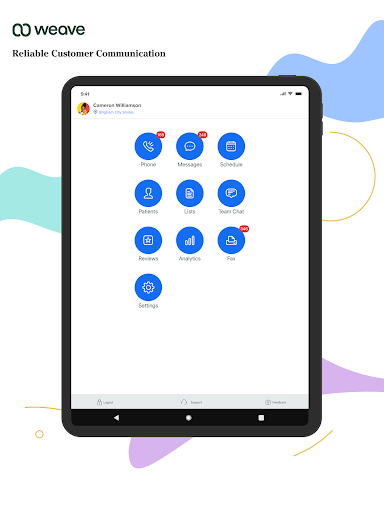
Weave is a mobile communication and practice-management companion. It can show a practice schedule, patient information, office call activity, voicemails, and recorded calls. Users can also call or text patients through an office number, change office hours, and manage call forwarding. Its features are intended to work with practice management software or an EHR and Weave’s office app.
Which phones and devices can run Weave?
Weave is an Android app available through Google Play. The supplied app facts do not include a minimum Android version, and device compatibility can vary. I’d check the Google Play store details for the current requirement before installing, especially if the phone is older. The app is described as a mobile companion for a practice’s connected Weave setup.
What Android version does Weave require?
The minimum Android version is not included in the available app facts, so I can’t give a reliable version number. Requirements may vary as the app is updated. Check Weave’s Google Play store page for the current compatibility information and make sure the phone meets it before relying on the app for work.
Does Weave cost money or include purchases?
Weave is free to download according to the supplied app facts, with no in-app purchases or ads reported. The mobile app is described as working alongside Weave’s office app and connected practice software or an EHR. If you need details about the broader service or any costs outside the mobile app, check the Google Play information or the practice’s existing service arrangements.
Is Weave suitable for my practice?
Weave may suit staff or owners who use the connected Weave office setup and want mobile access to schedules, patient information, office calls, and voicemail. It is not a general-purpose messenger or calendar, so it may not be useful outside that environment. Whether it fits depends on the practice’s existing systems and workflow; I’d check the store information and app compatibility first.
Pros
- Shows scheduled patients and appointment types for a quick view of the practice day.
- Lets staff call and text patients from an office number instead of a private number.
- Includes remote access to office call history, voicemail, recorded calls, and forwarding controls.
- Can help practice staff stay connected to office tasks while away from the front desk.
Cons
- Its usefulness depends on a connected Weave office setup and practice software or EHR.
- The 2.4-star Google Play rating may give prospective users reason to look closely.
- Its narrow practice focus makes it unsuitable as a general calendar or personal messenger.
- Category
- Communication
- Version
- 7.5.1











