Verizon Call Filter
- 636.48K
- 4.7
- Installs
- 100.00M
- Price
- Free

Screenshots
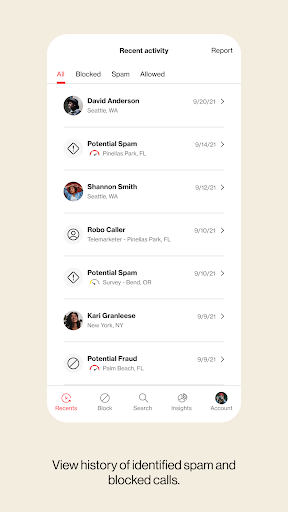
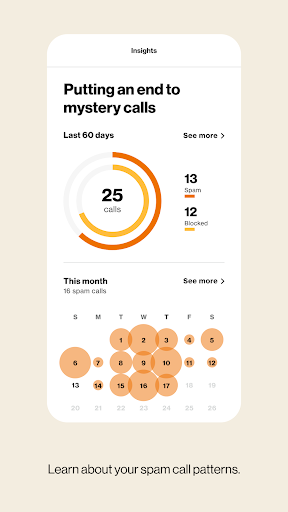
Analysis by Reviewed APKs
Verizon Call Filter helps identify incoming callers, flag suspected spam, and block unwanted numbers. It suits Verizon customers who want a little more context before answering and a simple way to manage nuisance calls. After looking at how its features fit together, my take is that it does its best work quietly in the background: useful for everyday call screening, but specifically tied to an eligible Verizon account.
A quieter phone day
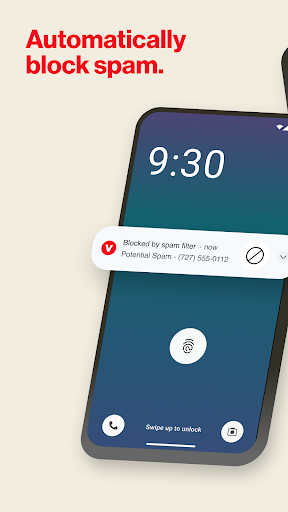
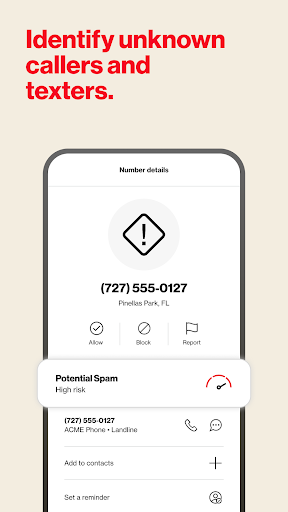
Picture a busy afternoon when your phone rings while you are cooking, working, or trying to get out the door. You may not recognize the number, but Call Filter can show caller information or a spam risk alert on the incoming call screen. That gives you a moment to decide whether the call deserves your attention instead of treating every unknown number as equally urgent.
When I first considered the everyday job this app does, the useful part was not a dramatic feature; it was reducing the guesswork around interruptions. Suspected spam can be sent to voicemail automatically, and you can report unwanted numbers. If a call still gets through, the risk information and your own block list give you ways to handle repeat nuisances.
More than a block list
Compared with manually rejecting calls or blocking numbers one at a time in a phone app, Call Filter adds spam identification, risk levels, and a searchable spam database. It can also identify some callers who are not saved in your contacts. Those tools make it more useful when the problem is a steady stream of unfamiliar numbers rather than one persistent caller.
It is not a replacement for your phone service, a general messaging app, or a broad privacy suite. Its focus is unwanted calls, and access requires an eligible Verizon standard monthly account and device. If you use another carrier, or mainly want a tool for organizing contacts and messages, this is not aimed at your situation.
Small habits that help
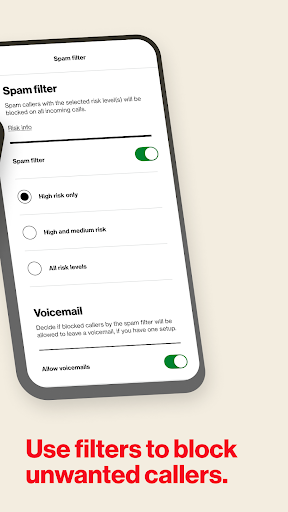
A little attention to settings can make the filtering feel more personal. Call Filter starts with high-risk spam blocking enabled when you enroll, but you can change block settings. I would take a minute to review that behavior, then add numbers you already know you do not want to hear from to the personal block list.
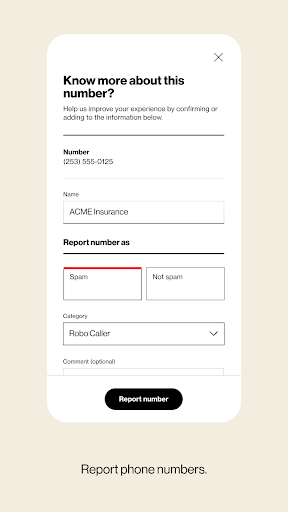
When an unwanted call arrives, reporting it is another useful habit. You can also search the spam database when a number looks unfamiliar, rather than making a decision from the caller ID alone. Over time, these small steps make the app easier to use as a screening aid without turning every unknown call into an automatic rejection.
More From Our News Desk

Zoom Meetings, Google Meet, or Teams: Which Is Easiest to Join?

How I Build a Free Streaming Lineup With Tubi

Why Crunchyroll Is the Default Anime App for So Many Fans

YouTube TV: A Practical Guide to Cutting Cable

Rummikub and the Small Comfort of Phone Games

TeamViewer Remote Control or AnyDesk for Helping Family?
Who may find it useful
I would recommend Verizon Call Filter to eligible Verizon customers who regularly get suspicious or unwanted calls and want caller clues before picking up. The combination of alerts, automatic high-risk filtering, number reporting, and a personal block list covers the practical basics. It is especially appealing if you prefer to make a quick call-by-call decision instead of answering every unfamiliar ring.
It may not suit people without an eligible Verizon account, or anyone expecting a carrier-independent call manager. People who rarely receive nuisance calls may not get much day-to-day value from adding another app to their routine. And because some caller identification depends on numbers being recognized, I would treat the displayed name or risk level as helpful context, not a reason to stop thinking critically.
Verizon Call Filter is published by Verizon Consumer Group. Google Play shows more than 100 million installs and a 4.7-star rating from about 636,000 ratings. The app is listed as free, contains no ads, and has an Everyone content rating. Its listed version is 18.4.
The recorded release date is January 29, 2018, and the last update date is August 10, 2026. The Android minimum requirement is worth checking on Google Play for the device you plan to use. Call Filter is intended for Verizon customers with a standard monthly account on an eligible device.
A closer look at everyday call screening
Getting started
My first impression is that Call Filter has a clear, narrow purpose: help me make sense of incoming calls. Rather than trying to be a complete phone-management package, it concentrates on identifying callers and dealing with suspected spam. That focus is welcome. The key thing to sort out before relying on it is whether your Verizon account and device are eligible.
Once enrolled, the app applies a starting behavior that blocks high-risk spam callers, while allowing you to change block settings. I would check that setting early, especially if I am expecting calls from unfamiliar numbers. That small bit of setup helps match the filtering to how cautious I want to be, rather than assuming the default is right for every situation.
Calls in daily use
The day-to-day experience centers on the moment a call comes in. Real-time alerts can offer a spam warning, and caller identification can put a name to some numbers that are not in your contacts. That is a practical improvement when I am deciding whether to pause what I am doing and answer, or let an uncertain call wait.
If spam filtering is enabled, high-risk calls can be sent to voicemail automatically. For callers that are not handled that way, the risk level gives another clue. I like that the app offers both an automatic option and information for making my own decision. It supports a calmer routine without requiring me to treat every unfamiliar number as dangerous.
Useful screening tools
The personal block list is the straightforward tool for numbers I specifically want to stop hearing from. Call Filter also lets users block numbers similar to their own or from a particular NPA-NXX. Those options add a little more control than repeatedly dismissing individual calls, though they are most useful when I understand which kinds of numbers I want to screen.
I also find the reporting and database search features worth noting. You can report a number as spam, and search the spam database to see whether a number has already been identified. Caller identification may appear on the incoming call screen, in the call log, and in eligible messaging apps. The app can also help update contacts with newly identified numbers.
A simple weekly routine
A practical routine might start with checking the incoming call alert whenever an unfamiliar number appears. If the call looks high-risk, let the filter handle it or allow it to go to voicemail. If the number is unfamiliar but potentially important, the caller details and risk information can help you decide whether to return the call.
Later, I would take a minute to review any unwanted calls and report numbers that appear to be spam. A search can help when one number keeps appearing, while the block list is there for specific repeat callers. This is not a complicated workflow; it is a few small decisions spread across the calls already coming in.
Limits to keep in mind
The biggest limit is eligibility: the app requires a Verizon standard monthly account and an eligible device. That makes it a poor fit for people using another carrier, regardless of how useful the call-screening tools might sound. Device requirements can also vary, so checking the store information for your phone is sensible before building the app into your routine.
Caller identification and spam risk labels are useful signals, not a perfect substitute for judgment. Some incoming numbers may remain unfamiliar, and the app's main focus is calls rather than broader phone organization. The basic service is free according to the app description, while Call Filter Plus is a paid option; the free tools should be enough for people who only want core spam handling.
Verizon Call Filter makes a focused case for itself: identify callers, flag potential spam, and give you practical ways to block or report unwanted numbers. I like the mix of automatic filtering and user control. For eligible Verizon customers who get frequent nuisance calls, it can make an everyday interruption easier to assess.
I would try it if unfamiliar calls are a recurring annoyance and I wanted screening tools built around my Verizon service. If I used another carrier or rarely received spam, I would skip it. The app is most convincing when its specific eligibility and narrow call-focused purpose match what you actually need.
Verizon Call Filter Frequently Asked Questions
What is Verizon Call Filter used for?
Verizon Call Filter helps identify incoming callers, assess spam risk, block unwanted numbers, and report suspected spam. It can send high-risk spam callers to voicemail when filtering is enabled. Users can also search a spam database and maintain a personal block list. Its purpose is call screening rather than general phone or message management.
What devices and platforms support Verizon Call Filter?
Verizon Call Filter is an Android app on Google Play. The description says it requires a Verizon standard monthly account and an eligible device. Check Google Play and Verizon's account information to see whether your particular phone and service qualify. The Android version requirement can vary by device and is worth checking in the store.
Does Verizon Call Filter cost money?
The app is listed as free, and its basic call filtering, blocking, and reporting are described as free. The description also offers Call Filter Plus for $3.99 per month per line, with a multi-line option for eligible accounts with three or more lines at $10.99 per month. Check the current store and Verizon details for applicable terms.
What Android version does Verizon Call Filter require?
The Android version requirement may vary with the device and app release. Check the Google Play page for Verizon Call Filter using the phone you plan to install it on. The service also requires a Verizon standard monthly account and an eligible device, so meeting a software requirement alone may not establish eligibility.
Who should use Verizon Call Filter?
It is best suited to eligible Verizon customers who want caller identification, spam alerts, and ways to block or report unwanted calls. It may be less useful for people who rarely receive nuisance calls, and it is not intended for customers using another carrier. Its main focus is incoming calls, not general contact or messaging organization.
Pros
- Combines spam alerts, risk levels, and caller identification for everyday screening.
- Offers automatic high-risk blocking alongside personal control over settings.
- Includes a personal block list, number reporting, and spam database search.
- Free basic filtering is available to eligible Verizon customers.
Cons
- Requires an eligible Verizon account and device, limiting who can use it.
- Caller names and risk assessments are helpful signals, not certainty.
- Call Filter Plus adds a recurring cost for its additional features.
- Category
- Communication
- Version
- 18.4











