UConnect by Uniti
- 1.55K
- 4.5
- Installs
- —
- Price
- Free

Screenshots
Analysis by Reviewed APKs
UConnect by Uniti is a customer portal for businesses using Uniti Solutions services. It brings account tasks, service support, network monitoring, and OfficeSuite UC communications into one iPhone app. I see it as a practical companion for customers who want to check a bill or follow a ticket while away from a desk, rather than a general business toolkit. Its appeal depends on already being a Uniti Solutions customer.
A portal for busy days
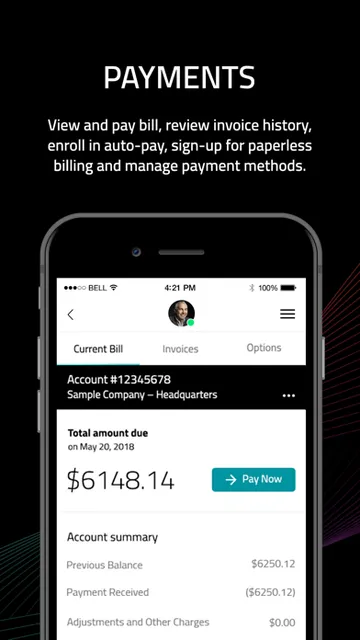
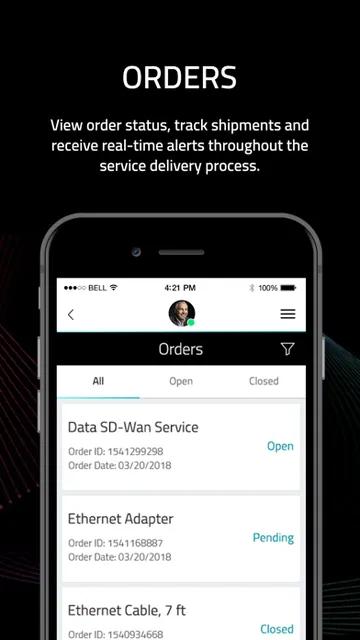
When I picture using UConnect during an ordinary workday, the draw is having account details and service tasks close at hand. I could check an invoice between meetings, look up a payment, then return to a support ticket later without switching between separate portal pages. Order tracking is there too, which makes the app useful when a new service or device is still in progress.
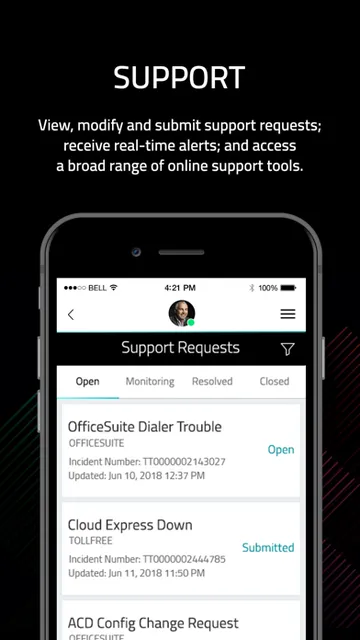
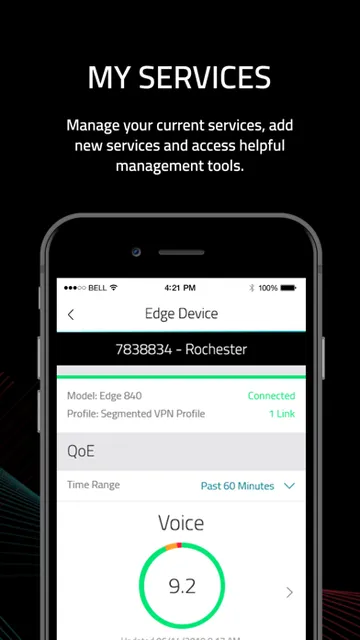
The service side gives the app a more operational role than a simple billing shortcut. A customer can monitor network status, including SD-WAN EDGE devices, and create, update, or track support tickets. If something needs attention, that combination can help me see both the issue and its support thread from the same account. It is aimed at keeping business service administration manageable on a phone.
Not a general business suite
Compared with checking an account through a browser, UConnect is a mobile route into Uniti Solutions services, with account access and service management gathered in one place. It also reaches beyond basic billing: customers can adjust notification preferences, repoint Toll-Free numbers, and access the Uniti Solutions online community. Those tools make sense for someone already dealing with Uniti; they are not a reason for a business to adopt the app on their own.
I would not treat it as a universal invoicing, project-management, or customer relationship tool. Its described functions revolve around a Uniti Solutions account, network services, and OfficeSuite UC. If you are looking for a car connection app, this is not that product either. The name may invite that assumption, but the app described here is a business customer portal, not a driving companion.
Small habits that help
A useful habit would be to check the account when a bill arrives, rather than waiting until a payment deadline is close. Invoice and payment history give customers a way to review prior activity, while notification preferences let them choose how account updates reach them. I would set those preferences early, then use the app as a quick reference instead of treating every visit as a fresh setup task.
For service issues, I would keep the ticket workflow together: open a ticket, return to update or track it, and check network status when the question involves connectivity. Order tracking can fit the same routine for pending work. If a team uses OfficeSuite UC, the included voice, video, and instant messaging services may make the app more relevant during the workday than billing alone.
More From Our News Desk

Zoom Meetings, Google Meet, or Teams: Which Is Easiest to Join?

How I Build a Free Streaming Lineup With Tubi

Why Crunchyroll Is the Default Anime App for So Many Fans

YouTube TV: A Practical Guide to Cutting Cable

Rummikub and the Small Comfort of Phone Games

TeamViewer Remote Control or AnyDesk for Helping Family?
Who will find it useful
I would recommend UConnect to existing Uniti Solutions customers who handle bills, orders, support requests, or network services from a phone. It should be especially relevant to people who need occasional access while away from their computer, or who want to keep an eye on SD-WAN EDGE device status and ticket progress. OfficeSuite UC users may also appreciate having those communication services within the same app.
It may not suit someone who has no Uniti Solutions account or who needs a broad business platform for unrelated services. The app’s value comes from its connection to Uniti’s customer environment, not from general-purpose tools. I would also look elsewhere if I needed a detailed desktop-first operations console; the stated purpose is mobile account access and service configuration, not an all-in-one management system.
UConnect by Uniti is developed by Uniti Group Inc. and is available on the Apple App Store for iPhone and other compatible Apple devices. The minimum requirement is iOS 15.6. The store record gives the app a 4+ age rating. It was released on September 20, 2018, and the listed current version is 1.97.1.
The app is free to download. On the App Store, it has a 4.5-star rating from 1,548 ratings. The supplied store facts do not give an install count or a separate in-app purchase or advertising figure, so I’m focusing on the confirmed price and rating rather than guessing at additional costs.
A closer look at daily account tasks
First steps and setup
My first impression is that UConnect has a focused job: provide an entry point to a Uniti Solutions customer account. The description emphasizes secure single sign-on and real-time responsiveness, so the intended experience is less about browsing a collection of unrelated tools and more about getting to account and service information directly.
The app’s usefulness naturally depends on having a Uniti Solutions account and services to manage. Once in, the available tasks span billing, support, orders, network status, and OfficeSuite UC. That breadth gives the portal a practical starting point for different customer needs without suggesting that every user will rely on every section.
The everyday experience
For day-to-day use, I like the mix of quick checks and tasks that may need follow-up. Looking at a bill or payment history is a short visit; tracking an order or support ticket may bring me back more than once. Keeping those activities associated with the same account gives the app a clear role as a mobile companion to ongoing business services.
The network-status view adds a more hands-on dimension. Rather than being only a place to check account paperwork, the app can show network status, including whether SD-WAN EDGE devices are operating. I would use that as a convenient status check, while recognizing that the app’s description does not frame it as a replacement for every deeper network-management workflow.
Useful service controls
The range of functions is the app’s most distinctive quality. Alongside bill payment, invoice history, and order tracking, customers can create, update, and follow support tickets. Repointing Toll-Free numbers and changing notification preferences give the portal service controls that are more specific than a standard account-balance screen.
OfficeSuite UC is another notable part of the package. The description includes voice, video, and instant messaging services, so the app has a communications angle as well as account administration. Access to the Uniti Solutions online community rounds out the customer-facing side. These features make UConnect more useful to customers whose work already touches several Uniti services.
A practical weekly routine
I would use UConnect in small bursts rather than leave it open all day. At the start of a workweek, I might check for a new invoice or payment update, review any open support ticket, and follow up on an order that is still underway. If a service question comes up, checking network status could be a sensible first stop before returning to the ticket.
That routine also helps keep the app from becoming another place to check without a purpose. Setting notification preferences gives customers some control over updates, while returning to the same ticket for changes and progress keeps related activity together. For teams using OfficeSuite UC, the communication services can make the portal worth opening even when no billing task is due.
Limits to keep in mind
UConnect is tightly tied to Uniti Solutions, which is both its strength and its main boundary. The listed capabilities are useful for customers of those services, but they do not turn it into a general-purpose business app. A company that does not use Uniti will have little reason to choose it, and a user seeking broad tools outside this service relationship should look elsewhere.
It is also a phone-oriented portal, not a promise of a complete desktop operations environment. The description covers account access, service configuration, tickets, network status, and communications, but it does not claim to replace every support or administration channel. I would keep expectations focused on the tasks it actually names and check the App Store for current compatibility and purchase details.
UConnect by Uniti looks most worthwhile as a convenient mobile companion for people already managing Uniti Solutions accounts. Billing, tickets, orders, network status, and OfficeSuite UC give it more substance than a simple payment app, while the focused customer-portal approach keeps its purpose clear.
I’d recommend trying it if those services are part of your work and you want account tasks within reach on an iPhone. If you are not a Uniti Solutions customer, or need a broad business platform, this is unlikely to be the right fit. Its value is practical and specific, not universal.
UConnect by Uniti Frequently Asked Questions
What is UConnect by Uniti used for?
UConnect is a customer portal for Uniti Solutions customers. It can be used to view and pay bills, review invoice and payment history, track orders, manage support tickets, change notification preferences, and check network status. It also provides access to the Uniti Solutions online community and OfficeSuite UC voice, video, and instant messaging services.
Which devices can run UConnect by Uniti?
UConnect is available through the Apple App Store and requires iOS 15.6 or later. It is intended for compatible Apple devices. For the latest device compatibility information, check the App Store entry before installing, since requirements and availability can vary over time.
What iOS version does UConnect by Uniti require?
The stated minimum requirement is iOS 15.6. If your device runs an older version, you may need to update iOS or check the App Store to see whether a compatible version is available. The store is the best place to verify current compatibility for your particular device.
Does UConnect by Uniti cost anything?
UConnect is free to download from the Apple App Store. The supplied store facts do not give a separate in-app purchase or advertising figure, so check the current App Store entry for any details that may vary. The app is designed for customers using Uniti Solutions services.
Who should use UConnect by Uniti?
It is best suited to Uniti Solutions customers who want to handle account tasks, support requests, order tracking, or network-status checks from a mobile device. OfficeSuite UC users may also find its communication services relevant. If you do not use Uniti Solutions, the app’s customer-portal functions may not be useful to you.
Pros
- Combines bill payment, invoice history, orders, and support tickets in one customer portal.
- Includes network-status monitoring for SD-WAN EDGE devices.
- Provides access to OfficeSuite UC voice, video, and instant messaging.
- Notification preferences and ticket tracking support ongoing account follow-up.
Cons
- Its usefulness is limited to customers using Uniti Solutions services.
- The focused portal is not a general-purpose business management suite.
- Requires iOS 15.6 or later.
- Category
- Business
- Version
- 1.97.1











