TranscribeMe
- 600
- 3.3
- Installs
- 100.00K
- Price
- Free

Screenshots
Analysis by Reviewed APKs
TranscribeMe is a mobile service for turning recorded speech into written transcripts, whether you’re working with an interview, a meeting, or research audio. It suits people who need more than a rough voice memo and are willing to pay for transcription work. I like the practical mix of recording, choosing transcript options, and receiving the finished text by email or in the app, though the service cost matters.
From Recording to Transcript
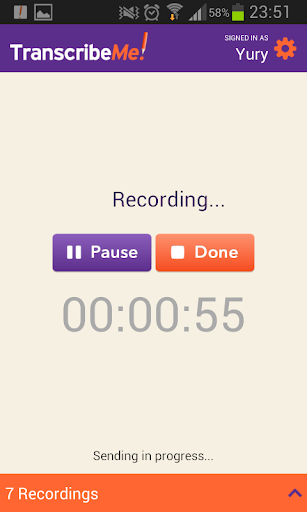
Imagine leaving a research interview with a phone full of audio and a deadline approaching. With TranscribeMe, I could record directly in the app or submit an audio or video file, then choose how I wanted the words handled. Options described include full verbatim, which keeps speech fillers, and transcripts with multiple speakers. That makes the process feel aimed at turning real recordings into usable documents, not just capturing a quick reminder.
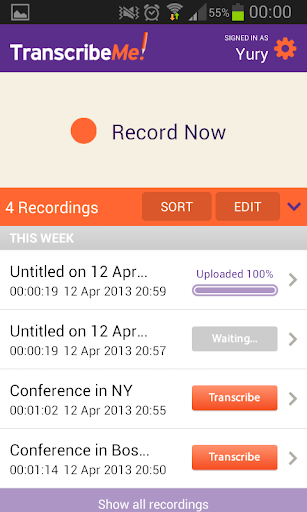
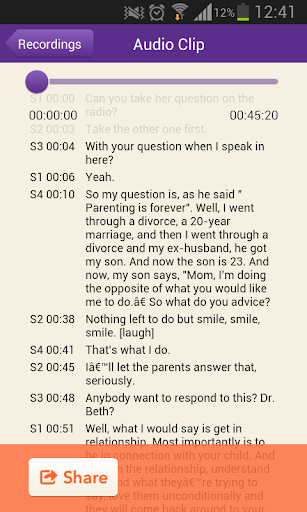
After choosing the transcription parameters, the workflow asks for billing details and order confirmation. The finished transcript is delivered to email and can also be accessed in the app or through a web browser. I appreciate that the result is not stuck in one place: the app also supports sharing transcripts and accompanying media by email or text. It is a straightforward path from spoken conversation to a document you can circulate.
A Service, Not Just Dictation
The obvious alternative is a basic voice recorder or a phone’s built-in speech-to-text tool. Those can be handy for personal notes, but TranscribeMe is designed around submitting media for transcription, with speech recognition and human transcribers involved. It also offers choices such as speaker identification and specialized legal or medical transcription. That service model may be useful when a polished written record matters more than getting a quick, informal note on screen.
This is not a free, instant dictation pad where every spoken sentence appears as you talk. The app itself is free to download, but transcription services have a separate charge, and the stated starting price is $0.79 per audio minute. That changes the best use case: I’d save it for recordings worth converting into a document, rather than sending every casual conversation for processing. It is a transcription service accessed through an app, not a general-purpose audio editor.
Make Each Order Count
A little preparation can make the app’s options more useful. Before confirming an order, I’d decide whether I need every hesitation preserved or a cleaner read, and whether the conversation has multiple speakers. The available parameters let users request those distinctions, including timestamps and speaker identification for multi-speaker transcripts. Thinking that through before submitting is more practical than treating every recording as if it needs the same transcript style.
I’d also make a habit of choosing the upload connection to suit the situation. TranscribeMe offers an option to upload only over Wi-Fi, or to use cellular data to move an order along sooner. For a non-urgent recording, Wi-Fi-only is a sensible way to avoid using mobile data; for something time-sensitive, cellular upload is available. Once the transcript arrives, sharing it directly by email or text can spare a separate export-and-attach step.
More From Our News Desk

Zoom Meetings, Google Meet, or Teams: Which Is Easiest to Join?

How I Build a Free Streaming Lineup With Tubi

Why Crunchyroll Is the Default Anime App for So Many Fans

YouTube TV: A Practical Guide to Cutting Cable

Rummikub and the Small Comfort of Phone Games

TeamViewer Remote Control or AnyDesk for Helping Family?
Who Might Find It Useful
I’d recommend TranscribeMe to researchers, business professionals, and others who routinely need recordings turned into readable text. Its options for verbatim work, multiple speakers, timestamps, and specialized transcription needs make it more considered than a simple recorder. The ability to receive files in Word, PDF, HTML, and NVivo-compatible formats is also useful when a transcript needs to join an existing writing or research workflow.
It may not suit someone who only wants free, immediate captions or occasional personal dictation. The app costs nothing to download, but transcription orders are paid services, so frequent or lengthy recordings can add up. People who prefer editing everything themselves may also find a human-assisted service more than they need. I’d try it when accuracy and a usable deliverable matter, while checking the order options and price before committing.
TranscribeMe is a Business app from TranscribeMe! for Android. Google Play shows over 100,000 installs and a 3.3-star rating from around 600 ratings. The app is free to download, and the stated starting price for transcription is $0.79 per audio minute. The service charge is separate from downloading the app; those per-minute transcription costs are not presented as in-app purchases.
The app contains no ads and has an Everyone content rating. Its current version is 2.9.3. TranscribeMe was released on February 11, 2013, and was last updated on August 26, 2024. The available Android version requirement is not included in these facts, so check the Google Play entry on your device for compatibility details.
A Closer Look at the Transcription Workflow
A Practical First Impression
When I first opened the idea of TranscribeMe, what stood out was that it treats recording and transcription as one connected task. I could start with audio captured in the app or work from an existing audio or video file. The workflow then moves toward selecting transcription preferences and confirming the order. That makes sense for someone who already knows they need a transcript, rather than someone browsing for a new recorder.
The setup is not simply “tap record and get free text.” Before an order is placed, the user selects parameters and enters billing details. I’d take a moment there to match the request to the recording: a verbatim transcript has a different purpose from a cleaner document, and a group conversation may need speaker labels. The app’s choices make that distinction visible before the transcription is underway.
Using It Day to Day
In everyday use, the best fit is a recording that would be tedious to type out by hand. A long interview, a work discussion, or a lecture can be submitted for transcription, with the result sent to email and made available in the app or browser. I like that the finished document has several routes out of the service, which helps when I need to read it on one device and share it from another.
There is a small planning decision around connectivity. Users can set uploads to happen only over Wi-Fi, or allow cellular data to speed up the order process. I’d leave Wi-Fi-only on for recordings that can wait, then consider cellular uploading when timing matters. It is a useful choice to have, especially when audio files are large, though the workflow still depends on placing a paid transcription order.
Useful Transcript Choices
TranscribeMe’s strongest distinction is the range of transcript styles it describes. Full verbatim preserves spoken fillers such as “um” and “ah,” while multi-speaker options can include speaker identification and timestamps. Those details can matter when a transcript is being used to review a discussion, follow an interview, or keep track of who said what. They give the service more shape than a one-size-fits-all speech-to-text conversion.
The app also describes specialized legal and medical transcription, alongside general transcription. That breadth may help people whose audio has more specific requirements, although the right option depends on the job and should be selected carefully when ordering. Completed transcripts can be supplied in Word, PDF, and HTML, as well as NVivo-compatible files. Those formats make the output easier to carry into writing and research routines.
A Simple Recording Routine
For a recurring interview workflow, I’d begin by recording the session directly in the app or gathering the media file I want transcribed. Before sending it, I’d decide whether I need verbatim wording, multiple-speaker treatment, or timestamps. I’d then check the connection setting, choose Wi-Fi-only or cellular upload based on urgency, and review the order details before confirming. A short checklist can prevent paying for a transcript that does not match the intended use.
When the transcript arrives, I’d open it through the app or email and choose the format that fits the next step. A Word file may be convenient for ongoing edits, while PDF can be handy for sharing a fixed document. If a colleague needs both the written result and its source media, the app supports sharing those through email or text. Keeping the recording and transcript together makes later review less of a scavenger hunt.
Costs and Expectations
The main limitation is cost. Downloading the app is free, but transcription is a paid service starting at $0.79 per audio minute. That may be reasonable for recordings where a dependable written version saves substantial manual work, but it is not a small detail for long files or frequent use. I’d check the charge for the intended order before confirming, and reserve the service for recordings that justify the expense.
There is also a difference between a transcript service and live captioning. The described workflow involves submitting audio or video and receiving the completed text afterward; it does not promise that words will appear instantly while someone speaks. The app describes a combination of speech recognition and human transcribers, but no transcript can remove the need to review important wording in context. I’d treat the output as a useful work product, not assume every recording needs identical handling.
TranscribeMe is a focused option for people who want recorded speech converted into a shareable document, with useful choices for verbatim text, speakers, timestamps, and file formats. Its paid, order-based approach is less suited to casual dictation, but the workflow is clear for users with recordings that deserve a proper transcript.
I’d recommend it to researchers and professionals who regularly work with interviews, meetings, or other audio and are comfortable paying per minute. If you mainly need free, instant text for short notes, a simpler tool may fit better. For everyone else, check the order pricing and options before sending a recording.
TranscribeMe Frequently Asked Questions
What is TranscribeMe used for?
TranscribeMe is used to turn audio or video recordings into written transcripts. The app can record audio directly or submit media for transcription, with options including full verbatim and multi-speaker transcripts. Finished transcripts are delivered by email and can be accessed in the app or a web browser. Sharing by email or text is also supported.
What devices can run TranscribeMe?
TranscribeMe is an Android app available through Google Play. The Android version requirement can vary with app updates and device compatibility, so check the Google Play entry on your device before installing. The service also makes completed transcripts available through a web browser, but the app itself is for Android.
Does TranscribeMe cost money?
The app is free to download and contains no ads. Transcription orders are a separate paid service, with a stated starting price of $0.79 per audio minute. The price for a particular order may vary with its requirements, so review the current pricing and order details in the app or store information before confirming.
Does TranscribeMe offer in-app purchases?
The app facts indicate that it does not offer in-app purchases. However, transcription services are subject to separate charges, with pricing stated to start at $0.79 per audio minute. Check the current order details before submitting media, since the amount for a specific transcription may vary.
Who is TranscribeMe best suited for?
It may suit researchers, business professionals, and others who need recordings turned into documents, particularly when speaker labels, timestamps, or verbatim wording are useful. It may be less appealing if you only want free, immediate dictation or rarely transcribe audio. The service is paid per audio minute, so consider the order cost and your needs before using it.
Pros
- Records audio in the app or accepts audio and video files for transcription.
- Offers verbatim and multi-speaker options, including timestamps and speaker identification.
- Delivers transcripts in Word, PDF, HTML, and NVivo-compatible formats.
- Lets users choose Wi-Fi-only uploads or cellular data.
Cons
- Transcription is a paid service, starting at $0.79 per audio minute.
- The workflow is for submitted orders, not instant live dictation.
- A 3.3-star Google Play rating suggests some users may have reservations.
- Category
- Business
- Version
- 2.9.3











