Traeger
- 24.71K
- 4.6
- Installs
- 1.00M
- Price
- Free

Screenshots
Analysis by Reviewed APKs
Traeger is a companion app for people who cook on a compatible WiFIRE grill and want recipes, cooking guidance, and remote grill controls in one place. I see it as most useful for Traeger owners who like to keep an eye on a long cook from their phone or need inspiration for dinner. The recipe library is a welcome bonus, though the grill connection is the main draw.
A long cook, less hovering
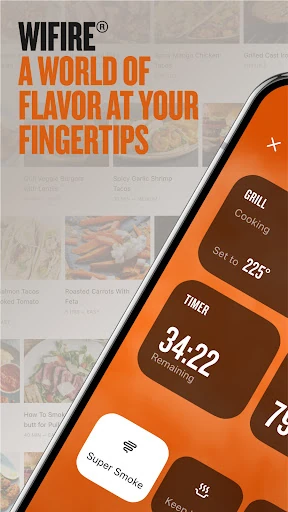
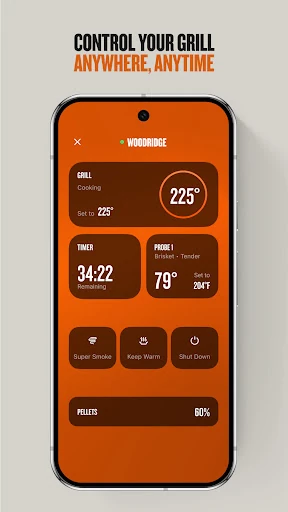
Picture a weekend brisket that needs hours rather than a quick turn on the grill. With the Traeger app, I can use WiFIRE controls to adjust the grill temperature, monitor the food’s internal temperature, and set alerts and timers from my phone. That makes it easier to step away for a while without losing track of the cook. It is a practical companion for people who already own a compatible connected grill.
For a shorter dinner, the same idea applies in a simpler way: I can look for a recipe, follow its steps, and keep temperature information close at hand. I like that the app brings guidance and grill controls together instead of making me bounce between a cooking reference and a separate controller. Its usefulness still depends on having a WiFIRE grill; without one, the recipe and learning material become the main reasons to open it.
More than a recipe book
The obvious alternatives are a general recipe app, a web search, or the controls on the grill itself. Traeger’s advantage is its focus: recipes are built around wood-fired cooking, while WiFIRE features connect the phone to supported grill functions. I would choose it when I want that combination, rather than expecting a broad meal-planning system or a neutral directory of every cooking method.
This is not a replacement for the hands-on parts of cooking, and it is not a standalone grill controller for every brand. The app’s remote controls are tied to WiFIRE, while recipes and videos can offer value even when I am simply looking for ideas. That distinction matters: owners of compatible Traeger grills get the fullest experience, while other cooks may find a general-purpose recipe source more relevant.
Small habits that help
I would start by setting up a profile with my skill level and preferences, since the app uses those details to curate content. Following favorite pitmasters and chefs is another useful habit if I want new recipes from familiar sources to be easier to find. These are modest touches, but they can make a large recipe collection feel less like a wall of choices when I am planning a meal.
For a cook, I would set the timer and alerts before stepping away, then check the grill and food temperatures when I get a notification. The app also includes detailed recipe and technique videos, so I can watch a tip before trying an unfamiliar dish rather than interrupting the cooking process to search around. If I need pellets, sauces, rubs, or accessories, the in-app shop and dealer locator offer related options.
More From Our News Desk

Zoom Meetings, Google Meet, or Teams: Which Is Easiest to Join?

How I Build a Free Streaming Lineup With Tubi

Why Crunchyroll Is the Default Anime App for So Many Fans

YouTube TV: A Practical Guide to Cutting Cable

Rummikub and the Small Comfort of Phone Games

TeamViewer Remote Control or AnyDesk for Helping Family?
Who will enjoy Traeger
I would recommend Traeger first to people who own a WiFIRE-enabled grill and want a more convenient way to monitor cooks, set alerts, or make temperature adjustments. It also suits anyone who enjoys wood-fired recipes and would rather learn from focused cooking videos than rely only on written instructions. The personalized feed and ability to follow favorite chefs give regular users a reason to return between grilling sessions.
It may be a weaker fit for someone who does not own a compatible grill and mainly wants meal planning, grocery lists, or recipes across many kinds of equipment. The app’s identity is closely tied to Traeger cooking, even though its recipes and learning content can still be browsed for inspiration. If remote control is the main reason to install it, compatibility with a WiFIRE grill is essential.
Traeger is developed by Traeger Pellet Grills, LLC. On Google Play, it has over 1 million installs and a 4.6-star rating from around 24,700 ratings. It is free to download, with no in-app purchases or ads. Its content rating is Everyone, making the store’s age classification straightforward for general audiences.
The current version is 3.14.1, and the app requires Android 10 or later. It first appeared on March 21, 2017, and its most recent update was January 24, 2026. Those details provide a useful snapshot of the Android app; the Google Play page is the place to check for the latest version and device compatibility.
A closer look at the cooking companion
Getting started
When I first open Traeger, its purpose is easy to understand: it is a place for grill controls, recipes, and cooking guidance. The app asks users to create a profile with a skill level and personal preferences for more tailored content. That setup makes sense for a product that wants to suggest useful recipes and tips, rather than present exactly the same material to every cook.
The key expectation to set early is that remote controls rely on a WiFIRE grill. The app describes temperature adjustments, food-temperature monitoring, alerts, and timers as connected features. If I am installing it mainly for those controls, I would make sure my grill is compatible before building a routine around the phone. Recipe browsing and videos, meanwhile, are appealing even before I start a cook.
The everyday experience
Day to day, the app’s best role is as a companion rather than a substitute for cooking judgment. I can look up a wood-fired recipe, consult its steps, and use the connected controls to keep an eye on temperatures. For a longer session, alerts and timers can help me check in at useful moments instead of repeatedly walking over to the grill just to see how things are going.
Connection reliability matters particularly when the phone changes networks or the app moves into the background. A recent update describes improvements to connection stability and reconnection in those situations, along with a fix related to adding a grill when push notifications are denied. Those changes speak to the practical details that can make a connected cooking session feel smooth—or leave me wishing I had checked the grill directly.
Recipes and learning
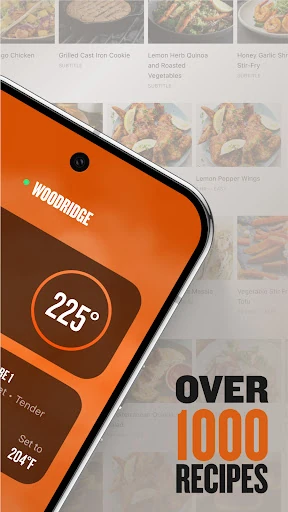
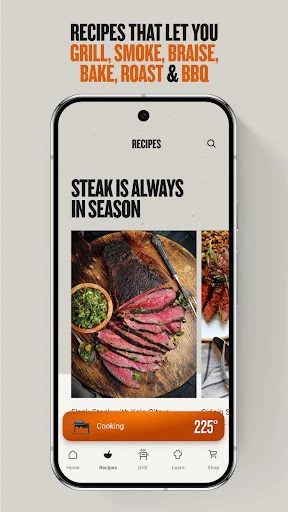
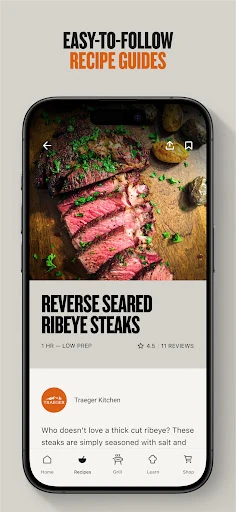
The recipe collection is a substantial part of the appeal: the app offers more than 1,500 recipes, spanning barbecue and baked goods. That range gives me reasons to browse beyond the usual ribs or burgers. It also makes the app useful for cooks who want to explore wood-fired approaches to dishes they might otherwise prepare indoors.
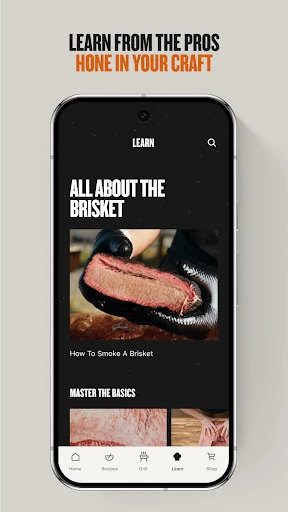
The learning material adds another layer. Detailed videos feature recipes, tips, and techniques from pitmasters and chefs, while profiles let users follow favorites and receive new recipes from them. I like the idea of learning from a particular cook and then keeping up with their new material, rather than treating each meal as an isolated search.
A simple weekly routine
A useful routine could begin before the weekend: browse recipes, save a few ideas mentally or return to the ones that catch my eye, and check for a video if a technique is unfamiliar. If I need ingredients or grill supplies, the app also includes a shop for pellets, sauces, rubs, and accessories. It is a focused planning aid, not a full grocery or meal-calendar system.
On cooking day, I would open the recipe, set the grill through WiFIRE, and use the timer and alerts to pace the session. Checking internal food temperature through the app can help me keep the relevant reading close at hand. Afterward, I can browse for the next cook or use the dealer locator when I need to find a nearby Traeger dealer.
What to keep in mind
The biggest limitation is also the app’s defining focus: the connected-control features are meant for WiFIRE grills. A person with a different grill may still enjoy the recipe library and videos, but will not get the same integrated cooking experience. That makes this an easy recommendation for the right owner and a more conditional one for everyone else.
The app’s recipe and shop content can make it feel busy if all I want is a basic temperature display. It combines several related jobs—cooking controls, inspiration, learning, shopping, and dealer finding—so some users will use only a portion of it. Recent improvements to network switching, background reconnection, long timer display, and Celsius readings are practical, but connected cooking still depends on the phone and grill staying in communication.
Traeger makes the most sense as a companion to a WiFIRE grill: it brings remote temperature controls, alerts, and cooking guidance together with a large wood-fired recipe collection. I appreciate that the app has uses both during a cook and while planning the next one, without pretending to be a general-purpose meal planner.
I would recommend it to Traeger owners who want to monitor cooks from their phone and explore more recipes or techniques. If you do not have a compatible grill, try it for the recipes and videos, but consider whether those alone match what you need. For connected grilling, its focused mix of controls and cooking content is a sensible fit.
Traeger Frequently Asked Questions
What is the Traeger app used for?
Traeger combines WiFIRE grill controls with recipes and cooking guidance. On a compatible grill, users can adjust temperature, monitor internal food temperatures, and set alerts and timers. The app also offers more than 1,500 recipes, videos, personalized content, a shop, and a dealer locator.
Which phones and grills work with the Traeger app?
The Android app requires Android 10 or later. Its remote grill controls are designed for WiFIRE grills, so compatibility depends on the grill as well as the phone. Check the Google Play page and your grill information for current compatibility details before relying on connected controls.
Does the Traeger app cost anything?
The app is free to download on Google Play, and it has no in-app purchases or ads. Store details and availability can change, so it is worth checking the Google Play page for the current information before installing.
Can I use the Traeger app without a grill?
You can use its recipe and learning content for inspiration, including recipes and videos. The remote control features, such as changing grill temperature and monitoring a cook, are intended for a compatible WiFIRE grill. Without one, the app’s usefulness depends on how much you value its cooking content.
Is the Traeger app a good choice for beginners?
It can suit beginners who cook on a compatible Traeger grill, since it offers recipes, detailed videos, and personalized content based on a profile. Experienced cooks can also use the controls and recipe collection. People seeking broad meal planning or support for other grill brands may prefer a different app.
Pros
- Pairs WiFIRE controls, temperature monitoring, timers, and alerts in one app.
- Offers more than 1,500 recipes, plus detailed cooking and technique videos.
- Personalized content and followed chefs can make discovery feel more relevant.
- Includes a shop and dealer locator for Traeger-related needs.
Cons
- Remote grill controls are useful only with a compatible WiFIRE grill.
- Its Traeger and wood-fired focus may not suit every cook or kitchen.
- The mix of controls, recipes, shopping, and learning may feel broader than needed.
- Category
- Food & Drink
- Version
- 3.14.1











