SONIC Drive-In - Order Online
- 748.94K
- 4.7
- Installs
- 10.00M
- Price
- Free

Screenshots


Analysis by Reviewed APKs
SONIC Drive-In - Order Online is for browsing the menu, customizing food and drinks, finding nearby locations, and placing an order ahead. I can see it fitting best into the moments when I already know I want Sonic and would rather sort out the order on my phone than start from scratch at the restaurant. Its focus is practical and specific: ordering, offers, rewards, and location details, rather than general meal planning.
A quicker stop for lunch
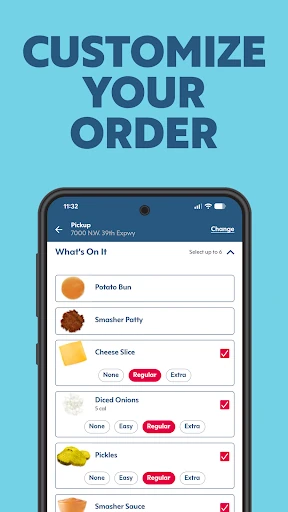
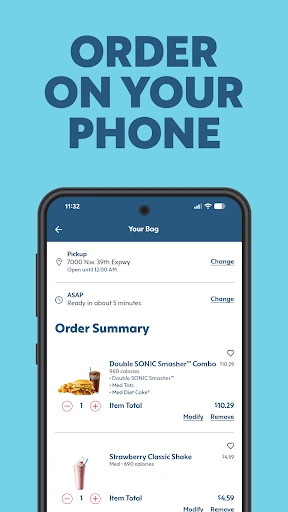
When I’m fitting lunch into a busy day, the useful part is being able to check the menu and make choices before I get to a Sonic. I can browse, customize a favorite, and order ahead rather than trying to decide everything at the last minute. If I’m craving a particular drink or want to adjust a meal, the app gives me a place to handle those choices as part of the order.
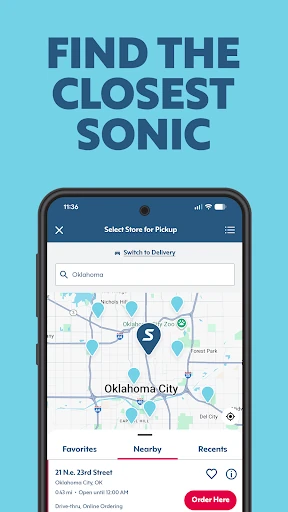
The location search makes the app more useful when I’m not heading to my usual stop. I can look for a nearby Sonic and check its hours, then make a more informed plan before setting out. That combination of menu, customization, and location information is the app’s everyday job. It does not take the decision-making out of lunch, but it can make the ordering part less of a scramble.
A focused ordering tool
Compared with a general food-delivery app, SONIC Drive-In is a narrower tool built around ordering from Sonic. That focus is helpful if I already have a Sonic in mind: the menu, item customization, offers, rewards, and location details sit together in one place. The app supports ordering ahead for pickup or delivery, so it can serve different meal routines without trying to cover restaurants beyond the Sonic experience.
I would not use it as a restaurant-discovery guide, a broad grocery or meal-planning app, or a nutrition tracker. The nutritional information is there to view for menu items, but the main purpose remains placing an order. If I have not decided where or what I want to eat, a wider search tool may be more useful first. Once Sonic is the plan, this app is the more direct route.
Small habits that help
A simple habit is to look over the menu before I’m hungry and in a hurry. I can check item details, customize a favorite, and save time when it is time to order. The app also lets me save favorites, which gives repeat customers a useful shortcut instead of rebuilding the same choices from the beginning each visit.
I’d also make checking location hours part of the plan, especially if I’m visiting somewhere unfamiliar or ordering around an unusual schedule. Account holders can access offers and rewards to redeem when ordering ahead, so it makes sense to check those before settling on an order. These are small steps, not a complicated system; the benefit is keeping the choices and practical details together.
More From Our News Desk

Zoom Meetings, Google Meet, or Teams: Which Is Easiest to Join?

How I Build a Free Streaming Lineup With Tubi

Why Crunchyroll Is the Default Anime App for So Many Fans

YouTube TV: A Practical Guide to Cutting Cable

Rummikub and the Small Comfort of Phone Games

TeamViewer Remote Control or AnyDesk for Helping Family?
Who will find it useful
I’d recommend SONIC Drive-In to people who already enjoy Sonic and place repeat orders, particularly anyone who likes to customize a meal or drink. The ability to browse the menu, see nutritional information, find a location and its hours, and order ahead covers the main questions that come up before a visit. Saved favorites can make the app more convenient for people whose usual order does not change much.
It may be less useful to someone who rarely visits Sonic or wants one app for comparing many restaurants. The app is centered on Sonic, and its rewards and offers are tied to ordering there. I also would not choose it primarily as a nutrition tool: menu nutrition information is a helpful extra, but ordering is the central purpose. For a Sonic regular, though, that focused approach is easy to understand.
SONIC Drive-In - Order Online is developed by Sonic Industries Services, Inc. On Google Play, it has over 10 million installs and a 4.7-star rating from around 749,000 ratings. The app is free to download, and the supplied store information says it contains no ads and offers no in-app purchases.
Google Play gives the app an Everyone content rating and lists Android 11 as its minimum Android version. The current supplied version is 8.0.30. It was released on July 15, 2014, and its listed last update was February 2, 2026.
Making a Sonic Order Feel Simpler
A straightforward first impression
When I first open an app like this, I want to know whether it will help me decide what to order or just add another step to a familiar stop. SONIC Drive-In’s purpose is clear from the outset: it brings menu browsing, location information, customization, and online ordering into one place. The recent changes describe a streamlined design, quicker ordering, and easier access to favorites.
The account is relevant if I want to access exclusive offers and rewards. That makes signing in more worthwhile for someone who expects to order regularly than for a one-off visit. I’d start by checking the menu and nearby locations, then set up an account if I plan to use the rewards. It is a practical first run, without needing to explore unrelated tools.
Ordering in the everyday
The everyday experience revolves around choosing food and drink, making adjustments, and placing an order ahead. Customization matters at a drive-in, where a familiar item may be better with a small change. The app’s description calls out that kind of personal touch, and the menu lets customers customize favorites before ordering rather than limiting them to a fixed combination.
I like that location details are part of the same task. If I’m planning pickup, checking the closest location and its hours can help me avoid a wasted trip. The app also supports delivery orders, according to its summary, so it can accommodate a meal at home as well as a stop on the way somewhere. Either way, the experience stays focused on ordering from Sonic.
Offers and useful details
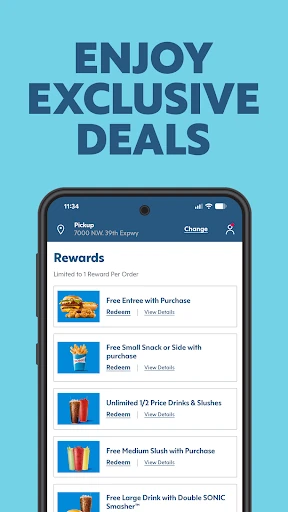
The most distinctive extras are account-based offers and rewards that can be redeemed when ordering ahead. They give regular customers another reason to use the app rather than treating it as only a digital menu. I’d check what is available before committing to an order, while keeping in mind that the core value is still the ordering flow, not a promise of a particular discount.
Menu information adds another useful layer. The app lets me view nutritional information for each item, which can help when I want to compare choices before ordering. That is different from making the app a full nutrition tracker; it provides item details in the context of Sonic’s menu. Recent changes also emphasize favorites and performance improvements, which support quicker repeat visits.
A repeat-order routine
For a regular lunch stop, I’d use a simple routine: open the app before leaving, look at a saved favorite or browse the menu, adjust the order if needed, and check the location’s hours. If my account has offers or rewards to use, I’d review those while making the choice. Having those steps in one place can make a familiar meal feel less like a last-minute decision.
On a weekend, the same routine works for a drink or a shared meal, with the menu available for browsing and customization. If I’m away from my usual area, I can search nearby locations instead of assuming the closest one is open. The app does not need a complicated daily habit to be useful; a quick check before ordering is likely enough for most people.
Keep the scope in mind
The main limitation is also the app’s defining choice: it is for Sonic. Someone comparing menus across different chains will still need another way to do that, and a person who rarely orders from Sonic may not get much value from saved favorites or account rewards. Its location and menu tools serve a specific restaurant experience rather than broader dining decisions.
I would also keep expectations grounded around the extras. The app provides nutritional information, but it is not presented as a dedicated health or meal-planning service. Offers and rewards are tied to an account and ordering ahead, so they are most relevant to people who use the app more than once. For a straightforward Sonic order, those boundaries are reasonable rather than surprising.
SONIC Drive-In - Order Online makes the most sense as a convenient companion for people who already know they want Sonic. Menu customization, location hours, saved favorites, and order-ahead support cover practical needs without stretching into a general food app. I especially like the way location checks and ordering fit into the same pre-meal routine.
I’d give it a try if I visit Sonic regularly, want to customize orders, or expect to use account offers and rewards. If I’m looking for restaurant comparisons or a broad meal-planning tool, I’d look elsewhere. For its narrower purpose, the app offers a sensible way to prepare a Sonic order before heading out or eating at home.
SONIC Drive Frequently Asked Questions
What is SONIC Drive-In - Order Online used for?
It is used to browse the Sonic menu, customize favorites, view nutritional information, find nearby locations and their hours, and order ahead. Account holders can access offers and rewards to redeem when ordering ahead. The app supports pickup and delivery ordering, making it useful for planning a Sonic meal before a visit or from home.
Which devices can run SONIC Drive-In - Order Online?
The supplied platform information is for Android, and Google Play lists Android 11 as the minimum version. Device compatibility can depend on the particular phone and current app requirements, so it is worth checking the Google Play store page on the device you plan to use.
Is SONIC Drive-In - Order Online free?
The app is free to download on Google Play. The supplied facts say it does not contain ads and does not offer in-app purchases. Ordering from Sonic is the app’s purpose, but prices for menu items and any applicable order costs can vary; check the app or store details when placing an order.
Does SONIC Drive-In - Order Online have rewards?
Yes. The app description says that creating an account gives access to exclusive offers and rewards that can be redeemed when ordering ahead. What is available can vary, so I’d check the app while preparing an order rather than assuming a particular offer or reward will be available.
Who is SONIC Drive-In - Order Online best for?
It is best suited to people who order from Sonic and want to browse or customize the menu, save favorites, check location hours, or order ahead. It may be less useful for someone seeking a general restaurant finder or a service covering multiple chains, since its tools focus on Sonic.
Pros
- Combines menu browsing, customization, location hours, and order-ahead in one Sonic-focused app.
- Account holders can access offers and rewards when ordering ahead.
- Saved favorites can make repeat orders quicker to prepare.
- Nutritional information is available for menu items.
Cons
- Its usefulness is limited for people who rarely order from Sonic.
- It is not designed for comparing restaurants across multiple chains.
- Nutritional details are an ordering aid, not a dedicated tracking tool.
- Category
- Food & Drink
- Version
- 8.0.30