OpenTable
- 186.36K
- 4.6
- Installs
- 10.00M
- Price
- Free

Screenshots

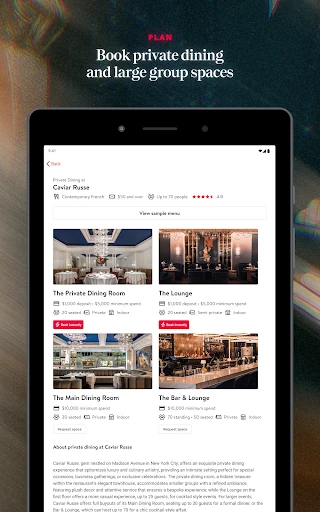

Analysis by Reviewed APKs
OpenTable helps me find restaurants and manage reservations from my phone, whether I’m choosing a place for a special dinner or looking for somewhere nearby on a regular evening. It suits diners who like comparing options before committing and want reservation changes in one place. After spending time with it, I see it as a useful planning companion, especially when I’m open to exploring beyond my usual spots.
A Dinner Takes Shape
When I’m trying to organize dinner with a friend, the first challenge is often agreeing on a place before anyone gets hungry. OpenTable gives me a way to browse restaurants nearby, explore different cuisines, and narrow the search by occasion. I can read verified diner reviews as I compare options, which makes the choice feel more grounded than picking a name from a map and hoping it works out.
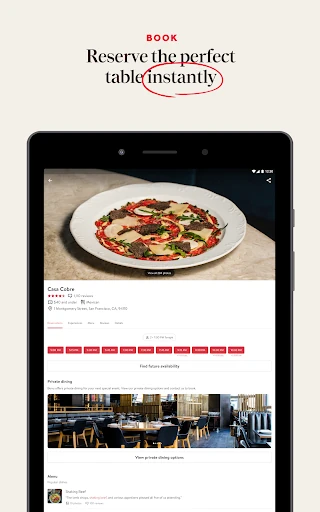
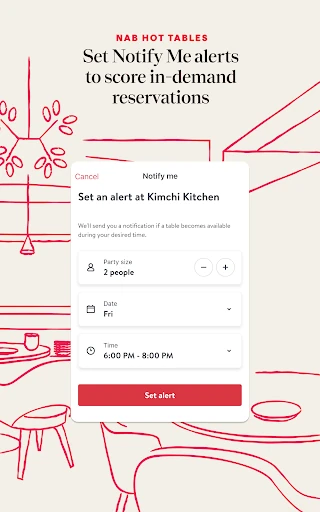
Once we settle on a restaurant, the app is also useful after the decision. I can manage a reservation from my phone, including changing the time or party size, or canceling if plans fall through. If a popular table isn’t available when I check, OpenTable can notify me when one becomes available. That makes it a practical tool for the whole plan, not just a directory I open once.
A Reservation Specialist
OpenTable sits somewhere between a restaurant discovery guide and a reservation manager. A search engine can help me locate a nearby restaurant, while a restaurant’s own site may be the place I go for its details. OpenTable brings restaurant browsing, diner reviews, reservation management, and dining rewards together. Its filters for cuisine and occasion are handy when I know the kind of evening I want but haven’t chosen a specific place.
I wouldn’t treat it as a general food guide for every question about a restaurant, nor as a replacement for deciding what kind of meal I actually want. The app’s focus is finding restaurants and handling reservations, rather than offering a broad set of dining services. If I already have a restaurant and reservation sorted, I may not need to open it at all. Its value is clearest when I’m choosing or coordinating.
Small Planning Habits
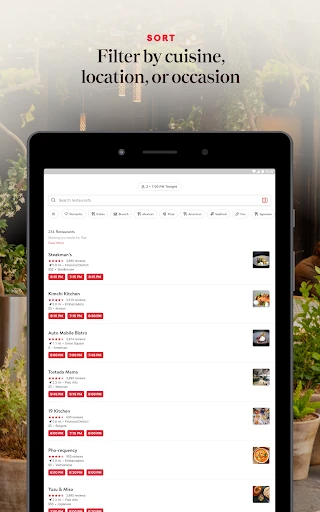
I get more from OpenTable when I start with one useful constraint instead of scrolling without a plan. A cuisine filter helps when the group has a craving; an occasion filter can help when I’m looking for a different kind of evening. I also check nearby options when I’m already out, since location-based searching can surface restaurants around me without requiring a long list of names to start with.
For a group dinner, I try to settle the party size before searching and then keep the reservation details up to date if plans change. That is where the option to increase or decrease the group becomes useful. I also pay attention to availability notifications for sought-after tables, rather than repeatedly checking for a change. If I dine through the app regularly, rewards are another reason to keep my reservations organized there.
More From Our News Desk

Zoom Meetings, Google Meet, or Teams: Which Is Easiest to Join?

How I Build a Free Streaming Lineup With Tubi

Why Crunchyroll Is the Default Anime App for So Many Fans

YouTube TV: A Practical Guide to Cutting Cable

Rummikub and the Small Comfort of Phone Games

TeamViewer Remote Control or AnyDesk for Helping Family?
Who Will Get the Most From It
I’d recommend OpenTable to people who eat out often, enjoy trying restaurants, or regularly coordinate meals with friends and family. It is particularly helpful if you want to compare local options, use cuisine or occasion filters, and keep reservation adjustments close at hand. Diners who like reading other guests’ verified reviews before choosing may also appreciate having that information alongside restaurant discovery.
It may be less compelling if you rarely make restaurant reservations or already rely on a restaurant’s own booking process. The app is also not a substitute for knowing your group’s preferences: filters help narrow the field, but you still have to decide what fits the occasion. For someone who mainly wants a single restaurant’s information after plans are settled, OpenTable’s wider discovery and reservation features may be more than they need.
OpenTable is the developer as well as the app name. On Google Play, it has over 10 million installs and a 4.6-star rating from about 186,000 ratings. The app is free to download, with no in-app purchases and no ads. Its content rating is Everyone. Those figures give a quick sense of the app’s reach and basic cost, while the main reason to use it remains restaurant discovery and reservation management.
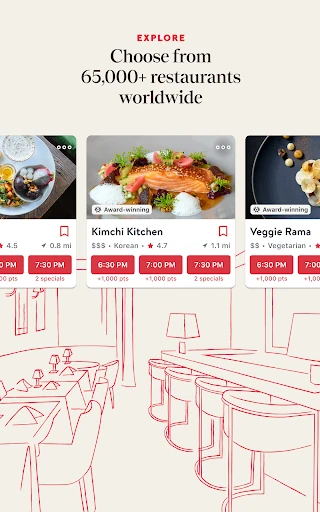
The Android version requires Android 8.0 or later. The current version is 26.7.2, and the most recent update date provided is February 7, 2026. The app’s description says its restaurant network includes more than 65,000 restaurants worldwide. Restaurant availability and the experience of using the app can depend on where you are and which restaurants participate, so local options are the most relevant measure for a particular outing.
Making Restaurant Plans Feel Easier
A Clear First Impression
When I first opened OpenTable, its purpose was easy to understand: look for a restaurant, compare possibilities, and deal with a reservation. That direct focus helps when I’m making plans in a hurry. I don’t have to begin with a specific restaurant name; I can start with what sounds good, an occasion, or places near my current location.
Getting oriented is less about learning a complicated system and more about deciding what information matters for this meal. I might be choosing between local favorites or looking for something new. The app’s browsing and filtering tools give me a few sensible ways into that decision, while reviews offer another perspective before I settle on a place.
Useful Between Plans
Day to day, the most practical part is that restaurant discovery and reservation changes live in the same app. If a friend can no longer make it, I can adjust the party size rather than treating the original booking as fixed. If timing changes, I can modify or cancel from my phone. Those are small conveniences, but they matter when dinner plans move around during a busy day.
I also like that the app can help before a reservation is made. A search for nearby restaurants is useful when I’m out and don’t want to start from scratch, while cuisine and occasion filters can turn a broad set of choices into a more manageable one. It is a straightforward rhythm: search, compare, choose, then return if the reservation needs attention.
Standout Planning Tools
The combination of location-aware discovery and focused filters is one of OpenTable’s strongest ideas. I can look for restaurants near me, browse local favorites or new openings, and narrow the search by cuisine or occasion. Editorial guidance also points toward sought-after restaurants, which adds a curated angle to browsing rather than leaving me with only an unfiltered list.
Verified diner reviews are another useful part of the decision process. They let me consider other guests’ experiences while I’m comparing restaurants, instead of relying only on a name or a quick impression. For a popular table that isn’t available at first, notifications when availability changes can save me from repeatedly checking. These features support a real planning task without making the app’s purpose hard to follow.
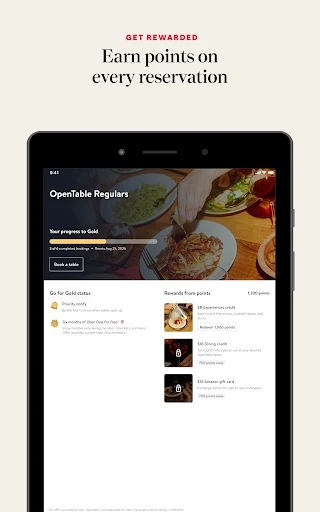
Dining rewards add a reason to keep using OpenTable across multiple outings. The description says diners can earn loyalty rewards and redeem them for future reservations. I see that as a bonus for people who already dine out and book through the app, not as the main reason to choose a restaurant. The discovery and reservation tools remain useful even if rewards aren’t part of someone’s routine.
A Simple Dinner Routine
For an ordinary weeknight, I’d start by checking restaurants near me and choosing a cuisine that works for the group. If the meal has a particular purpose, I’d use the occasion filter to focus the search. Then I’d read verified diner reviews while considering the options, instead of jumping straight at the first familiar name. It’s a low-effort way to make the choice feel a little more considered.
For a more popular restaurant, I’d check availability and use the notification option if a preferred table isn’t open. After making a reservation, I’d keep the party size accurate as replies come in. If someone drops out or the timing changes, I can update or cancel through the app. That routine makes OpenTable helpful both during the initial search and in the inevitable back-and-forth of planning with other people.
A Few Limits to Remember
OpenTable’s usefulness depends on the restaurants and reservation availability relevant to your area. A broad network does not mean every nearby place or every desired time will be available for a particular search. If I’m set on a specific restaurant, I may still need to check what the app can offer for that choice rather than assuming it will solve the booking automatically.
The app also can’t make a group agree on where to eat. Filters and reviews can help me compare, but the final decision still depends on everyone’s tastes and the occasion. Rewards are most relevant to people who dine through OpenTable often enough to value them. For an infrequent diner with plans already made, the app may be something to open only when a reservation needs attention.
OpenTable makes restaurant planning feel more manageable by joining discovery, diner reviews, reservation changes, availability notifications, and rewards in one place. I found its strongest use in the moments around a meal: deciding where to go and adapting when plans shift. The experience is practical rather than elaborate, which suits an app meant to support everyday dining decisions.
I’d recommend it to regular diners and anyone who often organizes meals for a group, especially if browsing nearby options and adjusting reservations from a phone sounds useful. It may add less for people who rarely book ahead or already have a fixed routine with one restaurant. For everyone else, OpenTable is a sensible companion to keep in mind when the next dinner plan takes shape.
OpenTable Frequently Asked Questions
What is OpenTable used for?
OpenTable is used to discover restaurants and manage reservations. You can browse options nearby, filter by cuisine or occasion, read verified diner reviews, and change or cancel a reservation from your phone. It can also notify you when a popular table becomes available and offers loyalty rewards for dining that can be redeemed for future reservations.
Which phones and platforms support OpenTable?
OpenTable is available as an Android app, and the Android version requires Android 8.0 or later. The app is focused on finding restaurants and managing reservations from a phone. Platform availability and device requirements can change over time, so it is worth checking the Google Play store entry for the latest compatibility details before installing.
Does OpenTable cost money to use?
OpenTable is free to download on Google Play. The provided app details say it has no in-app purchases and contains no ads. Its dining rewards are described as benefits earned through dining and redeemable for future reservations. Store details may vary over time, so check the Google Play listing for current cost and purchase information.
What Android version does OpenTable require?
The Android version of OpenTable requires Android 8.0 or later. If you are unsure which Android version your phone runs, you can check your device settings before installing. Requirements can change as the app is updated, so the Google Play store entry is the best place to check compatibility for your particular device.
Who is OpenTable best suited for?
OpenTable is a good fit for people who dine out, compare restaurants, or arrange meals with others and want to manage reservations on their phones. It may be less useful if you rarely book ahead or already have a fixed dining routine. The app can help narrow choices, but restaurant availability and relevance depend on your location and plans.
Pros
- Combines restaurant discovery with reservation changes in one app.
- Cuisine and occasion filters make browsing easier to focus.
- Verified diner reviews help add perspective when comparing restaurants.
- Availability notifications and dining rewards can support repeat use.
Cons
- Useful options depend on restaurants and availability in your area.
- Less valuable if you rarely make restaurant reservations.
- Filters narrow choices but cannot decide what suits your group.
- Category
- Food & Drink
- Version
- 26.7.2