Jimmy John's Sandwiches
- 275.15K
- 4.8
- Installs
- 5.00M
- Price
- Free

Screenshots
Analysis by Reviewed APKs
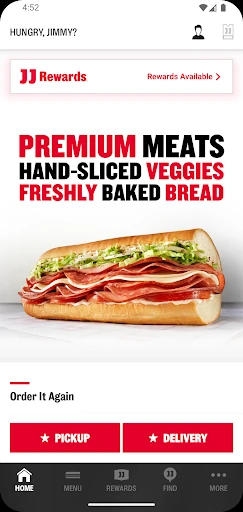
Jimmy John's Sandwiches is a food-ordering app for browsing the menu, customizing a sandwich, and arranging delivery or pickup. It also lets JJ Rewards members earn and redeem rewards at participating locations. I found it most useful when I knew what I wanted and preferred to order ahead rather than decide at the counter. It keeps the routine straightforward, with a few handy touches for repeat orders.
A quicker lunch break
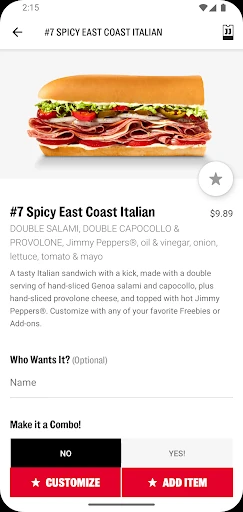
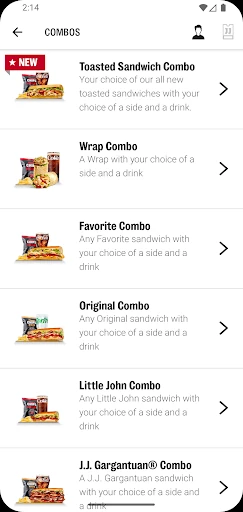
When I first opened Jimmy John's Sandwiches, I pictured using it on an ordinary workday: lunch is approaching, I have a short break, and I would rather settle the order before heading out. I can find a nearby location, look through the menu, customize a sandwich, and choose pickup. The app also supports contactless delivery, so the same basic ordering flow works when I am staying put.
What makes this scenario practical is the attention to the moments after ordering, too. The app can track an order and send a notification when it is ready for pickup or out for delivery. I like having that update rather than needing to keep checking the screen. It is a simple convenience, but useful when I am balancing lunch with work or other errands.
Ordering, not meal planning
Compared with calling a restaurant or deciding at the counter, the app gives me time to check the menu and tailor a sandwich before I place the order. Saved favorites can make a familiar lunch quicker to repeat, and recent delivery addresses or pickup locations help with common routines. For someone who already likes Jimmy John's, this is a focused way to place an order with fewer steps at the restaurant.
It is not a general food-delivery marketplace or a tool for comparing restaurants. The experience centers on Jimmy John's locations, menu items, and ordering options. That focus is useful when I know where I want to eat, but less helpful if I am still choosing between cuisines or want to browse several businesses in one place. Location participation and available options can also shape what I can order.
Make repeat orders easier
A small habit that pays off is saving a sandwich I order often to My Faves. Instead of rebuilding the same customization from memory the next time, I can return to that saved choice and move through the order again. This suits a regular lunch routine particularly well. I would still review the order before submitting it, especially if I am ordering for a different pickup location.
I would also keep my usual delivery address or pickup location handy and check the menu before a busy meal period. If I am ordering for a group, the catering option gives the app another role beyond an individual sandwich run. JJ Rewards members can keep an eye on earning and redeeming rewards at participating locations, while order notifications help me plan when to collect food.
More From Our News Desk

Zoom Meetings, Google Meet, or Teams: Which Is Easiest to Join?

How I Build a Free Streaming Lineup With Tubi

Why Crunchyroll Is the Default Anime App for So Many Fans

YouTube TV: A Practical Guide to Cutting Cable

Rummikub and the Small Comfort of Phone Games

TeamViewer Remote Control or AnyDesk for Helping Family?
Who will find it useful
I would recommend the app to people who already visit Jimmy John's and want an uncomplicated way to place an order for pickup or delivery. It is especially convenient for repeat customers: saved favorites and recent locations can reduce the small bits of effort involved in ordering the same lunch again. Rewards members may also appreciate being able to earn and redeem rewards through the app at participating locations.
It may not suit someone who wants to compare menus across multiple restaurants, or who rarely orders from Jimmy John's. The app is built around this one restaurant brand rather than broad meal discovery. It is also worth remembering that delivery, pickup, catering, and rewards depend on participating locations and the options available where you are ordering.
On Google Play, Jimmy John's Sandwiches is published by Jimmy John's Sandwiches and has over five million installs. It holds a 4.8-star rating from about 275,000 ratings. The app is free to download, with no in-app purchases or ads. Its content rating is Everyone, and it requires Android 9 or later.
The listed version is 7.2.0. The app was released on September 16, 2015, and was last updated on December 5, 2025. The latest update notes describe under-the-hood adjustments and bug fixes. These details give a useful snapshot of the Android app, while the ordering choices themselves depend on the local Jimmy John's location.
A straightforward route from menu to meal
A simple start
My first impression was that the app is meant to get me to a meal, not keep me browsing for its own sake. The main tasks are clear from the description: find a location, check the menu, and place an order. That makes sense for a restaurant app. I can start with the location and then decide whether delivery or pickup better fits the day.
Setup is centered on signing in and choosing where the order should go. The app can use a recent delivery address or pickup location, which is helpful once I have ordered before. I would take a moment to check that the selected location and order type are right before moving on. That small check matters when lunch is on a schedule.
A practical daily flow
The everyday experience is built around a familiar sequence: find a nearby store, browse the menu, customize a sandwich, then choose delivery or pickup. I like that the customization happens before checkout, while I can still think through what I want. For pickup, paying ahead helps me place the order before I get to the restaurant instead of beginning from scratch at the counter.
Once an order is in progress, tracking and notifications help answer the basic question of when to expect it. The app can notify me when a delivery is out or a pickup is ready. That is useful during a workday, when I may not want to keep the app open. Google Pay is also listed as an accepted payment method.
Useful repeat-order tools
My Faves is one of the more practical features for anyone with a go-to sandwich. Saving a favorite order makes the next visit feel less like filling out the same choices all over again. It is a small convenience rather than a dramatic change, but repeated lunches are exactly where little time-savers add up.
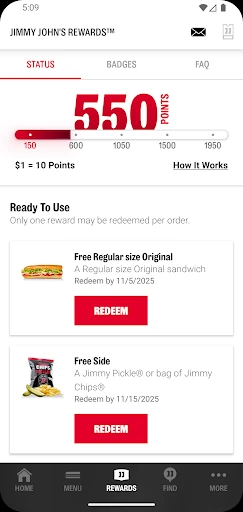
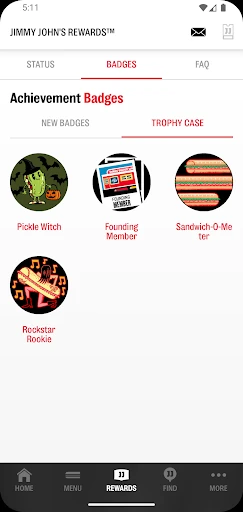
The app also covers catering, location finding, menu browsing, and order tracking. Those functions give it some range without changing its central purpose: ordering from Jimmy John's. JJ Rewards members can earn and redeem rewards at participating locations, with terms and conditions applying. I appreciate that rewards sit alongside useful ordering tasks rather than being the only reason to open the app.
A routine that works
For a regular lunch, I would begin by selecting the location I plan to use, then check the menu and choose a saved favorite or customize a sandwich. If I am heading out, pickup and paying ahead suit the routine. If I am eating at home or at work, contactless delivery is another option. Either way, the order updates help me fit the meal around the rest of the day.
For a group meal, I would look at the catering option rather than putting together several individual orders by guesswork. For a familiar solo lunch, My Faves is the more useful shortcut. These are different needs, but both fit the app's core job. I would still check the order details and the chosen location before submitting, especially when switching between pickup and delivery.
Keep expectations local
The biggest limitation is the app's narrow scope: it is for Jimmy John's, not for discovering or ordering from a wide range of restaurants. Its convenience also depends on the participating location and the services available there. A feature that suits one order may not be an option for another, so I would check the choices shown for the location I select.
The app can make the ordering process more organized, but it cannot make every meal decision for me. I still need to choose what I want, confirm the order, and plan around whether I am collecting it or waiting for delivery. Rewards have their own terms, and availability is limited to participating locations. Those are reasonable boundaries for a restaurant's own ordering app.
Jimmy John's Sandwiches does its best work as a convenient companion to a familiar lunch routine. Menu browsing, sandwich customization, pickup and delivery, order updates, and saved favorites all support the basic job without asking me to learn a complicated system.
I would recommend it to regular Jimmy John's customers who value ordering ahead or repeating a favorite. If you want a broad restaurant-discovery app, this is not the right fit. But for a straightforward way to order from a nearby participating location, it covers the useful essentials.
Jimmy John's Sandwiches Frequently Asked Questions
What is Jimmy John's Sandwiches used for?
Jimmy John's Sandwiches lets customers check the menu, find a nearby location, customize a sandwich, and place orders for pickup or contactless delivery. It also supports catering, order tracking, and saved favorites. JJ Rewards members can earn and redeem rewards at participating locations, subject to terms and conditions.
Which devices can run Jimmy John's Sandwiches?
The app is available for Android, and the listed minimum requirement is Android 9. Device compatibility can depend on the version of Android and the device itself, so it is worth checking the Google Play store entry for the latest compatibility details.
Does Jimmy John's Sandwiches cost anything?
The app is free to download on Google Play and has no in-app purchases. Food orders are separate from the app download, and the available ordering choices can depend on the selected location. Check the store listing for current app details.
Can I use rewards in Jimmy John's Sandwiches?
JJ Rewards members can earn and redeem exclusive rewards at participating locations through the app. Terms and conditions apply, and participation can vary by location. The app also supports saving favorite orders and tracking an order after it is placed.
Is Jimmy John's Sandwiches a good fit for me?
It should suit people who already order from Jimmy John's and want to arrange pickup or delivery, customize a sandwich, or repeat a favorite. It is less suited to anyone looking to compare several restaurant brands, since the app is focused on Jimmy John's locations and menu.
Pros
- Supports delivery and pay-ahead pickup, with notifications for order progress.
- My Faves can make familiar sandwich orders quicker to repeat.
- Includes location finding, catering, menu browsing, and order tracking.
- JJ Rewards members can earn and redeem rewards at participating locations.
Cons
- The app focuses only on Jimmy John's rather than multiple restaurant brands.
- Available services and rewards depend on participating locations.
- Users still need to check order details and location before submitting.
- Category
- Food & Drink
- Version
- 7.2.0