Tor Browser
- 273.25K
- 4.5
- Installs
- 10.00M
- Price
- Free

Screenshots
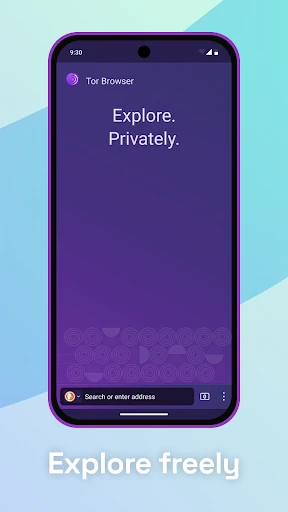
Analysis by Reviewed APKs
Tor Browser is an Android web browser for people who want more privacy while browsing or need to reach sites their internet provider may block. It routes traffic through the Tor network and is designed to limit tracking and browser fingerprinting. After considering how those protections shape ordinary browsing, I see it as a useful privacy-focused option, though not the browser I’d choose for every quick, everyday task.
A More Private Browsing Session
Imagine I’m using my phone to look up a sensitive topic on a shared connection. With a conventional browser, I may not want every visited site tied together through cookies and third-party trackers. Tor Browser isolates each website, and its description says cookies clear when I’m done browsing. That gives me a practical reason to open it for a particular research session rather than treating it as a cosmetic change to my usual browser.
The other part of that scenario is the connection itself. Tor routes traffic through volunteer-run relays and encrypts it in three layers as it travels across the network. Someone monitoring my connection can see that I’m using Tor, but the browser is designed to keep them from seeing which websites I visit. That distinction matters: I’d use it with a clear privacy goal, not assume that any browser makes every online activity invisible.
A Different Kind of Browser
Tor Browser is not simply a regular browser with a private tab switched on. Its approach is built around separating sites, reducing identifying browser differences, and routing traffic through the Tor network. That makes it a more deliberate choice than opening a normal browser window when I want a little less local history. It also means I should expect the privacy design to affect how browsing feels, rather than treating it as an invisible setting.
I’d reach for it when privacy or access to a site blocked by my local provider is the main point. I would not treat it as a universal replacement for every app, nor as a tool that promises privacy from every possible source. Tor Browser is for web browsing; its description does not present it as a full device privacy suite. The useful comparison is not “best browser for everything,” but “a browser with a distinct privacy model.”
Small Habits That Help
I’d keep the browser for sessions where its privacy features matter, and make a habit of closing out when I’m finished. Since the description says cookies clear when browsing is done, ending a session is part of the workflow rather than an afterthought. I’d also avoid casually mixing sensitive research with routine browsing simply because both happen on the same phone. A little intention makes the app’s purpose easier to understand.
When I need context about how Tor works, I’d use the mobile manual and release notes referenced by the project rather than guessing from a connection delay or a site’s behavior. The browser’s three-layer relay explanation is helpful background, but it does not mean every website will behave identically. I’d keep expectations practical: use it when the privacy or access trade-off is worthwhile, and choose a familiar browser for tasks where convenience matters more.
More From Our News Desk

Zoom Meetings, Google Meet, or Teams: Which Is Easiest to Join?

How I Build a Free Streaming Lineup With Tubi

Why Crunchyroll Is the Default Anime App for So Many Fans

YouTube TV: A Practical Guide to Cutting Cable

Rummikub and the Small Comfort of Phone Games

TeamViewer Remote Control or AnyDesk for Helping Family?
Who May Find It Useful
I’d recommend Tor Browser to Android users who want a dedicated option for privacy-conscious web sessions, especially when they want to limit third-party tracking or reach a site their provider blocks. The app’s approach is easier to appreciate when I have a specific reason to use it. People curious about how traffic can be routed through a volunteer network may also find the browser a practical way to explore that idea.
It may not suit someone who expects every site to load and behave exactly as it does in a conventional browser, or who wants one app to solve every privacy concern on a phone. I’d also be cautious about using it without understanding that it changes what a network observer can see, rather than making all activity unknowable. For routine browsing with no particular privacy need, a regular browser may feel more straightforward.
Tor Browser is developed by The Tor Project. On Google Play, it has over 10 million installs and a 4.5-star rating from about 273,000 ratings. The app is free, with no in-app purchases and no ads. Its content rating is Everyone, making the store’s age classification straightforward for general audiences.
The listed Android requirement is Android 5.0 or later. The current version is 15.0.5 (140.7.0esr), and the store data gives a release date of May 21, 2019, with the latest update on January 29, 2026. Those details help set expectations for compatibility, while the app’s ongoing release notes describe security improvements in the latest release.
How Tor Browser Fits Real Routines
Opening the Browser
My first impression is that this is a browser with a clear job, not a general privacy dashboard. The description puts the emphasis on web browsing through Tor, blocking trackers, and resisting fingerprinting. That focus makes the purpose easy to understand before I start. I would begin with a specific browsing task in mind, rather than expect a long list of unrelated phone-protection tools.
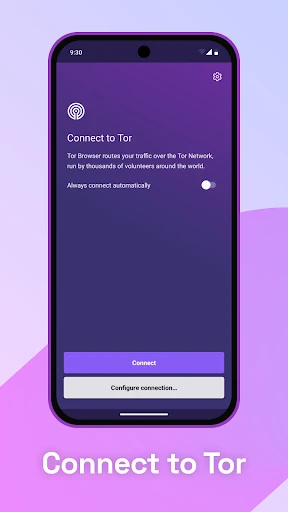
Getting started also means understanding the basic connection idea. Tor Browser sends traffic through a network of volunteer-run relays, with three layers of encryption described for traffic in transit. I find that more useful than vague privacy language because it explains why this browser differs from an ordinary one. The project’s mobile manual is a sensible companion if I want more detail before making it part of a routine.
The Daily Experience
For everyday use, the central experience is still visiting websites, but the browser’s privacy design changes the context around those visits. Each site is isolated from the others, and third-party trackers are prevented from following me across them. Cookies clear when I’m done browsing, according to the app description. These are specific protections, and I’d judge the app by how well they fit my task rather than expecting a familiar browser session to be identical.
I would keep in mind that Tor use is visible as Tor use to someone monitoring my connection. The described protection is that this observer cannot see which websites I visit through that connection. That is an important, practical distinction, not a reason to assume every kind of monitoring disappears. For a session where this separation matters, the model makes sense; for a quick search where convenience is the only concern, I may prefer my usual browser.
Privacy Features With Purpose
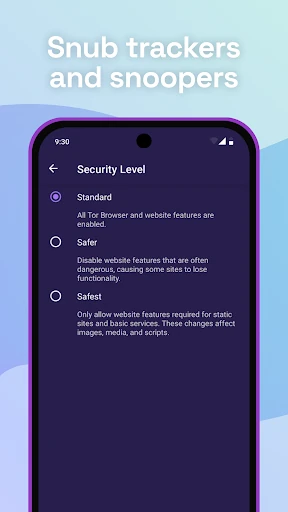
The standout feature is the way the browser combines site isolation with clearing cookies when I finish. In ordinary browsing, a trail of cookies can help connect activity across sites. Tor Browser’s design aims to make that kind of tracking harder. I like that these features support a coherent use case instead of appearing as a scattered collection of toggles. The goal is to reduce cross-site links and identifying details while I browse.
Fingerprinting resistance is another notable part of the design. Tor aims to make its users look more alike to websites, which can make it harder to identify an individual from browser and device information. The network relays and layered encryption address a different part of the picture: how traffic travels. Together, those descriptions explain why Tor Browser’s privacy approach includes both the browser’s appearance and the route taken by its connection.
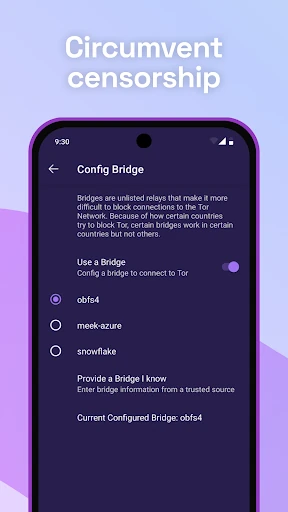
The browser can also help reach websites that a local internet service provider may have blocked. I see that as a useful access feature alongside the privacy tools, not as a promise that every site will be available. The project describes its software as free and open source, and says donations help support its work. That gives the app a clear nonprofit context without changing the practical choice of when I need it.
A Practical Session Routine
A routine I’d use is to open Tor Browser when I’m about to research a topic I’d rather not have tied to unrelated browsing. I’d keep that session focused, visit the sites I need, and close out when I’m finished. Since the browser isolates websites and clears cookies when browsing is done, ending the session fits the way its protections are described. The habit is simple and gives the app a defined place in my phone use.
If a site is blocked by my provider, I’d consider Tor Browser for that visit, while remembering that access can depend on the site and circumstances. If I’m unsure what a connection behavior means, I’d consult the mobile manual or release notes rather than infer too much from one experience. This kind of routine is less about turning every tap into a security exercise and more about choosing the browser when its design fits the task.
Limits to Keep in Mind
Tor Browser has a focused purpose, so it is not a complete answer to every privacy question. Its description explains what a connection observer can and cannot see, but users should not stretch that into claims about all apps, all device activity, or every kind of risk. I’d use the browser for the protections it actually describes and keep the rest of my expectations grounded.
A privacy-first approach can also be less convenient than ordinary browsing for some people. The important question is whether the trade-off suits the session: the added routing and distinct design are worthwhile when privacy or access is the priority. If I mostly want familiar browsing with no particular need for Tor’s network, this may be more deliberate than I need. It is strongest when I know why I opened it.
Tor Browser earns its place as a focused Android option for people who want to reduce tracking, resist fingerprinting, or reach sites their provider may block. I appreciate that its privacy model is explained in concrete terms, including both its protections and what a connection observer can still tell.
I’d recommend it for intentional, privacy-conscious browsing rather than as an automatic replacement for every browser on a phone. If that distinction matches how you browse, Tor Browser is a capable tool to keep available. If convenience and familiar site behavior matter more, it may not become your daily default.
Tor Browser Frequently Asked Questions
What is Tor Browser used for?
Tor Browser is an Android web browser designed to limit tracking and browser fingerprinting while routing traffic through the Tor network. Its site isolation and cookie clearing support more private browsing sessions. The app can also help users reach websites their local internet provider may have blocked. It is a browser, rather than a general-purpose privacy tool for every activity on a phone.
Which devices can run Tor Browser?
The facts provided describe Tor Browser for Android, available through Google Play. They do not establish support for iOS or desktop devices, so I would not assume those versions are covered by this app. For Android, the listed minimum is Android 5.0. Check the Google Play store details for current device compatibility before installing, since support can vary.
How much does Tor Browser cost?
Tor Browser is free on Google Play, and the provided facts say it has no in-app purchases and contains no ads. The Tor Project says donations help support development, but the app itself is not listed as a paid download. Store details may change over time, so it is worth checking the Google Play listing for the latest cost and purchase information.
What Android version does Tor Browser require?
The listed minimum requirement for Tor Browser is Android 5.0. A device running that version or later meets the stated operating-system requirement, though practical compatibility can also depend on the device and current app release. I’d check the Google Play store page on the phone where I plan to install it to see the latest compatibility information.
Is Tor Browser suitable for everyday browsing?
It can suit everyday browsing for someone who values its privacy features or needs access to sites their provider may block. I’d still treat it as a deliberate choice, since it uses a different connection model from a conventional browser. People who mainly want familiar, convenient browsing may prefer their usual app, while privacy-conscious users may appreciate keeping Tor Browser for selected sessions.
Pros
- Isolates websites to make cross-site tracking harder.
- Uses the Tor network with three layers of traffic encryption.
- Designed to resist browser fingerprinting.
- Free to use, with no ads or in-app purchases.
Cons
- Its privacy-focused approach may feel less convenient for routine browsing.
- A connection observer can still see that Tor is being used.
- It is a browser, not a complete privacy solution for a phone.
- Category
- Communication
- Version
- 15.0.5 (140.7.0esr)











