Stick Nodes - Animation
- 109.26K
- 4.7
- Installs
- 10.00M
- Price
- Free
Screenshots
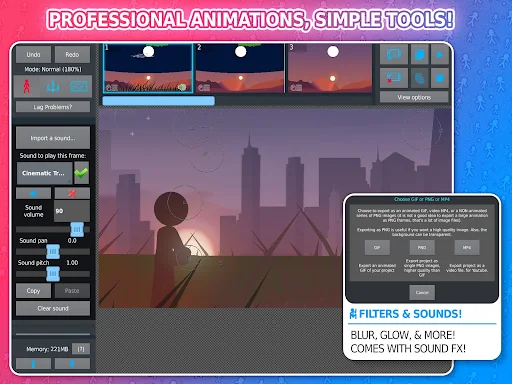
Analysis by Reviewed APKs
Stick Nodes - Animation is a mobile tool for building short stickfigure movies, one pose at a time. It suits beginners experimenting with movement as well as patient animators who want more control over a small-screen workflow. After looking through what it offers, my take is that it goes well beyond a basic flipbook: there are useful ways to shape scenes and reuse animation, though its many options reward a little practice.
A scene, one pose at a time
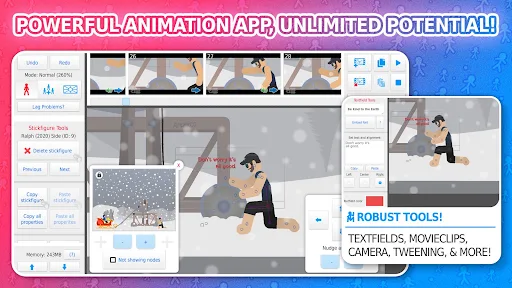
Picture a quiet stretch of time at home: I want to make a short scene where a stickfigure runs, stops, and waves. Stick Nodes is built around that sort of project. I can pose a figure across frames, use onion-skinning to compare nearby poses, and let customizable frame-tweening help smooth the movement. That makes the app a natural fit for small animation experiments rather than a place to simply watch finished clips.
I would start with a simple action, then add a background image or a bit of text once the motion feels right. The camera can pan, zoom, or rotate around the scene, so a project need not feel like a static row of poses. I also like that projects, stickfigures, and movieclips can be saved, opened, and shared. The basic rhythm is approachable: make a pose, adjust it, and see how the sequence plays.
More than a flipbook
The obvious comparison is a simple flipbook app: both approaches turn a sequence of images into movement. Stick Nodes is more specifically organized around stickfigure animation, with segment-level shapes, colors, and scale, plus the option to join figures so they can hold or wear objects. Reusable movieclips and image importing broaden the kind of scenes I can build without changing the app's central focus.
I would not choose it as a general-purpose video editor or a drawing app for polished frame-by-frame illustration. Its strongest identity is posing and animating figures, with supporting tools for sound, text, effects, and export. GIF export is available, while MP4 export is a Pro feature. That distinction matters if sharing a video file is the main goal; it is worth checking the current store details before planning around Pro features.
Small habits, smoother motion
I get more from an animation app when I keep the first test modest. A short movement gives me room to learn how posing and onion-skinning work before I add a camera move, background, or extra character. Then I can use undo and redo freely while I compare the spacing between poses. Customizable tweening is another tool to try after the basic action reads clearly, not a substitute for deciding what the figure should do.
For scenes I expect to reuse, movieclips can keep an animation object ready to loop or drop into a project. Saving and sharing projects, figures, and clips also makes it easier to build gradually instead of starting from scratch each time. I would add text or sound effects only after the motion works on its own. It is a practical order: establish the action, refine it, then decorate the scene.
More From Our News Desk

Zoom Meetings, Google Meet, or Teams: Which Is Easiest to Join?

How I Build a Free Streaming Lineup With Tubi

Why Crunchyroll Is the Default Anime App for So Many Fans

YouTube TV: A Practical Guide to Cutting Cable

Rummikub and the Small Comfort of Phone Games

TeamViewer Remote Control or AnyDesk for Helping Family?
Who might enjoy it
I would recommend Stick Nodes to anyone curious about making stickfigure animation on a mobile device, especially a beginner who wants to learn by building short scenes. The combination of posing, onion-skinning, tweening, and reusable movieclips gives experiments room to grow. More experienced animators may also appreciate the camera controls and segment styling, while people coming from older Pivot projects can make use of the stated compatibility with pre-3.0 files.
It may not suit someone looking for a general video editor, or someone who wants every sharing and sound option without checking the feature limits first. Some tools, including sounds, filters, and MP4 export, are described as Pro-only. The interface also has enough animation concepts that a first project may take some trial and error. If the goal is to make a quick clip with no interest in posing frames, a simpler tool may feel easier.
Stick Nodes - Animation is developed by ForTheLoss Games. Google Play shows over 10 million installs and a 4.7-star rating from about 109,000 ratings. It is free to download and contains ads. The content rating is Everyone. The app was first released on August 19, 2014, and the current version listed in the supplied app details is 4.3.4.
The supplied details give September 3, 2026 as the last update date. Some features in the description are Pro-only, including sounds, filters, and MP4 export; GIF export is also described. The Android version requirement is not included in the available app facts, so check Google Play for the requirement on your device. Store information is the best place to review current availability and feature terms.
Making Stickfigure Motion Feel Manageable
A welcoming first project
When I first opened a tool like this, I would want a clear first task rather than a grand film idea. Stick Nodes lends itself to a tiny test: give a figure a few poses and see how the motion reads. Its mobile-first design is a good match for that kind of learning in short bursts, whether I have a few spare minutes or a longer stretch to work.
The feature list points to the familiar foundations of animation, including undo and redo and onion-skinning, alongside more specialized options. I would take time to understand the pose-and-preview rhythm before layering on effects. That may sound cautious, but it saves the common beginner frustration of adding details to movement that still feels stiff. A small successful test is a better start than an ambitious scene left unfinished.
The everyday animation loop
Day to day, I would treat each project as a sequence of decisions about motion. Pose a figure, compare it with nearby frames using onion-skinning, and adjust the spacing until the action looks right. Tweening can help create smoother transitions, with customizable settings for more control. This combination gives a beginner a way to explore timing while still leaving room to refine the poses themselves.
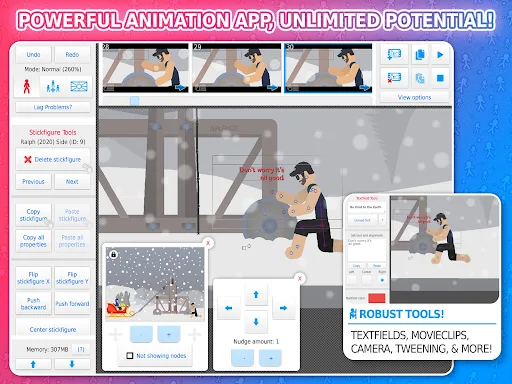
The work does not have to stop at a plain figure on an empty scene. Background images, textfields, and camera movement can give a short sequence a setting and a point of view. The camera tool handles panning, zooming, and rotation. I would add these in stages, though; too many changes at once make it harder to tell whether the animation or the presentation is what needs attention.
Tools beyond posing
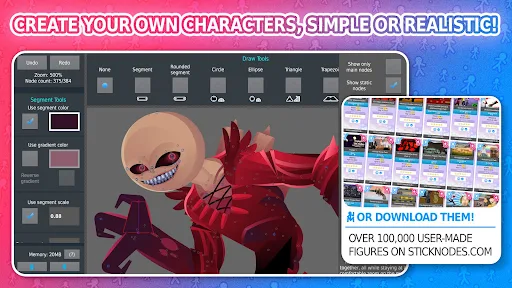
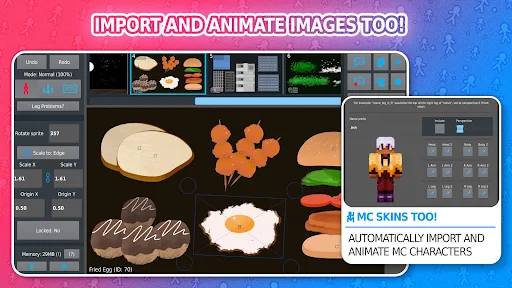
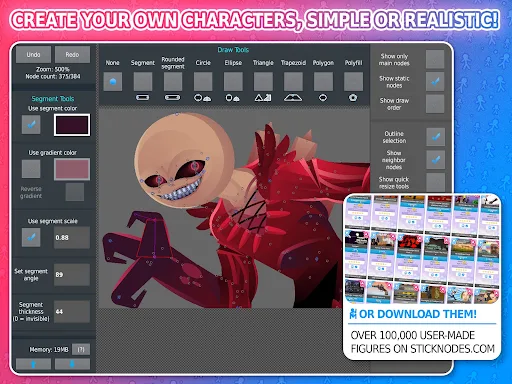
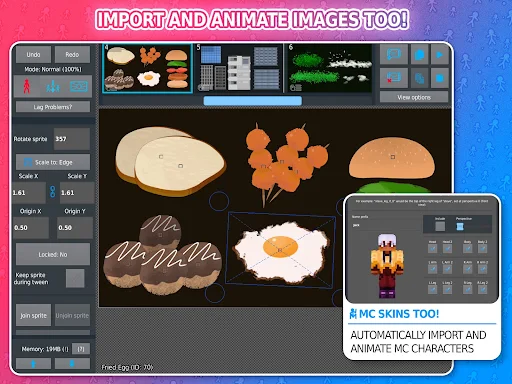
A standout for me is the ability to import and animate images, which opens up projects beyond the built-in stickfigure approach. Figures can also be customized with different shapes, colors, and scale on each segment, and gradients give more ways to style them. Joining figures together can help simulate holding or wearing objects. These options make the characters feel less like interchangeable outlines without changing the app's animation-first nature.
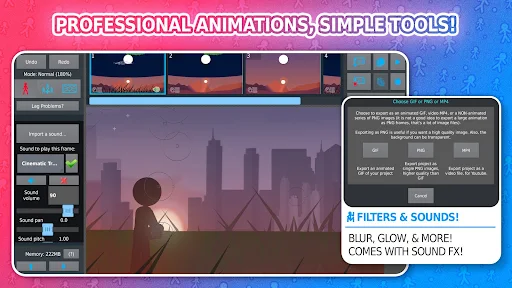
Movieclips are another useful idea: animation objects can be created and reused or looped within projects. Textfields make it possible to add written lines or speech, and sound effects can add another layer. Filters such as transparency, blur, and glow are also described. Sounds and filters are Pro-only features, so I would check the current store information if either one is central to a project.
For sharing, Stick Nodes supports GIF export, while MP4 export is listed as a Pro feature. The ability to save, open, and share projects, figures, and movieclips is handy for work that develops over time. The app also supports compatibility with pre-3.0 Pivot stickfigure files. Those are meaningful extras for a dedicated animator, not just a long list of effects.
A routine for short scenes
For a small after-school or evening project, I would begin with one clear action and keep the first pass rough. I would pose the figure through the important beats, use onion-skinning to check how frames relate, and preview the movement before adding a background. If a transition needs help, I could experiment with the customizable tweening rather than immediately adding more poses everywhere.
Once the action reads well, I would make a reusable movieclip if a movement needs to recur, then decide whether camera movement or text would add anything. A background image can establish place, and a GIF can be a straightforward way to share the finished animation. This staged routine keeps the project focused and makes it easier to learn which tools actually improve the scene.
Keep the scope in mind
The biggest practical limit is its clear focus: Stick Nodes is for stickfigure-based animation, not a catch-all creative suite. Image importing and styling options expand what can appear in a project, but the core work still revolves around animated figures. Someone who mainly wants to edit existing video or create detailed illustrations may find that the app's strengths do not match their usual workflow.
There is also a difference between the available export and Pro-only tools. GIF export is described, while MP4 export, sounds, and filters require Pro. I would not build a project around those options without checking the current Google Play information first. And although the basic frame-by-frame idea is easy to understand, good movement still takes patience; the app helps with the process but does not make every animation instantly smooth.
Stick Nodes - Animation has a focused job and a generous set of tools for doing it. I like that a small experiment can stay simple, while tweening, reusable movieclips, camera controls, and character styling offer paths to more involved work. The Pro-only distinctions are worth keeping in view, but they do not erase the appeal of a mobile stickfigure animator with GIF export.
I would try it if I wanted to learn animation by making short, character-led scenes and did not mind refining poses over time. It is less compelling for someone who needs a broad video or illustration editor. For curious beginners and dedicated stickfigure fans alike, it looks like a substantial place to practice, provided the format matches what they want to make.
Stick Nodes Frequently Asked Questions
What is Stick Nodes - Animation used for?
Stick Nodes - Animation is used to create stickfigure-based animations and movies on a mobile device. It offers frame-based posing, onion-skinning, customizable frame-tweening, camera controls, backgrounds, and ways to add text. Projects can be exported as GIFs; MP4 export is described as a Pro feature. It can also import images for animation.
Which devices can run Stick Nodes - Animation?
Stick Nodes is listed as an Android app on Google Play. The supplied details do not specify a minimum Android version, so check the store page to see whether your device meets the current requirement. The description presents the app as designed with mobile devices in mind.
Is Stick Nodes - Animation free?
The app is free to download and contains ads. The description says that sounds, filters, and MP4 export are Pro-only features. Check the current Google Play information for the terms and availability of Pro features, since those details may vary.
Does Stick Nodes - Animation require Android 13?
The minimum Android version is not specified in the app details provided here, so I would not assume a particular requirement. Google Play is the place to check compatibility for your phone or tablet before installing. The app is intended for mobile devices and is listed for Android.
Who is Stick Nodes - Animation best for?
It is a good fit for people who want to learn or practice stickfigure animation, from beginners to more experienced animators. Its tools support short scenes and more involved projects. It may not suit someone looking mainly for general video editing or detailed illustration, since its central focus is animating figures.
Pros
- Mobile-focused stickfigure animation with onion-skinning and customizable frame-tweening.
- Camera controls, reusable movieclips, and detailed figure styling broaden creative options.
- Supports GIF export and image importing for more flexible animation projects.
- Projects, figures, and movieclips can be saved, opened, and shared.
Cons
- Its stickfigure focus may not suit general video editing or illustration work.
- Sounds, filters, and MP4 export are Pro-only features.
- Learning to create smooth motion still takes patience and repeated pose adjustments.
- Category
- Entertainment
- Version
- 4.3.4











